
Edifier CX7
Edifier CX7 Active 2.1 Home Entertainment System User Manual
Модел: ЦКС7
Увод
The Edifier CX7 is an active 2.1 home entertainment system designed to deliver high-quality audio for various devices, including televisions, personal computers, and notebooks. This system features Bluetooth V5.0 connectivity, an 8-inch subwoofer, and an infrared remote control for convenient operation. This manual provides essential information for setting up, operating, and maintaining your CX7 system.
Садржај пакета
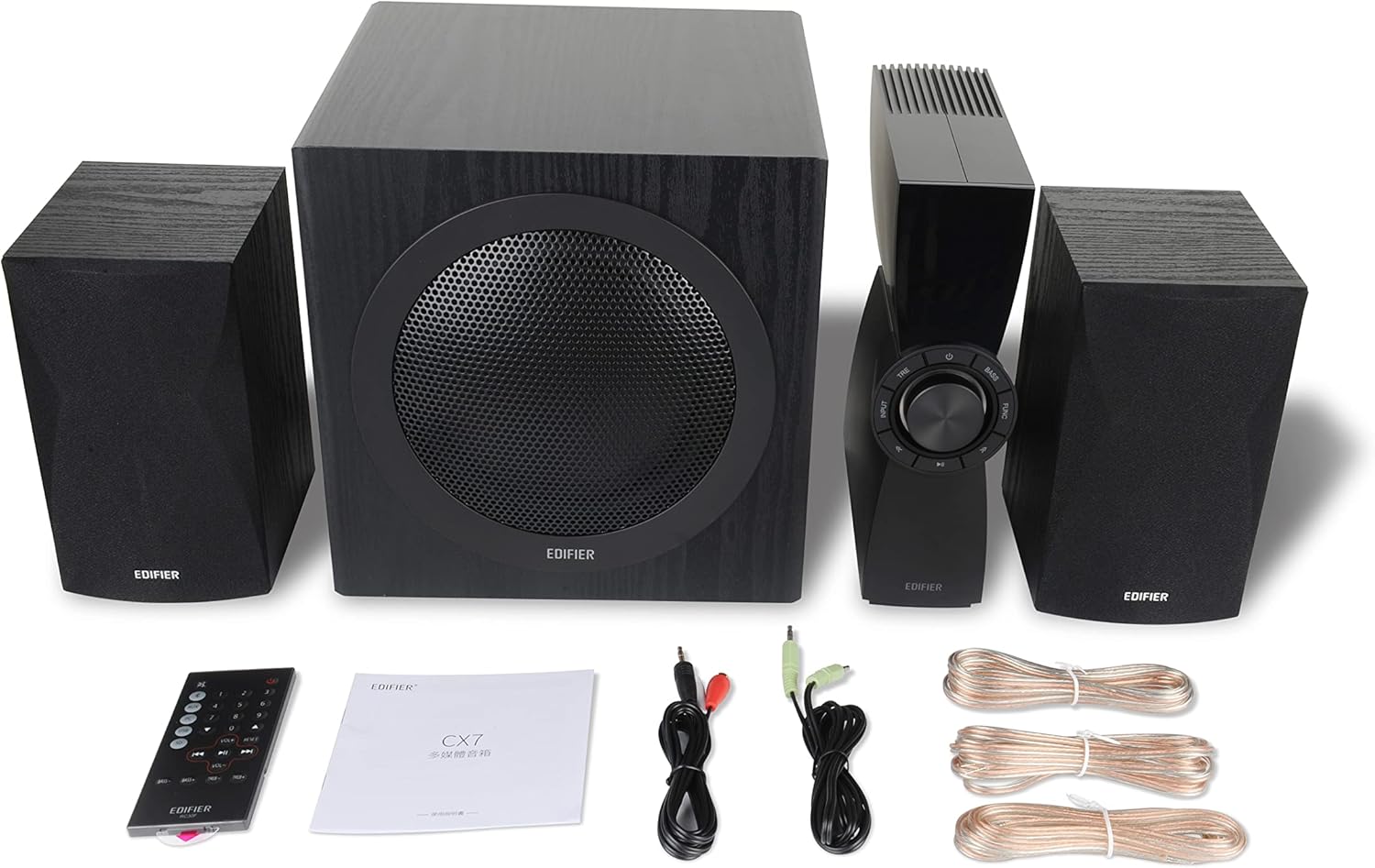
Figure 1: Edifier CX7 System Components
Молимо вас да проверите да ли су све ставке наведене у наставку укључене у ваш пакет:
- сабвуфер (1)
- Satellite Speakers (2)
- Control Unit (1)
- Infrared Remote Control (1)
- 3.5mm to RCA Audio Cable (1)
- RCA to RCA Audio Cable (1)
- Speaker Connection Cables (2)
- Упутство за употребу (1)
Водич за подешавање
КСНУМКС. Постављање
Position the subwoofer on the floor, preferably in a corner or near a wall for optimal bass response. Place the satellite speakers on either side of your listening area, equidistant from the listener, and at ear level if possible. Ensure the control unit is easily accessible.

Figure 2: Recommended System Placement
2. Повезивање звучника
Connect the satellite speakers to the speaker output terminals on the rear of the control unit using the provided speaker cables. Ensure correct polarity (red to red, black to black) for each speaker.
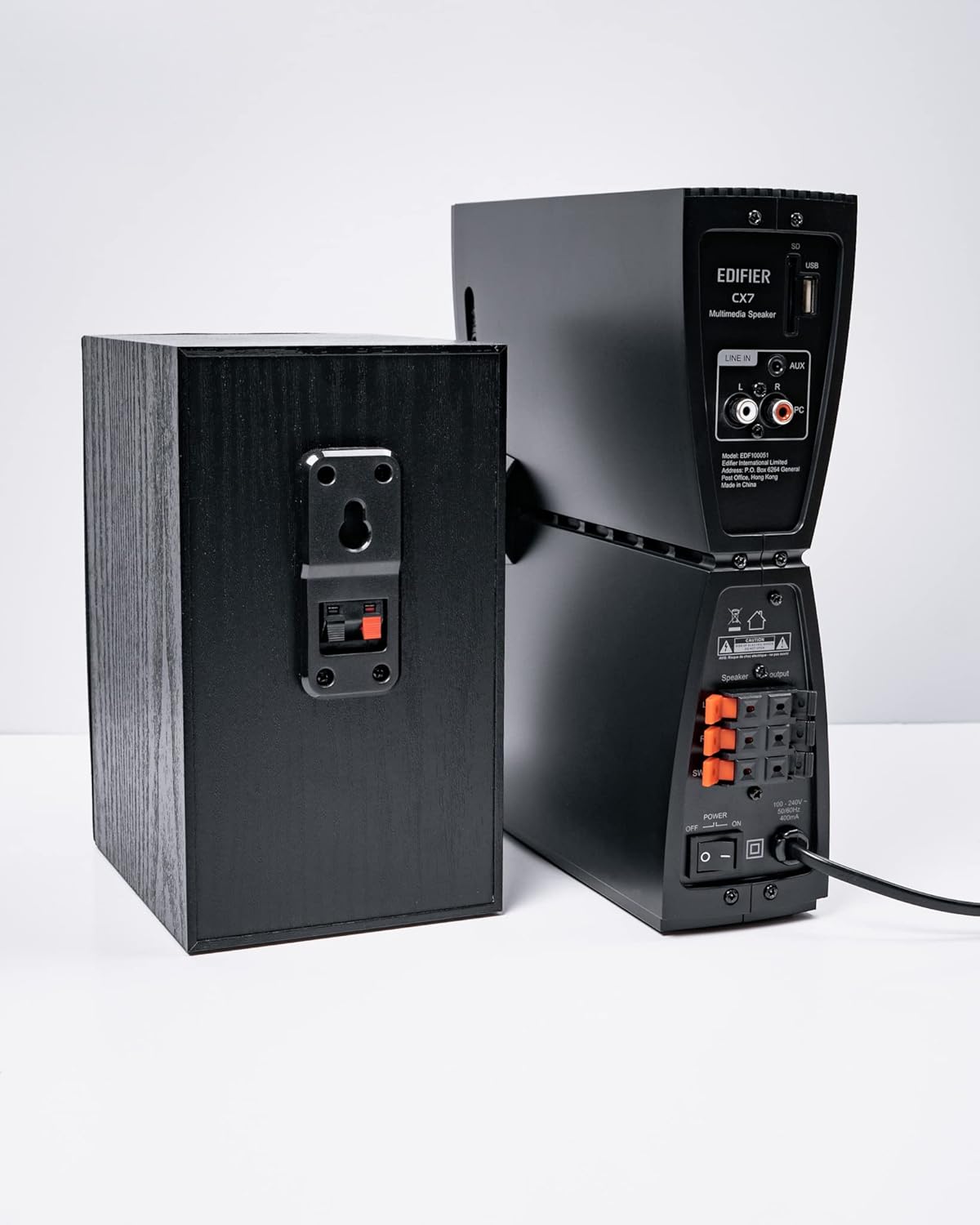
Слика 3: Прикључци звучника
3. Повезивање аудио извора
The CX7 system supports multiple audio input options:
- АУКС улаз: Use the 3.5mm to RCA audio cable to connect devices like smartphones, tablets, or computers to the AUX input on the control unit.
- ПЦ улаз: Use the RCA to RCA audio cable to connect your PC's audio output to the PC input on the control unit.
- Блуетоотх: For wireless connection, refer to the "Bluetooth Pairing" section under Operating Instructions.
4. Прикључак за напајање
Connect the power cable to the control unit and then plug it into a standard wall outlet. Turn on the power switch located on the rear of the control unit.
Упутство за употребу
1. Укључивање/искључивање
After connecting the power, press the power button on the control unit or the remote control to turn the system on or off. The display on the control unit will illuminate when powered on.

Figure 4: Control Unit Display
2. Избор улаза
Press the "INPUT" button on the control unit or the remote control to cycle through available audio sources: AUX, PC, and Bluetooth. The selected input will be displayed on the control unit's screen.

Figure 5: Control Knob and Input Buttons
3. Контрола јачине звука
Rotate the large knob on the control unit clockwise to increase volume and counter-clockwise to decrease it. Alternatively, use the "VOL+" and "VOL-" buttons on the remote control.
4. Подешавање баса и високих тонова
Press the "BASS" or "TRE" (Treble) buttons on the control unit or remote control, then rotate the main knob to adjust the respective levels. The display will show the current bass/treble setting.
5. Блуетоотх упаривање
- Select the Bluetooth input on the CX7 system. The display will show "BT" and flash, indicating it's in pairing mode.
- На свом уређају (паметном телефону, таблету итд.) омогућите Блутут и потражите доступне уређаје.
- Select "EDIFIER CX7" from the list of found devices.
- Once paired, the "BT" indicator on the CX7 display will stop flashing and remain solid.
To disconnect a Bluetooth device, press and hold the "FUNC" button on the control unit or the Bluetooth button on the remote control for a few seconds.
6. Функције даљинског управљача

Figure 6: Infrared Remote Control
The remote control provides convenient access to all major functions:
- Снага: Укључује/искључује систем.
- Избор улаза: Cycles through AUX, PC, Bluetooth.
- Волумен: Подешава главну јачину звука.
- бас/високи тонови: Подешава нивое баса и високих тонова.
- Искључи звук: Искључује/укључује звук.
- Контроле репродукције: Play/Pause, Previous/Next track (for Bluetooth mode).
Одржавање
- Чишћење: Use a soft, dry cloth to clean the surfaces of the speakers and control unit. Do not use liquid cleaners or abrasive materials.
- вентилација: Ensure adequate ventilation around the control unit and subwoofer to prevent overheating. Do not block ventilation openings.
- Окружење: Избегавајте излагање система екстремним температурама, влази, прашини или директној сунчевој светлости.
- Искључивање: If the system will not be used for an extended period, disconnect it from the power outlet.
Решавање проблема
| Проблем | Могући узрок | Решење |
|---|---|---|
| Нема звука |
|
|
| Блуетоотх веза не успева |
|
|
| Изобличен звук |
|
|
Спецификације
| Феатуре | Детаљ |
|---|---|
| Назив модела | ЦКС7 |
| Спеакер Типе | 2.1 систем звучника |
| Технологија повезивања | Блуетоотх |
| Бежична комуникациона технологија | Блуетоотх В5.0 |
| Блуетоотх домет | 10 метара |
| Режим аудио излаза | Сурроунд |
| Максимална излазна снага звучника | 69 Ваттс |
| Технологија повезивања сабвуфера | Бежични |
| Пречник вуфера | 8 инча |
| Материјал | полипропилен |
| Боја | Црно |
| Димензије производа | 16.93"Д к 17.72"Ш к 13.39"В |
| Тежина артикла | 29 фунте (13.2 килограма) |
| Извор напајања | Цордед Елецтриц |
| Тип контролера | Ремоте Цонтрол |
| Препоручена употреба | За телевизоре, за рачунаре, за паметне телефоне или таблете |
Гаранција и подршка
За информације о гаранцији и техничку подршку, погледајте гарантни лист који је приложен уз ваш производ или посетите званичну веб страницу Edifier-а. webсајт. Сачувајте рачун као доказ о куповини за потребе гаранције.
Званични Едифајер Webсајт: ввв.едифиер.цом
Ask a question about this manual
Ask about setup, troubleshooting, compatibility, parts, safety, or missing instructions. Manuals+ will review the question and use this page’s manual context to help answer it.