
CEM LDM-100H
Упутство за употребу ласерског даљиномера CEM LDM-100H
Model: LDM-100H | Brand: CEM
1. Производ је готовview
The CEM LDM-100H Laser Distance Meter utilizes advanced laser technology to provide fast, accurate, and reliable distance measurements. Designed for ease of use, this device helps users quickly obtain precise measurements, avoiding common errors associated with traditional methods or less precise instruments.
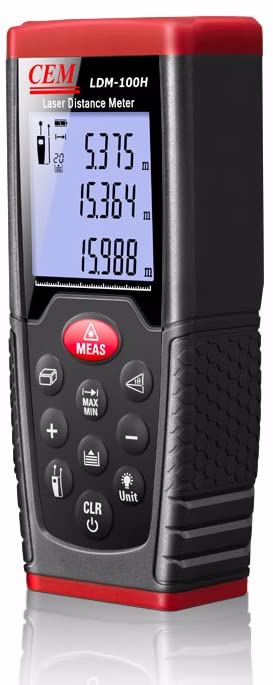
Слика 1.1: Предња страна view of the CEM LDM-100H Laser Distance Meter, showing its display and control buttons.
Кључне карактеристике:
- Precision laser for accurate target identification and measurement.
- Capable of single distance measurement.
- Supports continuous measurement mode for tracking distances.
- Integrated area calculation function.
- Integrated volume calculation function.
2. Почетно подешавање
2.1 Инсталација батерије
The LDM-100H requires standard batteries for operation. Locate the battery compartment cover on the rear or bottom of the device. Slide or unclip the cover to open. Insert the batteries, ensuring correct polarity (+/-) as indicated inside the compartment. Close the battery cover securely.
2.2 Укључивање/искључивање
Да бисте укључили уређај, притисните CLR/Power button (usually marked with a power symbol). The display will illuminate. To power off, press and hold the CLR/Power button for a few seconds until the display turns off. The device may also feature an automatic shut-off function to conserve battery life after a period of inactivity.
3. Упутство за употребу
3.1 Основно мерење (једна удаљеност)
- Уверите се да је уређај укључен.
- Point the laser beam at the target point from which you wish to measure the distance.
- Притисните тастер МЕАС button. The laser will activate, and the measured distance will be displayed on the screen.
3.2 режима мерења
The LDM-100H offers several measurement modes for various applications:

Figure 3.1: Illustrations of various measurement capabilities including distance, area, and continuous measurement.
- Режим континуираног мерења:
This mode allows for dynamic measurement, continuously updating the distance as you move the device. It is useful for finding minimum or maximum distances, or for setting out specific lengths. To activate, press the МЕАС button and then select the continuous measurement icon (often indicated by a running person or multiple lines) using the mode selection button. The display will show real-time distance updates.
- Мерење површине:
To calculate the area of a surface (e.g., a room), select the area measurement mode (often indicated by a square icon). The device will prompt you to take two measurements: first the length, then the width. After both measurements are taken, the device automatically calculates and displays the area.
- Мерење запремине:
For calculating the volume of a space, select the volume measurement mode (often indicated by a cube icon). The device will prompt you to take three measurements: length, width, and height. Once all three measurements are recorded, the device will automatically calculate and display the volume.
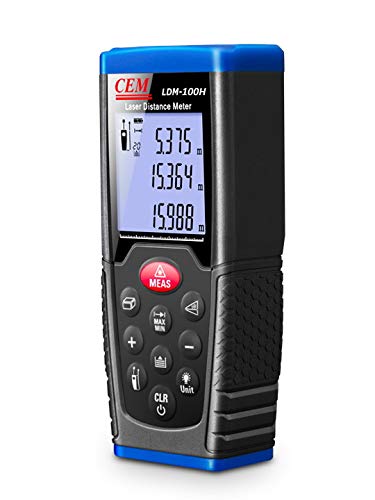
Figure 3.2: The CEM LDM-100H in operation, projecting a visible laser line for precise measurement within an indoor environment.
4. Нега и одржавање
- Чишћење: Користите меку, дamp cloth to clean the device. Do not use abrasive cleaners or solvents. Ensure the laser lens is kept clean and free from dust or smudges for accurate measurements.
- Складиштење: Уређај чувајте на сувом и хладном месту, даље од директне сунчеве светлости и екстремних температура. Уколико га складиштите дуже време, извадите батерије да бисте спречили цурење.
- Руковање: Avoid dropping the device or subjecting it to strong impacts, as this can damage internal components and affect accuracy.
- Замена батерије: Replace batteries promptly when the low battery indicator appears on the display to ensure consistent performance.
КСНУМКС. Решавање проблема
| Проблем | Могући узрок | Решење |
|---|---|---|
| Уређај се не укључује. | Слабе или празне батерије; неправилна инсталација батерија. | Замените батерије новим; водите рачуна о исправном поларитету. |
| Нетачна мерења. | Laser lens is dirty; unstable measuring surface; strong light interference. | Clean the laser lens; ensure a stable measurement; avoid direct sunlight or strong light sources. |
| Display shows "Error" or "Out of Range". | Measurement target too far or too close; laser beam obstructed. | Ensure target is within specified measurement range; clear any obstructions. |
Ако проблем и даље постоји након покушаја ових решења, обратите се корисничкој подршци.
6. Техничке спецификације
| Спецификација | Валуе |
|---|---|
| Бранд | ЦЕМ |
| Број модела | ЛДМ-100Х |
| Меасуремент Ранге | Up to 100m (as per product title) |
| Тежина артикла | 600 г |
| Димензије производа (ДкШкВ) | 15 к 10 к 8 цм |
| Земља порекла | Кина |
| Произвођач | ЦЕМ Инструментс |
Note: Specifications are subject to change without notice. For the most current information, please refer to the official product documentation.
7. Гаранција и подршка
For information regarding the product warranty, please refer to the warranty card included with your purchase or visit the official CEM Instruments webсајт. Сачувајте доказ о куповини за потребе гаранције.
If you encounter any issues or require technical assistance, please contact CEM Instruments customer support. Contact details can typically be found on the manufacturer's webсајту или у паковању производа.
Always ensure you are using official support channels for assistance.
Ask a question about this manual
Ask about setup, troubleshooting, compatibility, parts, safety, or missing instructions. Manuals+ will review the question and use this page’s manual context to help answer it.