
1. Увод
This manual provides detailed instructions for the amazon basics Wired Gaming Mouse, Model ABIM03. This mouse is designed to enhance your gaming and computing experience with its adjustable DPI, customizable RGB lighting, and programmable buttons. Please read this manual thoroughly before use to ensure proper operation and longevity of your device.
2. Карактеристике производа
- Подесиви ДПИ: Up to 6400 DPI for precise cursor control and quick movements.
- Прилагодљиво РГБ осветљење: Personalize your mouse with various RGB lighting modes and driver customization options for PC.
- Програмабилна дугмад: Equipped with multiple programmable buttons for assigning custom functions or macros.
- Gaming-Grade Sensor: Ensures accurate tracking and rapid response for gaming.
- Издржљив дизајн: Features extra durable switches and enhanced build quality for extended use.
- Honeycomb Grip: Ergonomic honeycomb design provides a comfortable and secure grip.

Image: The amazon basics Wired Gaming Mouse highlighting its adjustable DPI settings, ranging from 1200 to 7200 (though product states up to 6400).
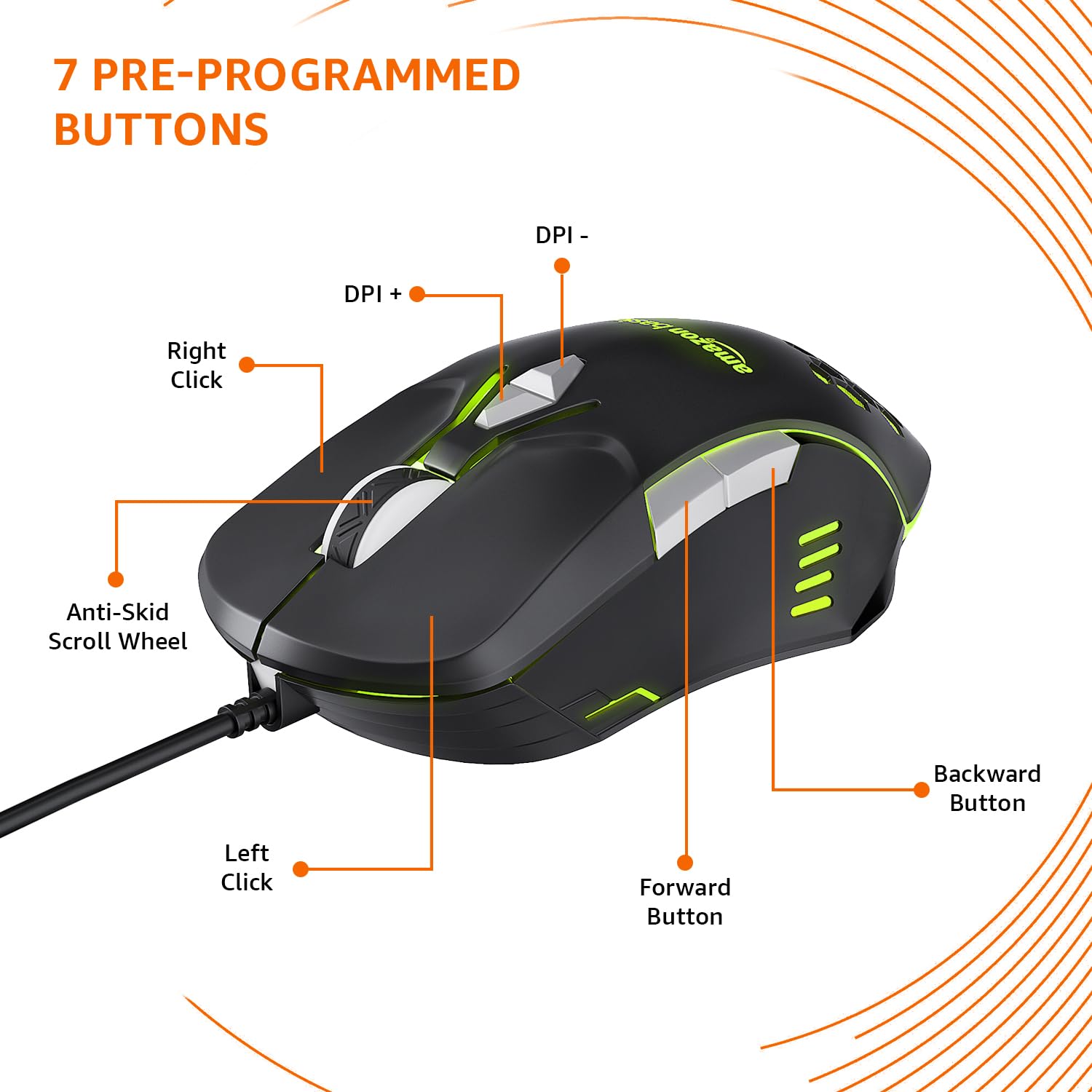
Image: The amazon basics Wired Gaming Mouse showing its 7 pre-programmed buttons, including Left Click, Right Click, Anti-Skid Scroll Wheel, DPI+, DPI-, Forward Button, and Backward Button.

Слика: Одозго надоле view of the amazon basics Wired Gaming Mouse, emphasizing its honeycomb-designed surface for improved grip and airflow.

Image: The amazon basics Wired Gaming Mouse illuminated with red RGB lighting, showcasing its light and comfortable design.
3. Упутства за подешавање
- Распакујте миш: Carefully remove the gaming mouse from its packaging.
- Повежите се са рачунаром: Прикључите УСБ конектор миша у слободан УСБ порт на рачунару.
- Инсталација драјвера: Your operating system (Windows, Linux) should automatically detect and install the necessary drivers. If prompted, follow the on-screen instructions. For advanced customization of RGB and programmable keys, refer to the manufacturer's website for specific driver software.
- Пласман: Поставите миш на равну, чисту површину или подлогу за миш за оптималне перформансе.
4. Упутство за употребу
4.1 Основна функционалност
- Леви клик: Примарна акција, селекција.
- Десни клик: Secondary action, context menus.
- Точак за померање: Scroll up/down pages. Pressing the scroll wheel often acts as a middle click.
- Дугмад за напред/назад: Обично се користи за навигацију у web претраживачи или file истраживачи.
4.2 Подешавање DPI (тачака по инчу)
The mouse features dedicated DPI adjustment buttons (DPI+ and DPI-) to change cursor sensitivity on the fly. Press these buttons to cycle through different DPI levels up to 6400. A higher DPI setting results in faster cursor movement across the screen with less physical mouse movement.
4.3 Customizing RGB Lighting
The mouse includes customizable RGB lighting. Specific lighting modes can often be cycled through using a dedicated button (if present) or through the optional driver software. Refer to the driver software for advanced customization options, including color selection, effects, and brightness.
4.4 Programming Buttons
The mouse is equipped with programmable buttons. To assign custom functions, macros, or key combinations to these buttons, you will need to install and use the specific driver software provided by the manufacturer. This software typically allows you to create profileза различите апликације или игре.
Video: A short product highlight video demonstrating the key features of the amazon basics Wired Gaming Mouse, including adjustable DPI, RGB lighting, programmable buttons, and durable design.
5. Одржавање
- Чишћење: Користите меку, суву крпу за чишћење спољашњости миша. За тврдокорну прљавштину, благо дamp Може се користити крпа, водећи рачуна да течност не уђе у миш.
- Чишћење сензора: Occasionally, use a cotton swab lightly dampened with isopropyl alcohol to gently clean the optical sensor on the underside of the mouse. Ensure the mouse is disconnected before cleaning.
- Избегавајте течности: Do not immerse the mouse in water or any cleaning solutions.
- Складиштење: Чувајте миша на хладном и сувом месту, даље од директне сунчеве светлости и екстремних температура.
КСНУМКС. Решавање проблема
| Проблем | Решење |
|---|---|
| Миш не реагује. |
|
| Кретање курсора је неправилно или скачкасто. |
|
| Programmable buttons are not working. |
|
| RGB осветљење не ради или је заглављено. |
|
7. Спецификације
| Феатуре | Детаљ |
|---|---|
| Бранд | основе Амазона |
| Број модела | АБИМ03 |
| Технологија повезивања | Жичани (УСБ) |
| Технологија детекције покрета | Оптицал |
| DPI опсег | До 6400 ДПИ |
| Програмабилни тастери | 4 (in addition to standard left/right click and scroll) |
| Осветљење | РГБ |
| Боја | Црно |
| Тежина артикла | 145 г |
| Димензије производа (ДкШкВ) | 15.8 к 10.4 к 5.4 цм |
| Хардверска платформа | PC |
| Компатибилност оперативног система | Linux, Windows 7 and above |
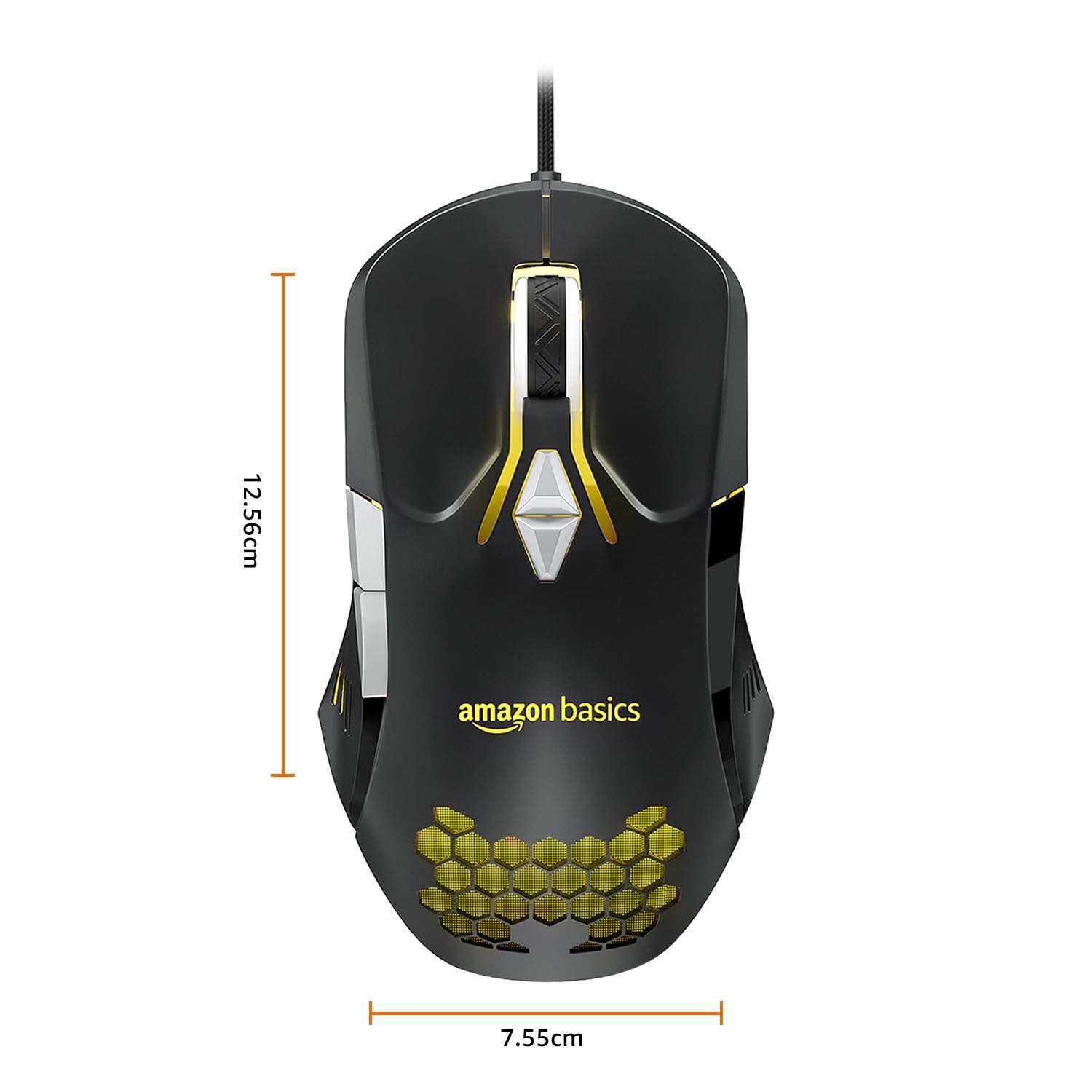
Image: The amazon basics Wired Gaming Mouse with its length (12.56cm) and width (7.55cm) dimensions indicated.
8. Информације о гаранцији
This amazon basics Wired Gaming Mouse comes with a 1 година гаранције from the date of purchase. This warranty covers manufacturing defects and issues arising from normal use. It does not cover damage caused by misuse, accidents, unauthorized modifications, or normal wear and tear. Please retain your proof of purchase for warranty claims.
9. Подршка
For further assistance, technical support, or warranty claims, please visit the official amazon basics support page or contact customer service through your purchase platform. Ensure you have your product model number (ABIM03) and proof of purchase ready when contacting support.
Онлине ресурси:
- Страница производа: amazon.in/dp/B0BTD2YN6Y
- amazon basics Store: amazon basics Store