
YIKESHU 1576
YIKESHU RC Forklift Instruction Manual
Model: 1576 | Brand: YIKESHU
1. Производ је готовview
The YIKESHU RC Forklift (Model 1576) is a highly detailed 1:10 scale remote control construction vehicle designed for both children and adults. Constructed from heavy metal, this full-functional forklift is built for durability and realistic operation. It features powerful motors capable of lifting up to 6 lbs and pulling up to 26 lbs! The model includes simulation lights and sounds, and operates on a 2.4Ghz frequency for stable control and multi-player compatibility.

Image: The YIKESHU RC Forklift with its included carrier slab and pallets, showcasing its realistic design.
2. Шта је у кутији
Your YIKESHU RC Forklift package includes the following components:
- RC Forklift
- Ремоте Цонтрол
- 7.2V 400mah Battery (2 included)
- Кабл за пуњење
- Metal Carrier Slab
- Хоок Арм
- Simulation Pallets (2 included)
- Climbing Ladder (at the tail)
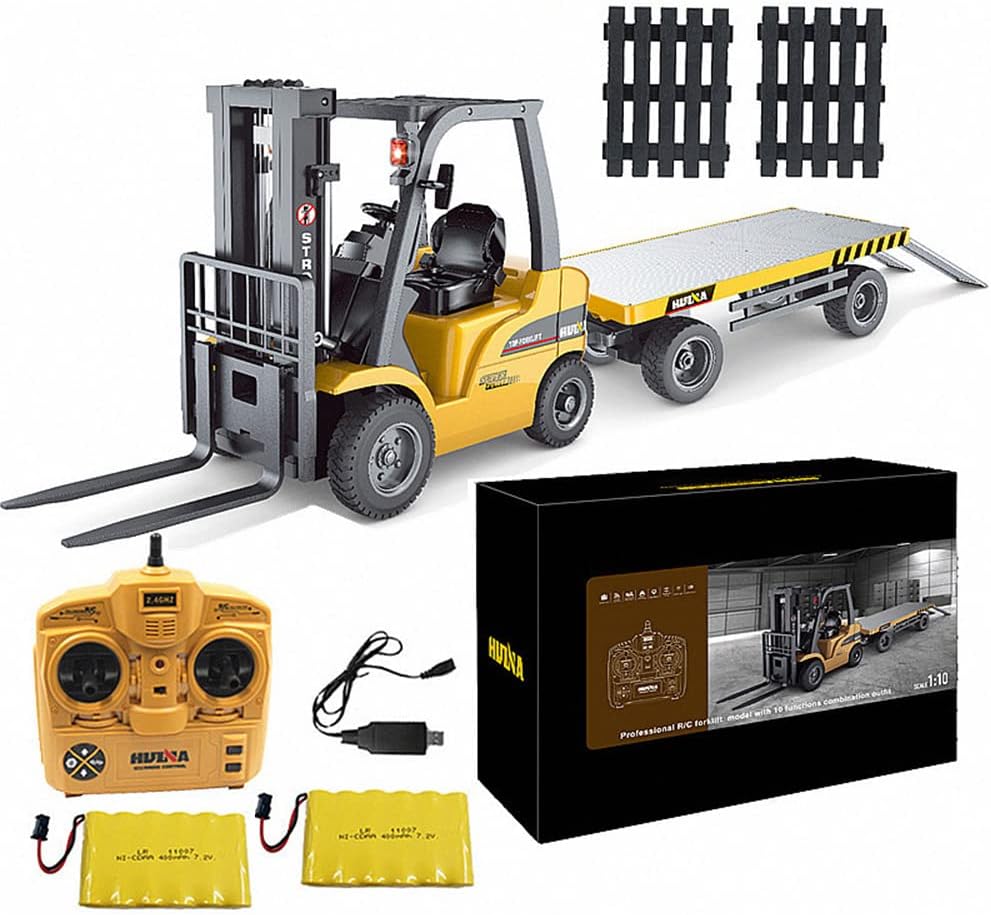
Image: All components included in the YIKESHU RC Forklift package.
3. Спецификације
| Феатуре | Детаљ |
|---|---|
| Димензије производа | 21 к 7 к 16 инча |
| Тежина артикла | 12 фунти |
| Број модела | 1576 |
| Препоручена старост | 8 година и више |
| Батерија | 7.2V 400mah Lithium Ion (2 included) |
| Плаи Тиме | Приближно 30 минута по пуњењу |
| Време пуњења | Прибл. 90 минута |
| Контролна фреквенција | 2.4Гхз |
| Контролни опсег | 160-260 стопа |
| Материјал | 90% Heavy Metal Construction |

Image: Detailed dimensions of the RC forklift and its carrier.
4. Подешавање
- Пуњење батерија: Connect the provided charging cable to the 7.2V 400mah battery. Plug the charger into a suitable USB power source. The charging indicator light will show the charging status. Allow approximately 90 minutes for a full charge.
- Install Forklift Battery: Open the battery compartment on the RC forklift (usually located underneath or at the rear). Insert one fully charged battery, ensuring correct polarity. Secure the compartment cover.
- Инсталирајте батерије за даљински управљач: Open the battery compartment on the remote control. Insert the required batteries (not specified in input, assuming standard AA/AAA, but will omit for now as it's not in the provided data). Secure the compartment cover.
- Укључено: Turn on the RC forklift using the power switch (location varies, typically on the underside or side). Turn on the remote control. The forklift and remote should automatically pair (2.4Ghz auto-pairing).
- Приложите додатну опрему: Attach either the forks or the hook arm to the forklift's mast as desired. The forks can be adjusted for width.
5. Упутство за употребу
Familiarize yourself with the remote control functions before operating the forklift.
- Напред назад: Use the left joystick (or designated control) to move the forklift forward or backward.
- Скретање лево/десно: Use the right joystick (or designated control) to steer the forklift left or right.
- Fork Up/Down: Use the dedicated buttons or levers on the remote to raise or lower the workbench frame (forks).
- Светла и звук: The forklift features simulation lights and sounds that activate during operation. Some models may have a button to toggle sound on/off.
- Attaching Carrier Slab: The carrier slab can be attached to the rear of the forklift for towing.

Image: The RC forklift in action, lifting and moving different materials.

Image: The RC forklift with its operational lights activated.
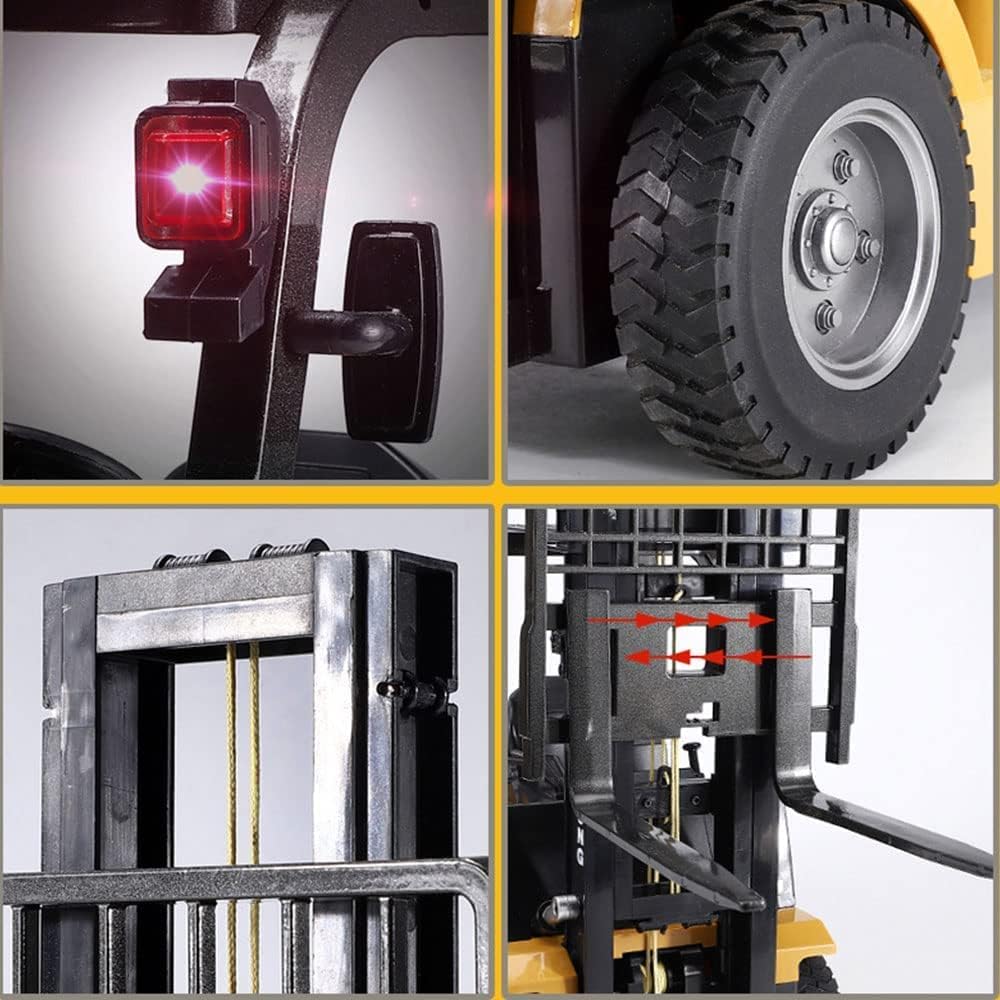
Слика: Детаљна views of the forklift's components, including lights, tires, and mast.
6. Одржавање
- Чишћење: Use a soft, dry cloth to wipe down the forklift after use. Avoid water or harsh chemicals, as they can damage electronic components.
- Одржавање батерије: Always fully charge the batteries before storage. If storing for extended periods, charge them every 2-3 months to maintain battery health. Remove batteries from the forklift and remote control when not in use.
- Складиштење: Store the forklift and remote control in a cool, dry place away from direct sunlight and extreme temperatures.
- инспекција: Periodically check for loose screws, damaged wires, or worn parts. Replace any damaged components immediately to ensure safe operation.
КСНУМКС. Решавање проблема
| Проблем | Могући узрок | Решење |
|---|---|---|
| Forklift does not respond to remote control. | Low battery in forklift or remote; not paired; interference. | Ensure batteries are fully charged and correctly installed. Turn both forklift and remote off, then on again to re-pair. Move to an area with less interference. |
| Forks do not lift/lower properly. | Overload; mechanical obstruction; low battery. | Reduce the weight on the forks. Check for any obstructions in the mast mechanism. Recharge the forklift battery. |
| Short play time. | Батерија није потпуно напуњена; стара батерија. | Ensure battery is fully charged before use. Consider replacing the battery if it's old and capacity has diminished. |
| Светла или звуци не раде. | Low battery; internal wiring issue. | Recharge the forklift battery. If the issue persists, contact customer support. |
8. Гаранција и подршка
For warranty information and customer support, please refer to the documentation included with your product packaging or visit the official YIKESHU store on Amazon. YIKESHU is committed to providing a fun and exciting experience with their products.
You can visit the YIKESHU Store for more RC trucks and related products: YIKESHU Amazon Store
Ask a question about this manual
Ask about setup, troubleshooting, compatibility, parts, safety, or missing instructions. Manuals+ will review the question and use this page’s manual context to help answer it.