
1. Увод
This manual provides detailed instructions for the installation, operation, and maintenance of your TP-Link Deco X50-Outdoor AX3000 Whole Home Mesh WiFi 6 Unit. The Deco X50-Outdoor is designed to extend your mesh WiFi network to outdoor and indoor spaces, providing robust and stable wireless connectivity. Please read this manual thoroughly before using the device to ensure proper setup and optimal performance.
2. Безбедносне информације
Увек се придржавајте ових основних мера предострожности како бисте смањили ризик од пожара, струјног удара и повреда:
- Не излажите овај уређај води или влази.
- Не покушавајте да раставите, поправите или модификујете уређај.
- Користите само адаптер за напајање који сте добили уз уређај.
- Ensure the device is installed in a stable location to prevent it from falling.
- Држите уређај даље од извора топлоте и директне сунчеве светлости.
- For outdoor installation, ensure all cable connections are properly sealed to prevent water ingress.
3. Садржај пакета
Проверите да ли ваш пакет садржи следеће ставке:
- 1 x TP-Link Deco X50-Outdoor Unit
- 1 к адаптер за напајање
- 1 к Етхернет кабл
- Mounting Kit (includes mounting bracket, screws, and wall plugs)
- Водич за брзу инсталацију

Image: The retail packaging for the TP-Link Deco X50-Outdoor unit, showing the device and its key features.
4. Производ је готовview
The Deco X50-Outdoor is a cylindrical, white unit designed for both outdoor and indoor use. It features an IP65 rating for waterproof and dustproof protection, making it suitable for various weather conditions.
4.1 Изглед уређаја

Слика: Фронт view of the TP-Link Deco X50-Outdoor unit, showcasing its sleek, cylindrical design and 'deco outdoor' branding.

Image: The bottom of the Deco X50-Outdoor unit, revealing the port cover and the attachment point for the mounting bracket.
4.2 Портови и дугмад
Under the protective cover at the bottom of the unit, you will find the following:
- ПоЕ порт: Used for Power over Ethernet (PoE) connection, providing both power and data through a single Ethernet cable.
- LAN Ports (2): For connecting wired devices or for backhaul connection to other Deco units.
- Напајање: For connecting the included power adapter when not using PoE.
- Дугме за ресетовање: A small button to reset the device to factory settings.

Слика: Крупни план view of the PoE and AC power supply ports located at the base of the Deco X50-Outdoor unit, with labels indicating their functions.
5. Подешавање
Follow these steps to set up your Deco X50-Outdoor unit. It is recommended to use the TP-Link Deco app for a guided setup process.
5.1 Download the Deco App
- Scan the QR code in the Quick Installation Guide or search for "TP-Link Deco" in the App Store or Google Play.
- Преузмите и инсталирајте апликацију Децо на свој паметни телефон или таблет.
5.2 Физичка инсталација
The Deco X50-Outdoor can be mounted on a pole, wall, or placed on a tabletop.
- Изаберите локацију: Select a location that provides optimal WiFi coverage and is within range of your existing Deco network (if extending). For outdoor use, ensure it's protected from direct impact and accessible for power/Ethernet.
- Монтажа:
- Монтажа на стуб: Use the provided straps to secure the mounting bracket to a pole.
- Zidni nosač: Drill holes, insert wall plugs, and screw the mounting bracket to the wall.
- Плоча стола: Simply place the unit on a flat, stable surface.
- Прикључите напајање:
- Коришћење адаптера за напајање: Connect the provided power adapter to the power port and plug it into an electrical outlet.
- Коришћење ПоЕ: Connect an Ethernet cable from a PoE-enabled switch or injector to the PoE port on the Deco unit.
- Connect to Existing Network (Optional): If you are using the Deco X50-Outdoor as a satellite unit, it will connect wirelessly to your main Deco unit. For a wired backhaul, connect an Ethernet cable from one of the LAN ports to your main Deco unit or network switch.

Image: The Deco X50-Outdoor unit securely mounted on an outdoor pole, demonstrating a typical installation scenario.
5.3 Подешавање вођено апликацијом
- Отворите апликацију Deco и пријавите се помоћу свог TP-Link ID-а. Ако га немате, креирајте налог.
- Tap the "+" icon in the top right corner to add a new Deco unit.
- Select your Deco model (X50-Outdoor) and follow the on-screen instructions to complete the setup. The app will guide you through connecting the unit and integrating it into your existing Deco mesh network.
6. Оперативни
Once set up, your Deco X50-Outdoor unit will automatically integrate into your mesh network, providing seamless WiFi coverage. You can manage your network using the TP-Link Deco app.
6.1 Deco App Features
The Deco app allows you to:
- View повезане уређаје и њихов статус.
- Подесите мрежу за госте.
- Управљајте родитељским надзором.
- Дајте приоритет уређајима за оптималне перформансе (QoS).
- Access HomeShield Security features.
- Ажурирајте фирмвер.
- Monitor network health and usage.
6.2 Статус ЛЕД индикатора
The LED on your Deco unit indicates its status:
- Стално зелено: Deco is working properly.
- пулсирајуће зелено: Децо почиње.
- Пуно црвено: Деко има проблем (нпр. нема интернет конекције).
- пулсирајуће црвено: Деко је искључен са главне Деко јединице.
- Пуна плава: Децо је спреман за подешавање.
- пулсирајуће плаво: Deco is pairing via Bluetooth.
7. Одржавање
Regular maintenance ensures the longevity and optimal performance of your Deco X50-Outdoor unit.
7.1 Ажурирања фирмвера
Keep your Deco's firmware updated to benefit from the latest features, security enhancements, and bug fixes. You can check for and install updates via the Deco app.
7.2 Чишћење
Wipe the device with a soft, dry cloth. Do not use liquid cleaners or chemical sprays.
7.3 Разматрања животне средине
Despite its outdoor rating, avoid placing the unit in locations where it is constantly submerged in water or exposed to extreme physical impact.
КСНУМКС. Решавање проблема
If you encounter issues with your Deco X50-Outdoor, try the following solutions:
8.1 Нема интернет конекције
- Check the LED status. If solid red, ensure your main Deco unit has an internet connection.
- Verify that the Ethernet cable (if used) is securely connected.
- Restart your modem, main Deco unit, and then the X50-Outdoor unit.
8.2 Deco X50-Outdoor Disconnected
- Ensure the unit is within range of your main Deco or another satellite Deco.
- Проверите прикључак за напајање.
- Try relocating the unit to a closer position to the main Deco.
8.3 Slow WiFi Speed
- Ensure the unit is placed in an open area, free from obstructions.
- Проверите да ли постоје ажурирања фирмвера.
- Use the Deco app to run a network optimization test.
8.4 Ресетовање на фабричка подешавања
If issues persist, you may need to perform a factory reset. With the Deco unit powered on, use a pin to press and hold the Reset button until the LED turns solid red (approximately 1 second), then release. The unit will restart with factory default settings.
9. Спецификације
Technical details for the TP-Link Deco X50-Outdoor unit:
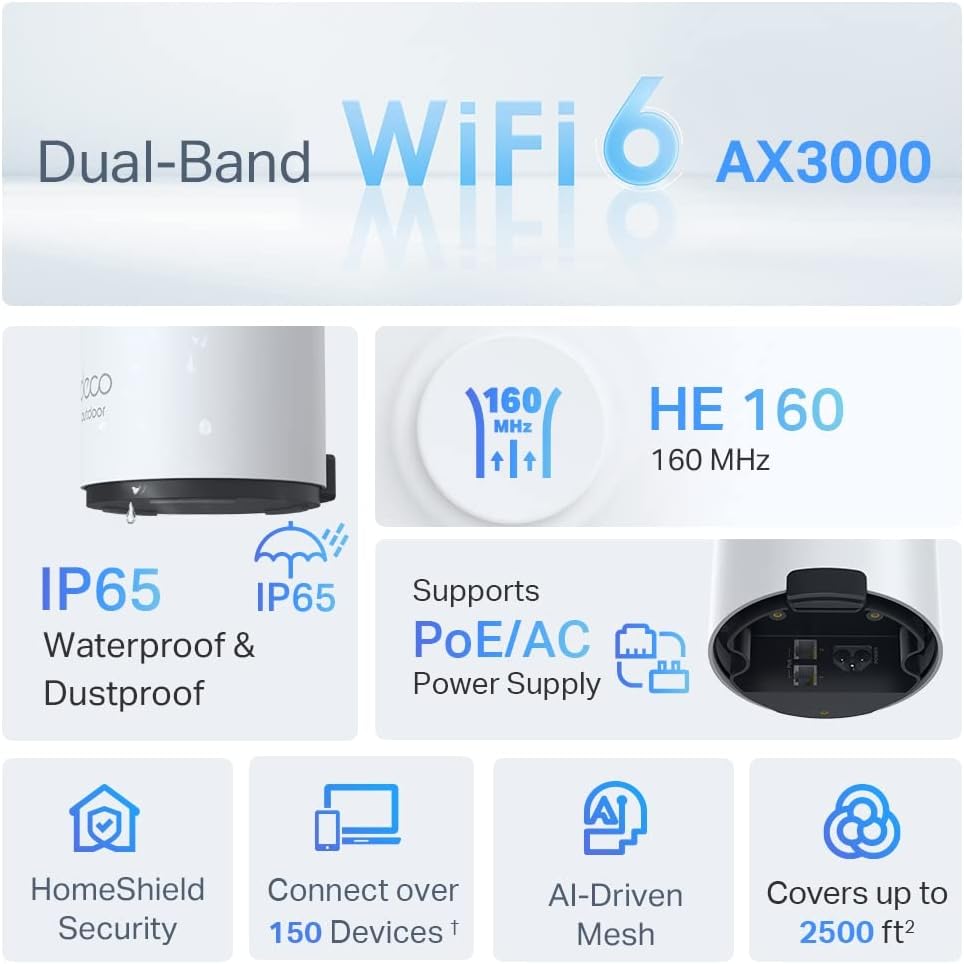
Image: An infographic highlighting key features of the Deco X50-Outdoor, including Dual-Band WiFi 6, AX3000 speeds, IP65 rating, PoE/AC power support, HomeShield Security, support for over 150 devices, AI-Driven Mesh, and up to 2500 sq ft coverage.
| Феатуре | Детаљ |
|---|---|
| Назив модела | AX3000 Outdoor Whole Home Mesh WiFi 6 Unit |
| вирелесс стандард | Ви-Фи 6 (802.11ак) |
| Класа фреквенцијског опсега | Дуал-Банд |
| Брзина преноса података | До 2402 Mbps (5 GHz) + 574 Mbps (2.4 GHz) |
| Опсег повезивања | Up to 2000 Square Feet (per unit) |
| Портс | 2 x Gigabit Ethernet Ports (Auto-sensing WAN/LAN) |
| Повер Суппли | PoE (802.3at) or AC Power Adapter (240V AC) |
| Отпорност на временске услове | IP65 (водоотпоран и отпоран на прашину) |
| Сигурносни протокол | ВПА, ВПА2, ВПА3 |
| Контролни метод | TP-Link Deco App |
| Тежина артикла | 0.9 килограма |
10. Гаранција и подршка
За информације о гаранцији и техничку подршку, обратите се званичном TP-Link-у. webсајту или контактирајте њихову корисничку службу.
- Званични ТП-Линк Webсајт: ввв.тп-линк.цом
- техничка подршка: Посетите одељак за подршку на ТП-Линк-у webсајт за најчешћа питања, водиче за решавање проблема и контакт информације.