
1. Увод
Хвала вам на куповиниasing the Roadstar IR-540D+BT Micro Hi-Fi System. This system offers a wide range of audio options including Internet Radio, DAB+/FM digital radio, CD-MP3 playback, Bluetooth connectivity, and USB media support. This manual provides essential information for safe operation, setup, and troubleshooting to ensure optimal performance of your device.
2. Безбедносне информације
- Пажљиво прочитајте сва упутства пре употребе.
- Сачувајте ово упутство за будућу употребу.
- Не излажите уређај киши или влази како бисте спречили пожар или струјни удар.
- Обезбедите одговарајућу вентилацију; не блокирајте ниједан вентилациони отвор.
- Користите само додатке/прибор које је навео произвођач.
- Искључите јединицу из струје током олуја са грмљавином или када се не користи дуже време.
- Све сервисирање препустите квалификованом сервисном особљу.
3. Садржај пакета
Молимо вас да проверите да ли су све ставке присутне:
- Roadstar IR-540D+BT Micro Hi-Fi System
- Ремоте Цонтрол
- Повер Адаптер
- Кориснички приручник (овај документ)
4. Производ је готовview
Familiarize yourself with the main components and controls of your Hi-Fi system.
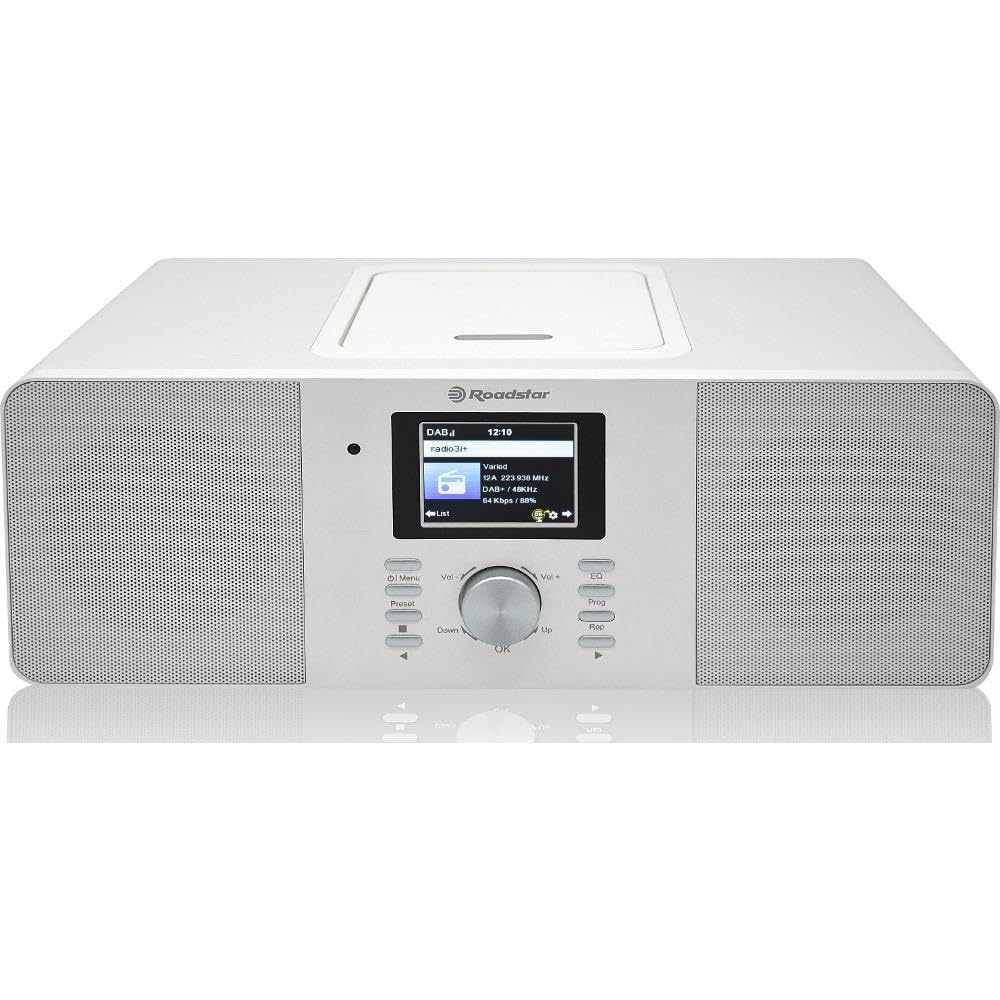
Слика 4.1: Предња страна view of the Roadstar IR-540D+BT Micro Hi-Fi System.

Figure 4.2: Close-up of the LCD display and main control buttons/knobs.
Контроле на предњој плочи:
- ЛЦД екран: Shows current mode, track information, radio station, time, etc.
- Дугме за напајање: Укључује/искључује уређај.
- Дугме за режим: Switches between CD, Internet Radio, DAB+, FM, Bluetooth, AUX, USB.
- Дугме за јачину звука: Подешава ниво аудио излаза.
- Навигациона дугмад (горе/доле/лево/десно/ОК): За навигацију и избор у менију.
- Дугме за репродукцију/паузу: Controls playback for CD/USB/Bluetooth.
- Дугмад за прескакање/претрагу: Skips tracks or searches radio stations.
- УСБ порт: For USB media playback and fast charging.
- Слушалице: За приватно слушање.
Прикључци задње плоче:
- АУКС ИН: 3.5 мм прикључак за повезивање екстерних аудио уређаја.
- FM/DAB Antenna Input: For connecting the included antenna.
- ДЦ ИН: Повезивање адаптера за напајање.

Figure 4.3: The Roadstar IR-540D+BT system shown with its multi-function remote control.
Функције даљинског управљача:
- All basic functions (Power, Volume, Mode, Playback controls).
- Direct access buttons for different modes (e.g., CD, BT, Internet Radio).
- Numeric keypad for direct track/station entry.
- Alarm setting and sleep timer functions.
5. Подешавање
5.1 Прикључак за напајање
- Connect the power adapter to the DC IN jack on the rear of the unit.
- Укључите адаптер за напајање у стандардну зидну утичницу.
5.2 Повезивање антене
For optimal DAB+ and FM radio reception, connect the supplied antenna to the FM/DAB Antenna Input on the rear panel. Extend the antenna fully and adjust its position for the best signal.
5.3 Initial Wi-Fi Setup (for Internet Radio)
Upon first power-on or when selecting Internet Radio mode, the system will prompt you to configure network settings.
- Use the navigation buttons to select 'Network Setup' or 'Wi-Fi Setup'.
- The system will scan for available Wi-Fi networks. Select your network from the list.
- Enter your Wi-Fi password using the navigation buttons and 'OK' to confirm each character.
- Once connected, the system will confirm the connection. You can now access Internet Radio stations.
6. Упутство за употребу
6.1 Општи рад
- Укључивање/искључивање: Притисните дугме за напајање на уређају или даљинском управљачу.
- Изаберите режим: Press the 'Mode' button repeatedly to cycle through available sources (CD, Internet Radio, DAB+, FM, Bluetooth, AUX, USB).
- Подесите јачину звука: Rotate the Volume knob or use the VOL +/- buttons on the remote.
6.2 CD/MP3 Playback
- Отворите поклопац одељка за ЦД.
- Place a CD or MP3 CD with the label side facing up.
- Close the CD compartment cover. The system will automatically switch to CD mode and begin playback.
- Use the Play/Pause, Skip, and Search buttons for control.
6.3 Радио операције
6.3.1 Интернет радио
- Select 'Internet Radio' mode.
- Use the navigation buttons to browse stations by genre, location, or search.
- Press 'OK' to select a station.
6.3.2 DAB+/FM Radio
- Select 'DAB+' or 'FM' mode.
- For DAB+, the system will perform an auto-scan for available stations. For FM, use the search buttons to find stations.
- To save a preset, press and hold the 'Preset' button, then select a preset number and press 'OK'.
6.4 Bluetooth повезивање
- Select 'Bluetooth' mode. The display will show 'Pairing' or 'Waiting for connection'.
- На свом мобилном уређају (паметном телефону, таблету) омогућите Блутут и потражите доступне уређаје.
- Select 'IR-540D+BT' from the list.
- Once paired, you can play audio from your device through the Hi-Fi system.
6.5 USB Playback and Charging
- Insert a USB flash drive into the USB port. The system will automatically switch to USB mode and begin playing compatible audio fileс (нпр. МП3).
- The USB port also supports fast charging for compatible devices.
6.6 AUX IN Connection
Connect an external audio device (e.g., MP3 player, smartphone) to the AUX IN jack on the rear panel using a 3.5mm audio cable. Select 'AUX' mode to listen to audio from the connected device.
6.7 Функција аларма

Figure 6.1: The display showing alarm clock settings.
The system features a dual alarm function.
- Press the 'Alarm' button on the remote or navigate through the menu to 'Alarm Settings'.
- Изаберите Аларм 1 или Аларм 2.
- Set the desired alarm time, source (Buzzer, FM, DAB+, Internet Radio), and volume.
- Омогућите аларм.
7. Одржавање
- Чишћење: Use a soft, dry cloth to clean the unit. Do not use abrasive cleaners or solvents.
- ЦД Царе: Handle CDs by their edges. Clean with a soft, lint-free cloth, wiping from the center outwards.
- вентилација: Уверите се да отвори за вентилацију нису блокирани да бисте спречили прегревање.
КСНУМКС. Решавање проблема
| Проблем | Могући узрок | Решење |
|---|---|---|
| Нема струје | Кабл за напајање није повезан; утичница је неисправна. | Проверите везу кабла за напајање; покушајте са другом утичницом. |
| Нема звука | Volume too low; Incorrect mode selected; Headphones connected. | Increase volume; Select correct source mode; Disconnect headphones. |
| Лош радио пријем | Antenna not extended/positioned correctly; Weak signal. | Extend and reposition the antenna; Try auto-tuning again. |
| Блуетоотх упаривање није успело | Device not in pairing mode; Distance too far; Interference. | Ensure unit is in Bluetooth mode; Keep devices close; Restart both devices. |
| Internet Radio not connecting | Incorrect Wi-Fi password; Router issues; Weak Wi-Fi signal. | Re-enter Wi-Fi password; Restart router; Move unit closer to router. |
9. Спецификације
| Феатуре | Спецификација |
|---|---|
| Бранд | Роадстар |
| Број модела | IR-540D+BT |
| Технологија повезивања | Auxiliary, USB, Bluetooth, Wi-Fi |
| Подржани стандарди | CD, CD-R, CD-RW, MP3, WAV, AAC, WMA |
| Спеакер Типе | Стерео |
| Излазна снага (РМС) | 2 x 10 W (Total 20W RMS) |
| Извор напајања | Цордед Елецтриц |
| Компатибилни уређаји | МП3 плејер, паметни телефон, таблет |
| Радио тјунер | Интернет радио, DAB+, FM |
| УСБ порт | Playback and Fast Charging |
| Дисплаи | Дигитални ЛЦД |
| Посебне карактеристике | Dual Alarm, Equalizer Presets |
10. Гаранција и подршка
For warranty information and technical support, please refer to the warranty card included with your product or visit the official Roadstar webсајт. Сачувајте доказ о куповини за евентуалне рекламације по гаранцији.