
1. Увод
This manual provides essential information for the safe and efficient operation of your Hantek HDP180V8S DC Power Supply. This adjustable switching bench power supply offers a stable output of 0-80V and 0-8A, featuring a 4-digit LED display for precise voltage and current readings. It includes various protection functions and an accurate encoder adjustment knob for fine control. Please read this manual thoroughly before use and retain it for future reference.

Figure 1: Hantek HDP180V8S DC Power Supply
Ова слика приказује предњи део view of the Hantek HDP180V8S DC Power Supply, displaying its digital readouts for voltage and current, control knobs, and output terminals.
2. Безбедносна упутства
Да бисте спречили струјни удар, пожар или оштећење производа, придржавајте се следећих мера безбедности:
- Уверите се да је напајање повезано са уземљеном утичницом.
- Немојте користити уређај на влажном или дamp условима.
- Avoid blocking ventilation openings. Ensure adequate airflow around the unit.
- Не отварајте цasinг; унутра нема делова које корисник може сам да поправи. За сервисирање се обратите квалификованом особљу.
- Проверите унос волtage selector (115V/230V) on the rear panel matches your local power supply before connecting the power cord.
- Увек искључите напајање и одспојите оптерећење пре него што направите или промените повезивање.
- Do not exceed the maximum rated output voltagе или струја.
3. Производ је готовview
3.1 Кључне карактеристике
- Висока прецизност: 4-digit LED display with 10mV/10mA resolution.
- Цонстант Волtage (C.V.) & Constant Current (C.C.) Modes: Automatic switching based on load.
- Компактан дизајн: Suitable for laboratory, school, repair, and DIY applications.
- УСБ брзо пуњење: Standard USB output (5-12V) supporting various fast charging protocols.
- Поуздана безбедност: Овер волtage, over current, overload, overheating, and short circuit protection.
- Ниска бука: Temperature-controlled fan for quiet operation.
- Рачунарска контрола: Fully isolated serial port for software control and multi-power supply management.
- Меморијске функције: 10 groups of data storage/retrieval.
- Закључавање панела: One-key panel lock to prevent accidental adjustments.
3.2 Компоненте предњег панела

Слика 2: Изглед предњег панела
This diagram illustrates the various controls and indicators on the front panel of the HDP180V8S power supply.
- Волtagе Дисплеј: Приказује излазну јачину звукаtage.
- Тренутни приказ: Приказује излазну струју.
- Save and Recall Keys (M1-M10): Used to store and recall preset voltagе/тренутне вредности.
- Схифт тастер: Used in conjunction with other keys for advanced functions.
- Тастер за укључивање/искључивање: Toggles the power output.
- Output Terminal (+/-): Повезује се са оптерећењем.
- Цонстант Волtage Output (CV) Indicator: Lights up when the unit is in Constant Voltage režim.
- Keyboard Lock Sign: Indicates when the panel controls are locked.
- Constant Current Output (CC) Indicator: Lights up when the unit is in Constant Current mode.
- Овер Волtage Protection (OVP) Indicator: Lights up when OVP is active.
- Волtagе Дугме за подешавање: Подешава излазну јачинуtage.
- Over Current Protection (OCP) Indicator: Lights up when OCP is active.
- Ручица за подешавање струје: Adjusts the output current.
- Keyboard Lock Button: Activates/deactivates the panel lock.
- УСБ прикључак за пуњење: Provides quick charging output for compatible devices.
3.3 Компоненте задње плоче
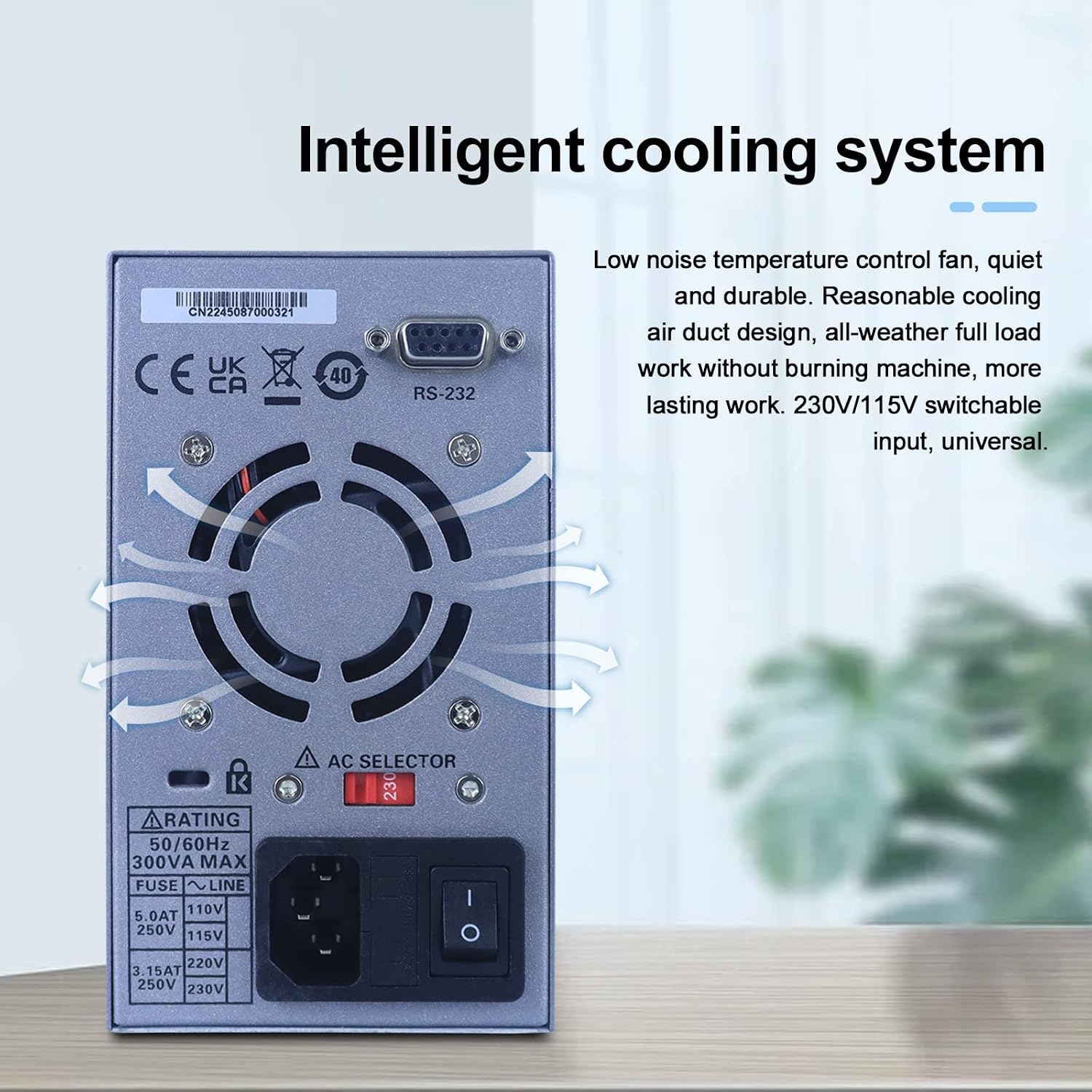
Слика 3: Изглед задњег панела
This image displays the rear panel of the power supply, including the cooling fan, AC input, and RS-232 port.
- Вентилатор за хлађење: Обезбеђује активно хлађење унутрашњих компоненти.
- Улазни наизменични прикључак: За повезивање главног кабла за напајање.
- Волtage Selector Switch (115V/230V): Бира одговарајући улазни волуменtage.
- РС-232 порт: For computer connectivity and control.
4. Подешавање
4.1 Распакивање и преглед
Upon receiving your HDP180V8S, carefully unpack all components and inspect for any signs of damage. If any damage is found, contact your supplier immediately.

Слика 4: Листа за паковање
The image displays the contents of the package: the Hantek HDP180V8S power supply, an input power cord, and a set of output power cords (alligator clips).
Пакет треба да садржи:
- 1 x Hantek HDP180V8S DC Power Supply
- 1 x Улазни кабл за напајање
- 1 set of Output Power Cords (alligator clips)
- 1 к Упутство за употребу
4.2 Прикључак за напајање
- Пре него што повежете кабл за напајање, уверите се да је јачина звукаtage selector switch on the rear panel is set to match your local AC power supply (115V or 230V).
- Connect the provided input power cord to the AC input socket on the rear panel of the power supply.
- Укључите други крај кабла за напајање у уземљену утичницу са наизменичном струјом.
4.3 Повезивање оптерећења
Connect your load to the red (+) and black (-) output terminals on the front panel using the provided output power cords. Ensure proper polarity. For safety, always connect the load with the power output turned OFF.
5. Упутство за употребу
5.1 Укључивање/искључивање
Press the main power switch on the rear panel to turn the unit on. The front panel LED display will illuminate. To turn off, press the main power switch again.
5.2 Подешавање Волtagе и струја
- With the output OFF (ensure the ON/OFF button is not illuminated), use the Волtagе Дугме за подешавање to set the desired output voltage. Rotate clockwise to increase, counter-clockwise to decrease.
- Користите Дугме за подешавање струје to set the desired current limit. This sets the maximum current the supply will deliver.
- Притисните тастер ОН/ОФФ дугме за омогућавање излаза. На екрану ће се приказати стварна јачина звука излазаtagе и струја.
5.3 Цонстант Волtage (CV) and Constant Current (CC) Modes
The HDP180V8S automatically switches between Constant Voltage (CV) and Constant Current (CC) modes depending on the load. The corresponding CV or CC indicator on the front panel will light up to show the active mode.
- Режим животописа: Излазни волtage remains constant at the set value, and the output current varies according to the load resistance.
- ЦЦ режим: The output current remains constant at the set limit, and the output voltage varies according to the load resistance. This occurs when the load resistance is too low for the set voltage, causing the current to reach its limit.
5.4 Функције меморије (M1-M10)
The power supply allows you to store and recall up to 10 sets of voltagе и тренутни параметри.
- Да сачувате: Подесите жељени волуменtage and current. Press and hold the Схифт key, then press one of the М1-М10 keys until the display flashes, indicating the parameters are saved.
- Да се присети: Притисните жељено М1-М10 key. The stored voltage and current will be loaded.
5.5 USB Quick Charging Function
The front panel features a USB quick charging port. Connect your compatible device to this port for fast charging. The power supply automatically recognizes various fast charging protocols and adjusts the output voltage (5-12V) and current accordingly.

Figure 5: USB Quick Charging
This image demonstrates the HDP180V8S power supply's USB quick charging feature, with a smartphone connected to the front USB port.
5.6 Panel Lock Function
To prevent accidental changes to settings, use the panel lock function. Press the Закључавање тастатуре button (often labeled with a lock icon) to activate or deactivate the lock. When active, the Keyboard Lock Sign will illuminate, and most front panel controls will be unresponsive.
5.7 Computer Control
The HDP180V8S supports computer control via its RS-232 serial port. This allows for remote control, data logging, and multi-power supply management using compatible software. Refer to the software documentation for detailed instructions on installation and usage.

Figure 6: Computer Control Interface
The image shows the HDP180V8S power supply connected to a computer, demonstrating its capability for software control and managing multiple power supplies simultaneously.
6. Одржавање
6.1 Чишћење
Regularly clean the exterior of the power supply with a soft, dry cloth. Do not use abrasive cleaners or solvents. Ensure the ventilation openings are free from dust and debris to maintain optimal cooling performance.
6.2 Складиштење
Када се не користи дуже време, чувајте напајање на хладном и сувом месту, даље од директне сунчеве светлости и екстремних температура.
6.3 Систем хлађења
The HDP180V8S features an intelligent cooling system with a low-noise temperature control fan. This system ensures efficient heat dissipation, allowing for continuous operation under full load without overheating.

Figure 7: Intelligent Cooling System
This internal view highlights the cooling fan and the designed airflow path within the HDP180V8S power supply, ensuring efficient heat management.
КСНУМКС. Решавање проблема
| Проблем | Могући узрок | Решење |
|---|---|---|
| Нема напајања/искључивања екрана | Power cord not connected; Rear power switch off; Incorrect voltage selector; Blown fuse. | Check power cord connection; Ensure rear power switch is ON; Verify voltage selector setting; Replace fuse (refer to qualified personnel). |
| Но оутпут волtagе/цуррент | Output OFF; Load disconnected or faulty; OVP/OCP active. | Press ON/OFF button; Check load connections; Reduce voltage/current settings or check load for short circuit. |
| Волtage/Current cannot be adjusted | Panel lock active. | Press the Keyboard Lock button to deactivate the lock. |
| Прегревање | Блокирана вентилација; Прекомерно оптерећење. | Ensure clear airflow around the unit; Reduce load or operating time. |
8. Спецификације
| Параметар | Валуе |
|---|---|
| Оутпут Волtage | 0-80В |
| Излазна струја | 0-8А |
| Ватtage | 170 вати |
| Дисплаи | 4-Digit LED (10mV/10mA resolution) |
| Улазни волtagе (АЦ) | 100-120В / 200-240В (променљиво) |
| Метод хлађења | Air (Temperature-controlled fan) |
| УСБ излаз за брзо пуњење | 5-12V (supports various protocols) |
| Комуникациони интерфејс | РС-232 |
| Функције заштите | OVP, OCP, Overload, Overheating, Short Circuit |
| Тежина артикла | 4.8 фунти |
| Димензије пакета | 5.9 к 5.9 к 3.2 инча |
9. Гаранција и подршка
Hantek products are designed for reliability and performance. This product comes with standard manufacturer support. For technical assistance, troubleshooting beyond this manual, or warranty inquiries, please contact Hantek customer support through their official channels or your point of purchase. Please have your product model number (HDP180V8S) and purchase information ready when contacting support.