
1. Увод
Thank you for choosing the Goshyda Portable Multimedia 1080P Projector. This compact and versatile device is designed to provide a personal cinema experience, supporting various multimedia inputs for entertainment, presentations, and more. Please read this manual carefully before using the projector to ensure proper operation and to maximize its lifespan.

Image 1.1: The Goshyda YG300 Mini Portable Projector in a home entertainment setting.
2. Безбедносне информације
- Напајање: Use only the specified 5V 2A power adapter or a compatible power bank. Incorrect voltagе може оштетити уређај.
- вентилација: Do not block the ventilation openings. Ensure adequate airflow around the projector to prevent overheating.
- Окружење: Avoid exposing the projector to water, moisture, dust, or extreme temperatures. Operate in a clean, dry environment.
- Чишћење: Искључите напајање пре чишћења. Користите меку, суву крпу. Не користите течна или аеросолна средства за чишћење.
- Растављање: Не покушавајте сами да растављате или поправљате пројектор. Сва сервисирања препустите квалификованом особљу.
- Заштита очију: Не гледајте директно у сочиво пројектора када је укљученоamp је укључен.
3. Садржај пакета
Молимо вас да проверите садржај пакета након распакивања. Ако неке ставке недостају или су оштећене, обратите се продавцу.
- Goshyda Portable Projector
- Ремоте Цонтрол
- АВ кабл
- Повер Адаптер
- Кориснички приручник (овај документ)

Image 3.1: Included accessories with the Goshyda Portable Projector.
4. Производ је готовview
4.1. Карактеристике пројектора
- 1080P Resolution Support: Пружа јасне и детаљне слике.
- Компактан и преносив дизајн: Weighing approximately 290g, it is easy to carry.
- Multi-Port Connectivity: Includes USB, HDMI, AV, memory card slot, and audio output.
- Уграђени звучници: Provides integrated audio for convenience.
- Флексибилна снага: Can be powered by a 5V 2A wall charger or power bank.

Image 4.1: Visual representation of the projector's main features.
4.2. Projector Ports and Controls
Familiarize yourself with the various ports and controls on your projector.
- Објектив: Front-facing projection lens.
- Прстен за фокусирање: Подешава јасноћу слике.
- Power Input (DC IN): Connects to the 5V 2A power adapter.
- ХДМИ порт: For connecting devices via HDMI cable.
- УСБ порт: За повезивање УСБ уређаја за складиштење података.
- AV порт: For connecting devices via AV cable.
- Утор за мицроСД картицу: За уметање меморијске картице.
- Аудио излаз: За повезивање екстерних звучника или слушалица.
- Контролна дугмад: On the top panel for basic navigation and selection.

Слика 4.2: Бочна страна view of the projector highlighting its connectivity ports.

Image 4.3: Close-up of the projector lens.
5. Подешавање
5.1. Прикључак за напајање
- Connect the provided power adapter to the DC IN port on the projector.
- Укључите адаптер за напајање у стандардну електричну утичницу.
- Alternatively, for portable use, connect a 5V 2A power bank to the DC IN port.

Image 5.1: Powering the projector via wall adapter or power bank.
5.2. Постављање и пројекција
Place the projector on a stable, flat surface. The optimal projection distance is between 1 to 2.5 meters, allowing for a screen size of up to 60 inches.
- For a 24-inch screen, place the projector approximately 0.8 meters away.
- For a 47-inch screen, place the projector approximately 1.2 meters away.
- For a 60-inch screen, place the projector approximately 1.6 meters away.
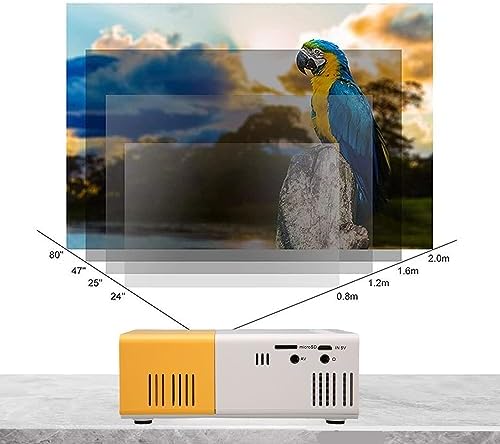
Image 5.2: Projection distance guidelines for various screen sizes. Note: Maximum recommended projection size is 60 inches.
5.3. Подешавање фокуса
After placing the projector and powering it on, rotate the focus ring located around the lens until the projected image appears clear and sharp.
6. Упутство за употребу
6.1. Укључивање/искључивање
- Укључено: Притисните дугме за напајање на пројектору или даљинском управљачу.
- Искључивање: Press the power button again. The projector will shut down.
6.2. Избор извора улаза
Use the 'Source' button on the remote control or the projector's control panel to cycle through available input sources (HDMI, USB, AV, MicroSD).
6.3. Мену Навигатион
Use the arrow buttons on the remote control or projector to navigate through menus. Press 'OK' or 'Enter' to confirm selections. Use the 'Return' or 'Back' button to go back to the previous menu.
7. Повезивање
The projector offers multiple connectivity options for various devices.

Image 7.1: Connectivity options for the Goshyda projector.
7.1. ХДМИ веза
Connect devices such as laptops, TV Sticks, game consoles (e.g., for Xbox One), or Blu-ray players using an HDMI cable. Select 'HDMI' as the input source.
7.2. УСБ веза
Уметните УСБ флеш диск у УСБ порт да бисте репродуковали медије files directly. Select 'USB' as the input source and navigate through your files.
7.3. AV Connection
Use the provided AV cable to connect older devices like DVD players. Select 'AV' as the input source.
7.4. Smartphone/Tablet Connection
To connect directly to your smartphone or tablet, you will need an appropriate adapter (e.g., Micro USB to HDMI, Type-C to HDMI, or a dedicated HD multimedia interface device), depending on your device's operating system (OS X or Android) and available ports. These adapters are sold separately.
7.5. Аудио излаз
Connect external speakers or headphones to the audio output port for enhanced sound.
8. Одржавање
- Чишћење сочива: Use a soft, lint-free cloth specifically designed for optical lenses to gently wipe the projector lens. Do not use abrasive materials or harsh chemicals.
- Спољно чишћење: Обришите спољашњост пројектора меком, сувом крпом.
- Складиштење: When not in use for extended periods, store the projector in a cool, dry place, away from direct sunlight and dust.
КСНУМКС. Решавање проблема
| Проблем | Могући узрок | Решење |
|---|---|---|
| Нема струје | Power adapter not connected or faulty; insufficient power supply. | Ensure the 5V 2A power adapter is securely connected and plugged into a working outlet. Try a different power source or power bank. |
| Нема слике | Incorrect input source selected; cable not connected properly; device not outputting signal. | Select the correct input source (HDMI, USB, AV). Check all cable connections. Ensure the connected device is powered on and outputting a signal. |
| Слика је мутна | Фокус није подешен; пројектор је преблизу/предалеко од платна. | Rotate the focus ring to sharpen the image. Adjust the projection distance within the recommended range (1-2.5m). |
| Нема звука | Volume too low or muted; external speakers not connected; audio format not supported. | Increase the volume on the projector and the source device. Check if external speakers are properly connected. Ensure the audio format is supported. |
10. Спецификације
| Феатуре | Детаљ |
|---|---|
| Бранд | Гошида |
| Број модела | Goshyda89pkbg17g0 |
| Резолуција екрана | 1920 x 1080 (1080P Support) |
| Осветљеност | 200 лумена |
| Аспецт Ратио | 4:3 |
| Удаљеност пројекције | 1 - 2.5 метара |
| Величина пројекције | До 60 инча |
| Технологија повезивања | HDMI, USB, AV, MicroSD, Audio Out |
| Повер Инпут | 5В 2А |
| Дисплаи Типе | ЛЦД |
| Димензије производа | 12L x 8.5W x 4.6H cm (Approx. 4.7 x 3.3 x 1.8 inches) |
| Форм Фацтор | Портабле |
| Тип монтаже | Табле Моунт |
11. Гаранција и подршка
For warranty information and customer support, please refer to the documentation provided with your purchase or contact your retailer directly. Keep your proof of purchase for warranty claims.