
1. Увод
This manual provides detailed instructions for the installation, operation, and maintenance of your INQMEGA Solar Security Camera. Please read this manual thoroughly before using the product to ensure proper function and safety. Keep this manual for future reference.
2. Производ је готовview
2.1 Садржај пакета
Проверите да ли су све компоненте присутне у вашем пакету:
- 1 x Solar Tuya Camera
- КСНУМКС к Соларни панел
- 1 к носач
- 1 к Упутство за употребу
- 1 x 5M long cable
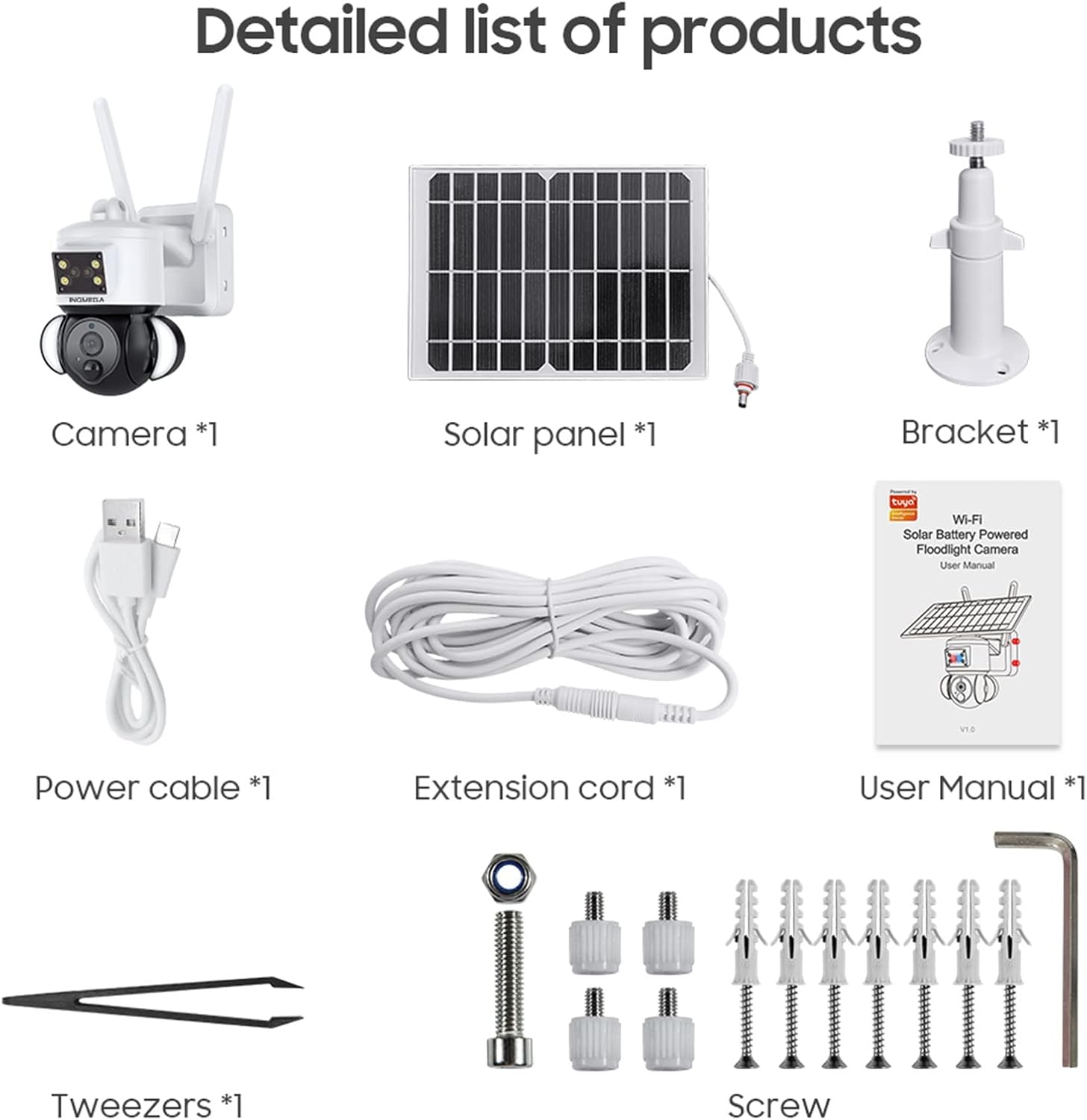
Figure 1: Package Contents. This image displays all items included in the INQMEGA Solar Security Camera package, such as the camera unit, solar panel, mounting bracket, power cable, extension cord, user manual, and installation hardware.
2.2 Кључне карактеристике
- 3MP FHD Resolution: Снима јасан и детаљан видео записtage.
- Соларни погон: Equipped with a 15000mAh rechargeable battery and a solar panel for continuous operation with 2-3 hours of daily sunlight.
- 360° View (Панорамирање и нагињање): Offers 355° horizontal pan and 120° vertical tilt for comprehensive area coverage, controllable via the TUYA SMART LIFE app.
- ПИР детекција покрета: Built-in radar PIR motion sensor provides high sensitivity detection, sending instant alerts to your app.
- Floodlight with Siren: Features 10 LEDs for color night vision up to 90ft, with the floodlight activating upon motion detection. Includes a siren for deterrence.
- Двосмерни аудио: Allows real-time communication through the camera via the app.
- 2.4GHz WiFi повезивање: Ensures stable network reception with 5dBi dual antennas. (Note: Does not support 5G WiFi).
- Опције складиштења: Supports 8-128GB SD card (not included) and cloud storage.
- Алека компатибилност: Can be paired with Alexa-enabled smart speakers for voice control.
- Отпоран на временске услове: IP66 International Protection Rating for outdoor use in various weather conditions.

Figure 2: PIR Human Detection. This image illustrates the camera's ability to detect human motion, activate a smart floodlight, and send phone alarms.

Figure 3: 3MP HD Image Quality and PTZ Control. This image demonstrates the camera's high-definition video capture and the pan-tilt-zoom functionality controlled through a mobile application.
3. Упутства за подешавање
3.1 Почетно укључивање
- Unpack all components and ensure they are intact.
- Connect the solar panel cable to the camera's power input.
- Locate the power button/switch on the camera and turn it on.
- Observe the LED indicator. It should blink RED initially, then turn to blink BLUE, indicating it is ready for connection.
3.2 Инсталација и повезивање апликације
- Download the "TUYA SMART LIFE" app from your smartphone's app store (iOS or Android).
- Региструјте се или се пријавите на свој налог.
- In the app, select "Add Device" or the "+" icon to add a new camera.
- Follow the on-screen prompts to select your device type (e.g., "Security Camera").
- Confirm that the camera's LED is blinking blue.
- Enter your 2.4GHz Wi-Fi network name and password. (Note: 5GHz Wi-Fi is not supported).
- The app will generate a QR code. Aim your phone screen, displaying the QR code, in front of the camera lens at a distance of approximately 4-8 inches.
- The camera will emit a confirmation sound once the QR code is successfully scanned and connected.
- Када се једном повежете, можете дати име својој камери и почети са преносом уживо viewинг.
Video 1: INQMEGA 528 Solar Security Cameras Packing list. This video demonstrates the unboxing and initial setup process for the INQMEGA solar security camera, including powering on and connecting to the mobile application.
3.3 Монтирање камере
- Изаберите одговарајућу локацију на отвореном са ampсунчева светлост за соларни панел и јасно view за камеру.
- Use the provided bracket and screws to securely mount the camera to a wall or other stable surface.
- Ensure the solar panel is positioned to receive maximum direct sunlight throughout the day.
- Adjust the camera's angle for optimal surveillance coverage.

Figure 4: Outdoor Mounting and Solar Power. This image shows the camera and solar panel installed outdoors, emphasizing the solar charging capability and the use of a 16ft extension cord for flexible positioning of the solar panel.
4. Упутство за употребу
4.1 Уживо View и репродукцију
- Open the TUYA SMART LIFE app and select your camera to view живи феед.
- Користите функцију репродукције да бисте поновоview снимљено фооtage stored on the SD card or cloud.
4.2 Контрола панорамирања и нагиба
- Within the live view interface, use the directional controls to remotely adjust the camera's horizontal (355°) and vertical (120°) angles.

Figure 5: PTZ App Control. This image illustrates how to control the camera's pan (355°) and tilt (90°) movements using the mobile application.
4.3 Двосмерни аудио
- Додирните икону микрофона у апликацији да бисте говорили преко звучника камере.
- Додирните икону звучника да бисте слушали звук са локације камере.

Figure 6: Two-Way Audio Communication. This image shows the camera's two-way audio function, allowing users to speak and listen through the device via their smartphone.
4.4 Ноћни вид и рефлектор
- The camera automatically switches to night vision mode in low light conditions.
- Color night vision is enabled by the built-in floodlight, which activates upon motion detection.
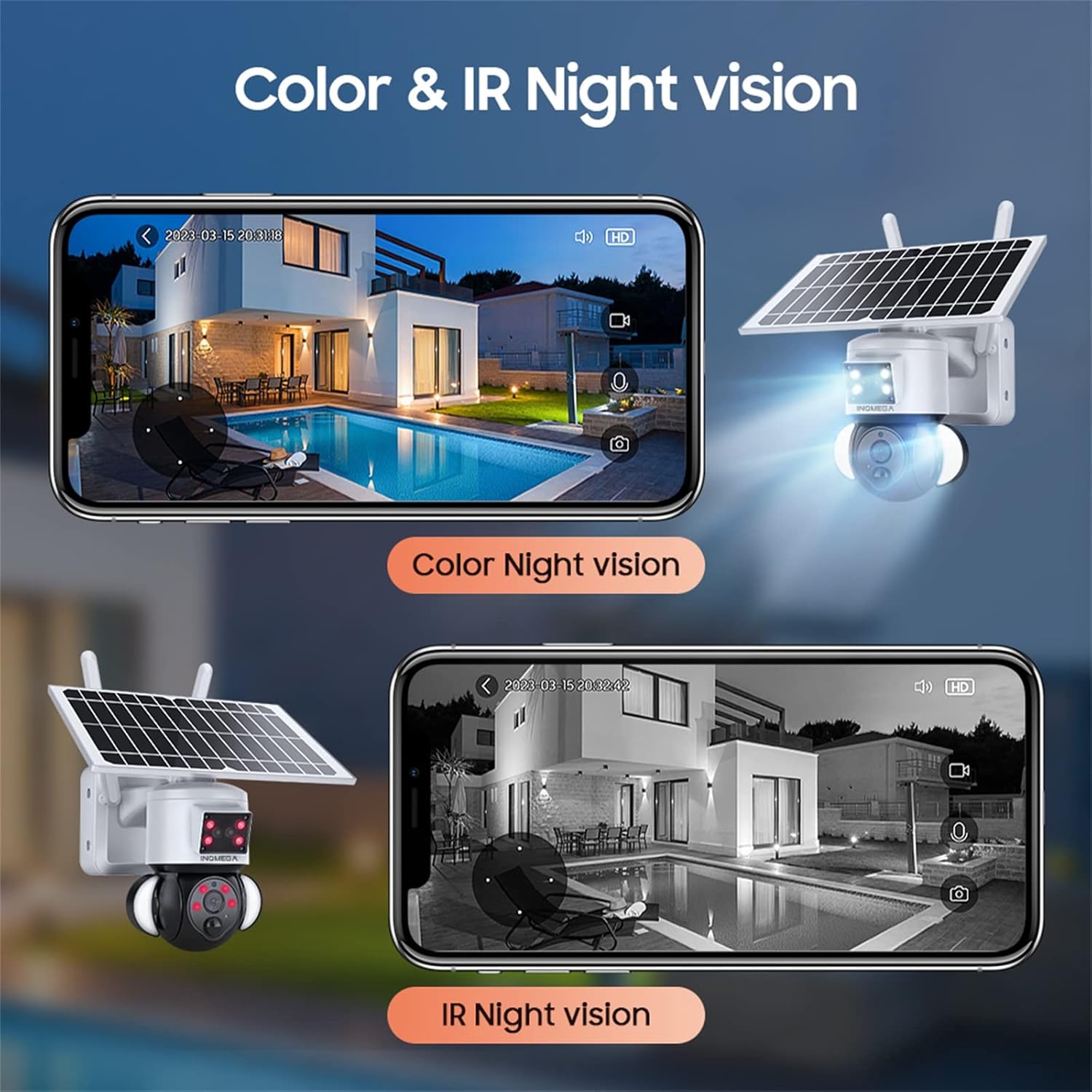
Figure 7: Color and IR Night Vision. This image compares the camera's color night vision, enabled by its floodlight, with traditional infrared (IR) night vision, both displayed on a smartphone.
4.5 Детекција покрета и упозорења
- The PIR motion sensor detects movement and triggers recording.
- Receive instant alerts on your TUYA SMART LIFE app when motion is detected.
- Adjust sensitivity settings within the app to minimize false alarms.
5. Одржавање
- Чишћење соларних панела: Редовно бришите соларни панел меком крпомamp cloth to remove dust, dirt, and debris. A clean panel ensures optimal charging efficiency.
- Чишћење сочива камере: Gently clean the camera lens with a microfiber cloth to maintain clear image quality. Avoid abrasive materials.
- Ажурирања фирмвера: Check the TUYA SMART LIFE app periodically for available firmware updates to ensure your camera has the latest features and security enhancements.
- Здравље батерије: While solar-powered, ensure the camera receives adequate sunlight. If the camera is in a shaded area for extended periods, consider temporarily relocating it or manually charging the battery if possible (refer to product specifications for charging options).
- Заштита животне средине: Although the camera is IP66 rated, avoid direct high-pressure water jets or prolonged submersion.
КСНУМКС. Решавање проблема
- Камера се не повезује на Ви-Фи:
- Уверите се да ваша Wi-Fi мрежа користи фреквенцију од 2.4 GHz. Камера не подржава Wi-Fi од 5 GHz.
- Verify the Wi-Fi password is entered correctly in the app.
- Проверите да ли је камера у домету вашег Wi-Fi рутера.
- Restart the camera and your router, then attempt the connection process again.
- Ensure the camera's LED is blinking blue before scanning the QR code.
- Лош квалитет слике:
- Очистите сочиво камере.
- Уверите се да нема препрека у видном пољу камере view.
- Check your Wi-Fi signal strength; a weak signal can affect streaming quality.
- Батерија се не пуни:
- Уверите се да је соларни панел чист и без препрека.
- Verify the solar panel is receiving direct sunlight for at least 2-3 hours daily.
- Проверите везу између соларног панела и камере.
- Motion Detection Not Working or Too Sensitive:
- Adjust the PIR motion detection sensitivity settings in the TUYA SMART LIFE app.
- Уверите се да је камера view није ометано.
- No Audio or Poor Two-Way Audio:
- Check the volume settings on your smartphone and within the app.
- Ensure there is no interference near the camera's microphone or speaker.
7. Спецификације
| Феатуре | Спецификација |
|---|---|
| Назив модела | ST-S528M-3M-TY |
| Бранд | INQMEGA |
| Унутрашња/спољна употреба | Оутдоор |
| Извор напајања | Солар Поверед |
| Цоннецтивити Протоцол | Wi-Fi (само 2.4 GHz) |
| Резолуција снимања видео записа | 3 МП |
| Тип монтаже | Валл Моунт |
| Ноћни вид | Up to 90ft (Color Night Vision) |
| Материјал | Пластика |
| Димензије артикла (Д к Ш к В) | 6 к 8.5 к 6 инча |
| Тежина артикла | 3.74 фунте (1.7 килограма) |
| Батерије | 3 Lithium Polymer batteries required (15000mAh capacity) |
| Оцена међународне заштите | ИП66 |
| Контролни метод | App (TUYA SMART LIFE) |
| Посебне карактеристике | Motion Sensor, Night Vision, Floodlight, Two-Way Audio |
8. Гаранција и подршка
For warranty information, please refer to the documentation included with your product packaging or contact INQMEGA customer support directly. INQMEGA is committed to providing reliable brand reputation and professional technical services. If you encounter any product problems, please contact support in a timely manner.
For further assistance, please visit the official INQMEGA website or refer to the TUYA SMART LIFE app's help section.