
Увод
The AXAGON CRE-SM4N is a USB Smart Card StandReader designed for secure communication with smart cards. This device supports various applications including online banking, digital signatures, and national identity card verification. This manual provides detailed instructions for setting up, operating, and maintaining your smart card reader.

This image shows the AXAGON CRE-SM4N USB Smart Card StandReader in a standing position with a smart card partially inserted into its slot. The card displays text in a foreign language, indicating its use for identity verification. The device is black with the 'AXAGON' logo and a yellow smart card chip icon on its front.
Садржај пакета
- AXAGON CRE-SM4N USB Smart Card StandReader
- Интегрисани УСБ-А кабл
- Упутство за употребу

This image displays the AXAGON CRE-SM4N USB Smart Card StandReader, its retail packaging, and a small instruction manual. The reader is connected via its integrated USB-A cable, which is neatly coiled. The packaging highlights features like 'SMART & ID CARD READER' and 'USB-A INPUT'.
Системски захтеви
- Operating System: Windows, macOS, Linux (specific versions may vary, refer to product specifications for details)
- Доступан УСБ-А порт
- Internet connection for driver download (if not automatically installed)
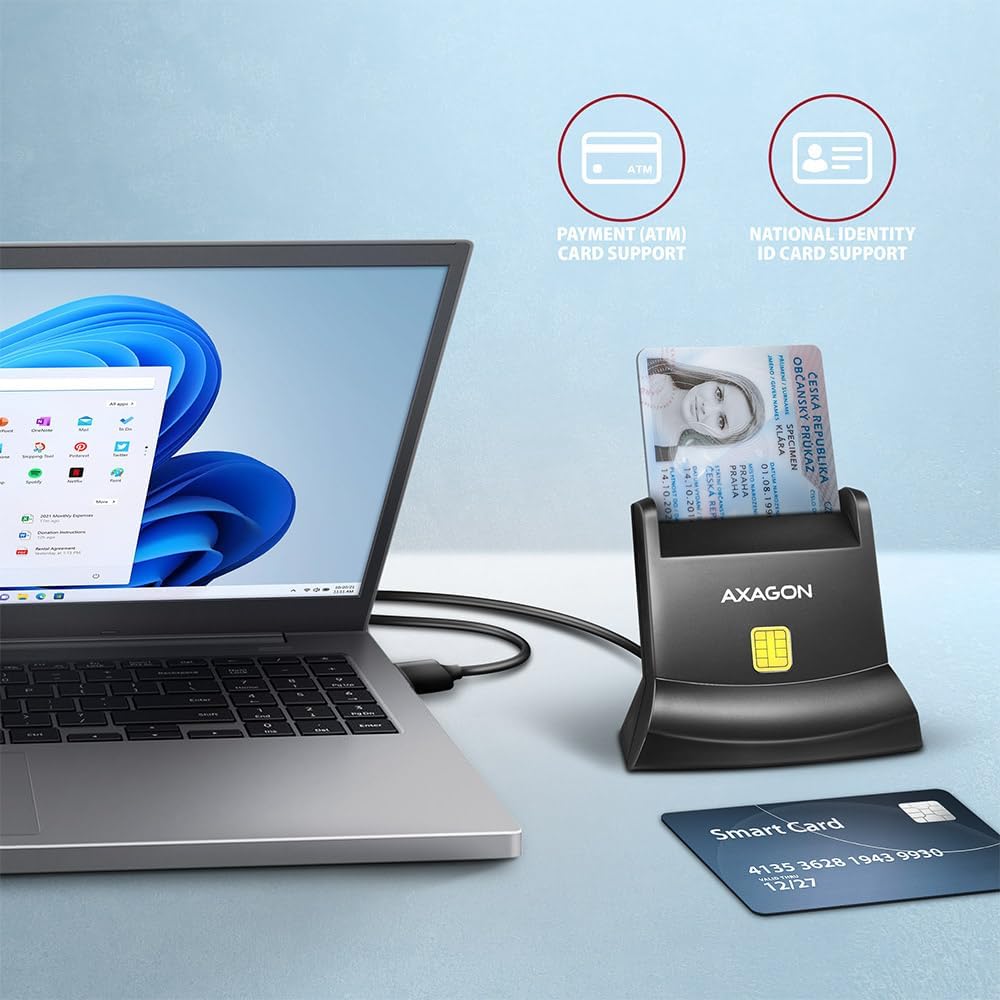
This image shows the AXAGON CRE-SM4N USB Smart Card StandReader connected to a laptop via its USB cable. A smart card is inserted into the reader. Icons above the reader indicate support for 'PAYMENT (ATM) CARD SUPPORT' and 'NATIONAL IDENTITY ID CARD SUPPORT', illustrating its broad compatibility.
Сетуп
- Повежите читач: Plug the USB-A connector of the AXAGON CRE-SM4N into an available USB port on your computer.
- Инсталација драјвера: The necessary drivers are typically installed automatically by your operating system. If not, please visit the AXAGON webсајт за преузимање драјвера.
- Проверите инсталацију: After connecting, your computer should recognize the device. You can verify this in your operating system's Device Manager (Windows) or System Information (macOS/Linux).

This image focuses on the AXAGON CRE-SM4N USB Smart Card StandReader's integrated USB-A cable and port. A circular graphic indicates a '1.3m LONG CABLE', and an icon points to the 'USB-A INPUT', emphasizing the connectivity feature.
Упутство за употребу
- Insert Smart Card: Gently slide your smart card into the reader with the chip facing upwards and towards the reader's internal contacts. Ensure the card is fully seated.
- Интеракција софтвера: Use the specific application software (e.g., banking software, e-government portal) that requires smart card authentication. The software will guide you through the necessary steps, such as entering a PIN.
- Remove Smart Card: After completing your transaction or operation, carefully remove the smart card from the reader.
Important Note on Card Type:
This reader is designed for smart cards with visible contact chips. It is not compatible with contactless (NFC) cards or cards without a chip.

This diagram visually explains smart card compatibility. On the left, a 'SMART CARD' with 'CONTACTS' (a yellow chip icon) is shown with a green checkmark, indicating compatibility. On the right, a 'SMART CARD' with 'NO CONTACTS' is shown with a red 'X', indicating incompatibility. The text 'CHECK YOUR CARD TYPE' is prominently displayed below.
Одржавање
- Keep the reader clean and free from dust. Use a soft, dry cloth for cleaning.
- Избегавајте излагање уређаја екстремним температурама или влази.
- Do not force cards into the slot, as this can damage the reader or the card.
Решавање проблема
Reader Not Detected:
- Уверите се да је USB кабл безбедно повезан и са читачем и са рачунаром.
- Покушајте са другим УСБ портом на рачунару.
- Поново покрените рачунар.
- Check the AXAGON website for the latest drivers if automatic installation failed.
Smart Card Not Recognized:
- Ensure the smart card is inserted correctly with the chip facing the contacts.
- Verify that your smart card is a contact-based card (not contactless).
- Check if the smart card chip is clean and free from damage.
- Ensure the application software you are using is compatible with your smart card and the reader.
Спецификације
| Феатуре | Детаљ |
|---|---|
| Бранд | АКСАГОН |
| Број модела | ЦРЕ-СМ4Н |
| Технологија повезивања | УСБ |
| Компатибилни уређаји | Smart Cards (contact-based) |
| Хардверски интерфејс | УСБ |
| Димензије производа (Д к Ш к В) | 7.7 к 5.6 к 4.9 цм |
| Тежина артикла | 82 г |
Гаранција и подршка
For warranty information and technical support, please refer to the official AXAGON webсајт или директно контактирајте њихову корисничку службу. Сачувајте доказ о куповини за потребе гаранције.
Official AXAGON Webсајт: ввв.акагон.еу