
Увод
This manual provides essential information for the safe and efficient use of your ONN 42-Inch Full HD LED Smart TV, Model 100018254. Please read these instructions thoroughly before operating your television and retain them for future reference.
Шта је у кутији
Проверите да ли су све компоненте присутне пре него што наставите са подешавањем.
- ONN 42-Inch Full HD LED Smart TV
- Ремоте Цонтрол
- ТВ сталак (2 комада)
- Вијци за постоље за ТВ
- Повер Цорд
- Кратки водич (није укључен у овај приручник)

Слика: Фронт view of the ONN 42-inch Smart TV displaying the Roku TV home screen with various streaming app icons like Netflix, Disney+, Apple TV, Hulu, Peacock, and Roku Channel. The TV is black with slim bezels and two stand feet.
Сетуп
1. Причвршћивање постоља за телевизор
- Пажљиво поставите телевизор екраном надоле на меку, чисту површину како бисте спречили оштећења.
- Поравнајте сваки део постоља са одговарајућим отворима за завртње на дну телевизора.
- Причврстите сваки део постоља приложеним завртњима. Уверите се да су чврсто затегнути.

Image: A diagram illustrating the dimensions of the ONN 42-inch TV, showing its width as 43 inches and height as 37 inches when placed on its stand.
2. Монтажа на зид (опционо)
This TV is compatible with VESA standard wall mounts. Refer to your wall mount's instructions for proper installation. Ensure the wall mount can support the weight of the television.

Слика: Позади view of the ONN 42-inch TV, highlighting the VESA mounting screw holes in a square pattern and various input ports on the side and bottom right.
3. Повезивање уређаја
Connect your external devices such as cable boxes, gaming consoles, or Blu-ray players to the TV's input ports.
- ДВИ: For high-definition audio and video. Use an HDMI cable to connect devices like set-top boxes, game consoles, or streaming sticks.
- УСБ: За повезивање УСБ уређаја за складиштење података ради репродукције медија files.
- Ви-Фи: For internet connectivity to access smart TV features and streaming services.
4. Почетно укључивање и чаробњак за подешавање
- Укључите кабл за напајање у телевизор, а затим у зидну утичницу.
- Притисните дугме за напајање на даљинском управљачу или на самом телевизору.
- Follow the on-screen instructions to complete the initial setup, including language selection, network connection (Wi-Fi), channel scanning, and linking to your Roku account (if applicable).
Управљање ТВ-ом
1. Даљинско управљањеview
The remote control allows you to navigate the TV's interface and control various functions.
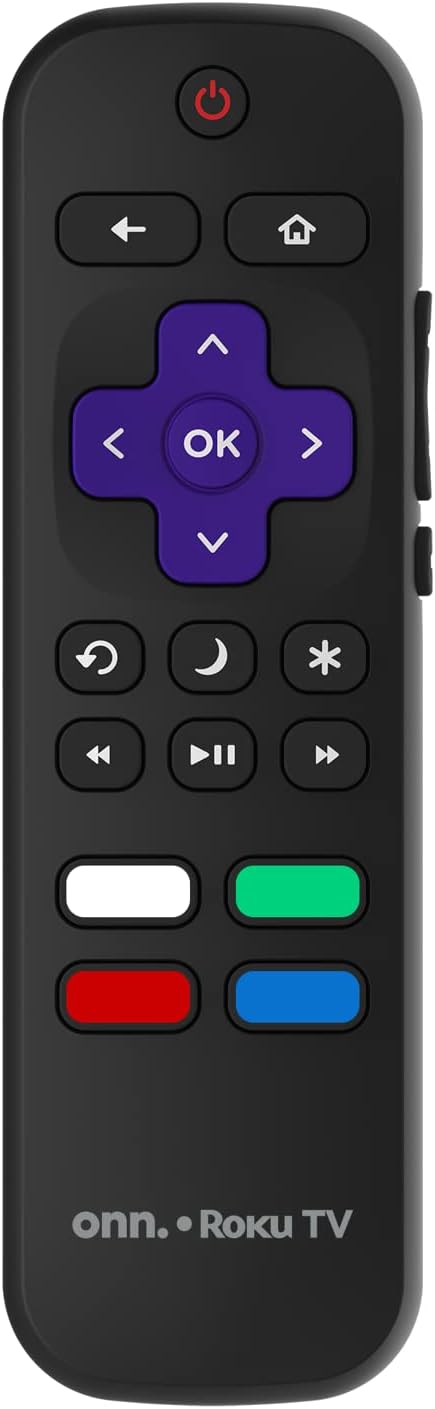
Image: The ONN Roku TV remote control, featuring a power button, directional pad, OK button, home button, back button, volume controls, and dedicated buttons for popular streaming services.
- Дугме за напајање: Укључује или искључује ТВ.
- Directional Pad (D-Pad) & OK: Креће се кроз меније и потврђује изборе.
- Хоме дугме: Враћа се на почетни екран Roku TV-а.
- Дугме за назад: Враћа се на претходни екран или мени.
- Појачавање/утишавање: Подешава јачину звука.
- Дугме за утишавање: Искључује или укључује звук.
- Канал горе/доле: Changes channels (for antenna/cable inputs).
- Наменска дугмад за апликације: Quick access to popular streaming services like Netflix, Hulu, etc.
2. Карактеристике паметног телевизора
Your ONN Smart TV provides access to a wide range of streaming content and smart functionalities.
- Услуге стримовања: Access pre-installed apps like Netflix, YouTube, and many more through the Roku Channel Store.
- Контрола гласом: Compatible with Alexa and Google Assistant for hands-free control (requires a separate compatible voice assistant device).
- Аутоматска ажурирања софтвера: The TV will automatically update its software when connected to the internet, ensuring you have the latest features and security.
3. Избор улаза
To switch between connected devices (e.g., cable box, game console), use the Инпут button on your remote or select the desired input from the Roku TV home screen.
4. Подешавања слике и звука
Access the TV's settings menu to customize picture and sound preferences. Navigate to Подешавања > Подешавања слике на телевизору or Подешавања > Аудио to adjust options like brightness, contrast, color, sound mode, and equalizer settings.
Одржавање
1. Чишћење екрана
- Always turn off the TV and unplug it before cleaning.
- Користите меку крпу која не оставља влакна, благо навлаженуampводом или специјализованим средством за чишћење екрана.
- Не прскајте средство за чишћење директно на екран. Прво га нанесите на крпу.
- Avoid using abrasive cleaners, alcohol, benzene, or thinners, as these can damage the screen.
2. Ажурирања софтвера
Ensure your TV is connected to the internet to receive automatic software updates. These updates improve performance, add features, and enhance security. You can manually check for updates in the Подешавања > Систем > Ажурирање система мени.
Решавање проблема
Ако наиђете на проблеме са телевизором, погледајте следећа уобичајена решења:
Но Повер
- Проверите да ли је кабл за напајање безбедно прикључен и у телевизор и у зидну утичницу.
- Проверите да ли зидна утичница функционише тако што ћете укључити други уређај.
- Покушајте да притиснете дугме за напајање на самом телевизору, не само на даљинском управљачу.
Нема слике / Искривљена слика
- Уверите се да је изабран исправан улазни извор (нпр. HDMI 1, HDMI 2).
- Проверите све кабловске везе између телевизора и спољних уређаја.
- Пробајте други HDMI кабл ако је могуће.
- Adjust picture settings (brightness, contrast) in the TV menu.
Нема звука / Тихи звук
- Check if the TV is muted or if the volume is turned down.
- Ensure external audio devices (soundbars, receivers) are properly connected and powered on.
- Check audio settings in the TV menu.
Проблеми са мрежном везом
- Verify your Wi-Fi router is powered on and functioning.
- Рестартујте рутер и модем.
- Иди на Подешавања > Мрежа > Провери везу on your TV to diagnose the issue.
- Уверите се да уносите исправну лозинку за Ви-Фи.
Спецификације
| Феатуре | Детаљ |
|---|---|
| Број модела | 100018254 |
| Величина екрана | 42 инча |
| Дисплаи Тецхнологи | ЛЕД |
| Резолуција | 1080p (Full HD) |
| Рефресх Рате | 60 Хз |
| Повезивање | УСБ, Ви-Фи |
| Подржане Интернет услуге | Netflix, YouTube (and others via Roku platform) |
| Контролни метод | Voice (via Alexa & Google Assistant compatible devices), Remote Control |
| Тип монтаже | Зидни носач (компатибилан са VESA стандардом) |
| Боја | Црно |
| УПЦ | 671227025567 |

Image: Energy Guide label for Television Model 100018254, indicating an estimated yearly energy cost of $11 based on 12 cents per kWh and 5 hours use per day.
Гаранција и подршка
For warranty information and technical support, please refer to the documentation included with your purchase or visit the official ONN support webсајту. Сачувајте рачун о куповини за гаранције.