
1. Увод
Хвала вам на куповиниasing the LFF LDR113-EU Kitchen Radio. This manual provides essential information for the safe and efficient operation of your device. Please read it thoroughly before use and retain it for future reference.
The LFF LDR113-EU is a versatile kitchen radio featuring DAB+, FM, and Bluetooth connectivity. It includes dual alarms, a sleep timer, and 60 station presets, designed for both tabletop use and under-cabinet mounting.
2. Безбедносне информације
- Извор напајања: Користите само приложени адаптер за напајање. Уверите се да је јачина звукаtagе одговара вашем локалном извору напајања.
- Вода и влага: Do not expose the device to water, rain, or excessive moisture. Avoid placing liquids near the radio.
- вентилација: Ensure adequate ventilation around the device. Do not block ventilation openings.
- топлота: Држите уређај даље од извора топлоте као што су радијатори, грејни уређаји, шпорети или други уређаји који производе топлоту.
- Чишћење: Disconnect from power before cleaning. Use a soft, dry cloth. Do not use liquid cleaners or aerosol cleaners.
- Сервисирање: Не покушавајте сами да сервисирате овај производ. Све сервисирање препустите квалификованом сервисном особљу.
- Пласман: Place the radio on a stable, level surface or mount it securely according to the instructions.
3. Садржај пакета
Молимо вас да проверите да ли су све ставке присутне у пакету:
- LFF LDR113-EU Kitchen Radio
- Повер Адаптер
- Mounting Kit (screws, spacers, mounting template)
- Кориснички приручник (овај документ)
4. Производ је готовview
Упознајте се са компонентама и контролама радија.

Слика 4.1: Фронт view of the LFF LDR113-EU Kitchen Radio, showing the LCD display on the left, control buttons in the center, and a large rotary knob on the right. The buttons include power, mode, menu, info, preset, timer/sleep, and navigation arrows. The rotary knob is for volume and selection.

Слика 4.2: Diagram illustrating the key features of the LFF Kitchen Radio, including DAB/DAB+ radio, FM radio, two alarms, sleep timer, Bluetooth connectivity, and 60 station presets.
4.1. Контроле и дисплеј
- ЛЦД екран у боји: Shows current mode, station information, time, and settings.
- Дугме за напајање: Укључује/искључује радио.
- Дугме за режим: Switches between DAB+, FM, and Bluetooth modes.
- Menu/Info Button: Accesses menu options or displays station information.
- Унапред подешена дугмад (1-5): Quick access to saved stations.
- Timer/Sleep Button: Sets sleep timer or alarm functions.
- Навигациона дугмад (горе/доле/лево/десно): Navigates through menus and station lists.
- Rotary Knob (Volume/Enter): Adjusts volume, scrolls through options, and confirms selections.
5. Подешавање
5.1. Прикључак за напајање
- Connect the power adapter to the DC IN port on the back of the radio.
- Укључите адаптер за напајање у зидну утичницу.
- Радио ће се укључити или прећи у режим приправности.
5.2. Initial Scan (DAB+ and FM)
Upon first power-on, the radio will typically perform an automatic scan for DAB+ and FM stations. If not, follow these steps:
- Притисните тастер Режим button to select DAB+ or FM mode.
- For DAB+, the radio will usually initiate a full scan automatically. If not, navigate to the 'Full Scan' option in the DAB+ menu and press the rotary knob to confirm.
- For FM, navigate to the 'Auto Scan' option in the FM menu and press the rotary knob to confirm.
- The radio will search for available stations and store them.

Слика 5.1: The LFF Kitchen Radio's LCD color screen displaying the main menu with icons for Digital Radio (DAB+), FM Radio, and Bluetooth, indicating available modes.
6. Упутство за употребу
6.1. Укључивање/искључивање
Притисните тастер Повер дугме за укључивање или искључивање радија (режим приправности).
6.2. Избор режима
Притисните тастер Режим button repeatedly to cycle through DAB+, FM, and Bluetooth modes.
6.3. Рад DAB+ радија
- In DAB+ mode, use the Горе/Доле navigation buttons or the rotary knob to browse available stations.
- Press the rotary knob to select a station.
- Притисните Мени/Информације да view station information (e.g., program type, signal strength).
6.4. Рад ФМ радија
- У FM режиму, користите Горе/Доле navigation buttons to tune to stations manually.
- Притисните и држите Горе/Доле buttons for automatic station seeking.
- Притисните Мени/Информације да view информације о станици.
6.5. Блуетоотх повезивање
Connect your smartphone or other Bluetooth-enabled device to the radio.
- Притисните тастер Режим button to select Bluetooth mode. The display will show 'Bluetooth Pairing'.
- На свом мобилном уређају омогућите Блуетоотх и потражите доступне уређаје.
- Select 'LFF LDR113-EU' from the list of devices.
- Once connected, the radio display will show 'Bluetooth Connected'. You can now play audio from your device through the radio.
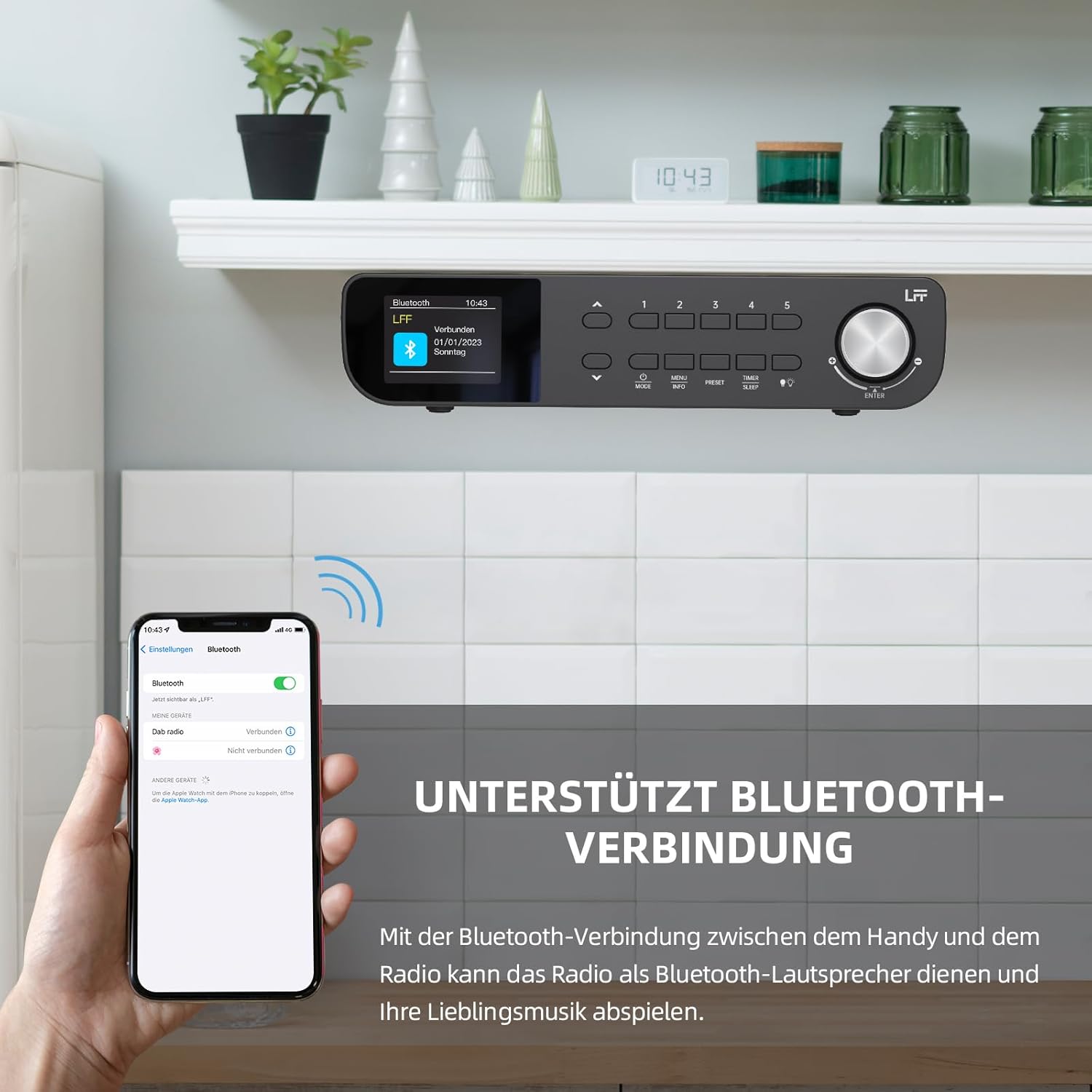
Слика 6.1: The LFF Kitchen Radio displaying a successful Bluetooth connection, with a smartphone screen showing the radio as a connected device.

Слика 6.2: Цлосе-уп view of the radio's display indicating 'LFF' and 'Connected' under the Bluetooth menu, confirming a successful pairing.
6.6. Подешавање аларма
The radio features two independent alarms.
- Притисните тастер Тајмер/Слееп button repeatedly until 'Alarm 1' or 'Alarm 2' appears.
- Use the navigation buttons and rotary knob to set the alarm time, source (DAB+, FM, or Buzzer), and frequency (daily, weekdays, weekends, once).
- Confirm settings by pressing the rotary knob.

Слика 6.3: Close-up of the radio's display showing the current time and options to activate or deactivate Alarm 1 and Alarm 2.
6.7. Мерач спавања
Тајмер за спавање омогућава да се радио аутоматски искључи након подешеног периода.
- Притисните тастер Тајмер/Слееп button repeatedly until 'Sleep Timer' appears.
- Use the navigation buttons or rotary knob to select the desired sleep duration (e.g., 15, 30, 60 minutes).
- Потврдите притиском на окретно дугме.

Слика 6.4: Close-up of the radio's display showing the 'Sleep Timer' setting, with an option to set the duration, for example, to 30 minutes.
6.8. Пресетс
Save up to 60 favorite stations for quick access.
- Да бисте сачували предефинисану поставку: Подесите жељену станицу. Притисните и држите једно од Унапред подешено (1-5) buttons until 'Preset Saved' appears. For additional presets, use the 'Preset Store' option in the menu.
- Да бисте позвали унапред подешену вредност: Кратко притисните један од Унапред подешено (1-5) buttons. For other presets, navigate to 'Preset Recall' in the menu.
6.9. ЛЕД светло
The radio includes an integrated LED light, useful for illuminating the area below if mounted under a cabinet.
- Притисните тастер Светлост button (if available, or navigate through menu) to turn the LED light on or off.

Слика 6.5: The LFF Kitchen Radio mounted under a kitchen cabinet, with its integrated LED light providing illumination to the countertop below.
6.10. Дисплаи Бригхтнесс
Adjust the display backlight brightness to suit your environment.
- Access the 'Display' or 'Settings' menu.
- Select 'Brightness' and choose from High, Medium, or Low settings.

Слика 6.6: A visual comparison of the LFF Kitchen Radio's display at three different backlight brightness levels: High, Medium, and Low, demonstrating the adjustable visibility.
7. Упутства за монтирање
The LFF LDR113-EU Kitchen Radio offers flexible placement options: tabletop or under-cabinet mounting.
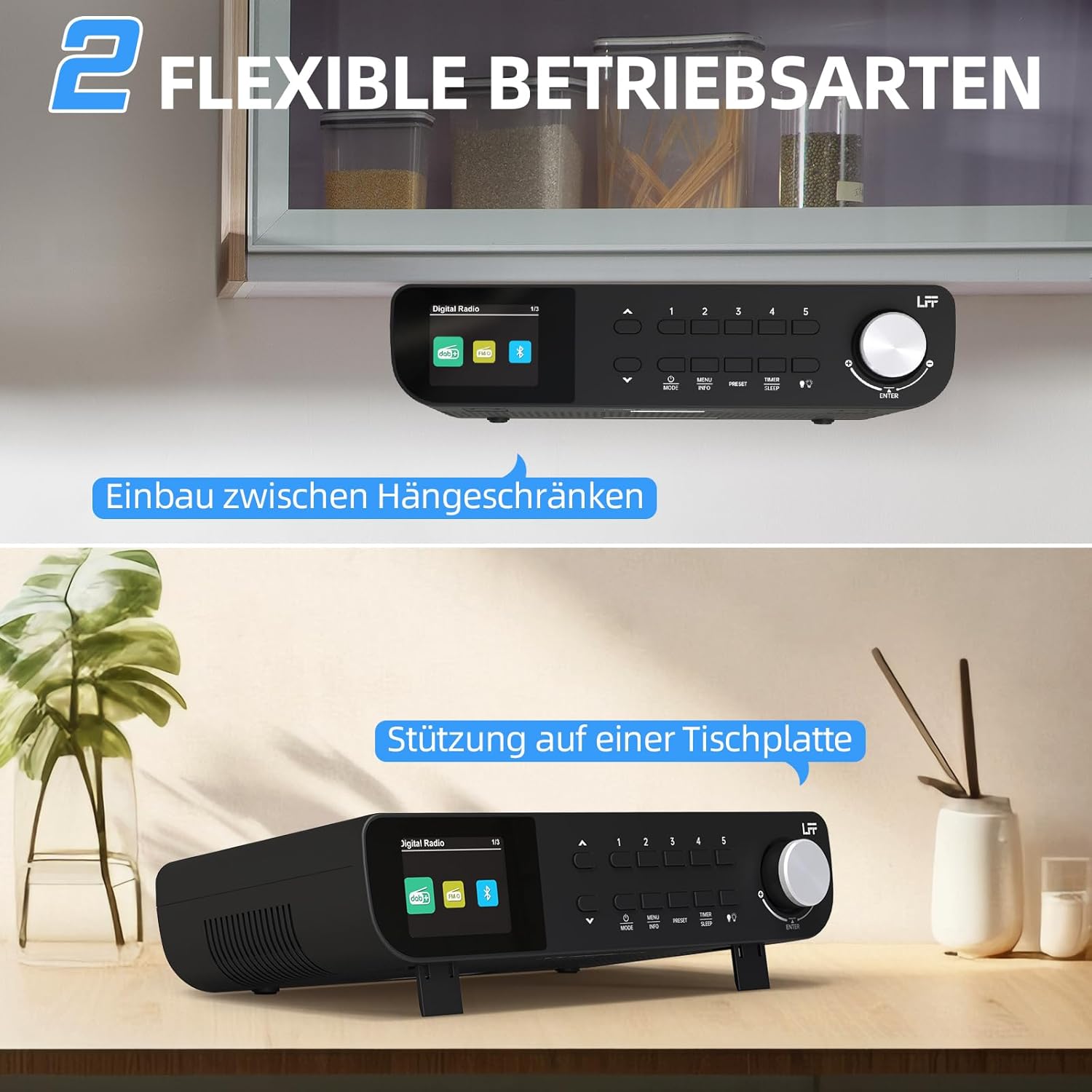
Слика 7.1: The LFF Kitchen Radio displayed in two common installation scenarios: mounted underneath a kitchen cabinet and placed freestanding on a tabletop.
7.1. Tabletop Placement
Simply place the radio on a stable, flat surface. Ensure it is not near the edge to prevent accidental falls.
7.2. Under-Cabinet Mounting
For under-cabinet installation, use the provided mounting kit.
- Припремите локацију: Choose a suitable location under a kitchen cabinet, ensuring there is enough space and access to a power outlet.
- Означите избушене рупе: Use the provided mounting template to mark the drill holes on the underside of the cabinet.
- Избушите пилот рупе: Избушите пилот рупе на означеним позицијама.
- Attach Mounting Plate (if applicable): Some models may include a separate mounting plate. Attach this to the cabinet using the screws.
- Обезбедите радио: Align the radio with the mounting holes or plate and secure it using the provided screws. Ensure it is firmly attached.
- Прикључите напајање: Укључите адаптер за напајање.

Слика 7.2: Detailed diagram showing the steps for under-cabinet mounting, including measuring distances (e.g., 58mm) and securing the radio with screws.
8. Одржавање
- Чишћење: To clean the radio, disconnect it from the power supply. Use a soft, dry, lint-free cloth. Do not use abrasive cleaners, waxes, or solvents.
- Антена: Ensure the antenna is extended for optimal reception in DAB+ and FM modes. Handle it gently to avoid damage.
- Складиштење: Ако складиштите радио дуже време, искључите га из струје и чувајте га на хладном и сувом месту.
КСНУМКС. Решавање проблема
| Проблем | Могући узрок | Решење |
|---|---|---|
| Нема струје | Адаптер за напајање није повезан или је утичница неисправна. | Проверите везу за напајање. Пробајте другу утичницу. |
| Слаб DAB+/FM пријем | Антена није испружена, слаб сигнал или сметње. | Fully extend the antenna. Reposition the radio. Perform a full scan. |
| Блуетоотх се не повезује | Radio not in pairing mode, device too far, or already connected to another device. | Ensure radio is in Bluetooth mode. Move device closer. Disconnect from other devices. |
| Нема звука | Volume too low, mute activated, or incorrect mode. | Increase volume. Check if mute is active. Ensure correct mode (DAB+, FM, Bluetooth). |
| Displej ne radi | Brightness too low or device malfunction. | Adjust display brightness. If problem persists, contact support. |
10. Спецификације

Слика 10.1: Diagram showing the dimensions of the LFF Kitchen Radio: 250mm length, 146mm width, and 55mm height.
| Феатуре | Детаљ |
|---|---|
| Бранд | ЛФФ |
| Број модела | LDR113-EU |
| Боја | Црно |
| Повезивање | Блуетоотх |
| Технологија подешавања | DAB Plus, FM |
| Извор напајања | Електрични кабл |
| Фреквенција | 108 MHz (FM max) |
| Димензије (Д к Ш к В) | 250 мм к 146 мм к 55 мм |
| Пресетс | 60 |
| Дисплаи | ЛЦД екран у боји |
| Посебне карактеристике | Dual Alarms, Sleep Timer, Under-cabinet mounting option, LED Light |
11. Гаранција и подршка
This product comes with a standard manufacturer's warranty. Please refer to the warranty card included in your package for specific terms and conditions. For technical support, troubleshooting assistance, or warranty claims, please contact your retailer or the LFF customer service department.