
Увод
This manual provides comprehensive instructions for the installation, operation, and maintenance of your Podofo Wireless CarPlay Android Auto Portable Car Stereo. Please read this manual thoroughly before using the device to ensure proper functionality and safety. Keep this manual for future reference.
Производ је завршенview
Кључне карактеристике
- Suitable for All Car Models: Compatible with various car brands (7-32V), including Ford, Jeep, BMW, and Lexus. It can be installed without disassembling the central console, making it an ideal choice for vehicles without an original screen.
- Wireless CarPlay and Android Auto Support: Compatible with both CarPlay and Android Auto. After a wireless Bluetooth connection, you can use features like Siri, Maps, Music, and Phone.
- Integrated Driving Recorder and External Reversing Camera: The stereo includes a built-in driving recorder for front-view video recording, enhancing driving safety. An external reversing camera is also provided, supporting reverse input.
- Larger Screen: The 9.3-inch high-definition touchscreen offers a wider viewing angle. Its rectangular design minimizes obstruction of the driver's line of sight.
- Card Reader Function and Split Screen: Features a card reader function, allowing you to insert a 64GB memory card to view stored videos, music, and movies. Supports two-way split-screen video display, showing two different application interfaces simultaneously.
Садржај пакета
Проверите да ли су све ставке присутне у пакету:
- Преносни ауто стерео уређај
- Повер Цорд
- Продужни кабл за камеру
- Монитор Басе
- TF Card (64GB)
- Налепнице за причвршћивање носача
- Цамера Аццессориес
- Упутство за употребу
- AUX кабл од 3 м
- Pull Back Camera (Backup Camera)
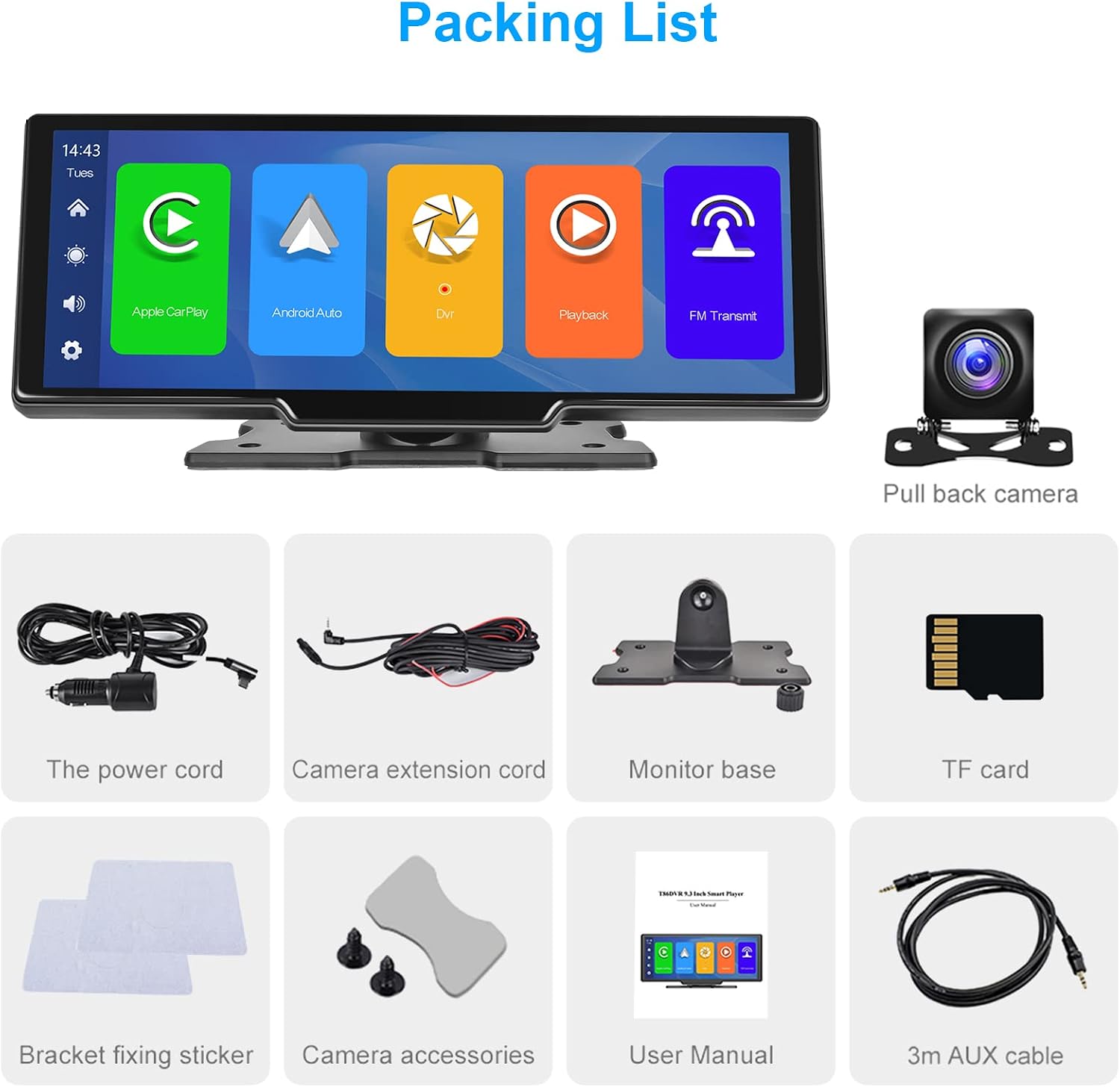
Слика 1: Садржај пакета
Сетуп
Монтажа уређаја
- Изаберите одговарајуће место на контролној табли које вам неће заклањати view или ометају контроле вожње.
- Attach the monitor base to the back of the main unit. The base allows for 360-degree rotation and angle adjustment for optimal viewинг.
- Clean the dashboard surface where you intend to mount the device.
- Apply the bracket fixing stickers to the bottom of the monitor base and firmly press it onto the dashboard.

Figure 2: Product Dimensions and Mounting Details
Упутства за ожичење
- Прикључак за напајање: Insert the power cord into the designated power hole on the side of the unit. Plug the other end into your car's 12V power outlet (cigarette lighter socket).
- Повезивање задње камере: Connect the camera extension cord to the 'Cable holes for rear cameras' port on the unit. Route the cable to the rear of your vehicle and connect it to the backup camera. Ensure the camera is mounted securely and provides a clear view.
- Forward Camera (Dash Cam) Connection: If applicable, connect the forward camera to its designated port.
- АУКС веза: If you wish to output audio to your car's stereo system via AUX, connect the 3m AUX cable from the 'AUX hole' on the unit to your car's AUX input.
- TF Card Insertion: Insert the provided 64GB TF card into the 'Storage slot' for recording and media playback.

Слика 3: Дијаграм ожичења
Почетно укључивање
Once all connections are made, start your vehicle. The device should power on automatically. Follow the on-screen prompts for initial setup, including language selection and time zone.
Упутство за употребу
Бежични CarPlay и Android Auto
- Уверите се да су Блуетоотх и Ви-Фи омогућени на вашем паметном телефону.
- На ауто-стерео уређају изаберите икону CarPlay или Android Auto.
- On your phone, search for the device's Bluetooth name and pair.
- Confirm the connection on both devices. CarPlay or Android Auto will launch automatically.
- Сада можете приступити навигацији, музици, позивима и порукама директно са екрана стерео уређаја.

Figure 4: Wireless CarPlay Interface
Воице Цонтрол
With CarPlay or Android Auto connected, you can use voice commands for hands-free operation. Activate your phone's voice assistant (Siri for iOS, Google Assistant for Android) by saying the wake word (e.g., "Hey Siri" or "OK Google") or by pressing the voice control button on the screen (if available).

Слика 5: Интерфејс за гласовно управљање
Функција ФМ предајника
To output audio to your car's FM radio:
- Select the FM Transmitter icon on the stereo's main menu.
- Choose an unused FM frequency on the stereo.
- Подесите ФМ радио у вашем аутомобилу на потпуно исту фреквенцију.
- Audio from the portable stereo will now play through your car's speakers.

Figure 6: FM Transmitting Interface
Блуетоотх повезивање
For direct Bluetooth audio streaming or hands-free calling without CarPlay/Android Auto:
- Select the Bluetooth icon on the stereo's main menu.
- Омогућите Блуетоотх на свом паметном телефону и потражите доступне уређаје.
- Select the stereo's Bluetooth name (e.g., "PODOFO") from your phone's list.
- Потврдите упаривање на оба уређаја.
- You can now play music or make calls via Bluetooth.

Figure 7: Bluetooth Connection Screen
Dash Cam and Backup Camera
The integrated dash cam continuously records video to the TF card. When reversing, the external backup camera automatically displays the rear view on the screen with parking guidelines.
- Дасх камера: Видео files are saved in a loop recording format on the TF card. Older files are overwritten automatically when the card is full.
- Резервна камера: When the vehicle is shifted into reverse, the screen will automatically switch to the backup camera view.
- Viewинг Рецордингс: Access recorded videos through the 'DVR' or 'Playback' application on the main menu.

Figure 8: Dash Cam Loop Recording and Backup Camera View

Figure 9: AHD Backup Camera Details
TF Card Media Playback
Insert a TF card with media files (videos, music, photos) into the storage slot. Use the 'Playback' or relevant media player application on the stereo to browse and play content.
Функција подељеног екрана
The device supports displaying two applications simultaneously on the screen. Refer to the on-screen interface for activating and managing split-screen mode, typically by long-pressing an app icon or using a dedicated split-screen button.
Одржавање
Чишћење
Use a soft, dry cloth to clean the screen and exterior of the device. For stubborn smudges, slightly dampen the cloth with water or a screen-safe cleaner. Avoid using harsh chemicals, abrasives, or solvents.
Складиштење
Ако уређај складиштите дуже време, искључите га из струје и чувајте га на хладном и сувом месту, даље од директне сунчеве светлости и екстремних температура.
Решавање проблема
Ако наиђете на проблеме, погледајте следеће уобичајене проблеме и решења:
- Нема напајања:
- Ensure the power cord is securely plugged into both the device and the car's 12V outlet.
- Check if the car's 12V outlet is functioning (e.g., by plugging in another device).
- Verify the car's fuse for the 12V outlet is not blown.
- Проблеми са повезивањем са CarPlay-ом/Android Auto-ом:
- Уверите се да су Bluetooth и Wi-Fi омогућени на вашем телефону.
- Заборавите уређај из Bluetooth подешавања телефона и поново га упарите.
- Рестартујте и телефон и стерео систем у аутомобилу.
- Уверите се да је оперативни систем вашег телефона ажуриран.
- Poor Audio Quality (FM/AUX):
- ФМ предајник: Try different FM frequencies to find one with less interference. Ensure your car's radio is tuned precisely to the stereo's frequency.
- АУКС веза: Ensure the AUX cable is fully inserted into both the stereo and your car's AUX input. Check the volume levels on both devices. If experiencing humming or static, an audio ground loop isolator may be required (not included).
- Camera Display Problems:
- Check all camera cable connections for looseness or damage.
- Ensure the cameras are clean and free from obstructions.
- If the backup camera doesn't activate, verify its power connection and trigger wire (if applicable).
- Екран осетљив на додир не реагује:
- Поново покрените уређај искључивањем и поновним укључивањем напајања.
- Уверите се да је екран чист и сув.
- Avoid using sharp objects on the screen.
Спецификације
| Феатуре | Спецификација |
|---|---|
| Бранд | Подофо |
| Број модела | 26cb7522-ae9a-40c6-9a1c-05b4a5651427 |
| Технологија повезивања | Блуетоотх |
| Тип контролера | Андроид, иОС |
| Посебна карактеристика | Портабле |
| Компатибилни уређаји | Паметни телефон, таблет |
| Укупни ХДМИ портови | 1 |
| Режим аудио излаза | Стерео |
| Конфигурација канала сурроунд звука | 2.0 |
| Видео Енцодинг | F4V, MOV, MP4, TS |
| Боја | Црно |
| Излазна снага | 6 Ватт |
| Број канала | 2 |
| Internet Applications | Apple Music, Google Play Music |
| Контролни метод | Додирните |
| Тип аудио излаза | Блуетоотх |
| Бежична технологија | Блуетоотх |
| Формат | Дигитал |
| Произвођач | Подофо |
| Земља порекла | Кина |
| Тежина артикла | 64 грама |
Гаранција и подршка
Информације о гаранцији
This product is covered by a standard manufacturer's warranty. For specific warranty terms, duration, and claim procedures, please refer to the warranty card included in your package or contact the seller directly. Keep your proof of purchase for warranty claims.
Корисничка подршка
If you require further assistance, technical support, or have questions not covered in this manual, please contact the seller or manufacturer through the platform where you purchased the product. Provide your model number and a detailed description of the issue for efficient support.