
1. Увод и крајview
This manual provides detailed instructions for the installation, operation, and maintenance of your Yansoo 3-Channel Dash Cam. Please read this manual thoroughly before using the device to ensure proper functionality and safety.
Карактеристике производа:
- Снимање на 3 канала: Simultaneously captures video from the front (170° wide-angle), rear (165°), and inside (140°) of your vehicle.
- High Definition Video: Supports 1080P Front video + AHD-720P Rear video + AHD-720P Inside video.
- Побољшани ноћни вид: Features 4 unique infrared LED fill lights, F1.8 aperture, and WDR technology for optimal performance in low light.
- Закључавање у случају нужде (Г-сензор): Automatically detects sudden shocks or collisions and locks the current video footagе да бисте спречили преписивање.
- Лооп Рецординг: Continuously records and automatically overwrites the oldest unlocked video fileс када је меморијска картица пуна.
- Паркинг монитор: Activates recording when motion or shocking is detected while parked (requires separate hardwire kit for 24/7 monitoring).
- Adjustable Interior Camera: The interior lens can be rotated 60° for flexible positioning.
Садржај пакета:
- Yansoo 3-Channel Dash Cam Unit
- Задња камера са каблом
- Носач усисне чаше
- Car Charger (Type-C)
- УСБ кабл за пренос података
- Упутство за употребу
- Mounting Hardware for Rear Camera
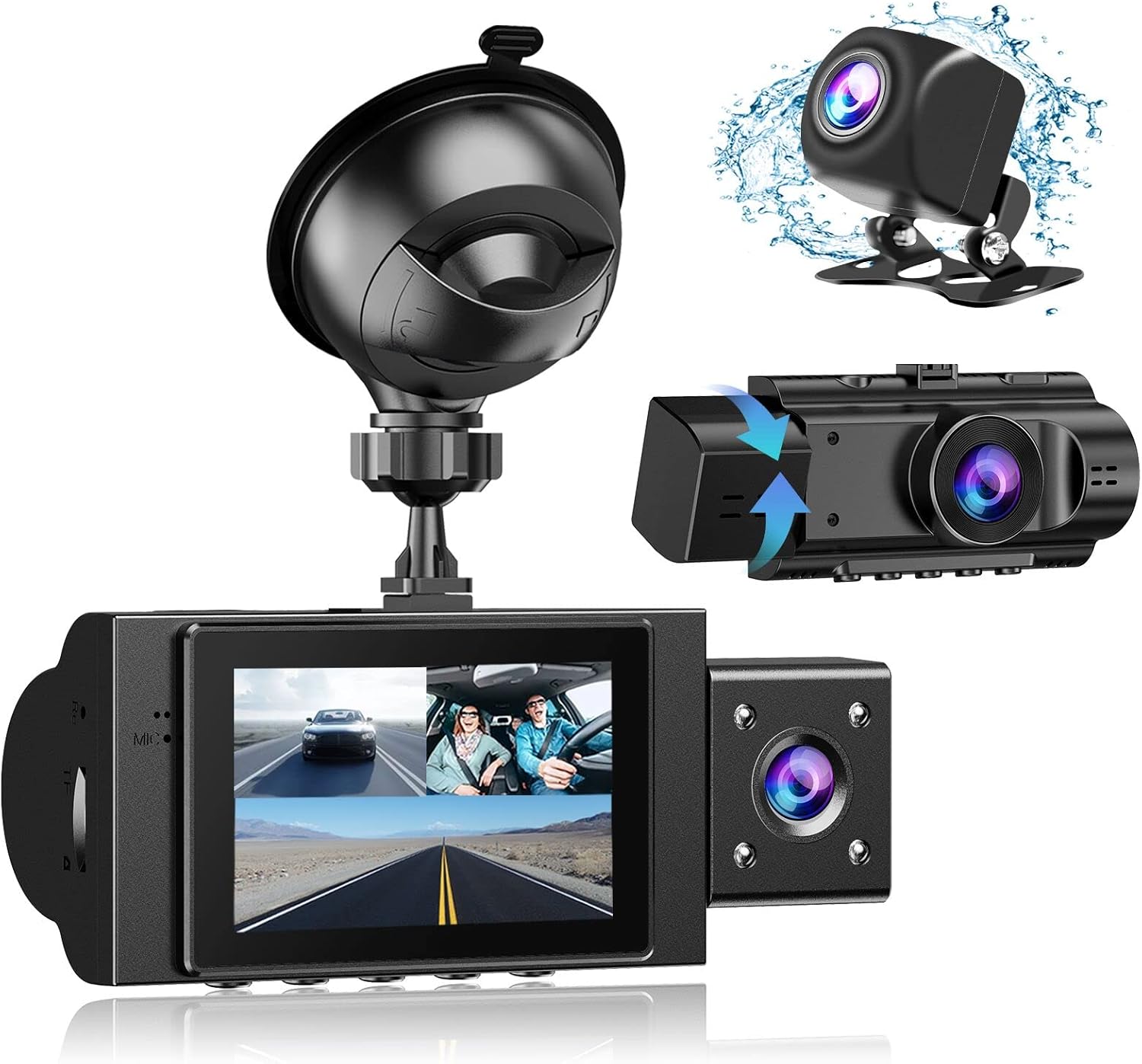
Image: The Yansoo 3-Channel Dash Cam unit with its suction cup mount and the separate rear camera, illustrating the complete package.
2. Подешавање
2.1 Уметање меморијске картице
The dash cam supports Micro Memory cards up to 64GB (Class 10 or above recommended, not included). Please format the card in the camera menu before first use.
- Locate the memory card slot on the side of the dash cam.
- Insert the Micro Memory card into the slot until it clicks into place.
- Да бисте је уклонили, нежно гурните картицу док не искочи.

Image: A four-panel illustration showing the steps to insert a Micro SD card into the dash cam's slot.
2.2 Монтирање камере за аутомобил
Mount the main dash cam unit to your windshield using the provided suction cup mount. Choose a location that does not obstruct your view током вожње.
- Пажљиво очистите изабрано подручје на ветробранском стаклу.
- Attach the suction cup mount to the dash cam unit.
- Чврсто притисните вакуумску чашицу уз ветробранско стакло и померите полугу да бисте је учврстили.
- Подесите угао камере да бисте осигурали јасан view пута испред.

Image: The Yansoo 3-Channel Dash Cam mounted on a car's windshield, showing its position relative to the driver's view.
2.3 Инсталирање задње камере
The rear camera provides a view of the vehicle's rear. It can be installed inside the rear window or externally above the license plate.
- Повежите кабл задње камере са главном јединицом камере на инструмент табли.
- Route the cable neatly along the vehicle's interior trim to the rear.
- Mount the rear camera in the desired location, ensuring a clear view.

Image: A diagram illustrating the recommended cable routing path for the dash cam and rear camera within a car's interior.
2.4 Прикључак за напајање
Connect the dash cam to your vehicle's cigarette lighter socket using the provided car charger. The camera will automatically power on and begin recording when the vehicle starts.

Image: The Yansoo 3-Channel Dash Cam connected to a power source, indicating its readiness for operation.
3. Упутство за употребу
3.1 Основни рад
- Укључивање/искључивање: The camera powers on/off automatically with your vehicle's ignition. You can also manually power on/off by pressing and holding the power button.
- Започни/Заустави снимање: Recording starts automatically when the camera powers on. Press the "OK" button to manually stop or start recording.
- Свитцх Дисплаи Views: Press the "Up" button to cycle through different display modes (Front, Inside, Rear, Picture-in-Picture combinations).
Video: Demonstration of the Yansoo X88 Dash Cam's recording capabilities, showcasing its ability to capture clear video footage.
Video: Footage from the Yansoo X88 Dash Cam demonstrating its clear day and night recording capabilities.
Video: A demonstration of the Yansoo X88 Dash Cam's 1080P Full HD recording quality.
3.2 Подешавања менија
To access the menu settings, stop recording (if active) by pressing the "OK" button, then press the "M" button twice.
- Резолуција: Adjust video resolution for front, inside, and rear cameras.
- Лооп Рецординг: Set the duration of video segments (e.g., 1, 3, 5 minutes).
- Осетљивост Г-сензора: Adjust the sensitivity of the emergency lock feature.
- Паркинг монитор: Enable or disable the parking monitoring function.
- Датум/време: Подесите тачан датум и време за тачно времеampс на снимцима.
- Језик: Select your preferred language for the menu.
Video: A step-by-step guide on how to set the date and time on the Yansoo Dash Cam.
4. Одржавање
- Редовно форматирање: Format the memory card regularly (e.g., once a month) to prevent data corruption and ensure optimal recording performance.
- Чишћење сочива: Одржавајте сочива камере чистим меком крпом која не оставља влакна. Избегавајте абразивне материјале који би могли да огребу сочиво.
- Ажурирања фирмвера: Check the official Yansoo webсајт за сва доступна ажурирања фирмвера како би се побољшале перформансе и додале нове функције.
- Разматрање температуре: Избегавајте излагање камере за аутомобил екстремним температурама током дужег периода.
КСНУМКС. Решавање проблема
| Проблем | Могући узрок | Решење |
|---|---|---|
| Камера се не укључује. | Нема напајања из упаљача за цигарете; лабав контакт. | Check car charger connection; ensure vehicle ignition is on. |
| Снимање се неочекивано прекида. | Memory card full or corrupted; G-Sensor triggered. | Format memory card; adjust G-Sensor sensitivity. |
| Видео фооtagе је замућено. | Заштитна фолија на сочиву; прљаво сочиво. | Remove protective film; clean lenses with a soft cloth. |
| Датум/време је нетачно. | Date/Time not set or battery low. | Set Date/Time in menu; ensure continuous power supply. |
| Camera freezes or malfunctions. | Софтверски квар. | Use a needle to press the "RE" (Reset) button. |
6. Спецификације
| Феатуре | Детаљ |
|---|---|
| Димензије производа | 4.13 к 1.57 к 1.77 инча |
| Тежина артикла | 1.23 фунти |
| Резолуција снимања видео записа | 1080p (Front), 720p (Inside & Rear) |
| Поље View | 170° (Front), 140° (Inside), 165° (Rear) |
| Технологија повезивања | УСБ |
| Посебна карактеристика | G-Sensor, Loop Recording, Parking Monitor, Night Vision |
| Тип монтаже | Усисни носач |
| Произвођач | Иансоо |
7. Гаранција и подршка
Yansoo offers comprehensive after-sales support for your dash cam.
- гаранција: 1-YEAR warranty from the date of purchase.
- Техничка служба: 7*24 hours technical service is available.
- Контакт: For any questions or issues, please contact our customer service team via Amazon or the after-sales email provided in the original product packaging.
- Упутство за употребу (PDF): Дигитална верзија упутства за употребу доступна је за преузимање овде.