
Angetube 913AI
Ангетубе 4К АИ WebЦам упутство за употребу
Model: 913AI
Марка: Angetube
Увод
This manual provides detailed instructions for the Angetube 4K AI Webcam (Model 913AI). It covers product features, setup, operation, maintenance, troubleshooting, and technical specifications to ensure optimal performance and user experience.
Шта је у кутији
- Webцам
- Даљински управљач
- УСБ 3.0 кабл за повезивање
- УСБ-Ц на УСБ-А адаптер
Производ је завршенview и кључне карактеристике

The Angetube 4K AI Webcam, shown with its remote control, USB 3.0 cable, and USB-C to USB-A adapter.
4K Sony CMOS Sensor
Тхе webcam features a high-quality Sony CMOS sensor, delivering 3840x2160 UHD resolution at 30 fps or 1080p at 60fps. This sensor ensures vivid imagery with exceptional clarity, vibrant colors, and sharp details, even in low-light conditions due to its super high SNR (Signal-to-Noise Ratio) capability.
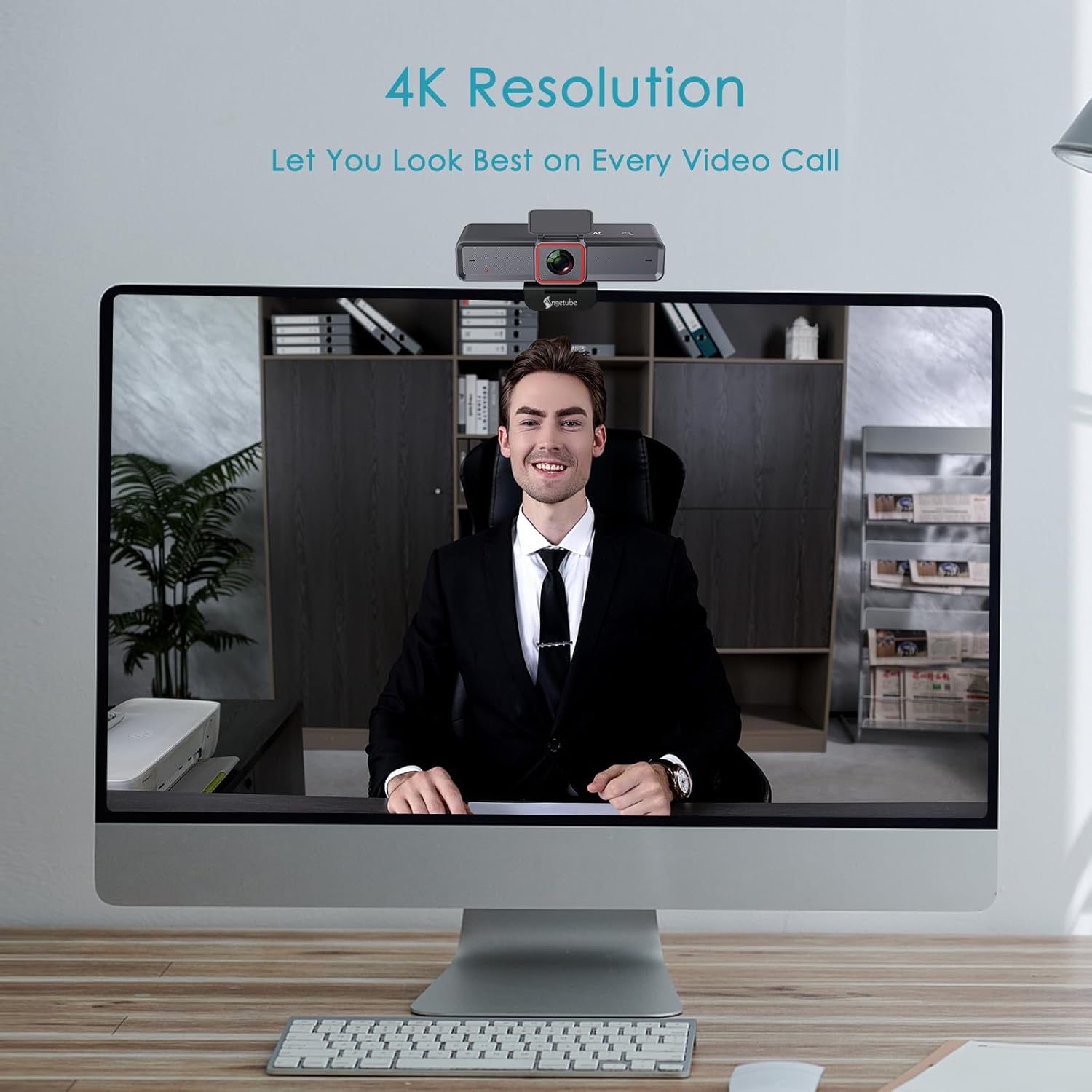
Тхе webcam provides clear 4K resolution for video calls, ensuring high visual quality.
AI-Tracking with Auto-Framing
Advanced face detection AI automatically frames the video based on the number of participants, keeping the focus centralized. The presenter tracking feature intelligently follows the presenter as they move. AI functions can be activated via the remote control or touch switch.

The AI-tracking feature keeps the subject in frame, even when moving.
Demonstration of the 4K AI webcam's features, including 3DNR and true color reproduction, and remote control functionality.
Remote Control and 10X Digital Zoom
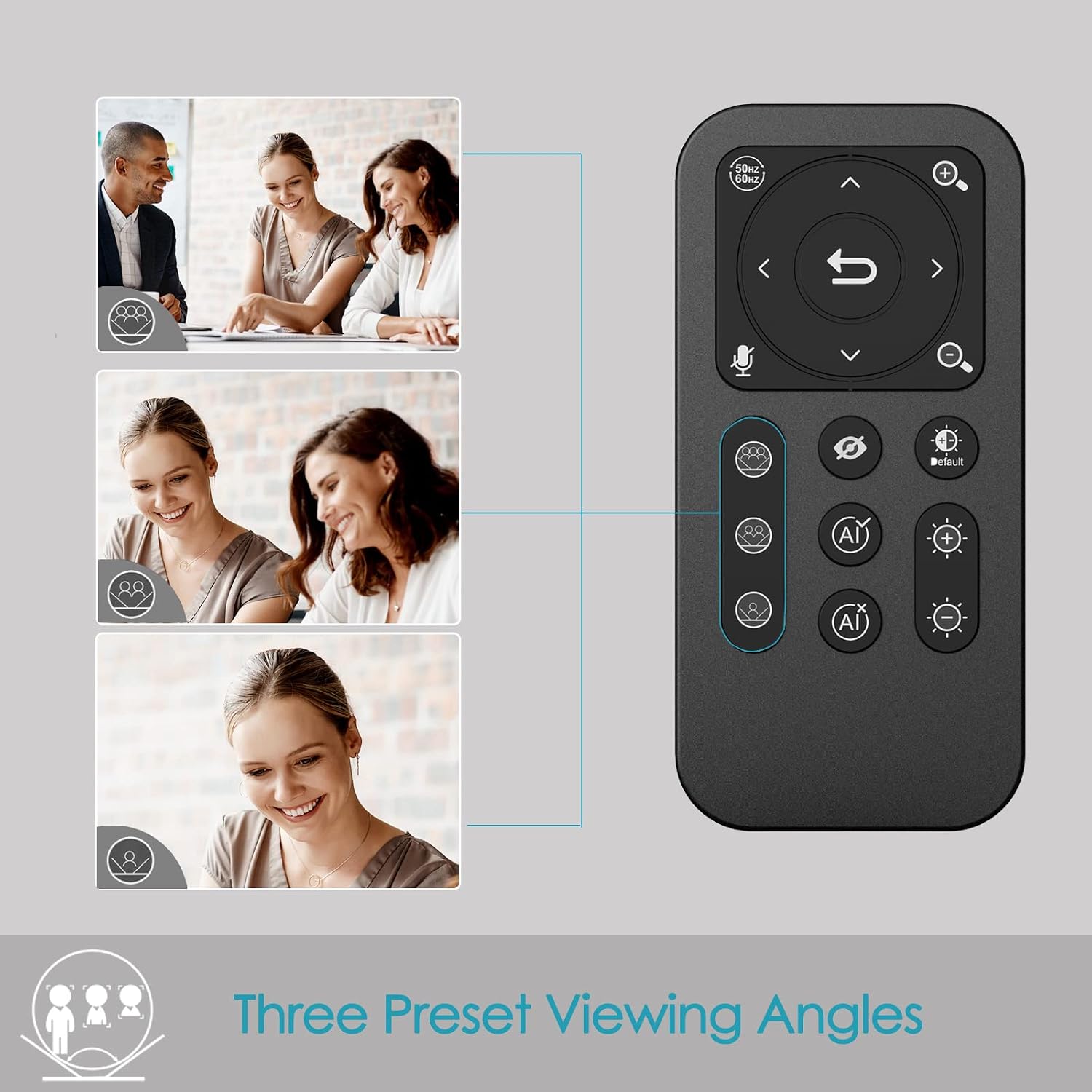
The included remote control allows for convenient operation away from the desk. Functions include activating/deactivating AI, 10X digital zoom, disabling video, muting the microphone, and flipping the image. Brightness can also be adjusted without software. Напомена: To manually zoom, first turn off AI.

Тхе webcam offers up to 10X digital zoom, controllable via the remote or touch controls.

The remote control provides access to various webcam functions, including AI mode, zoom, and privacy settings.
High-Speed USB 3.0 Connectivity
Тхе webcam connects via a lightning-fast USB 3.0 port, providing a 5Gbps camera signal for maximum video performance without compression. It features a plug-and-play USB-C connector, requiring no driver installation.

The USB 3.0 interface ensures fast data transfer for smooth, high-quality video.
Clear Voice Pickup with Dual AI Noise-Cancelling Microphones
Built-in dual AI noise-cancelling microphones remove ambient sounds, ensuring clear voice pickup up to 5m/16ft. This feature enhances audio clarity for all participants.
HDR-Enabled
Activate HDR at 30FPS to enhance your stream with a full spectrum of vibrant colors. HDR improves the video's dynamic range and corrects over and underexposed areas, providing a more balanced image.
HDR mode provides perfect lighting and color balance in various environments.
Водич за подешавање
1. Повезивање Webцам
The Angetube 4K AI Webcam is designed for plug-and-play functionality. Simply connect the provided USB 3.0 cable from the webcam to an available USB 3.0 port on your computer. If your computer only has USB-C ports, use the included USB-C to USB-A adapter.
2. Монтирање Webцам
Тхе webcam features an integrated mounting clip that can be securely placed on top of your monitor or laptop screen. Ensure the clip is stable and the webcam is level. Alternatively, the webcam is compatible with standard tripods for flexible placement.

Тхе webcam can be mounted on a monitor or used with a tripod for versatile setup.
3. Initial Software Recognition
Upon connecting, your operating system should automatically recognize the webcam. No additional drivers are typically required. You can then select the Angetube 4K AI Webcam as your video and audio input device within your preferred video conferencing or streaming application.
Упутство за употребу
Коришћење даљинског управљача
The remote control provides comprehensive control over the webcam's features:
- AI Function On/Off: Toggle AI-tracking and auto-framing.
- Дигитални зум: Use the zoom buttons to magnify the image up to 10X. Remember to turn off AI before manual zooming.
- Video Disable: Turn off the video feed for privacy.
- Искључивање микрофона: Mute the built-in microphones.
- Преокрет слике: Adjust image orientation.
- Подешавање осветљености: Control exposure for optimal lighting.
- Поље оф View (FOV) Adjustment: Use arrow buttons to pan/tilt the view.
- Дугме за ресетовање: Return FOV and zoom to default settings.
Touch Controls on Webцам
Тхе webcam also features touch-sensitive controls for quick adjustments:
- AI Touch On/Off: Activate or deactivate AI features by touching the designated area on the webцам.
- Zoom Touch Adjustment: Fine-tune zoom levels directly from the webцам.
Функције приватности
For enhanced privacy, the webcam includes a physical privacy cover that can be closed over the lens when not in use. Additionally, the remote control offers a one-touch button to disable the video feed.
Enhanced Control with Angetube Webцам Софтваре
For advanced settings and fine-tuning, Angetube provides dedicated webcam software. This software allows you to customize various parameters to ensure your webcam performs optimally for your specific needs.
Please visit the official Angetube website for software download and installation instructions. The software provides controls for brightness, contrast, saturation, white balance, and other image properties.
Компатибилност
The Angetube 4K AI Webcam is widely compatible with various operating systems and popular video conferencing platforms:
Оперативни системи:
- Виндовс 7, 8, 10, 11
- Мац ОС 10.6 или новији
- Линук
- Цхроме ОС
- Убунту
- Андроид В5.0 или новији
Video Calling Software:
- Зоом
- Скипе
- Facetime
- Фацебоок
- Мицрософт Теамс
- ИоуТубе
- Хангоутс
- LifeSize
- ОБС
- Миксер
Одржавање
To ensure the longevity and optimal performance of your Angetube 4K AI Webкамеру, пратите ова упутства за одржавање:
- Чишћење: За чишћење користите меку, суву крпу webобјектив и тело камере. Избегавајте абразивна средства за чишћење или раствараче који би могли оштетити површине.
- Складиштење: Када није у употреби, чувајте webкамеру на хладном и сувом месту, даље од директне сунчеве светлости и екстремних температура.
- Нега каблова: Handle the USB cable carefully. Avoid sharp bends or excessive pulling that could damage the cable or connectors.
- Ажурирања фирмвера: Periodically check the Angetube official webсајт за сва доступна ажурирања фирмвера. Одржавање ажурираног фирмвера може побољшати перформансе и додати нове функције.
Решавање проблема
If you encounter issues with your Angetube 4K AI Webкамера, погледајте следеће уобичајене кораке за решавање проблема:
- Без слике/видеа:
Уверите се да је USB кабл безбедно повезан са оба webcam and your computer. Try a different USB port or a different computer to rule out port or system issues.
Проверите да ли је webcam is selected as the primary video device in your application's settings (e.g., Zoom, Teams).
Check if the physical privacy cover is open.
- Нема звука/лош квалитет звука:
Потврдите да је webcam's microphone is selected as the audio input device in your application's settings.
Ensure the microphone is not muted via the remote control or software.
Check your computer's sound settings to ensure the microphone input level is adequate.
- AI-Tracking Not Working:
Ensure the AI function is enabled via the remote control or the touch switch on the webцам.
Make sure there is sufficient lighting and clear visibility of the subject for the AI to function correctly.
- Проблеми са квалитетом слике (замућена, зрнаста, погрешне боје):
Check lighting conditions. Ensure adequate and balanced lighting in your environment.
Adjust brightness and HDR settings using the remote control or Angetube software.
Очистите webобјектив камере меком, сувом крпом.
Ensure you are using a USB 3.0 port for optimal performance.
- Даљински управљач не реагује:
Check the battery in the remote control and replace if necessary (CR2 battery).
Уверите се да нема препрека између даљинског управљача и уређаја webцам.
- прегревање:
While some warmth is normal during operation, excessive heat could indicate an issue. Ensure the webcam has adequate ventilation and is not covered.
Ако се прегревање настави, прекините употребу и контактирајте корисничку подршку.
Ако ови кораци не реше ваш проблем, погледајте одељак „Гаранција и подршка“ за додатну помоћ.
Спецификације
| Феатуре | Детаљ |
|---|---|
| Бранд | Ангетубе |
| Број модела | 913АИ |
| Максимална резолуција екрана | 4K UHD (3840x2160) at 30fps, 1080p at 60fps |
| Технологија фото сензора | Сони ЦМОС |
| Технологија повезивања | USB 3.0 (USB-C plug) |
| Микрофони | Dual AI Noise-Cancelling Microphones (up to 5m/16ft pickup) |
| Дигитални зум | 10Кс |
| АИ карактеристике | AI-Tracking, Auto-Framing, Presenter Tracking |
| ХДР подршка | Да |
| Компатибилност оперативног система | Windows 7/8/10/11, Mac OS X, Linux, Chrome OS, Ubuntu |
| Тежина артикла | 13.2 унци |
| Димензије производа (ДкШкВ) | 5.14 к 1.93 к 2.74 инча |
| Батерије (даљински управљач) | 1 ЦР2 батерија (укључена) |
Гаранција и подршка
Angetube offers comprehensive customer support for its products. For warranty information, technical assistance, or further inquiries, please visit the official Angetube webсајту или контактирајте њихов тим за корисничку подршку.
Брз одговор у року од 24 сата.
Return within 30 days for an exchange or refund.
Доживотна техничка подршка за кориснике.
Више информација и контакт податке можете пронаћи на Angetube Store on Amazon.
Ask a question about this manual
Ask about setup, troubleshooting, compatibility, parts, safety, or missing instructions. Manuals+ will review the question and use this page’s manual context to help answer it.