
1. Увод
The ETOE Smart Projector D2 Pro is a compact and versatile home entertainment device designed to deliver a high-quality viewing experience. Featuring Android TV 10.0, built-in Chromecast, and a native 1080P resolution with 4K support, it provides access to a wide range of streaming content and connectivity options. This manual provides essential information for setting up, operating, and maintaining your projector.

Image: The ETOE Smart Projector D2 Pro, showcasing its compact design, included remote control, and a projection of the Android TV interface with Netflix and other apps.
2. Шта је у кутији
Молимо вас да проверите садржај пакета након распакивања како бисте били сигурни да су сви елементи присутни:
- ETOE D2 Pro Projector (x1)
- Remote Control (x1, batteries not included)
- DC 19V Adapter (x1)
- Кабл за напајање (к1)
- User Manual + Quick Guide (x1)
3. Физички претекview
Familiarize yourself with the projector's ports and controls for optimal use.

Слика: Позади view of the ETOE D2 Pro Projector, highlighting the DC power input, USB port, HDMI port, and Aux audio output.
Портови и везе:
- DC for Power: Овде прикључите приложени адаптер за напајање.
- УСБ: For connecting USB drives to play media or connect compatible accessories.
- ДВИ: For connecting external devices such as laptops, gaming consoles (PS5/PS4, X-Box ONE), TV boxes, or Fire TV sticks.
- Помоћни: For connecting external audio devices like headphones or speakers via a 3.5mm audio cable.
4. Подешавање
4.1 Положај и величина екрана
Position the projector on a stable, flat surface. The optimal projection distance will vary based on your desired screen size. The projector supports screen sizes from 40 inches to 120 inches, with 100 inches being the recommended size for a balanced viewинг искуство.
4.2 Укључивање
- Connect the DC 19V adapter to the projector's DC input port.
- Укључите кабл за напајање у зидну утичницу.
- Притисните дугме за напајање на пројектору или даљинском управљачу да бисте укључили уређај.
4.3 Подешавање фокуса и трапезоидног искривљења
To ensure a clear and rectangular image, adjust the focus and keystone correction.

Image: Diagram illustrating the manual focus, digital 4D & 4P keystone correction, and digital zoom features of the ETOE D2 Pro Projector.
- Ручно фокусирање: Окрећите прстен за фокусирање на објективу пројектора док слика не постане оштра и јасна.
- Digital Keystone Correction (4D & 4P): If the projected image is trapezoidal or tilted, use the digital keystone correction feature to adjust it into a perfect rectangle. This can be done through the projector's settings menu.
- Digital Zoom (50% - 100%): Adjust the projection size without physically moving the projector using the digital zoom function in the settings.
5. Руковање пројектором
5.1 Андроид ТВ 10.0 интерфејс
The projector runs on Android TV 10.0, providing access to over 8000 apps from Google Play, including Netflix, YouTube, Disney+, HBO Max, and Spotify. Navigate the interface using the remote control.

Image: A comparison showing the rich Android TV 10.0 interface of the ETOE D2 Pro System on the left, with numerous app icons, versus a simpler, less feature-rich interface of other projectors on the right.
- Use the directional buttons on the remote to navigate through menus and select apps.
- Press the 'OK' button to confirm selections.
- Utilize the voice control feature (Google Assistant) on the remote for hands-free content search and control.
5.2 Casting with Chromecast Built-in
The built-in Chromecast allows for seamless content casting from your Android, iOS devices, or laptops.
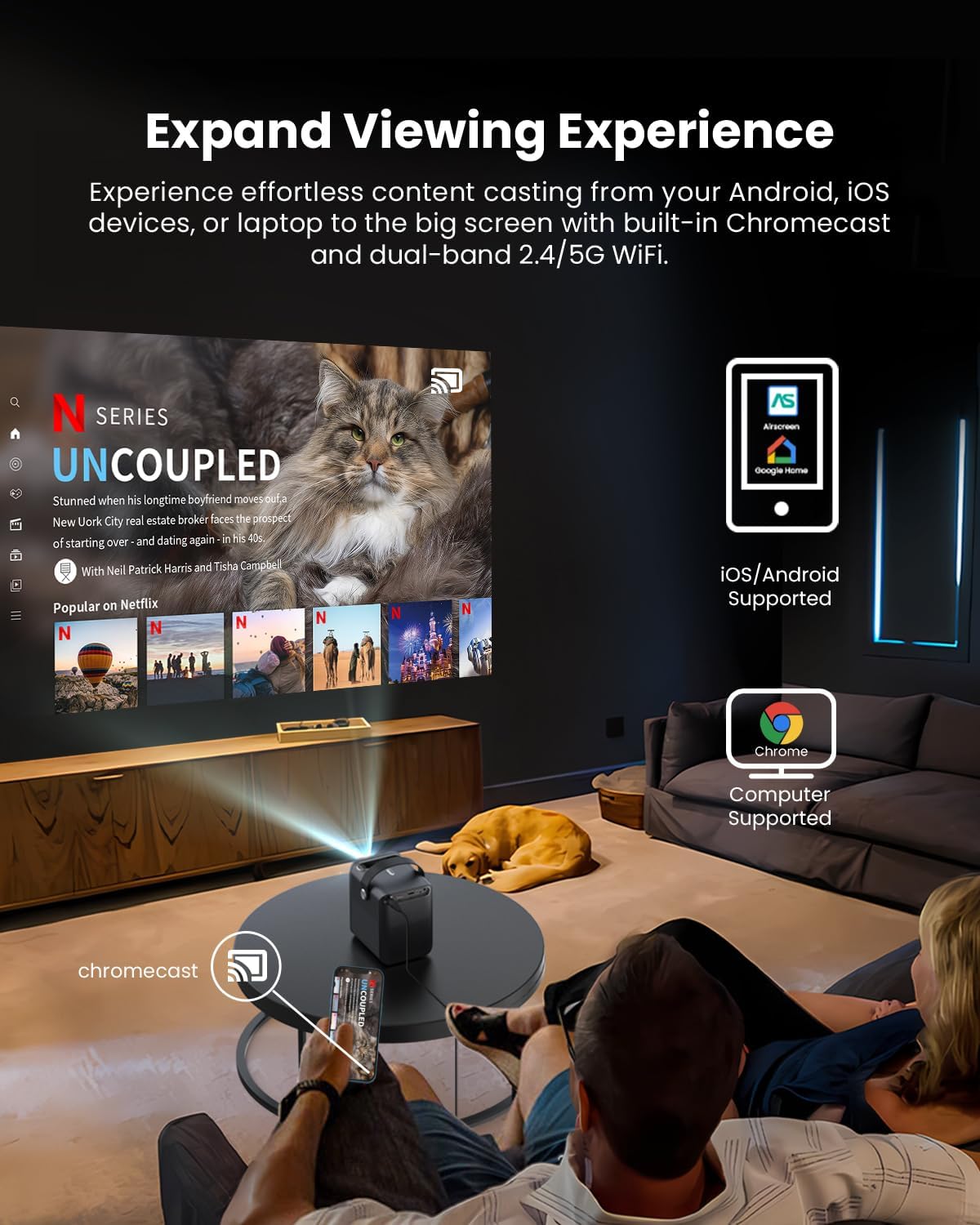
Image: A person relaxing on a couch, casting content from their smartphone to the ETOE D2 Pro Projector, demonstrating the Chromecast feature for an expanded viewинг искуство.
- Ensure your mobile device or computer is connected to the same Wi-Fi network as the projector.
- Open a Chromecast-enabled app (e.g., YouTube, Netflix) on your device.
- Додирните икону Cast (обично правоугаоник са симболом Wi-Fi мреже) and select your ETOE D2 Pro Projector from the list of available devices.
5.3 Повезивање екстерних уређаја
The projector offers multiple connectivity options for various devices.

Image: The ETOE D2 Pro Projector displayed with various compatible accessories, including a TV stick, USB stick, external speaker, and headphones, illustrating its versatile connectivity options.
- ДВИ: Connect TV sticks, gaming consoles, laptops, or other HDMI-enabled devices to the HDMI port. Select the HDMI input source from the projector's menu.
- УСБ: Insert a USB drive into the USB port to play local media fileс (видео снимци, фотографије, музика).
- Блуетоотх: Pair Bluetooth speakers or headphones for wireless audio output. Go to the projector's Bluetooth settings to search for and connect to devices.
- Помоћни: Use a 3.5mm audio cable to connect wired headphones or external speakers to the Aux port.
5.4 Image and Audio Settings
Подесите подешавања слике и звука да бисте оптимизовали viewинг искуство.

Image: The ETOE D2 Pro Projector projecting a vibrant city scene, highlighting its native 1080P Full HD resolution, 4K support, 400 ANSI lumens brightness, and HDR 10 compatibility for stunning image quality.
- Режим слике: Select from preset picture modes (e.g., Standard, Vivid, Movie) or customize settings like brightness, contrast, and color temperature.
- Режим звука: Choose from various sound modes (e.g., Standard, Music, Movie) or adjust equalizer settings for the built-in dual 3W speakers or connected audio devices.
- Режим пројекције: Adjust the projection mode (e.g., Front, Rear, Ceiling Front, Ceiling Rear) based on your projector's placement.
6. Одржавање
6.1 Dust-Free Design
The ETOE D2 Pro features a fully-sealed optical engine designed to prevent dust from entering the lens area, ensuring long-term performance and reducing the need for frequent internal cleaning.

Image: An illustration of the ETOE D2 Pro Projector's sealed optical engine, showing how it prevents dust from entering the internal components, ensuring long-lasting performance.
6.2 Генерално чишћење
- Екстеријер: Обришите спољашњост пројектора меком, сувом крпом која не оставља влакна. Не користите абразивна средства за чишћење или раствараче.
- Објектив: Gently clean the projector lens with a lens cleaning cloth or a soft brush designed for optical surfaces. Avoid touching the lens directly with your fingers.
- Ensure the projector is unplugged before cleaning.
КСНУМКС. Решавање проблема
Ако наиђете на проблеме са пројектором, погледајте следеће уобичајене проблеме и решења:
| Проблем | Могући узрок | Решење |
|---|---|---|
| Нема слике | Кабл за напајање лабав; Неисправан улазни извор; Уређај није повезан | Check power connection; Select correct HDMI/USB input; Ensure external device is properly connected and powered on. |
| Замућена слика | Focus not adjusted; Keystone not corrected | Adjust the manual focus ring; Use digital keystone correction in settings. |
| Нема звука | Volume too low; Muted; Incorrect audio output; External device audio issue | Increase volume; Unmute; Check audio output settings (internal speakers, Bluetooth, Aux); Verify audio settings on connected device. |
| Даљински управљач не ради | Batteries low/dead; Obstruction between remote and projector | Замените батерије; Обезбедите јасну линију вида са ИР пријемником пројектора. |
| Повезивање на Ви-Фи није могуће | Incorrect password; Router issue; Projector too far from router | Double-check Wi-Fi password; Restart router; Move projector closer to router. |
If the problem persists after trying these solutions, please contact ETOE customer support.
8. Спецификације
| Феатуре | Детаљ |
|---|---|
| Модел | Д2 Про |
| Оперативни систем | Андроид ТВ 10.0 |
| Резолуција екрана | Native 1920 x 1080 (1080P Full HD), 4K video supported |
| Осветљеност | КСНУМКС АНСИ Луменс |
| Однос контраста | HDR 10 support |
| Величина пројекције | 40" - 120" (100" recommended) |
| Кеистоне Цоррецтион | Digital 4D & 4P Keystone |
| Функција зумирања | Digital Zoom (50% - 100%) |
| Повезивање | HDMI, USB, Chromecast, 5G WiFi, Bluetooth, Aux |
| Аудио | Двоструки звучници од 3 В |
| Optical Engine | Fully-sealed (Dust-proof) |
| Тежина артикла | 3.58 фунти |
| Димензије производа | 5.31 к 4.45 к 5.83 инча |
9. Гаранција и подршка
ETOE provides comprehensive support for your D2 Pro projector:
- гаранција: A 12-month after-sales service is provided from the date of purchase.
- техничка подршка: Lifetime technical support is available for all ETOE D2 Pro users.
For any questions, technical assistance, or warranty claims, please contact ETOE customer support directly. There is no need to return the projector without prior contact.