1. Увод
The AVARRO 0E-HDMIMX4 is a high-performance 4x4 HDMI matrix switcher designed to route any of four HDMI input sources to any of four HDMI output displays. It supports 4K Ultra HD resolutions, HDCP 2.2, and advanced features like Smart EDID Management and a built-in 4K-1080P downscaler. This manual provides detailed instructions for installation, operation, and troubleshooting to ensure optimal performance of your device.
2. Безбедносне информације
- Пажљиво прочитајте сва упутства пре употребе уређаја.
- Do not expose this unit to rain, moisture, or excessive humidity.
- Do not place any objects filled with liquids on the unit.
- Не блокирајте отворе за вентилацију.
- Користите само испоручени адаптер за напајање.
- Не покушавајте сами да сервисирате уређај. Сва сервисирања препустите квалификованом особљу.
- Ensure proper grounding for all connected equipment.
3. Садржај пакета
Verify that all items are present before installation:
- AVARRO 0E-HDMIMX4 HDMI Switcher Unit
- ИР даљински управљач
- ДЦ 12В адаптер за напајање
- Кориснички приручник (овај документ)
- Mounting Brackets (if applicable, not explicitly mentioned but common for such devices)
4. Производ је готовview
4.1 Предња плоча

Слика: Фронт view of the AVARRO 0E-HDMIMX4 HDMI Switcher, showing the IR receiver and output selector buttons.
- ИЦ пријемник: Receives signals from the IR remote control.
- Output Selectors (1-4): Buttons to select the input source for each corresponding HDMI output. Each output has its own set of source selection buttons (1, 2, 3, 4).
- ЛЕД индикатори: Indicate the currently selected input for each output.
4.2 Задња плоча
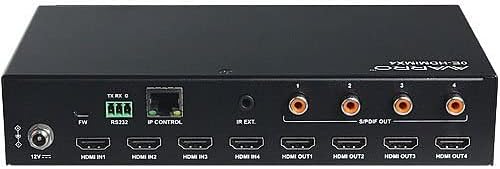
Слика: Позади view of the AVARRO 0E-HDMIMX4 HDMI Switcher, displaying all input/output ports and control interfaces.
- ДЦ 12В ИН: Улазни порт за напајање.
- FW (Micro USB): Micro-USB port for firmware upgrades.
- РС232: Serial port for control via RS232 commands.
- IP CONTROL (RJ45): Ethernet port for network control and Web УИ приступ.
- ИР ЕКСТ: Port for connecting an external IR receiver.
- HDMI IN (1-4): HDMI input ports for connecting source devices (e.g., Blu-ray player, game console).
- HDMI OUT (1-4): HDMI output ports for connecting display devices (e.g., TV, projector).
- S/PDIF OUT (1-4): Digital audio output ports for each HDMI output, supporting PCM 2.0/5.1, Dolby Digital, and DTS up to 5.1 Channel.
5. Подешавање и повезивање
- Искључите све уређаје: Before making any connections, ensure all source devices, displays, and the switcher are powered off.
- Повежите ХДМИ изворе: Connect your HDMI source devices (e.g., media players, gaming consoles) to the HDMI IN 1-4 ports on the switcher using high-quality HDMI cables.
- Повежите HDMI екране: Connect your HDMI display devices (e.g., TVs, projectors) to the HDMI OUT 1-4 ports on the switcher using high-quality HDMI cables.
- Connect Audio Outputs (Optional): If desired, connect external audio systems to the S/PDIF OUT ports for digital audio extraction.
- Повежи мрежу (опционо): For IP control and Web UI access, connect an Ethernet cable from your network router/switch to the IP CONTROL (RJ45) port.
- Прикључите напајање: Connect the provided DC 12V power adapter to the DC 12V IN port on the switcher, then plug the adapter into a power outlet.
- Уређаји за укључење: Power on the switcher, then your display devices, and finally your source devices.
Напомена: For optimal performance with 4K content, use certified High-Speed HDMI cables.
6. Упутство за употребу
6.1 Контрола на предњој плочи
To switch an input source for a specific output:
- Locate the "SELECTOR" buttons for the desired OUTPUT (1-4).
- Press the corresponding "SOURCE" button (1, 2, 3, or 4) below the "SELECTOR" button to route the desired input to that output. The LED indicator will illuminate to show the active input.
6.2 ИР даљински управљач
The included IR remote control allows for convenient switching from a distance. Point the remote towards the IR receiver on the front panel of the switcher.
- Дугмад за унос (1-4): Бира улазни извор.
- Output Buttons (A-D or 1-4): Selects the output to control.
- Матрично пребацивање: Typically, you would press an Output button, then an Input button to route that input to the selected output. Refer to the remote's specific layout for exact button functions.
6.3 Web Контрола корисничког интерфејса
Тхе Web UI provides a graphical interface for advanced control and configuration.
- Ensure the switcher is connected to your network via the IP CONTROL port.
- Obtain the IP address of the switcher (refer to network settings or device documentation for default IP or discovery method).
- Отвори а web претраживач на рачунару повезаном на исту мрежу.
- Enter the switcher's IP address into the browser's address bar.
- Log in using the default credentials (if prompted, refer to device documentation for default username/password).
- Користите Web UI to manage input/output routing, EDID settings, and other advanced features.
6.4 РС232 контрола
The RS232 port allows for integration with control systems using serial commands. Refer to the detailed RS232 command set documentation (usually available from the manufacturer's website) for specific protocols and commands.
7. Smart EDID Management
The 0E-HDMIMX4 features Smart EDID Management to ensure compatibility between source devices and displays. EDID (Extended Display Identification Data) communicates display capabilities to the source. The switcher can automatically manage EDID or allow manual configuration via the Web UI to optimize video and audio formats for connected devices.
8. Надоградња фирмвера
Firmware updates can improve performance, add new features, or resolve issues. The 0E-HDMIMX4 supports firmware upgrading via both the Micro-USB port and the Web УИ.
- Микро-УСБ: Connect a computer to the FW (Micro USB) port and use the manufacturer's provided upgrade tool.
- Web УИ: Приступите Web UI and navigate to the firmware upgrade section.
Always download the latest firmware and instructions from the official AVARRO website before attempting an upgrade.
9. Спецификације
| Феатуре | Детаљ |
|---|---|
| Модел | 0Е-ХДМИМКС4 |
| Инпутс | 4 к ХДМИ ИН |
| Излази | 4 x HDMI OUT, 4 x S/PDIF OUT (Digital) |
| Контролни портови | 1 x RS232, 1 x IP CONTROL (RJ45), 1 x FW (Micro USB) |
| ХДМИ усклађеност | 4K Ultra HD, HDCP 2.2 compliant |
| Подршка за видео резолуцију | VESA: 800x600 to 1920x1200; SMPTE: 720x576P to 4096x2160 |
| ХДР подршка | HDR 10, HLG, DOLBY VISION up to 4K60 444 |
| Довнсцалер | Built-in 4K-1080P downscaler |
| Максимална брзина преноса података | 18 Гбпс |
| Максимални сат пиксела | 600 МХз |
| Аудио формати (ХДМИ) | PCM 2.0/5.1/7.1, Dolby TrueHD, Dolby Atmos, DTS HD Master Audio, DTS:X |
| Audio Formats (S/PDIF) | PCM 2.0/5.1, Dolby Digital, DTS up to 5.1 Channel |
| ЕСД заштита | ±8kV (пражњење у ваздушном зазору) / ±4kV (контактно пражњење) |
| Заштита од пренапона | Волtage: ±1 Kv |
| Повер Суппли | ДЦ 12В 2А |
| Потрошња енергије (мак) | 10.8В |
| Device Dimensions (L x W x H) | 8.46 ”к 4.73” к 1.65 ”(21.49 цм к 12.01 цм к 4.19 цм) |
| Тежина производа | 1.19 фунти (0.54 кг) |
КСНУМКС. Решавање проблема
Ако наиђете на проблеме, погледајте следеће уобичајене проблеме и решења:
- Нема видео/аудио излаза:
- Уверите се да су сви HDMI каблови безбедно повезани.
- Verify the power adapter is correctly connected and the unit is powered on.
- Check that the correct input source is selected for the desired output.
- Test with different HDMI cables.
- Bypass the switcher to confirm source and display functionality.
- Check EDID settings, especially with mixed resolution displays.
- Intermittent Signal/Flickering:
- Use high-quality, certified HDMI cables, especially for longer runs or 4K content.
- Ensure cables are not excessively bent or damaged.
- Check for potential electromagnetic interference from other devices.
- Даљински управљач не ради:
- Ensure there are no obstructions between the remote and the switcher's IR receiver.
- Замените батерије даљинског управљача.
- Verify the remote is pointed directly at the IR receiver.
- Web UI/IP Control Issues:
- Confirm the Ethernet cable is properly connected.
- Verify the switcher's IP address and ensure your computer is on the same network subnet.
- Проверите подешавања заштитног зида (фајервола) на рачунару или мрежи.
11. Одржавање
- Чишћење: Користите меку, суву крпу за чишћење спољашњости уређаја. Не користите течна средства за чишћење или аеросоле.
- вентилација: Уверите се да су отвори за вентилацију чисти и да нису зачепљени како бисте спречили прегревање.
- Складиштење: If storing the unit for an extended period, disconnect power and store in a cool, dry place.
12. Гаранција и подршка
AVARRO products are designed for reliability and performance. For specific warranty information, please refer to the warranty card included with your product or visit the official AVARRO website. For technical support, product registration, or to download the latest drivers and firmware, please visit www.avarrus.com or contact AVARRO customer service.