
1. Увод
The SEQURE SI012 Soldering Iron is a portable and intelligent welding tool designed for various soldering projects. It features rapid heating, precise temperature control, and multiple power supply options, making it suitable for both beginners and experienced users in field repair, circuit board welding, appliance repair, and more.

The SEQURE SI012 Soldering Iron is versatile for both outdoor and indoor use, ideal for various electronic repairs.
2. Садржај пакета
Молимо вас да проверите да ли су све ставке наведене у наставку укључене у ваш пакет:
- SI012 Soldering Iron Controller
- T12-B2 Soldering Iron Tip
- TS-K Soldering Iron Tip
- 19В адаптер за напајање
- TX60 Power Cable
- Држач за лемило
- Алати за растављање
- Упутство за употребу
- Торба за складиштење

The complete SEQURE SI012 Soldering Iron kit, ready for use.
3. Подешавање
Follow these steps to set up your SEQURE SI012 Soldering Iron:
3.1 Опције напајања
The SI012 supports multiple power supply modes:
- 3S-6S Lipo Batteries: Connect a compatible 3S-6S Lipo battery using the TX60 power cable.
- 12-24V Power Adapter: Use the provided 19V adapter or any compatible 12-24V power adapter.
- PD Power 3.0: Connect via the Type-C interface to a PD 3.0 compatible power source.

Different power supply methods for flexible use.
3.2 Tip Assembly
The SI012 supports both T12 and TS soldering iron tips. Ensure correct assembly for optimal performance.
- T12 Tip: No additional fastener is required. Simply insert the T12 tip into the soldering iron.
- TS Tip: An additional fastener must be installed when using a TS tip to secure it properly.
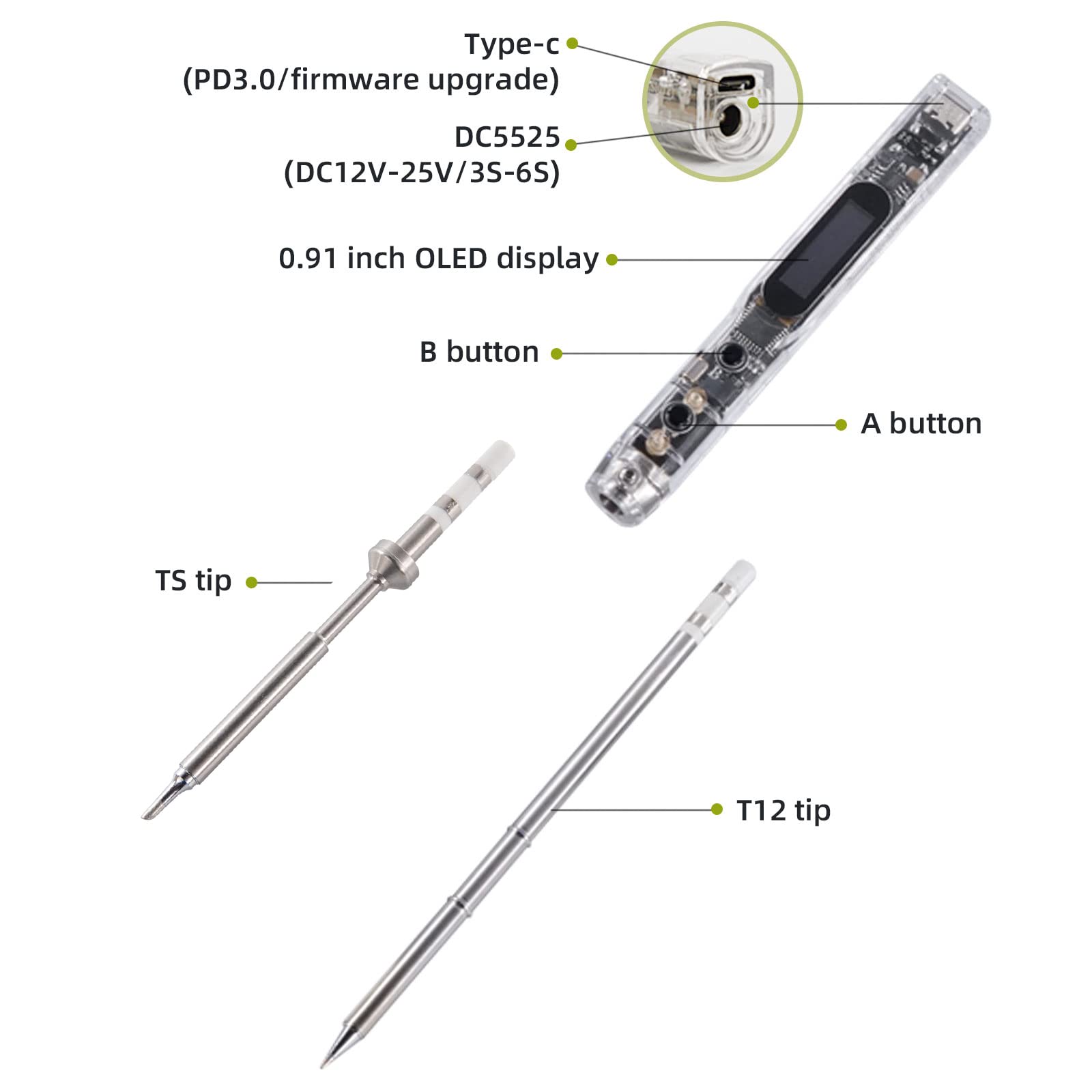
Key components and tip types of the SI012 soldering iron.
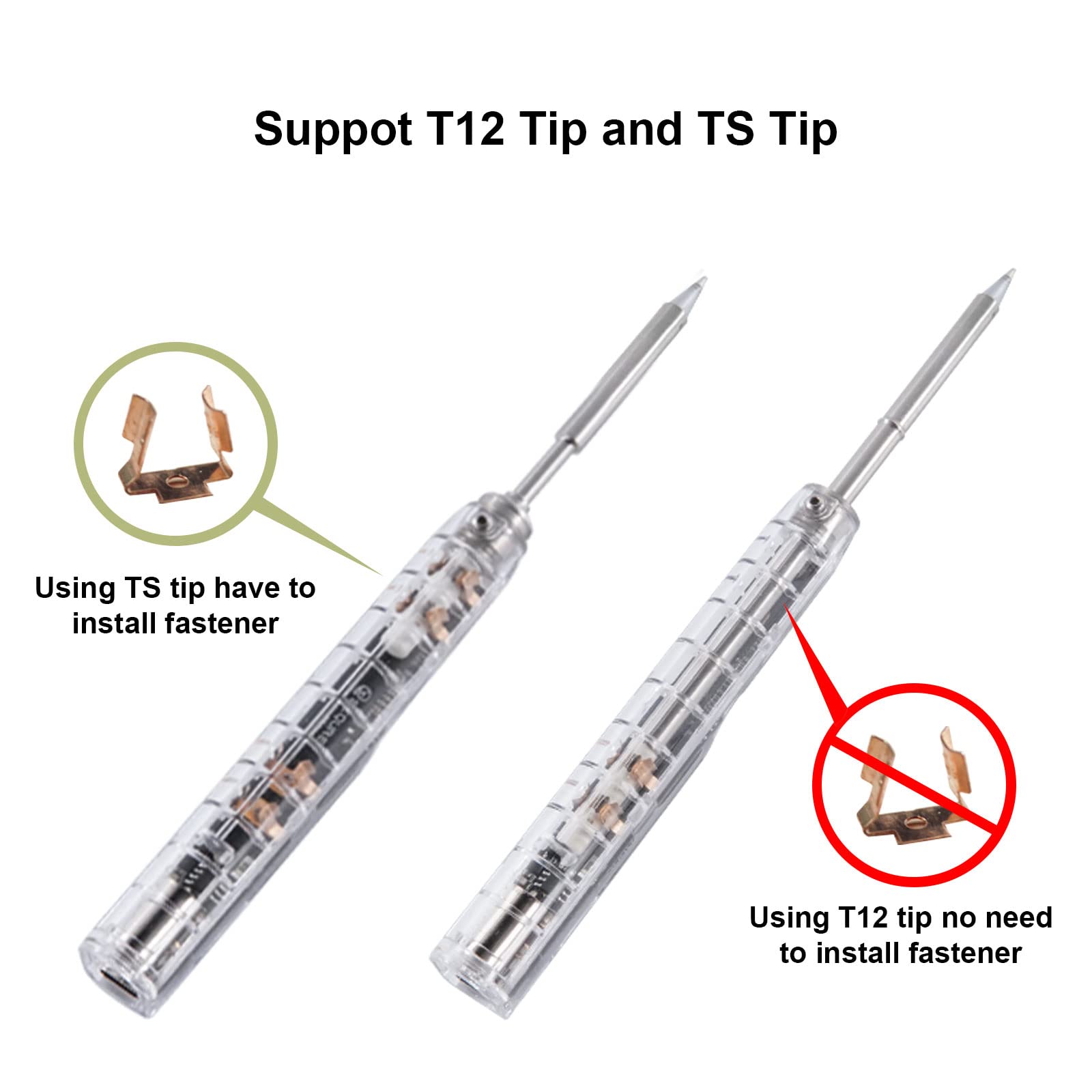
Instructions for installing T12 and TS soldering tips.
3.3 Почетно укључивање
Once powered, the OLED display will show the current temperature and voltage. The iron will begin heating to the set temperature.
Official product video demonstrating the setup and initial operation of the SEQURE SI012 Soldering Iron.
4. Упутство за употребу
4.1 Fast Heating
The SI012 portable soldering iron reaches the melting point of 572°F (300°C) in just 8 seconds, eliminating long heating processes before use. You can set an auto-heating mode to save time.
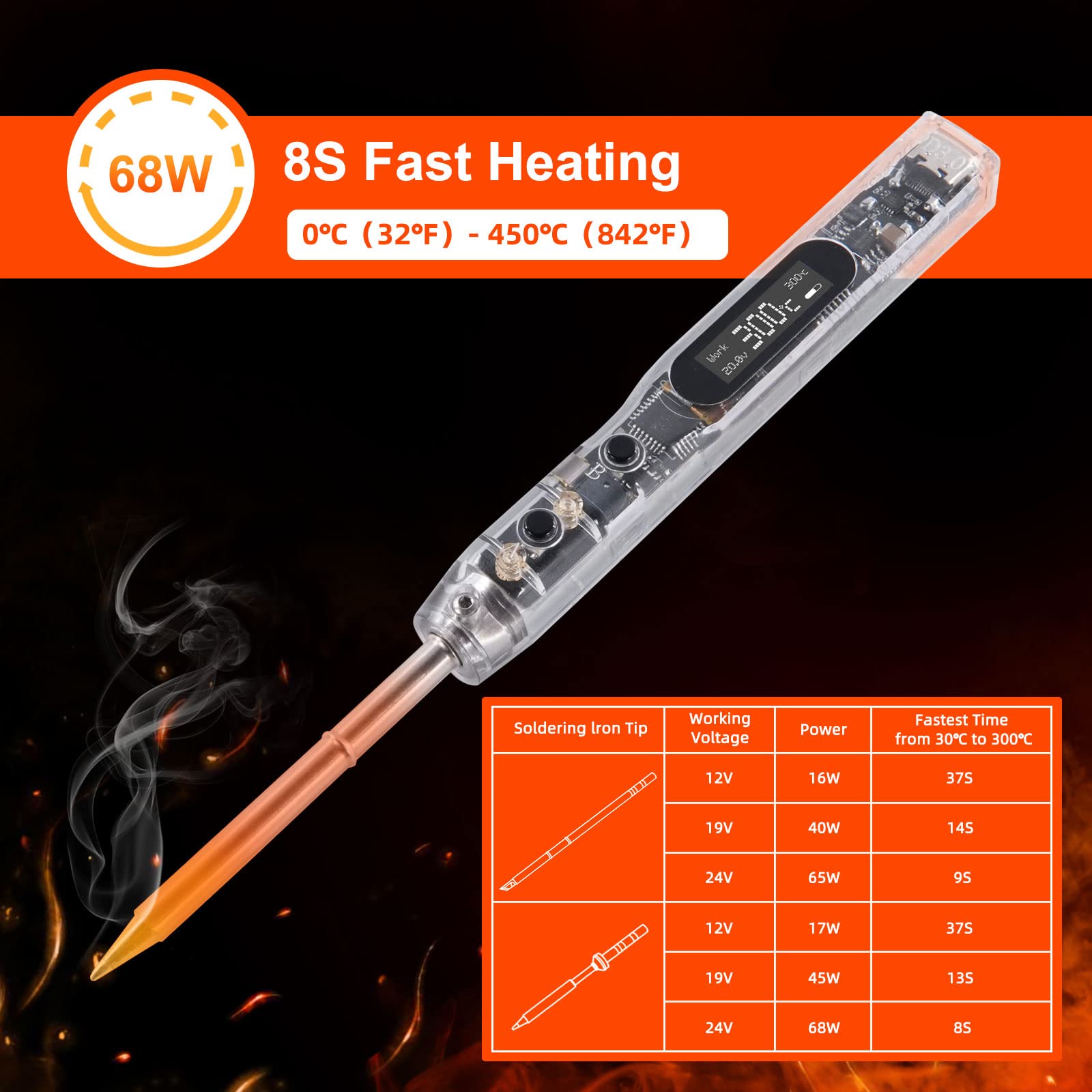
The SI012 heats up rapidly for efficient soldering.
4.2 Контрола температуре
The intelligent temperature control range is 100°C-450°C / 212°F-842°F. Temperature stability is ±1% to provide constant temperature while soldering.

The soldering iron features automatic heating for convenience.
4.3 Режими рада
This electric soldering iron has 3 modes: Work, Sleep, and Stop.
- Режим рада: Standard operating mode for soldering.
- Режим спавања: After 3 minutes without any operation, the solder iron automatically enters sleep mode to reduce wear. It can be woken up by key operations or shaking.
- Режим заустављања: If not woken up after 6 minutes in sleep mode, it will automatically stop to protect the soldering iron and prolong its lifespan.

Understanding the different operational modes of the soldering iron.
4.4 Function Parameter Adjustment
You can change various default parameter settings of this digital soldering iron according to your preference via the OLED display and control buttons.

The OLED display allows for easy adjustment of various settings.
4.5 Screen Orientation
The direction of the screen is adjustable to meet your habits, providing comfortable viewing whether you are left-handed or right-handed.

Adjust the screen orientation for comfortable use.
5. Кључне карактеристике
The SEQURE SI012 Soldering Iron is equipped with several advanced features for enhanced performance and safety:
- Брзо загревање: Reaches 572°F (300°C) in 8 seconds.
- 3 режима рада: Work, Sleep, and Stop modes for efficient power management and extended lifespan.
- Smart & Portable: Compact size (172mm long) and lightweight (33g) for easy portability and field repair. Firmware upgradeable via Type-C.
- Safe & User-friendly: Built-in buzzer for warnings (high/low voltage, high temperature, wrong soldering tips). Temperature stability of ±1%.
- Digital OLED Display: 0.91 inch HD display for clear information.
- Celsius & Fahrenheit Conversion: Лако пребацивање између температурних јединица.
- Iron Wake-up Sensitivity: Adjustable sensitivity for waking the iron from sleep mode.
- Type C PD Power Charging: Supports modern power delivery standards.
- Компатибилност савета: Supports both T12 and TS tips.
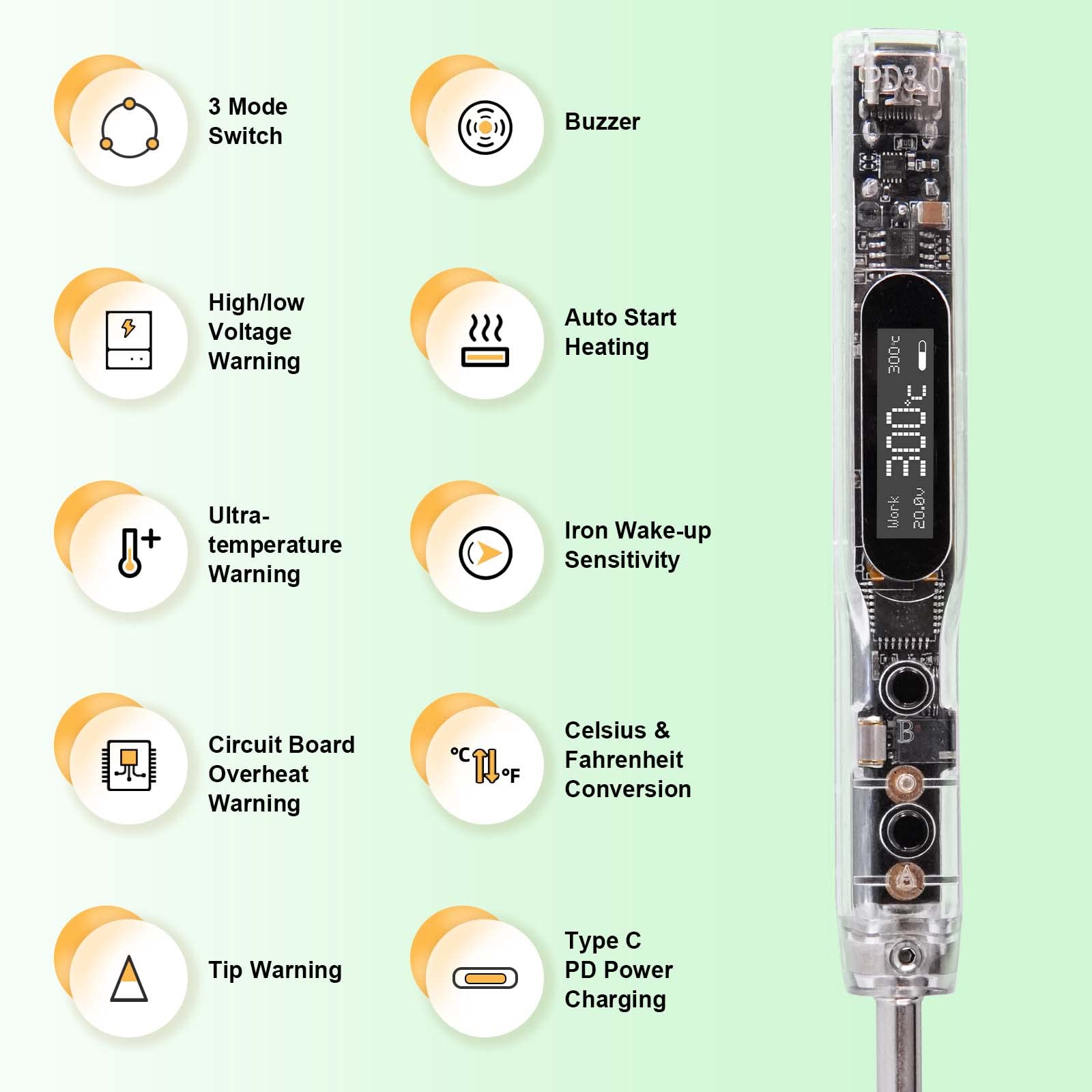
Готовоview of the intelligent features of the SI012.

The clear OLED display provides essential information.

The device supports firmware upgrades for continuous improvement.
5.1 Безбедносна упозорења
The SI012 includes built-in warnings to ensure user safety and protect the device:
- Хигх/Лов Волtagе Упозорење: Упозорења када је јачина звукаtage is outside the safe operating range.
- Ultra-temperature Warning: Notifies if the iron reaches excessively high temperatures.
- Circuit Board Overheat Warning: Protects the internal circuitry from overheating.
- Wrong Soldering Tips Warning: Indicates if an incompatible or improperly installed tip is detected.

The soldering iron provides warnings for voltagе питања.

High temperature alerts ensure safe operation.

The device warns against PCB overheating.
6. Одржавање
Proper maintenance ensures the longevity and optimal performance of your soldering iron:
- Clean the Soldering Tip: Редовно чистите врх са огласомamp sponge or brass wool to remove excess solder and oxidation. This helps maintain good heat transfer and extends tip life.
- Калај врх: After cleaning and before storing, apply a small amount of fresh solder to the tip. This 'tins' the tip, preventing oxidation and corrosion.
- Чувајте правилно: When not in use, place the soldering iron in its holder. Store the entire kit in a dry, dust-free environment.
- Прегледајте каблове: Periodically check power cables for any signs of wear, cuts, or damage. Replace if necessary.
- Избегавајте капи: Handle the soldering iron with care to prevent physical damage to the internal components and the OLED display.
КСНУМКС. Решавање проблема
If you encounter issues with your SEQURE SI012 Soldering Iron, refer to the following common problems and solutions:
- Пегла се не загрева:
- Ensure the power supply is correctly connected and providing sufficient voltage (12-24V DC or PD 3.0).
- Check if the soldering tip is properly installed and making good contact.
- Verify the iron is not in 'Stop' mode. Press a button or shake to wake it up.
- Температурне флуктуације:
- Ensure the tip is clean and tinned. Oxidation can affect temperature stability.
- Check the power supply for stable output.
- Error Messages on OLED:
- Refer to the specific error code displayed. Common errors relate to voltage (high/low), temperature (overheat), or tip issues. Address the underlying cause as indicated by the warning.
- Дугмад не реагују:
- Уверите се да је уређај укључен.
- Try disconnecting and reconnecting the power.
Ако проблем и даље постоји након што сте покушали да решите проблем овим корацима, обратите се корисничкој подршци.
8. Спецификације
| Атрибут | Валуе |
|---|---|
| Бранд | СЕКУРЕ |
| Број модела | SI012-T12 B2+TS BC2 |
| Ватtage | 68 вати |
| Извор напајања | DC (12-24 Volts) |
| Горња оцена температуре | 842 степена Фаренхајта (450°C) |
| Тежина артикла | 33 грама (1.16 унци) |
| Дужина ставке | 6.77 инча (172 мм) |
| Материјал ручке | PC |
| Стил главе | Soldering tips (T12, TS) |
| Тип горионика | Керамичке |
| Посебна карактеристика | Портабле |
| Специфичне употребе за производ | Outdoor & Indoor Use, Jewelry Soldering |
9. Гаранција и подршка
For warranty information or technical support, please refer to the contact details provided with your product packaging or visit the official SEQURE webсајту. Сачувајте рачун о куповини за гаранције.