
1. Увод
This manual provides detailed instructions for the Hexgears GK715 Mechanical Gaming Keyboard. Please read this manual thoroughly before using the product to ensure proper operation and to maximize your experience.

Image 1.1: The Hexgears GK715 Mechanical Gaming Keyboard.
2. Кључне карактеристике
- Распоред са 104 тастера: Full-size keyboard for comprehensive functionality.
- Kailh Box Switches: Durable and responsive mechanical switches.
- Blue Backlighting: Побољшава видљивост и естетску привлачност.
- Дизајн са могућношћу брзе замене: Омогућава једноставну замену прекидача без лемљења.
- Double Shot ABS Keycaps: Ensures legends do not fade over time and provides a premium feel.
- Анти-Гхостинг: Guarantees accurate registration of multiple simultaneous key presses.
- Водоотпорна конструкција: Provides protection against accidental spills.

Image 2.1: The GK715 keyboard showcasing its 104-key layout and anti-ghosting capability.

Слика 2.2: Детаљно view of the double-shot ABS keycaps and blue backlighting on the GK715 keyboard.
3. Подешавање
- Распакујте тастатуру: Carefully remove the Hexgears GK715 keyboard from its packaging.
- Повежите се са рачунаром: Plug the USB cable from the keyboard into an available USB port on your computer. The keyboard is a corded electric device and requires a USB connection.
- Инсталација драјвера: Ваш оперативни систем би требало аутоматски да детектује и инсталира потребне драјвере. Обично није потребна инсталација додатног софтвера.
- Подесите угао тастатуре: The keyboard features dual-segment foot support. Adjust the feet on the underside of the keyboard to your preferred typing angle for ergonomic comfort.
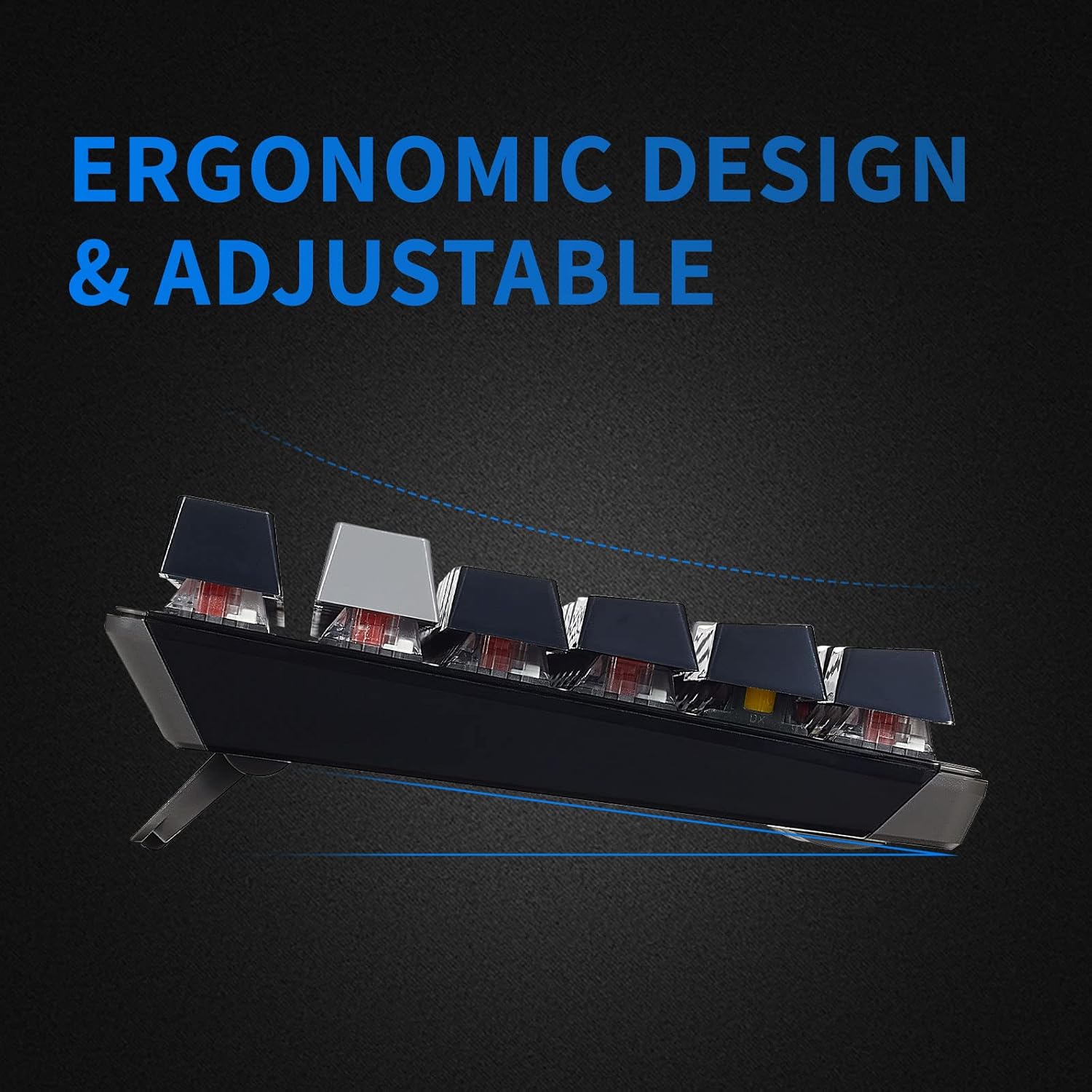
Image 3.1: The adjustable feet of the GK715 keyboard, allowing for ergonomic customization.

Image 3.2: The GK715 keyboard in a typical computer setup, demonstrating its wired connection and blue backlighting.
4. Упутство за употребу
4.1 Основна употреба
The Hexgears GK715 functions as a standard 104-key mechanical keyboard. Simply begin typing after connecting it to your PC. The indicator lights (Caps Lock, Num Lock, Scroll Lock) will illuminate to show their active status.
4.2 Контрола позадинског осветљења
The keyboard features blue backlighting. Specific key combinations (often involving the 'Fn' key) are used to adjust brightness or switch between lighting modes. Refer to the keycap legends for specific function key assignments related to lighting.
4.3 Прекидачи са могућношћу замене током рада
The GK715 supports hot-swappable Kailh Box switches, allowing you to change switches without soldering. Use the included keycap puller and switch puller tools for this process.
- Use the keycap puller to gently remove the desired keycap.
- Use the switch puller to carefully grip and pull out the switch from the PCB.
- Поравнајте пинове новог прекидача са отворима на штампаној плочи и чврсто притисните док не кликне на своје место.
- Замените поклопац тастера.
Video 4.1: Demonstration of hot-swapping Kailh Box switches on the Hexgears GK715 keyboard, including keycap and switch removal and installation.
Видео 4.2: Крајview of the GK715 Black Grey keyboard, showcasing its design, backlighting, and typing experience.
5. Одржавање
5.1 Чишћење
To clean the keyboard, disconnect it from your computer. Use a soft, dry cloth to wipe down the keycaps and chassis. For deeper cleaning, you may remove keycaps using a keycap puller and clean underneath with compressed air or a small brush. Avoid using harsh chemicals or abrasive materials.
5.2 Waterproof Feature
The GK715 is designed with waterproof features to protect against accidental spills. While it offers protection, it is not recommended to submerge the keyboard in liquid. In case of a spill, disconnect the keyboard immediately, wipe off any liquid, and allow it to air dry completely before reconnecting.
КСНУМКС. Решавање проблема
- Тастатура не реагује:
- Уверите се да је USB кабл безбедно повезан и са тастатуром и са рачунаром.
- Покушајте да прикључите тастатуру на други УСБ порт.
- Поново покрените рачунар.
- Backlight Not Working/Dim:
- Check if the backlight is turned off or set to the lowest brightness level using the designated function keys (e.g., Fn + arrow keys or other indicated keys).
- Уверите се да тастатура добија довољно напајања са УСБ порта.
- Кључеви се не региструју:
- If individual keys are not working, ensure the switch underneath is properly seated. If you have hot-swapped switches, try re-seating or replacing the affected switch.
- Clean any debris that might be under the keycap or switch.
- Connection Issues After Sleep Mode:
- If the keyboard experiences connection issues after the computer enters sleep mode, try unplugging and re-plugging the USB cable.
- Ensure your computer's USB power management settings are not set to turn off USB devices to save power.
7. Спецификације
| Феатуре | Детаљ |
|---|---|
| Бранд | Hexgears |
| Назив модела | ГК715 |
| Технологија повезивања | USB (електрични са каблом) |
| Компатибилни уређаји | PC |
| Број кључева | 104 |
| Тип прекидача | Kailh BOX |
| Посебна карактеристика | Waterproof, Hot-Swappable |
| Димензије производа (Д к Ш к В) | 17.2 cm x 5.08 cm x 1.42 cm |
| Оријентација руке | Амбидектроус |

Слика 7.1: Готовоview of various Kailh BOX switch types, highlighting their tactile and linear characteristics.
8. Гаранција и подршка
For warranty information and technical support, please refer to the official Hexgears webсајт или директно контактирајте њихову корисничку службу. Сачувајте рачун као доказ о куповини за евентуалне рекламације по гаранцији.