
1. Увод
Thank you for choosing the COOAU 6MP Outdoor Security Camera. This manual provides detailed instructions for the installation, operation, and maintenance of your camera. Please read this manual carefully before use to ensure proper functionality and to maximize your security experience.
2. Производ је готовview
Кључне карактеристике
- 6MP High-Resolution & 360° Coverage: Equipped with a 6MP CMOS image sensor and 3360*1890P ultra-clear lens for sharp, detailed images. Features horizontal 350° and vertical 90° rotation for 360° monitoring without blind spots.
- Аутоматско праћење: Automatically tracks and records movement upon human detection, ensuring no critical moments are missed.
- 20M Long-Range Night Vision & AI Human Detection: Features 3 infrared LEDs and light LEDs, offering two night vision modes (infrared black and white, full-color) up to 20m. AI human detection reduces false alarms from animals or light changes.
- Light Deterrent: Automatically activates a light alarm upon detecting intruders at night, preventing mischief.
- Multiple Data Storage Options & H.265 Video Compression: Supports MicroSD card (up to 128GB) and cloud storage. Advanced H.265 video compression saves up to 50% storage space compared to H.264 while maintaining video quality.
- Enhanced Antenna & Two-Way Audio: Powerful internal antenna provides stable and reliable Wi-Fi connection even through walls. Built-in microphone with noise cancellation allows clear two-way communication up to 8 meters.
- IP66 Weatherproofing: Dustproof and waterproof, suitable for use in various weather conditions including rain, sun, storms, and snow.
- Компатибилност са више уређаја: Compatible with iOS/Android/Windows via the "MIPC" app. Supports Alexa for voice control.
Садржај пакета
- Camera body x 1
- УСБ кабл за напајање к 1
- АЦ адаптер к 1
- Вијци к 3
- Сидра к 3
- Упутство за употребу к 1
3. Подешавање
3.1 Провера пре инсталације
Before physical installation, connect your mobile phone to the camera and confirm that the camera is functioning correctly. This ensures the camera is operational before mounting.
3.2 Физичка инсталација
- Обележавање рупа за бушење: Place the mounting base against the desired installation surface and use a pencil to mark the positions for drilling.
- Бушење рупа: Use a drill to create holes at the marked positions.
- Inserting Wall Anchors: Gently tap the provided wall anchors into the drilled holes until they are flush with the surface.
- Монтажа базе: Align the mounting base with the anchors and secure it using the provided screws.
- Причвршћивање камере: Slide the camera onto the mounted base until it clicks securely into place.
- Повезивање напајања: Connect the USB power cable to the camera and plug the AC adapter into a power outlet. The camera will perform a self-test, rotating its lens and emitting a beep sound. This is normal.

Image: Step-by-step guide for mounting the camera base and attaching the camera.
Video: Demonstrates the physical installation process of the outdoor security camera.
3.3 Инсталација и повезивање апликације
- Преузмите апликацију: Download the "MIPC" app from your smartphone's app store (iOS/Android).
- Региструјте налог: Open the app and register a new user account.
- Додај уређај: Додирните икону „+“ да бисте додали нови уређај.
- Enable Bluetooth (Optional): If prompted, enable Bluetooth on your smartphone to allow the app to automatically search for nearby cameras.
- Изаберите Wi-Fi мрежу: Choose your 2.4GHz or 5GHz Wi-Fi network and enter the password. The camera supports both frequencies.
- Скенирање КР код: The app will display a QR code. Position your smartphone 15-25 cm in front of the camera lens so the camera can scan the QR code. You will hear a beep sound upon successful scan.
- Веза завршена: Once connected, the camera's blue indicator light will turn solid, and the app will confirm successful device addition.

Image: Visual guide for connecting the camera to the app via QR code.
Video: Instructions on how to add the camera to your smartphone app.
4. Упутство за употребу
4.1 Даљински надзор
Приступ видео преносима уживо и снимљеној храниtage from anywhere using the MIPC app on your smartphone, tablet, or computer.
4.2 Контрола панорамирања/нагињања/зумирања (PTZ)
Use the app to remotely adjust the camera's viewing angle. The camera supports 350° horizontal pan and 90° vertical tilt, allowing you to cover a wide area.

Image: Illustrates the camera's 360° pan and tilt capabilities.
4.3 Режими ноћног вида
The camera offers two night vision modes:
- Infrared Black and White: Provides clear black and white video in low-light conditions using infrared LEDs.
- Ноћни вид у пуној боји: Activates light LEDs to capture full-color video at night, allowing for detailed identification of subjects and their clothing.
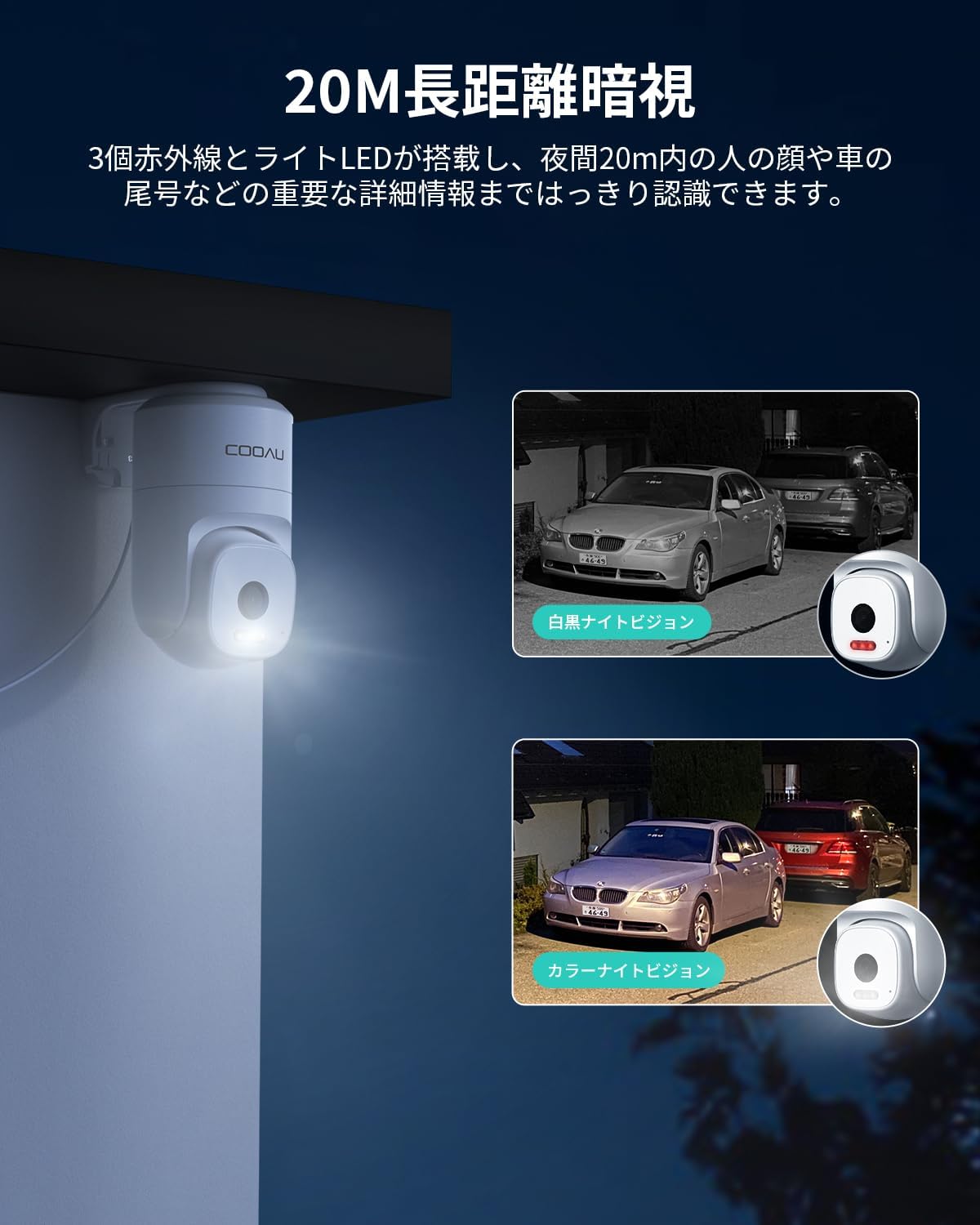
Image: Comparison of black and white infrared night vision and full-color night vision.
4.4 AI Human Detection & Auto Tracking
The camera's AI human detection feature accurately identifies human figures, minimizing false alarms from pets, shadows, or vehicles. When a person is detected, the camera automatically tracks their movement, ensuring continuous recording of the event.
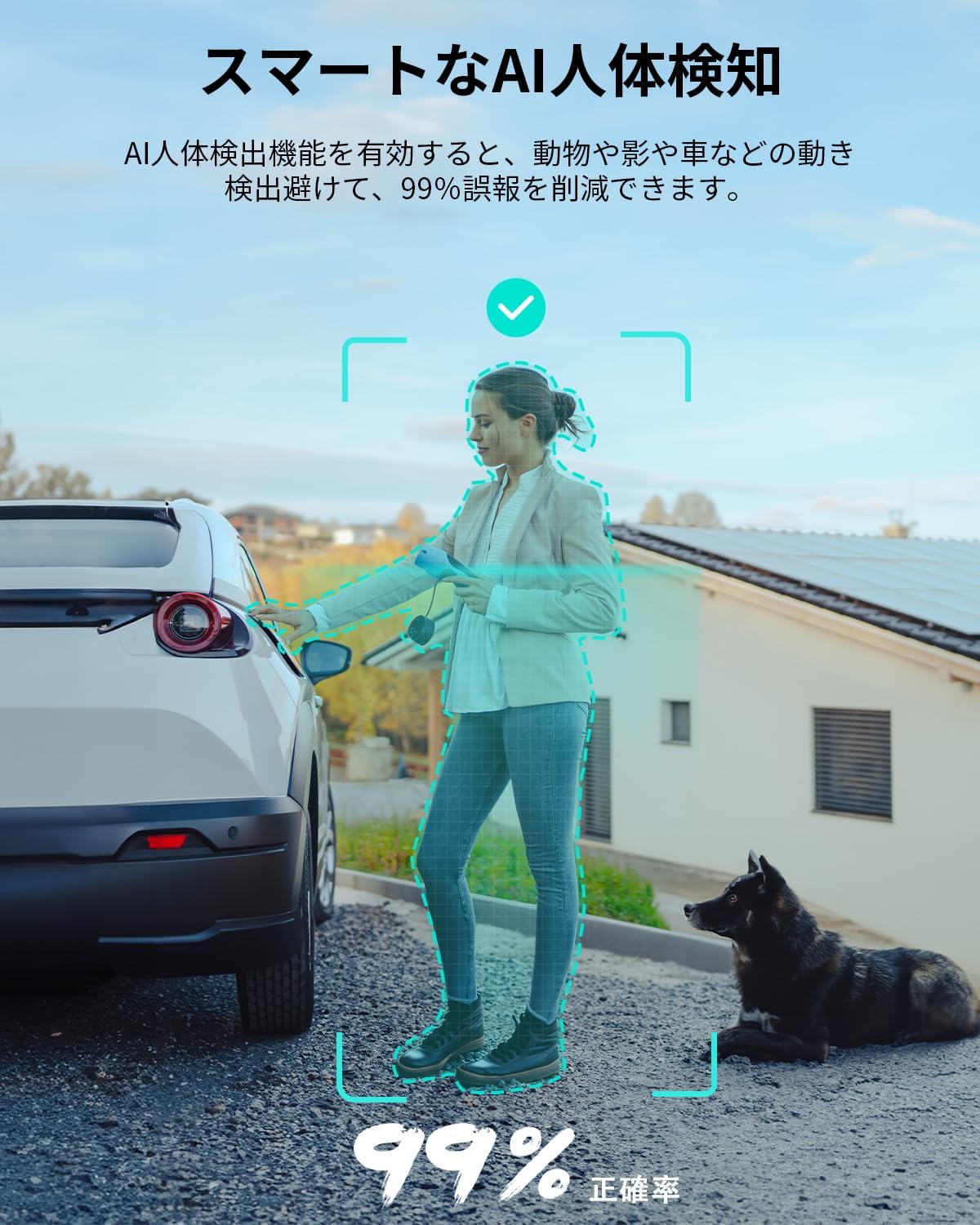
Image: Demonstrates the camera's AI human detection accuracy.

Image: The camera's auto-tracking function following a person.
4.5 Двосмерни аудио
Utilize the built-in microphone and speaker for real-time two-way communication through the app. This allows you to speak to visitors or deter intruders remotely.
4.6 Alarm Notifications & Light Deterrent
Receive real-time notifications on your smartphone when motion or human activity is detected. At night, the camera can automatically activate its light LEDs to deter potential intruders.
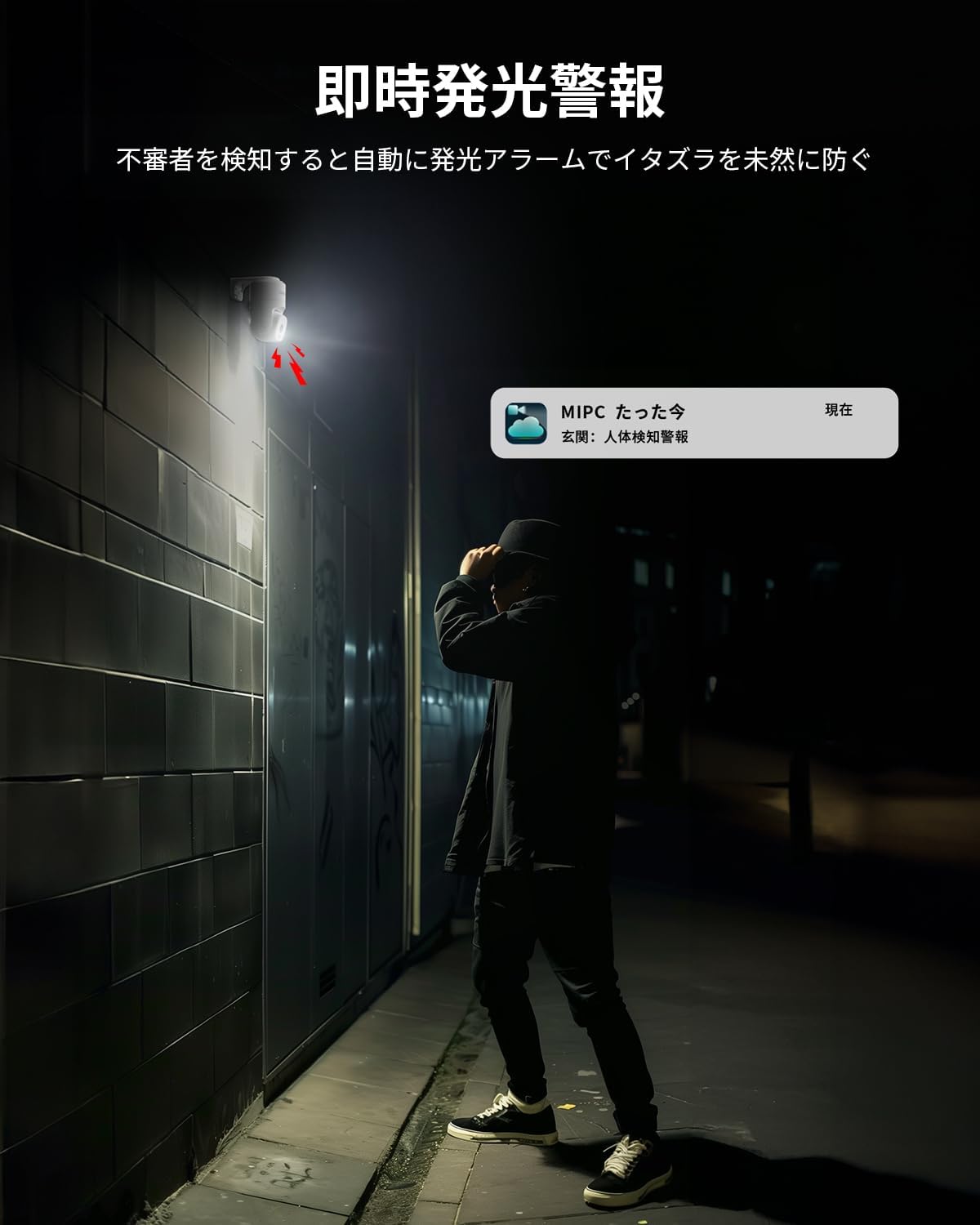
Image: The camera's light deterrent function in action.
4.7 Снимање и складиштење
The camera supports various recording modes:
- 24-часовно непрекидно снимање: Снима континуирано током целог дана.
- Снимање детекције покрета: Снима само када се детектује кретање.
- Планирано снимање: Записи током одређеног времена.
Recorded videos can be stored on a MicroSD card (up to 128GB, not included) or via cloud storage (subscription may be required). The advanced H.265 video compression ensures efficient storage usage without compromising video quality.

Image: Illustrates the flexible storage options available for the camera.
4.8 Интеграција са Алексом
The camera is compatible with Alexa, allowing you to view live feeds on compatible Alexa-enabled devices using voice commands. For example, say "Alexa, show me the garden" to see your camera's view.

Image: Demonstrates Alexa integration for convenient monitoring.
5. Одржавање
- Чишћење сочива: Regularly clean the camera lens with a soft, dry cloth to ensure clear image quality. Avoid using harsh chemicals.
- Провера веза: Periodically inspect all cable connections for security and integrity, especially the power and network cables.
- Ажурирања фирмвера: Check the MIPC app regularly for available firmware updates to ensure your camera has the latest features and security enhancements.
КСНУМКС. Решавање проблема
6.1 Уобичајена питања
- Камера се не повезује на Ви-Фи: Ensure your Wi-Fi password is correct and the camera is within range of your router. Try restarting both the camera and your router.
- Лош квалитет слике: Check if the lens is clean. Ensure there is sufficient lighting, especially at night. Verify your internet connection speed.
- Чести лажни аларми: Adjust the sensitivity of motion detection or enable AI human detection in the app settings to reduce unwanted alerts.
- Нема звука: Check the microphone and speaker settings in the app. Ensure the volume on your smartphone is turned up.
6.2 Ресетовање камере
If you encounter persistent issues, you may need to reset the camera to its factory settings. Locate the reset button (usually a small pinhole) on the camera. Press and hold the reset button for approximately 5 seconds until you hear a beep sound. The camera's red indicator light will slowly flash, indicating a successful reset. After resetting, you will need to reconfigure the camera through the app.
Video: Demonstrates how to reset the camera and its initial self-test.
7. Спецификације
| Феатуре | Спецификација |
|---|---|
| Назив модела | 849 |
| Резолуција снимања видео записа | 6MP (3360*1890p) |
| Опсег померања/нагиба | Хоризонтално 350°, вертикално 90° |
| Ноћни вид | До 20 метара |
| Водоотпорна оцена | ИП66 |
| Технологија повезивања | Wireless (Wi-Fi, supports 2.4GHz & 5GHz) |
| Опције складиштења | MicroSD card (Max 128GB), Cloud Storage |
| Видео Цомпрессион | Х.265 |
| Димензије производа | 45 к 55 к 75 мм |
| Тежина производа | 470 г |
| Препоручена употреба | Хоме Сецурити |
| Компатибилни уређаји | Smartphones (iOS/Android), Alexa |
8. Гаранција и подршка
We offer a 30-day return or exchange policy from the date of purchase. If you encounter any product quality issues or usage problems, please do not hesitate to contact us. We are committed to providing our customers with the highest level of after-sales service.
Контакт канали:
- Order History: Please contact the seller directly through your order history.
- Званична е-пошта: You may also contact us via our official email address.