
Увод
This manual provides detailed instructions for the installation, operation, and maintenance of the Supermicro MBD-X12DPI-N6-B E-ATX Server Motherboard. It is designed to assist users in setting up their server system correctly and efficiently. Please read this manual thoroughly before proceeding with any installation or configuration.
Безбедносне информације
Observe the following safety precautions to prevent damage to the motherboard and ensure personal safety:
- Always disconnect the power cord from the power supply before installing or removing any components.
- Wear an anti-static wrist strap and work on an anti-static mat to prevent electrostatic discharge (ESD) damage to sensitive components.
- Handle the motherboard by its edges to avoid touching components directly.
- Ensure proper ventilation within the server chassis to prevent overheating.
- Refer to the power supply unit's manual for specific safety guidelines related to power connections.
Садржај пакета
Проверите да ли су све ставке присутне у пакету:
- Supermicro MBD-X12DPI-N6-B E-ATX Server Motherboard
- И / О штит
- SATA каблови (количина може да варира)
- Брзи референтни водич
- Driver and Utility DVD/USB (if included)
Подешавање и инсталација
Овај одељак вас води кроз физичку инсталацију матичне плоче и њених главних компоненти.
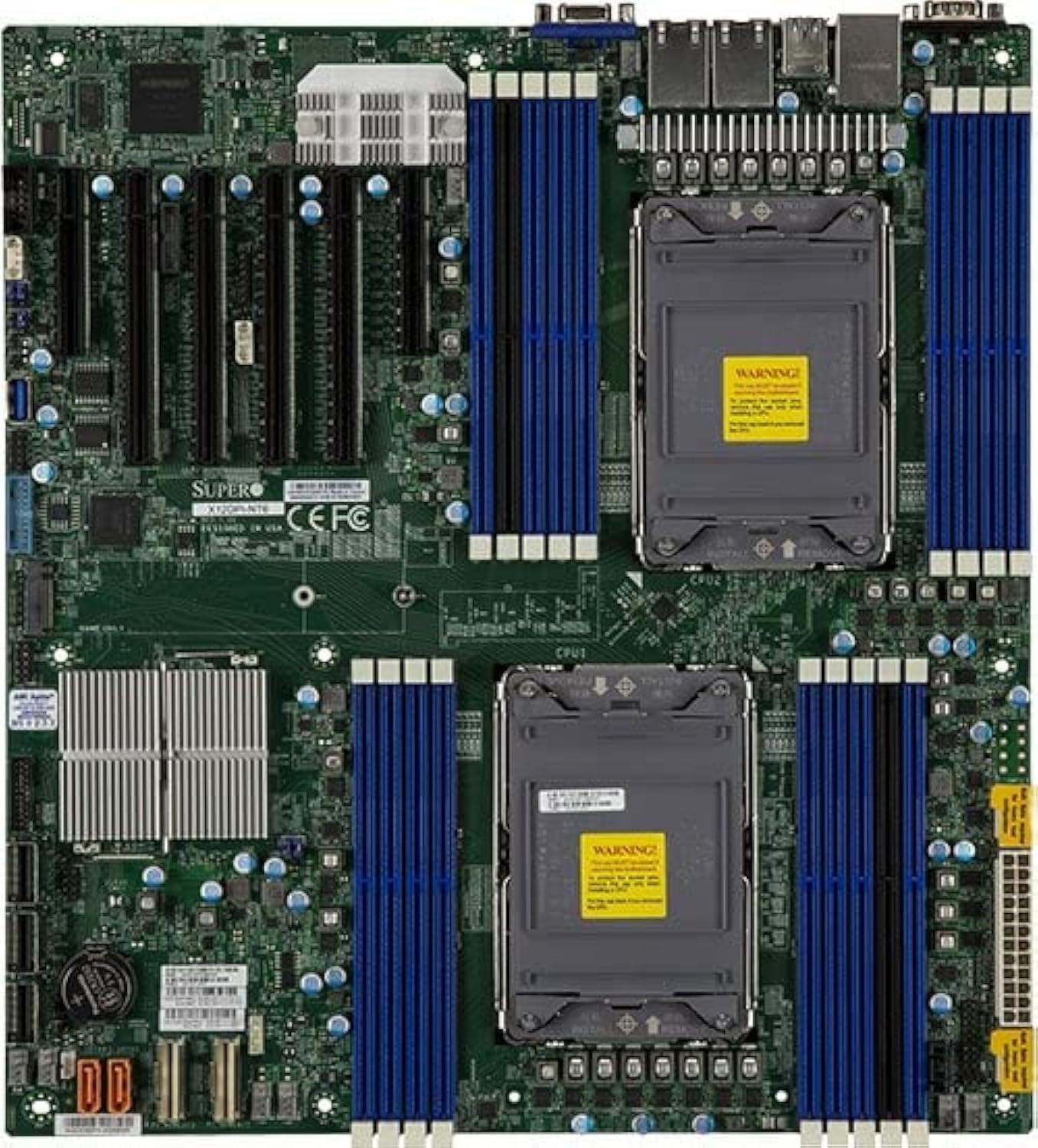
Слика 1: Одозго надоле view of the Supermicro MBD-X12DPI-N6-B E-ATX Server Motherboard, showcasing its dual LGA 4189 CPU sockets, 18 DDR4 DIMM slots, multiple PCIe 4.0 expansion slots, and various connectors for storage and peripherals. The board features a green PCB with blue and black DIMM slots, and silver heatsinks for chipset and VRMs.
1. Инсталација процесора (LGA 4189)
- Carefully open the CPU socket retention mechanism by releasing the levers.
- Поравнајте троугласту ознаку на процесору са одговарајућом ознаком на сокету.
- Пажљиво поставите процесор у утичницу без присиљавања.
- Close the socket retention mechanism, ensuring the CPU is securely seated.
- Нанесите термалну пасту на процесор и инсталирајте хладњак процесора према упутствима произвођача.
2. Memory (DIMM) Installation
The motherboard supports up to 4TB of 3DS ECC RDIMM/LRDIMM DDR4-3200MHz memory across 18 DIMM slots. Intel Optane Persistent Memory 200 Series is supported in specific slots (P1-DIMMB2 and P2-DIMMB2).
- Open the retention clips at both ends of the DIMM slot.
- Поравнајте зарез на меморијском модулу са кључем у DIMM слоту.
- Insert the module firmly into the slot until the retention clips snap into place.
- Ensure all modules are seated correctly and evenly.
3. Инсталација PCIe картице
The motherboard features 2 PCIe 4.0 x8 and 4 PCIe 4.0 x16 slots.
- Select an appropriate PCIe slot for your expansion card.
- Remove the corresponding metal bracket cover from the server chassis.
- Поравнајте картицу са слотом и чврсто притисните док се потпуно не уклопи.
- Secure the card with a screw or retention clip to the chassis.
4. Повезивање уређаја за складиштење
The Intel C621A controller provides 14 SATA3 (6 Gbps) ports with RAID 0, 1, 5, 10 support. There is also 1 PCIe 4.0 x4 M.2 slot (2280/22110 form factor, M-Key).
- SATA уређаји: Connect SATA data cables from your storage drives to the SATA ports on the motherboard. Connect power cables from the power supply to the drives.
- М.2 уређаји: Insert the M.2 SSD into the M.2 slot, securing it with the provided screw.
5. Priključak za napajanje
Connect the main 24-pin ATX power connector and the 8-pin (or 4+4 pin) CPU power connectors from your power supply unit to the corresponding ports on the motherboard. Ensure all power connections are secure.
Упутство за употребу
1. Почетно покретање система
- After all components are installed, connect the power cord to the power supply and turn on the system.
- The system will perform a Power-On Self-Test (POST). Monitor for any error codes or beeps.
2. Конфигурација BIOS-а/UEFI-ја
During POST, press the designated key (usually ДЕЛ or F2) to enter the BIOS/UEFI setup utility. Here you can configure boot order, system time, and various hardware settings.
3. Инсталација оперативног система
Insert your operating system installation media (USB drive or DVD) and configure the BIOS/UEFI to boot from it. Follow the on-screen instructions to install your preferred operating system.
Одржавање
1. Чишћење
Regularly clean the interior of your server chassis to prevent dust buildup, which can lead to overheating. Use compressed air to remove dust from heatsinks, fans, and other components. Ensure the system is powered off and unplugged before cleaning.
2. Firmware and Driver Updates
Periodically check the Supermicro official website for the latest BIOS/UEFI firmware and driver updates for your motherboard. Keeping your system updated ensures optimal performance, stability, and security.
Решавање проблема
Ако наиђете на проблеме, погледајте следеће уобичајене кораке за решавање проблема:
- Нема напајања: Ensure all power cables (24-pin ATX, 8-pin CPU) are securely connected. Check the power supply unit and wall outlet.
- Без приказа: Verify that the monitor is connected and powered on. Reseat the graphics card (if applicable) and memory modules. Try booting with minimal components.
- Системски звучни сигнали: Consult the motherboard's beep code table (usually found in the full manual on the Supermicro website) to diagnose hardware issues indicated by specific beep patterns.
- Оперативни систем се не покреће: Check the boot order in BIOS/UEFI. Ensure the storage drive with the OS is detected and functional.
- прегревање: Ensure CPU coolers and chassis fans are properly installed and functioning. Clean dust from heatsinks and vents.
Спецификације
| Феатуре | Детаљ |
|---|---|
| ЦПУ Соцкет | Dual LGA 4189 (Socket P+) |
| Компатибилни процесори | 3rd Gen Intel Xeon Scalable processors (up to 270W TDP) |
| Чипсет | Intel C621A |
| Тип меморије | DDR4 3DS ECC RDIMM/LRDIMM, Intel Optane Persistent Memory 200 Series |
| Брзина меморије | 3200МХз |
| меморијска слота | 18 DIMM slots (up to 4TB total) |
| ПЦИе слотови за проширење | 2 x PCIe 4.0 x8, 4 x PCIe 4.0 x16 |
| Подршка за НВМе | 2 x PCIe 4.0 NVMe x8 Internal Port(s) |
| М.2 Интерфаце | 1 x PCIe 4.0 x4 (2280/22110, M-Key) |
| САТА портови | 14 x SATA3 (6 Gbps) with RAID 0, 1, 5, 10 |
| ЛАН | Dual LAN with Intel i350 Gigabit Ethernet Controller |
| Видео Оутпут | 2 x VGA (1 rear bezel, 1 front panel) |
| Форм Фацтор | Е-АТКС |
| Димензије | 16 к 12 к 5 инча |
Подршка и гаранција
For technical support, driver downloads, and the latest BIOS updates, please visit the official Supermicro website. Information regarding product warranty terms and conditions can also be found on the Supermicro support portal or by contacting your point of purchase.
Always refer to the official Supermicro documentation for the most accurate and up-to-date information.