
1. Увод
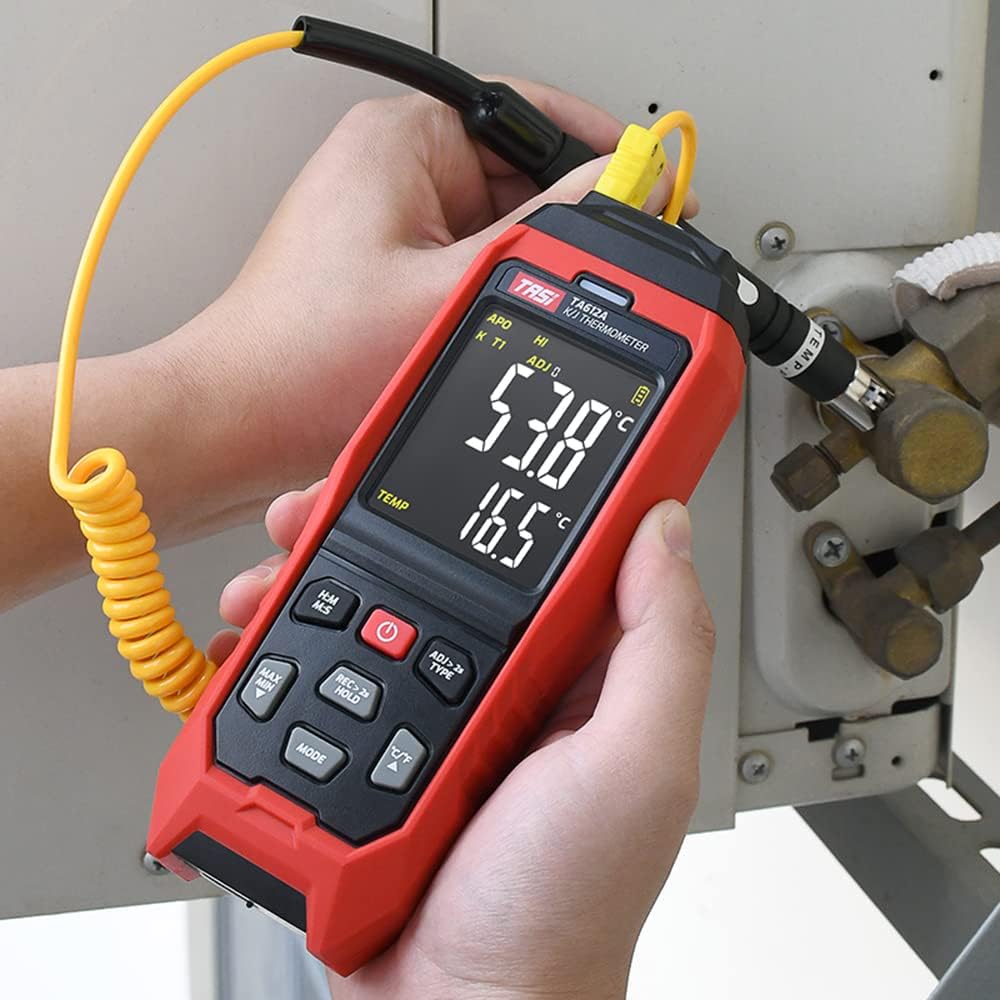
The TASI TA612C is a portable digital thermometer designed for precise temperature measurement using K/J type thermocouples. This model supports four channels, allowing simultaneous measurement of multiple points. It features a VA digital color display, data hold function, MAX/MIN value tracking, extensive data storage capabilities, an alarm buzzer, and automatic shutdown for convenient and efficient operation. The TA612C also includes a USB interface for data upload and real-time measurement.
2. Садржај пакета
Молимо вас да проверите садржај пакета након распакивања како бисте били сигурни да су сви предмети присутни и да нису оштећени.
- 1 x TASI TA612C Thermometer
- 4 x K-type Thermocouple Probes
- 1 к УСБ кабл
- 1 к торба за складиштење
- 1 x Упутство за употребу (енглески)

3. Карактеристике производа
- 4-Channel Measurement: Simultaneously monitor temperatures from up to four different locations using K/J type thermocouples.
- Широк температурни опсег: Мери температуре од -200℃ до 1372℃ (-328℉ до 2501℉).
- VA Digital Color Display: Provides clear and easy-to-read temperature values and operational status.
- Функција задржавања података: Freezes the current temperature reading on the display.
- MAX/MIN Value Tracking: Records and displays the maximum and minimum temperatures measured during a session.
- Extensive Data Storage: Stores up to 5000 groups of temperature data.
- USB Data Logger: Allows data upload to a computer and real-time measurement monitoring via USB connection.
- Adjustable Probe Error Compensation (ADJ): Compensates for probe inaccuracies within a range of -9℃ to 9℃.
- Аларм високе/ниске температуре: Configurable alarm limits (default 1300℃/-200℃) with dual sound and light alerts.
- Аутоматско искључивање: Штеди трајање батерије аутоматским искључивањем након периода неактивности.

4. Подешавање
4.1 Напајање
The TA612C thermometer can be powered by three AA/LR06 batteries (not included) or via a 5V 1A USB power source. Ensure batteries are inserted with correct polarity. For continuous operation or data transfer, connect the device using the provided USB cable.
4.2 Connecting Thermocouple Probes
The device supports K/J type thermocouples. Four K-type probes are included in the package. Connect the thermocouple probes to the corresponding input jacks (T1, T2, T3, T4) at the top of the device. Ensure a secure connection for accurate readings.
5. Упутство за употребу
5.1 Укључивање/искључивање
- Притисните тастер Дугме за напајање (
 ) да бисте укључили уређај.
 - Притисните и држите Дугме за напајање око 2 секунде да бисте искључили уређај.
5.2 Приказ прекоview
The VA color display provides comprehensive information. Refer to the diagram below for key indicators:

5.3 Основна мерења
Once powered on and probes are connected, the device will automatically begin displaying temperature readings for each active channel. The sampling rate is approximately 1 time per second.
5.4 Задржавање података
Притисните тастер REC > 2s HOLD button briefly to activate/deactivate the data hold function. The 'HOLD' indicator will appear on the display when active.
5.5 MAX/MIN Value
Притисните тастер МАКС МИН button to cycle through current, maximum (MAX), and minimum (MIN) temperature readings. The corresponding indicator will show on the display.
5.6 Пребацивање јединица (°C/°F)
Притисните тастер ° Ц/° Ф дугме за пребацивање између јединица температуре Целзијуса и Фаренхајта.
5.7 Складиштење података
The TA612C can store up to 5000 groups of temperature data. To manually record data, press and hold the REC > 2s HOLD button for more than 2 seconds. The 'REC' indicator will flash, and the data group number will increment. The device stores the temperature values of the thermocouple channels, not ambient temperature.

5.8 Подешавања аларма
The device has default high/low alarm limits of 1300℃ and -200℃. Consult the full user manual for detailed instructions on how to adjust these alarm thresholds. When an alarm condition is met, the device will provide both sound and light alerts.
5.9 Probe Error Compensation (ADJ)
The TA612C allows for probe error compensation (ADJ) within a range of -9℃ to 9℃. This feature helps to fine-tune the accuracy of readings for specific probes. Refer to the detailed user manual for steps on how to access and adjust this setting.
6. Data Management (USB)
The TA612C model features a USB interface for data connectivity. Connect the thermometer to a computer using the provided USB cable. This allows for:
- Отпремање података: Transfer stored temperature data from the device to your computer for analysis and record-keeping.
- Real-time Measurement: Monitor live temperature readings on your computer screen, which can be useful for long-term logging or detailed observation.
Software for data management is typically available from the manufacturer's website, as indicated in the included user manual.
7. Одржавање
7.1 Чишћење
За чишћење уређаја користите меку, дamp cloth. Do not use abrasive cleaners, solvents, or immerse the device in water. Ensure the device is powered off and disconnected from any power source before cleaning.
7.2 Складиштење
When not in use, store the thermometer and its probes in the provided storage bag in a cool, dry place, away from direct sunlight and extreme temperatures. Remove batteries if the device will not be used for an extended period to prevent leakage.
7.3 Замена батерије
When the battery indicator shows low power, replace the three AA/LR06 batteries. Ensure the device is powered off before opening the battery compartment and observe correct polarity when inserting new batteries.
КСНУМКС. Решавање проблема
- Уређај се не укључује: Check battery installation and ensure batteries are not depleted. If using USB power, verify the cable and power source.
- Нетачна очитавања: Ensure thermocouple probes are correctly and securely connected. Check for any visible damage to the probes. Consider using the ADJ compensation feature if a known offset exists.
- Екран је празан или трепери: Replace batteries or connect to USB power. If the issue persists, contact customer support.
- Проблеми са преносом података: Ensure the USB cable is properly connected to both the device and the computer. Verify that the correct software/drivers are installed on your computer.
- Alarm not working: Check alarm settings to ensure limits are correctly configured and the alarm function is enabled.
For issues not covered here, please refer to the comprehensive user manual or contact KKnoon customer support.
9. Техничке спецификације
| Параметар | Спецификација |
|---|---|
| Модел | ТА612Ц |
| Канал | 4 канала |
| Складиштење података | 5000 Групе |
| Data Upload & Real-time Measurement | Supported (USB) |
| Материјал | ABS (Acrylonitrile Butadiene Styrene), PC (Polycarbonate) |
| K/J Type Measurement Range | -200~1372℃ / -328~2501℉ |
| Прецизност | ±0.2% + 0.7℃ |
| High/Low Alarm Limit (Default) | 1300℃ / -200℃ |
| ADJ Compensation Range | -9℃ ~ 9℃ |
| Sampлинг Рате | Approx. 1 time/s |
| Повер Суппли | 3 x AA/LR06 Batteries (not included) or USB 5V 1A |
| Величина артикла | 177 к 70 к 35 мм (6.97 к 2.76 к 1.38 инча) |
| Тежина артикла | 565 г (1.25 лбс) |
| Дисплаи Типе | Digital VA Color Display |
| Технологија повезивања | УСБ |
10. Безбедносне информације
Please read and understand all safety instructions before using this device. Failure to follow these instructions may result in electric shock, fire, or personal injury.
- Do not operate the device if it appears damaged or is not functioning properly.
- Не покушавајте да поправљате или модификујете уређај. Све сервисирање препустите квалификованом особљу.
- Ensure the correct type of thermocouple probes (K or J) are used and properly connected.
- Избегавајте излагање уређаја екстремним температурама, влажности или директној сунчевој светлости.
- Држите уређај даље од јаких електромагнетних поља.
- Remove batteries if the device is not used for a long period to prevent battery leakage.
- Одложите батерије и уређај у складу са локалним прописима.
11. Гаранција и подршка
For warranty information, technical support, or service inquiries, please refer to the contact details provided in the original product packaging or visit the official KKnoon webсајт. Сачувајте рачун као доказ о куповини за потребе гаранције.