
GATEXPERT GT2200
GATEXPERT Sliding Automatic Gate Opener Kit Instruction Manual
Модел: ГТ2200
Марка: GATEXPERT
1. Увод
This manual provides comprehensive instructions for the installation, operation, and maintenance of your GATEXPERT GT2200 Sliding Automatic Gate Opener Kit. This system is designed for enhancing security and convenience for sliding gates up to 40 feet long and weighing up to 2200 lbs. Please read this manual thoroughly before installation and operation to ensure proper function and safety.
2. Безбедносне информације
УПОЗОРЕЊЕ: Improper installation or use can lead to serious injury or property damage. Always follow all safety precautions and instructions.
- Уверите се да су сви електрични прикључци у складу са локалним прописима и прописима.
- Keep hands and feet clear of the gate and opener mechanism during operation.
- Do not allow children to play with or operate the gate opener or its remote controls.
- Редовно проверавајте капију и отварач да ли имају знаке хабања, оштећења или неправилног поравнања.
- The infrared photocell sensor is a critical safety feature; ensure it is installed and functioning correctly to prevent the gate from closing on obstructions.
- In case of power failure, use the manual release key to operate the gate.

3. Производ је готовview и компоненте
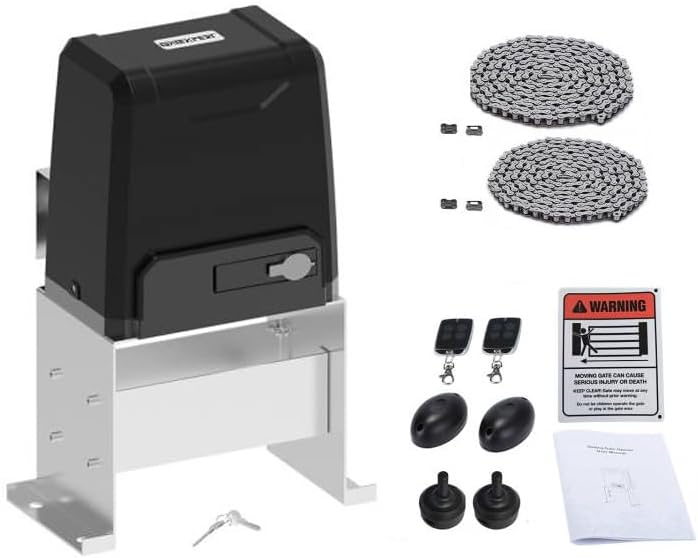
The GATEXPERT GT2200 kit includes the main gate opener unit and essential accessories for installation and operation.
Главне компоненте:
- Gate Opener Unit: The primary motor and control housing.
- Remote Controls (x2): For wireless operation of the gate.
- Infrared Photocell Sensor: Safety device to detect obstructions.
- Drive Chain (20ft): Connects the opener to the gate. Can be shortened or lengthened with compatible chain.
- Хардвер за монтажу: Bolts, nuts, and brackets for installation.
- Знак упозорења: For placement near the gate to alert users of automatic operation.


4. Спецификације
| Феатуре | Спецификација |
|---|---|
| Максимална тежина капије | 2200 фунти (1000 кг) |
| Максимална дужина капије | 40 стопа (12 метра) |
| Chain Length Included | 20 стопа (6 метра) |
| Даљински управљач | Single button (OPEN/STOP/CLOSE/STOP cycle), Pedestrian mode |
| Максималан број подржаних даљинских управљача | 25 |
| Automatic Close Function | Adjustable (12, 24, 36 seconds) or disabled |
| Карактеристике контролне плоче | Soft start and slow stop |
| Тежина артикла | 48 фунти |
| Димензије производа | 13.4 к 9.3 к 20.1 инча (340 мм к 237 мм к 510 мм) |
| Боја | Црно |

5. Подешавање и инсталација
Careful installation is crucial for the safe and efficient operation of your gate opener. Professional installation is recommended.
5.1 Припрема локације
- Ensure the gate slides smoothly and is properly aligned before installing the opener.
- Prepare a stable, level concrete pad or foundation for mounting the opener unit.
- Ensure access to a suitable power supply (AC 110V/60Hz or as per local requirements).
5.2 Mounting the Opener Unit
- Position the opener unit on the prepared foundation, ensuring the drive sprocket aligns with the gate's chain path.
- Secure the unit firmly using the provided mounting hardware.
5.3 Installing the Drive Chain
- Attach the drive chain to the gate, ensuring it is taut but not overly tight, allowing for smooth movement.
- The included chain is 20ft long. If your gate requires a longer chain, ensure to use the same type of chain for extension. If shorter, remove excess links.
5.4 Wiring and Electrical Connections
- Connect the power supply to the control board inside the opener unit. Refer to the wiring diagram provided in the separate detailed wiring manual (if applicable).
- Install the infrared photocell sensor on both sides of the gate opening, ensuring they are aligned and connected to the control board as per instructions. This is a crucial safety device.
5.5 Подешавање граничног прекидача
- Adjust the limit switches to define the gate's fully open and fully closed positions. This prevents the gate from over-traveling.
6. Упутство за употребу
Your GATEXPERT GT2200 gate opener offers convenient and secure operation.
6.1 Рад на даљинском управљачу
- The remote control operates in a single-button mode for the main gate function. Pressing the same button cycles through OPEN → STOP → CLOSE → STOP.
- The remote also features a dedicated button for pedestrian mode, allowing the gate to open partially for foot traffic.
- Up to 25 remote controls can be programmed to the system. Refer to the programming section in the detailed manual for adding or removing remotes.
6.2 Automatic Close Function
- The gate can be configured to close automatically after a set period.
- Auto-close times can be set to 12, 24, or 36 seconds. This function can also be disabled.
- Consult the control board settings section in the detailed manual to adjust this feature.
6.3 Infrared Photocell Sensor Function
- During the closing process, if the infrared beam of the photocell sensor is interrupted by an obstruction, the gate will immediately reverse and open.
- This feature is designed to protect users and property from being struck by the moving gate. Ensure the sensors are clean and unobstructed.
6.4 Soft Start and Slow Stop
- The intelligent control board incorporates soft start and slow stop functions. This means the gate begins and ends its movement gradually, reducing wear and tear on the motor and extending the life of the gate opener.
7. Одржавање
Regular maintenance ensures the longevity and reliable operation of your gate opener.
- месечно: Inspect the gate for smooth movement, ensuring no binding or excessive friction. Check the drive chain for proper tension and lubricate if necessary.
- Квартално: Clean the infrared photocell sensors to ensure their beams are not obstructed by dirt, dust, or spiderwebs. Test the safety reversal mechanism by intentionally breaking the beam during closing.
- Годишње: Check all mounting hardware for tightness. Inspect electrical wiring for any signs of wear or damage. Lubricate all moving parts of the gate and opener as recommended by the gate manufacturer.
- Keep the area around the gate opener clear of debris and vegetation.
КСНУМКС. Решавање проблема
Погледајте табелу испод за уобичајене проблеме и њихова могућа решења.
| Проблем | Могући узрок | Решење |
|---|---|---|
| Капија не реагује на даљински управљач. | Dead remote battery, remote out of range, remote not programmed, power outage. | Replace remote battery, move closer to opener, reprogram remote, check power supply. |
| Капија се отвара, али се не затвара. | Photocell sensor obstructed or misaligned, limit switch issue. | Clear and align photocell sensors, check limit switch settings. |
| Gate stops unexpectedly during operation. | Obstruction detected by safety sensor, motor overheating, mechanical binding. | Check for obstructions, allow motor to cool, inspect gate for smooth movement. |
| Капија се креће споро или са потешкоћама. | Insufficient lubrication, worn chain, gate binding. | Lubricate chain and gate rollers, inspect chain for wear, check gate alignment. |
| Нема напајања за јединицу. | Circuit breaker tripped, power cord disconnected. | Check circuit breaker, ensure power cord is securely plugged in. |
Ако наиђете на проблеме који нису наведени овде или ако решења не реше проблем, обратите се корисничкој подршци.
9. Гаранција и подршка
GATEXPERT products are manufactured to high-quality standards and are backed by a manufacturer's warranty. Please refer to the warranty card included with your product for specific terms and conditions.
For technical assistance, troubleshooting, or parts inquiries, please contact GATEXPERT customer support through the retailer where you purchased the product or visit the official GATEXPERT webсајт за контакт информације.
Онлине ресурси: Visit the GATEXPERT Store on Amazon
Ask a question about this manual
Ask about setup, troubleshooting, compatibility, parts, safety, or missing instructions. Manuals+ will review the question and use this page’s manual context to help answer it.