
TEEHO TE002L
TEEHO TE002L Fingerprint Door Lock with 2 Lever Handles Instruction Manual
Model: TE002L | Brand: TEEHO
Увод
This manual provides comprehensive instructions for the installation, setup, operation, maintenance, and troubleshooting of your TEEHO TE002L Fingerprint Door Lock. Please read this manual carefully before installation and retain it for future reference.
Видео: Оверview of the TEEHO TE002L Fingerprint Door Lock, highlighting its key features and functionality.
Шта је укључено
The TEEHO TE002L Fingerprint Door Lock package includes the following components:
- Склоп спољашње тастатуре
- Унутрашња скупштина
- 2 Ручице полуге
- Деадболт Латцх
- Монтажна плоча
- Стрике Плате
- Screws and Installation Hardware
- Резервни кључеви (2)
- Ресет Тоол
- Упутство за инсталацију

Image: All components included in the TEEHO TE002L Fingerprint Door Lock package, laid out for easy identification.
Упутство за инсталацију
Follow these steps to properly install your TEEHO TE002L Fingerprint Door Lock. Ensure your door is compatible with the lock's dimensions (1-3/8" to 2" thick, 2-3/8" or 2-3/4" backset).
1. Припремите врата
- Уклоните све постојеће браве са врата.
- Verify door dimensions and drill holes if necessary, according to the provided template (not included in this manual).

Image: Diagram illustrating door thickness and backset measurements for compatibility with the TEEHO TE002L lock, suitable for both left-handed and right-handed doors.
2. Инсталирајте резу
- Insert the deadbolt latch into the door edge. Ensure the "TOP" indicator on the latch is facing upwards.
- Причврстите затварач приложеним завртњима.
3. Инсталирајте спољашњи склоп
- Feed the cable from the exterior keypad assembly through the door hole and under the latch.
- Поравнајте завршни део са средишњим отвором засунa.
- Press the exterior assembly firmly against the door.
4. Инсталирајте монтажну плочу
- Place the mounting plate on the interior side of the door, aligning it with the exterior assembly.
- Secure the mounting plate using the long screws, ensuring the cable is not pinched.
5. Инсталирајте унутрашњи склоп
- Повежите кабл са спољашњег склопа на унутрашњи склоп.
- Ensure the thumbturn on the interior assembly is in the vertical (unlocked) position.
- Attach the interior assembly to the mounting plate and secure it with screws.
- Test the thumbturn to ensure smooth operation.
6. Install the Lever Handles
- Insert the spindle of the exterior lever handle through the latch mechanism.
- Attach the interior lever handle, ensuring it engages correctly with the spindle.
- Secure both lever handles with the provided screws.
7. Инсталирајте заштитну плочу
- Поравнајте запорну плочу са резом на оквиру врата.
- Secure the strike plate with the provided screws.
Video: Detailed installation guide for the TEEHO TE002L Fingerprint Door Lock, demonstrating each step from preparing the door to securing the components.
Подешавање и програмирање
After installation, you need to set up and program your lock. The default master code is 12345678. It is required that you change it to a code of your own before programming any other features.
1. Restore to Factory Settings (Initial Setup)
- Install 3 AA batteries into the interior assembly.
- Using the reset tool (or a similar pointed object), press and hold the reset button located inside the battery compartment.
- While holding the reset button, insert the 4th AA battery.
- Continue holding the reset button for 5 seconds until you hear a long "Beep". This indicates a successful reset.
2. Промените главни код
- Press the "TEEHO" button twice.
- Enter the current Master Code (default: 12345678).
- Press the "TEEHO" button.
- Press "1".
- Enter your new Master Code (4-10 digits).
- Press the "TEEHO" button.
- Re-enter your new Master Code.
- Press the "TEEHO" button. (A green light flash indicates success).
3. Додај кориснички код
- Press the "TEEHO" button twice.
- Унесите свој главни код.
- Press the "TEEHO" button.
- Press "2".
- Enter a new User Code (4-10 digits).
- Press the "TEEHO" button.
- Поново унесите нови кориснички код.
- Press the "TEEHO" button. (A green light flash indicates success).
4. Add User Fingerprints
- Press the "TEEHO" button twice.
- Унесите свој главни код.
- Press the "TEEHO" button.
- Press "4".
- Scan the user's fingerprint 8 times, each time succeeding with a short beep. (A green light flash indicates success).

Image: A hand demonstrating the fingerprint unlock feature on the TEEHO TE002L lock, highlighting its biometric identification capabilities.
5. Функција аутоматског закључавања
- To enable/disable Auto-Lock: Press the "TEEHO" button twice, enter Master Code, press "TEEHO", then press "7". Press "1" to enable or "2" to disable.
- To set Auto-Lock time delay (10-99 seconds): Press the "TEEHO" button twice, enter Master Code, press "TEEHO", then press "0". Enter the desired duration (e.g., 30 for 30 seconds), then press "TEEHO".

Image: A woman carrying a baby and groceries, illustrating the convenience of the auto-lock feature of the TEEHO TE002L lock, which can be set to lock automatically after 10-99 seconds.
6. Закључавање једним додиром
- To activate one-touch locking, press and hold any key on the keypad for 2 seconds. The door will lock immediately.
7. Једнократни ПИН код
- To add a one-time PIN code: Press the "TEEHO" button twice, enter Master Code, press "TEEHO", then press "9". Enter the new one-time user code, press "TEEHO", re-enter the code, then press "TEEHO". This code will be automatically deleted after one use.
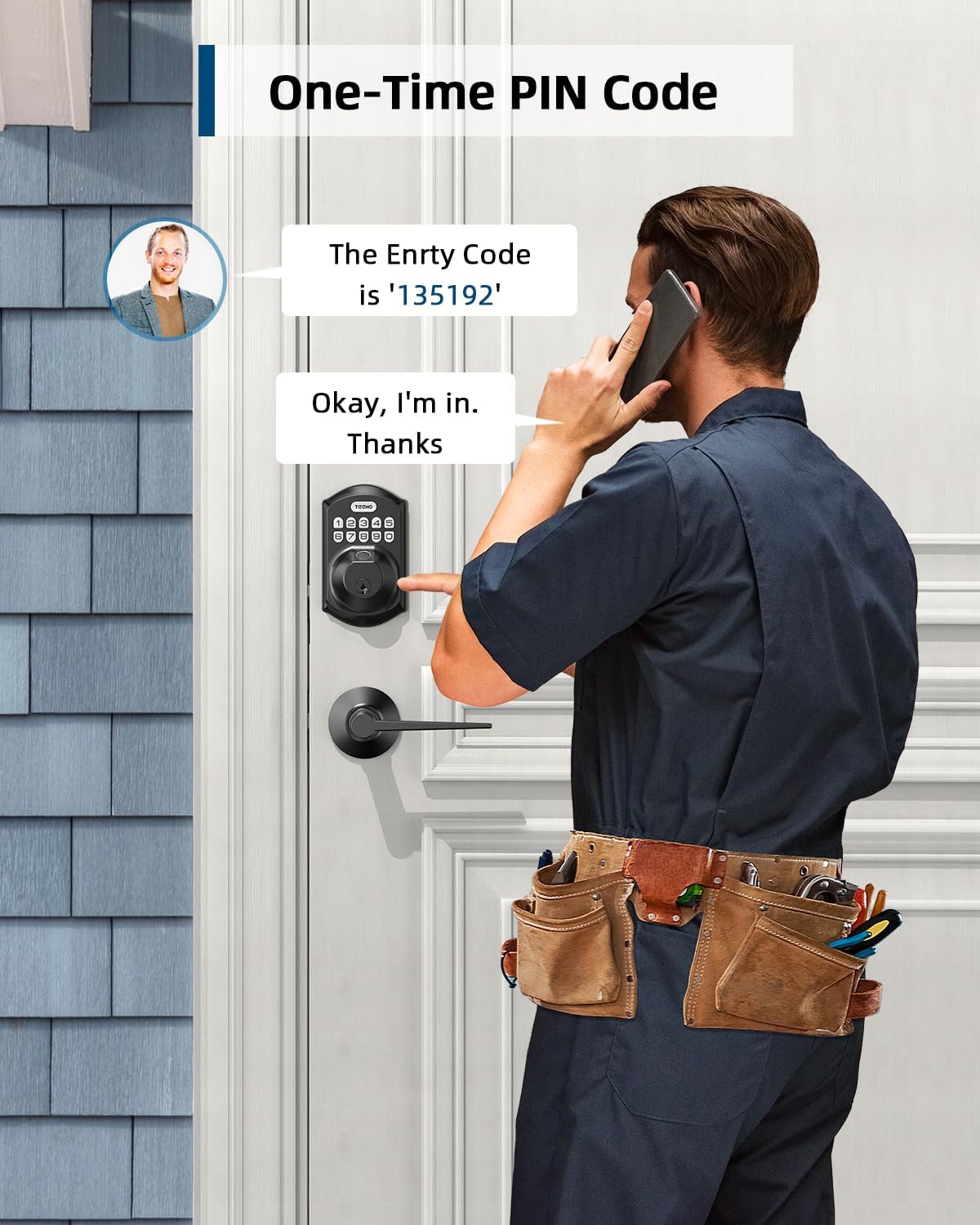
Image: A man receiving a one-time PIN code via phone, demonstrating the temporary access feature of the TEEHO TE002L lock for visitors or service providers.
8. Anti-Peeping PIN Code
- To prevent others from seeing your code, you can enter random digits before or after your actual PIN code. The lock will still recognize the correct sequence within the longer entry.

Image: A hand entering an anti-peeping PIN code on the TEEHO TE002L keypad, showing how random digits can be added before or after the actual code for privacy.
9. Начин одмора
- To enable/disable Vacation Mode: Press the "TEEHO" button twice, enter Master Code, press "TEEHO", then press "8". (A green light flash indicates Vacation Mode is enabled). In this mode, all user codes and fingerprints are temporarily disabled, and only the Master Code or physical key can unlock the door.
10. Тихи режим
- To enable/disable Silent Mode: Press the "TEEHO" button twice, enter Master Code, press "TEEHO", then press "6". Press "1" to enable or "2" to disable. This mutes all beeps and sounds from the lock.
Video: Programming guide for the TEEHO TE002L Smart Lock, detailing steps for changing the master code, adding user codes, adding fingerprints, and setting various modes.
Карактеристике и функције
- 3D Fingerprint Unlock: 99.99% biometric fingerprint recognition rate, unlocks in 0.3 seconds.
- Улаз без кључа: Supports up to 20 access codes (4-10 digits) and fingerprints. One-time PIN codes can be set for temporary access.
- Аутоматско закључавање: Can be set to lock automatically in 10-99 seconds.
- Закључавање једним додиром: Press and hold any key on the keypad for 2 seconds to lock the door.
- Погрешно ограничење уноса кода: Keypad deactivates for 3 minutes after 10 unsuccessful attempts with an invalid password.
- Безбедносна брава: ANSI Grade 3 rated, made with sturdy lock cylinder and alloy.
- Снага: Powered by 4 AA batteries, providing over 1 year of battery life. Features a low battery indicator.
- Отпорност на временске услове: IP54 rating, operates well in temperatures from -22°F to 158°F.

Слика: Прекоview of the TEEHO TE002L lock's key features, including support for multiple fingerprints and user codes, auto-lock, IP54 weather resistance, one-time PIN codes, one-touch locking, and a low battery indicator.
Одржавање
- Замена батерије: Replace all four AA batteries when the low battery indicator appears. Use alkaline batteries for optimal performance.
- Чишћење: Wipe the keypad and lock body with a soft, dry cloth. Avoid abrasive cleaners or solvents.
- подмазивање: Periodically lubricate the latch mechanism with a silicone-based lubricant to ensure smooth operation.
- Ажурирања фирмвера: Check the TEEHO website or app (if applicable) for any available firmware updates to ensure optimal performance and security.
Решавање проблема
| Проблем | Могући узрок | Решење |
|---|---|---|
| Брава не реагује / Нема струје | Истрошене батерије. | Замените све четири АА батерије. |
| Keypad deactivated | 10 incorrect code entries. | Wait 3 minutes for the keypad to reactivate. |
| Отисак прста није препознат | Finger is dirty, wet, or improperly placed. Fingerprint not registered. | Ensure finger is clean and dry. Place finger flat on the sensor. Re-register fingerprint if necessary. |
| Auto-lock not working | Auto-lock feature is disabled or time delay is too long. | Enable Auto-Lock and set the desired time delay in programming. |
| Lock does not lock/unlock smoothly | Неправилно поравнање компоненти браве или оквира врата. | Check installation for proper alignment. Ensure door frame strike plate is correctly positioned. |
Спецификације
- Бренд: ТЕЕХО
- Назив модела: Fingerprint Door Lock with 2 Lever Handles
- Број модела ставке: TE002L
- Тип браве: Биометријски
- Посебна карактеристика: Fingerprint, Keypad, Auto-Lock, One-Touch Lock, One-Time PIN Code, Anti-Peeping Code, Silent Mode, Vacation Mode
- Материјал: легирани челик
- Боја: Мат црна
- Димензије артикла (Д к Ш к В): 1 к 1 к 1 инча
- Тежина артикла: 3.7 фунте (1.68 килограма)
- Извор напајања: 4 АА батерија (нису укључене)
- Трајање батерије: Више од 1 година
- Отпорност на временске услове: ИП54
- Радна температура: -22°Ф до 158°Ф
- Оцена безбедности: АНСИ разред 3
- Протокол повезивања: Нон-цоннецтед
Гаранција и подршка
TEEHO offers a 1-year warranty on all parts and lifetime customer service for the TE002L Fingerprint Door Lock. This includes online phone support from Monday to Friday, 9 AM to 5 PM PST, and 24/7 online email service.
For assistance, please contact TEEHO customer support:
- Телефонска подршка: Monday - Friday, 9 AM - 5 PM PST
- Подршка путем е-поште: Онлајн услуга доступна 24/7
Ask a question about this manual
Ask about setup, troubleshooting, compatibility, parts, safety, or missing instructions. Manuals+ will review the question and use this page’s manual context to help answer it.