
Увод
This manual provides instructions for the proper setup, operation, and maintenance of your Motorola Talkabout T460 Two Way Radio. Please read this manual thoroughly before using your device to ensure optimal performance and safety.
The Motorola Talkabout T460 is designed for reliable communication with features such as IP54 weatherproof rating, 22 channels, 121 privacy codes, and various power options.
Садржај пакета
The Motorola Talkabout T460 8-Pack includes the following items:
- 8 Motorola T460 2-Way Radios
- 8 NiMH Rechargeable Battery Packs
- 4 Micro USB Wall Charging Cables
- 8 копче за појас
- 4 Корисничка упутства
Сетуп
1. Инсталација батерије
Your T460 radio can be powered by either the included NiMH rechargeable battery pack or three AA alkaline batteries (not included).
- Уверите се да је радио искључен.
- Пронађите поклопац одељка за батерију на задњој страни радија.
- Притисните резу надоле и скините поклопац.
- Insert the NiMH battery pack or three AA batteries, observing the polarity markings (+/-).
- Вратите поклопац одељка за батерију, водећи рачуна да се сигурно уклопи на своје место.
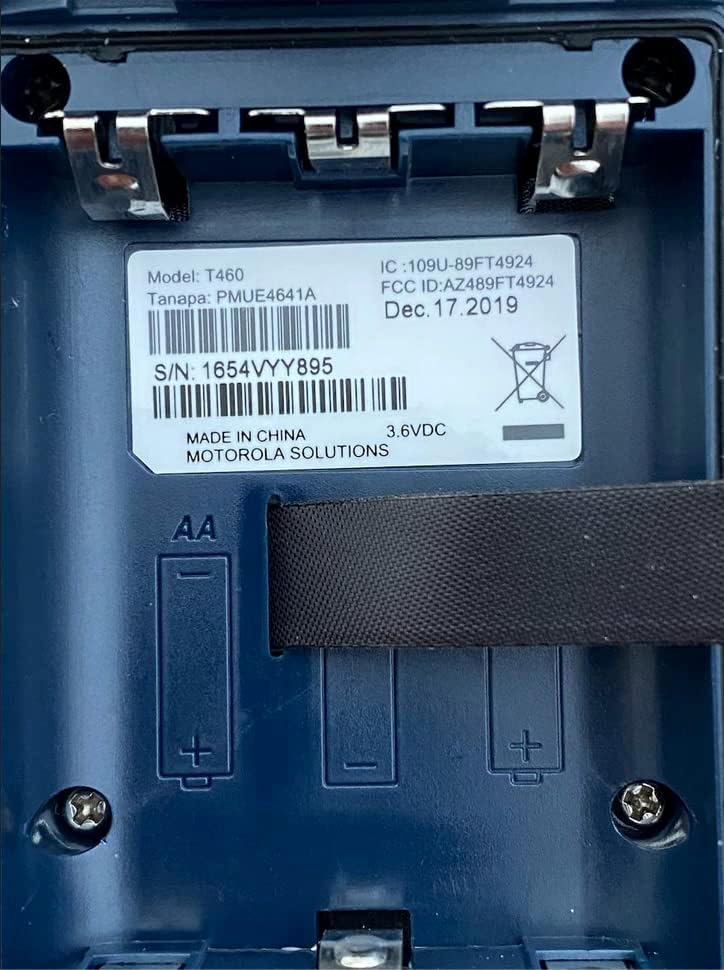
Слика 1: Battery compartment of the Motorola T460 radio, showing the label with model information and slots for AA batteries.
2. Charging the NiMH Battery Pack
The included NiMH battery packs can be charged using the micro-USB wall charging cables. Charging can be done via a standard wall outlet, a vehicle adapter, or a computer USB port.
- Connect the micro-USB cable to the charging port on the radio.
- Connect the other end of the cable to a power source (wall adapter, vehicle adapter, or computer).
- The battery indicator on the radio display will show charging status.
- Потпуно пуњење обично траје неколико сати.
3. Причвршћивање копче за каиш
To attach the belt clip, align the clip with the grooves on the back of the radio and slide it downwards until it locks into place.
Упутство за употребу
1. Укључивање/искључивање
Да бисте укључили или искључили радио, окрените дугме за укључивање/искључивање/јачину звука у смеру казаљке на сату или супротно од смера казаљке на сату док не чујете клик.
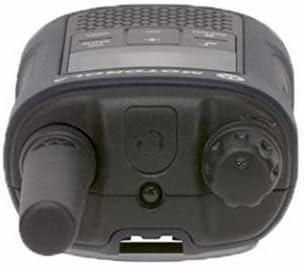
Слика 2: Врх view of the Motorola T460 radio, highlighting the On/Off/Volume knob on the right side.
2. Подешавање јачине звука
Rotate the On/Off/Volume knob to adjust the listening volume.
3. Избор канала
Your T460 radio has 22 channels. Use the Мени дугме и Горе/Доле дугмад за одабир канала.
4. Кодови за приватност
The radio supports 121 privacy codes per channel, totaling 2,662 combinations. This helps reduce interference from other users. To set a privacy code, enter the menu and navigate to the privacy code setting for the selected channel.
5. Пренос и пријем
- За пренос: Press and hold the Push-to-Talk (PTT) button located on the side of the radio. Speak clearly into the microphone. Release the PTT button to listen.
- За пријем: Ensure the PTT button is not pressed. The radio will automatically receive transmissions on the selected channel and privacy code.

Слика 3: Дно view of the Motorola T460 radio, displaying the 'Talkabout' branding. The PTT button is on the side, not visible in this view.
6. PTT Power Boost
The PTT power boost feature allows you to temporarily increase the transmitter power output to extend transmission range when needed. This feature also helps conserve battery life when maximum range is not required.
7. iVOX/VOX (Hands-Free Communication)
The iVOX/VOX feature enables hands-free communication by detecting your voice and automatically transmitting. This is useful when your hands are occupied. Refer to the radio's on-screen menu for activation and sensitivity settings.
8. VibraCall™ Alert
Activate the VibraCall feature for silent alerts in situations where an audible ring tone might be disruptive.
9. Call Tones
Customize your radio's call tone by selecting from the available options in the menu settings.
10. Weather Alert and NOAA Weather Radio
The T460 can receive real-time weather conditions and alerts. Turn on the weather channel or enable weather alerts to stay informed. Note: NOAA radio service availability may vary by region. Consult your local weather office for details.
11. Emergency Alert Button
In an emergency, press the dedicated emergency alert button. The radio will transmit an alert siren followed by spoken or incidental sounds, signaling distress to other radios within range.
12. Уграђена ЛЕД батеријска лампа
Activate the integrated LED flashlight for illumination during low-light conditions or emergencies.
Одржавање
1. Брига о батерији
- Always use genuine Motorola NiMH battery packs or recommended AA alkaline batteries.
- Charge NiMH batteries fully before first use.
- Do not overcharge or leave batteries discharged for extended periods.
- Remove batteries if the radio will not be used for a long time.
2. Чишћење
Обришите спољашњост радија меком крпомamp cloth. Do not use harsh chemicals or abrasive cleaners. Ensure the charging port cover is securely closed to maintain the IP54 weatherproof rating.
3. Заштита од временских услова
The T460 radio has an IP54 weatherproof rating, meaning it is protected against dust and splashing water from any direction. While it can withstand rain and snow, it is not designed for submersion. Ensure all port covers are sealed to maintain water resistance.
Решавање проблема
| Проблем | Могуће решење |
|---|---|
| Радио се не укључује. |
|
| Не може се преносити или примати. |
|
| Лош квалитет звука. |
|
| Трајање батерије је кратко. |
|
Спецификације
| Модел | Т460 |
| Канали | 22 канала ФРС |
| Кодови за приватност | 121 (CTCSS/DCS) |
| Отпорност на временске услове | ИП54 отпоран на временске услове |
| Тип батерије | NiMH Rechargeable Pack (included) or 3 AA Alkaline Batteries (not included) |
| Трајање батерије (приближно) | Up to 10 hours (NiMH), Up to 26 hours (AA) |
| Волtage | 9 Волтс |
| Дисплаи Типе | ЛЕД |
| Посебне карактеристике | Weather Alert, Emergency Alert, iVOX/VOX, VibraCall, LED Flashlight, PTT Power Boost |
| Тежина предмета (паковање од 8 комада) | 5.52 фунти |
| Package Dimensions (8-pack) | 10.63 к 9.96 к 9.84 инча |
Информације о гаранцији
The Motorola Talkabout T460 Two Way Radio comes with a Двогодишња гаранција произвођача од датума куповине. Ова гаранција покрива недостатке у материјалу и изради при нормалној употреби. Молимо вас да сачувате доказ о куповини за потребе подношења захтева за гаранцију.
For full warranty terms and conditions, please refer to the separate warranty document included with your product or visit the official Motorola Solutions webсајту.
Подршка
For technical assistance, troubleshooting beyond this manual, or to inquire about replacement parts, please contact Motorola Solutions customer support.
- Подршка на мрежи: Visit the official Motorola Solutions webсајт за често постављана питања и ресурсе за подршку.
- Телефонска подршка: Погледајте контакт информације које се налазе на паковању производа или на званичном webсајту.