
Увод
Хвала вам на куповиниasing the Walfront Wooden LED Digital Alarm Clock. This manual provides comprehensive instructions to help you set up, operate, and maintain your new alarm clock. Please read this guide thoroughly before use to ensure proper functionality and longevity of the product.
Производ је завршенview и кључне карактеристике
The Walfront Wooden LED Digital Alarm Clock combines functionality with a sleek, natural design. Its wooden and ABS material construction ensures durability and a pleasant aesthetic. The clock features a clear LED display and several convenient functions.

Image: The Walfront Wooden LED Digital Alarm Clock, showcasing its digital display for time, date, and day of the week.
Карактеристике:
- Издржљив материјал: Constructed from wood and ABS material, providing a textured, durable, and long-lasting design.
- ЛЕД дигитални дисплеј: Features a clear LED light digital display that illuminates through the smoothed wooden surface, visible even in low light.
- Функција гласовне контроле: Activates the display to show time, date, and day of the week simultaneously upon detecting sound.
- Опције формата времена: Supports both 12-hour and 24-hour time systems.
- Подесива осветљеност: Offers three levels of brightness adjustment for comfortable viewинг у различитим условима осветљења.
- Вишеструки аларми: Includes three independent alarm functions.
- Weekday Alarm Setting: Option to set alarms to activate only on weekdays.
Водич за подешавање
Напајање уређаја:
The Walfront Digital Alarm Clock can be powered in two ways:
- УСБ кабл за пренос података: Connect the provided USB data cable to the DC 5V port on the back of the clock and plug the other end into a compatible USB power adapter (not included) or a USB port.
- ААА батерије: For portable use or as a backup, insert four (4) AAA batteries (not included) into the battery compartment located on the back of the clock. Ensure correct polarity.
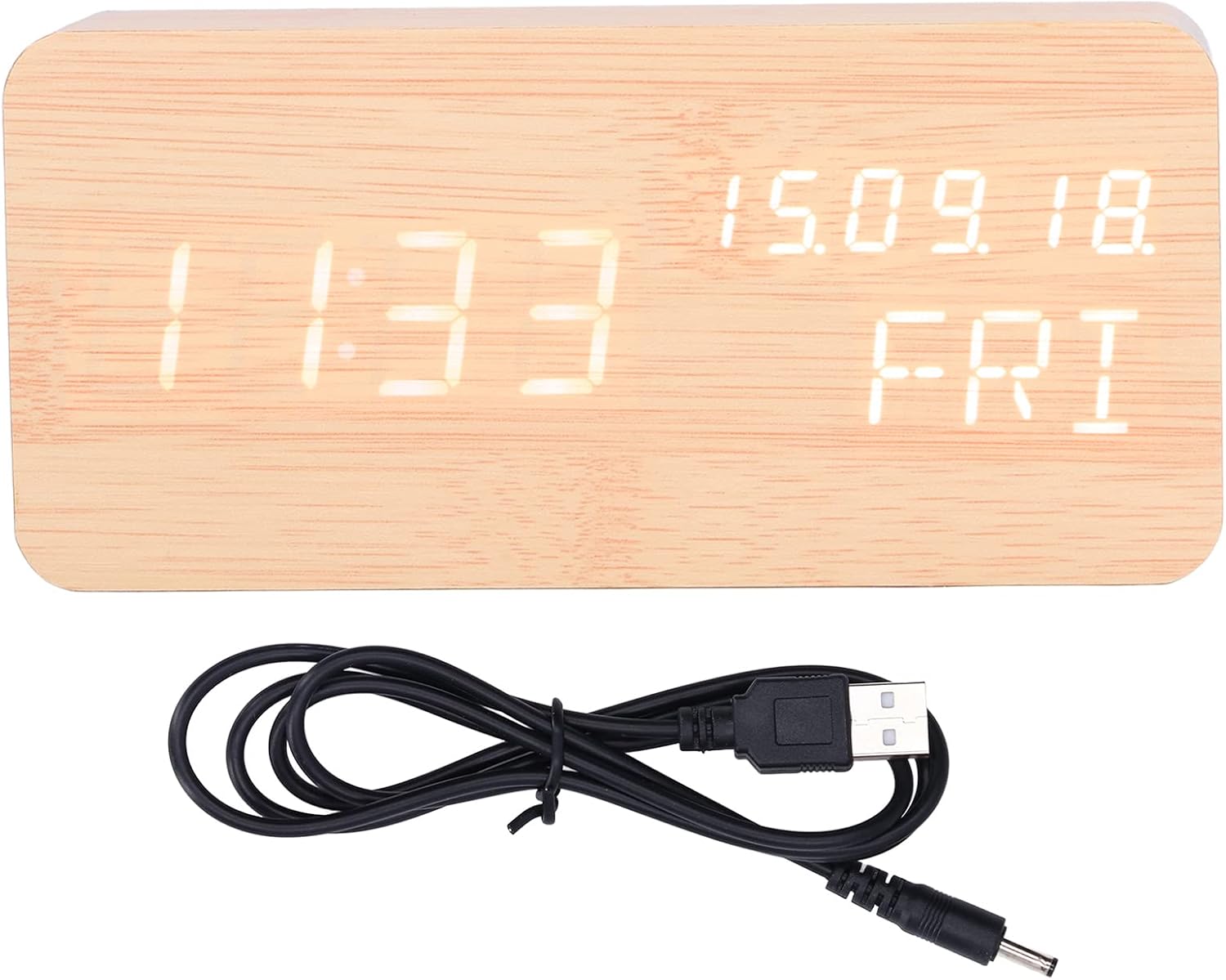
Image: The USB power cable used to power the alarm clock.

Слика: Позади view of the alarm clock, highlighting the battery compartment and control buttons (SET, UP, DOWN).
Упутство за употребу
The clock features three control buttons on the back: СЕТ, UP, и ДОВН.
Подешавање времена и датума:
- Притисните и држите СЕТ button to enter time setting mode. The display will flash.
- Користите UP и ДОВН дугмад за подешавање сата. Притисните СЕТ да потврдите и пређете на минуте.
- Подесите минуте помоћу UP/ДОВН, а затим притисните СЕТ потврдити.
- Наставите овај поступак да бисте подесили годину, месец и дан.
- After setting the date, you can select 12-hour or 24-hour format using UP/ДОВН, а затим притисните СЕТ.

Image: Two Walfront alarm clocks, demonstrating the display of time, date, and day of the week.
Подешавање аларма:
The clock supports three independent alarms (AL1, AL2, AL3).
- У режиму нормалног приказа времена, притисните СЕТ button repeatedly to cycle through AL1, AL2, AL3 settings.
- When an alarm (e.g., AL1) is displayed, press and hold СЕТ to enter its setting mode.
- Користите UP/ДОВН to adjust the alarm hour, then press СЕТ.
- Adjust alarm minutes with UP/ДОВН, а затим притисните СЕТ.
- You can then choose to enable/disable the alarm or set it for weekdays only (indicated by 'ON E' for weekday alarm). Use UP/ДОВН да изаберете, а затим притисните СЕТ потврдити.
- Repeat for AL2 and AL3 as needed.
Подешавање осветљености:
The clock offers three levels of brightness. In normal time display mode, press the UP button to cycle through the brightness levels (L1, L2, L3, where L3 is brightest).
Функција гласовне контроле:
To activate the voice control function, ensure the clock is in power-saving mode (display off). A sound (e.g., clap, tap) will temporarily illuminate the display to show the time, date, and day of the week.

Image: The alarm clock displaying the current temperature in Celsius, alongside the date and day.
Одржавање
- Чишћење: Use a soft, dry cloth to wipe the surface of the clock. Avoid using abrasive cleaners or solvents, which may damage the wooden finish or display.
- Пласман: Place the clock on a stable, flat surface. Avoid direct sunlight, high temperatures, or high humidity, which can affect the wood and electronic components.
- Замена батерије: If using batteries, replace all four AAA batteries simultaneously when the display dims or functions become erratic. Do not mix old and new batteries.
- Извор напајања: When not in use for extended periods, disconnect the USB power cable and remove batteries to prevent leakage.
Решавање проблема
| Проблем | Могући узрок | Решење |
|---|---|---|
| Екран је затамњен или се не види. | Low battery power or brightness setting is too low. | Replace batteries or connect via USB. Press UP to adjust brightness level. |
| Clock not responding to voice control. | Voice control feature might be off or ambient noise is too low. | Ensure the clock is in power-saving mode (display off). Make a louder sound to activate. |
| Аларм се не оглашава. | Alarm is not set or is set for weekdays only and it's a weekend. | Check alarm settings (AL1, AL2, AL3) and ensure they are enabled for the desired days. |
| Приказано је погрешно време или датум. | Time/date was not set correctly or power interruption. | Re-enter time and date settings as per "Setting Time and Date" instructions. |
Спецификације производа
| Феатуре | Детаљ |
|---|---|
| Врста ставке | Аларм Цлоцк |
| Материјал | Wood, ABS |
| Величина производа | Approx. 150 x 40 x 70 mm / 5.9 x 1.6 x 2.8 inches |
| Тежина артикла | 9.2 унци |
| Повер Суппли | USB data cable (DC 5V), 4 x AAA batteries (not included) |
| Функције приказа | Time, Date, Week, Temperature (Celsius/Fahrenheit) |
| Временски систем | 12/24 hour system |
| Бригхтнесс Левелс | 3 нивоа подесивих |
| Функције аларма | 3 sets of alarms, Weekday alarm option |
| Посебне карактеристике | Функција контроле гласа |
| Број модела | WALFRONT73dgi05csv |
Гаранција и подршка
For warranty information or technical support, please refer to the retailer's return policy or contact Walfront customer service directly. Keep your purchase receipt as proof of purchase.