
SHANREN MAX 30
Shanren MAX 30 Bicycle Computer User Manual
Модел: МАКС 30
1. Производ је готовview
The Shanren MAX 30 is an advanced GPS smart bike computer designed to provide comprehensive cycling data and control capabilities. Featuring a clear 3-inch display, it offers accurate speed measurement, power estimation, and seamless integration with the ShanrenSport application. It also includes unique control over the RazPro Tail Light and automatic data synchronization with platforms like StravaTrip.
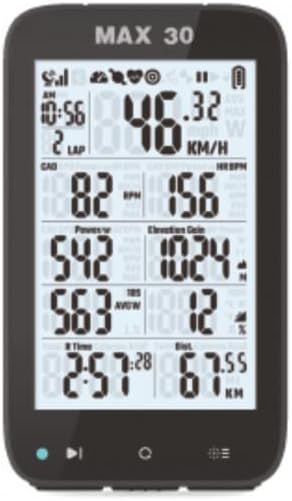
Слика 1.1: Предња страна view of the Shanren MAX 30 Bicycle Computer displaying speed, cadence, heart rate, power, elevation gain, time, and distance.
2. Садржај пакета
Молимо вас да проверите да ли су све ставке присутне у вашем пакету:
- MAX30 bicycle counter
- Кабл за пуњење
- Steering wheel holder
3. Кључне карактеристике
- Easy to read 3" display
- Control from ShanrenSport app
- Power estimation
- ГПС праћење
- RazPro Tail Light Control
- Прилагодљив дисплеј
- Automatic route download
- Auto-sync with StravaTrip
- Loop page switching
- Full colour LED indicator
4. Подешавање
4.1 Монтажа уређаја
Attach the provided steering wheel holder securely to your bicycle's handlebars or stem. Ensure it is tightened sufficiently to prevent movement during rides. Once the holder is in place, align the MAX 30 bicycle computer with the mount and twist it until it clicks securely into position.
4.2 Почетно укључивање
To power on the device for the first time, press and hold the power button (usually located on the side or bottom) for a few seconds until the display illuminates.
4.3 Пуњење
Before first use, it is recommended to fully charge the MAX 30. Connect the provided charging cable to the device's charging port and plug the other end into a standard USB power adapter (not included) or a computer USB port. The device will indicate charging status on its display.

Image 4.1: The Shanren MAX 30 Bicycle Computer shown on a flat surface, indicating its compact size and readiness for charging or setup.
5. Упутство за употребу
5.1 Основна навигација
The MAX 30 features intuitive buttons for navigation. Typically, there are buttons for power/menu, selection, and page switching. Refer to the on-screen prompts for specific functions.
5.2 GPS функционалност
Upon powering on, the device will automatically search for a GPS signal. For best results, ensure you are in an open area with a clear view of the sky. Once a signal is acquired, the GPS icon on the display will become solid, indicating readiness for tracking.
5.3 Sensor Pairing (ANT+/BLE)
The MAX 30 supports ANT+ and Bluetooth Low Energy (BLE) sensors. To pair a sensor (e.g., heart rate monitor, cadence sensor, power meter):
- Ensure the sensor is active and within range of the MAX 30.
- Идите до менија „Упаривање сензора“ на уређају.
- Select the type of sensor you wish to pair.
- The MAX 30 will scan for available sensors. Select your sensor from the list to complete pairing.
5.4 ShanrenSport App Integration
Download the ShanrenSport app from your smartphone's app store. Connect your MAX 30 to the app via Bluetooth. The app allows for device configuration, data review, firmware updates, and more.

Image 5.1: Cyclists interacting with the ShanrenSport app on a smartphone, demonstrating the app's ability to display ride data and maps, complementing the MAX 30 computer.
5.5 RazPro Tail Light Control
The MAX 30 can control compatible RazPro Tail Lights. Once paired, you can manage light modes and settings directly from your bike computer, enhancing safety and convenience.
5.6 Прилагођавање екрана
The MAX 30 allows for customization of its display fields. Through the device settings or the ShanrenSport app, you can select which data metrics are shown on each screen, arranging them to your preference for optimal readability during rides.
5.7 Data Sync with StravaTrip
After completing a ride, you can automatically sync your ride data to StravaTrip (and other compatible platforms) via the ShanrenSport app. Ensure your accounts are linked within the app settings for seamless uploads.
6. Одржавање
6.1 Чишћење
Редовно бришите уређај меком крпомamp cloth. Avoid using harsh chemicals or abrasive cleaners, which can damage the display or casing.
6.2 Одржавање батерије
To prolong battery life, avoid exposing the device to extreme temperatures. Charge the device regularly, even if not in frequent use, to maintain battery health.
6.3 Ажурирања фирмвера
Periodically check for firmware updates via the ShanrenSport app. Updates can provide new features, performance improvements, and bug fixes. Follow the app's instructions carefully during the update process.
КСНУМКС. Решавање проблема
- Нема GPS сигнала: Ensure you are in an open area. Allow several minutes for the device to acquire a signal.
- Сензор се не повезује: Check if the sensor's battery is charged and if it's active. Ensure the sensor is within range and try re-pairing it through the device settings.
- Проблеми са приказом: If the display is unresponsive or frozen, try restarting the device by holding the power button until it turns off, then power it back on.
- Data Sync Problems: Verify your internet connection and ensure the ShanrenSport app is updated. Check linked accounts within the app settings.
8. Спецификације
| Атрибут | Детаљ |
|---|---|
| Број модела | МАКС 30 |
| Бранд | СХАНРЕН |
| Боја | Црно |
| Величина екрана | 3 инча |
| Дисплаи Типе | ЛЦД |
| Врста материјала | полипропилен |
| Укључене компоненте | Steering wheel holder, Charging Cable, MAX30 bicycle counter |
| Sensor Types Supported | Power, NP power, power 3s/10s/30s, LR balance, calories, speed, cadence, heart rate, ascend, inclination, lap distancing (travel/total), cycling time (travel/total) |
| Димензије пакета | 12 к 6 к 5 цм |
| Тежина артикла | 100 г |
| Први доступан датум | 13. новембар 2023 |
9. Гаранција и подршка
For detailed warranty information, technical support, and customer service, please refer to the official SHANREN website or contact their authorized distributors. Keep your proof of purchase for any warranty claims.
You can visit the SHANREN store for more information: SHANREN Store on Amazon
Ask a question about this manual
Ask about setup, troubleshooting, compatibility, parts, safety, or missing instructions. Manuals+ will review the question and use this page’s manual context to help answer it.