
1. Увод и крајview
The Beelink SER3 3200U Mini PC is a compact and versatile computing device designed for a wide range of applications, from office productivity to 4K media playback. This manual provides essential information for the proper setup, operation, maintenance, and troubleshooting of your device. Please read this manual thoroughly before using your Mini PC.
2. Садржај пакета
Upon unboxing your Beelink SER3 3200U Mini PC, please verify that all the following items are included:
- Beelink SER3 3200U Mini PC
- Адаптер за напајање (19В/3.42А)
- HDMI Cables (100cm)
- Wall-Mounted Bracket with screws
- Упутство за употребу
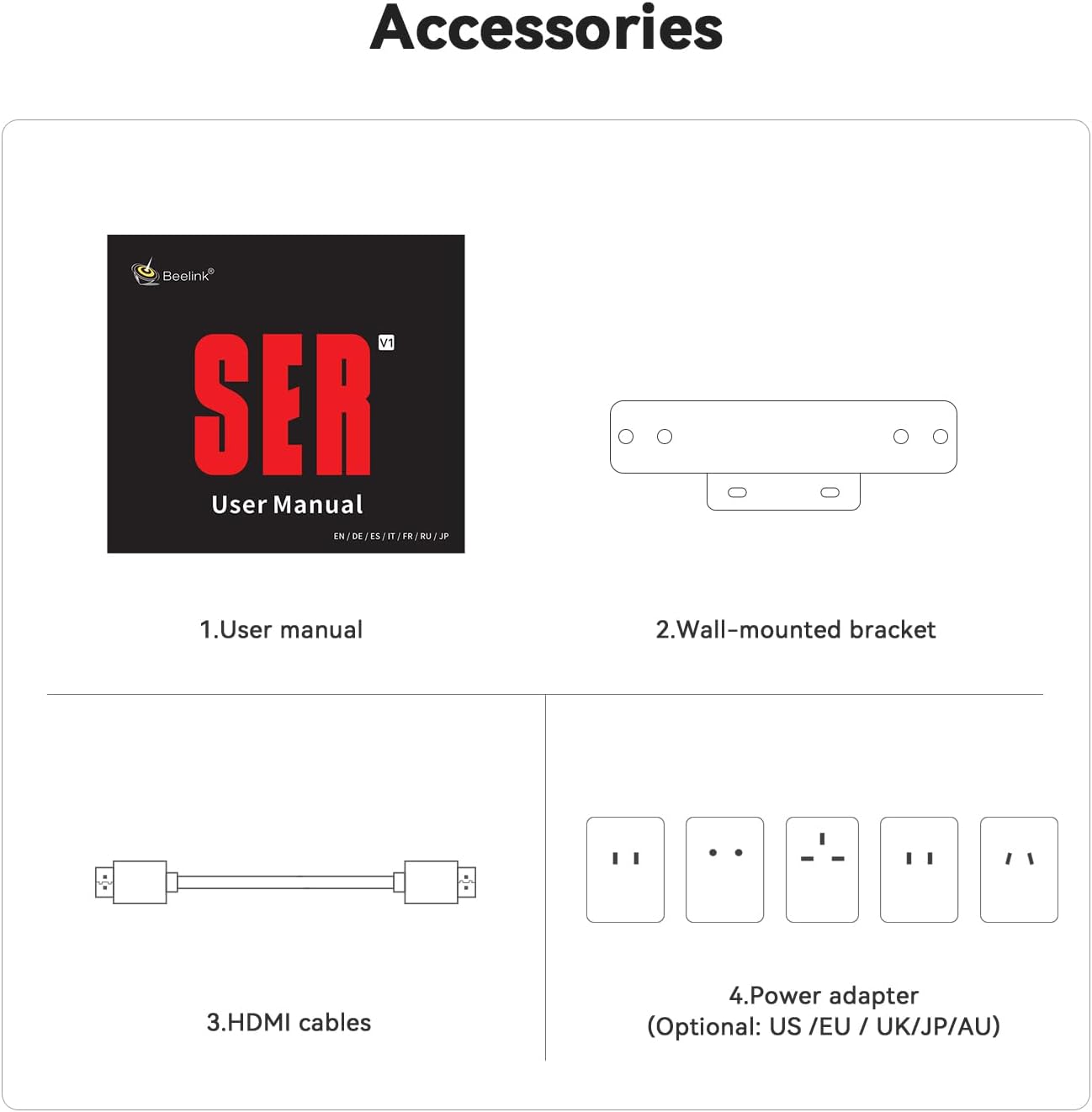
Опис: This image shows the standard accessories provided with the Beelink SER3 Mini PC, including the user manual, wall-mounted bracket, HDMI cables, and the power adapter.
3. Карактеристике производа
The Beelink SER3 3200U Mini PC offers a robust set of features for efficient performance:
- процесор: AMD Ryzen 3 3200U (2C/4T, 2.6GHz up to 3.5GHz)
- Графика: 3-core AMD Radeon Vega 3 Graphics (1200MHz)
- Меморија: Dual-channel DDR4 16GB RAM (expandable up to 32GB)
- Складиштење: 500GB M.2 PCIe 3.0 X4 SSD (supports up to 2TB M.2 NVMe SSD and 2.5-inch SATA HDD/SSD)
- Оперативни систем: Pre-installed Windows 11 Pro
- Приказ излаза: Dual HDMI outputs supporting up to 4K 60Hz
- Повезивање: WiFi 5 (2.4G+5GHz), Bluetooth 5.0, Gigabit Ethernet (1000M LAN)
- Портови: 1x DC Jack, 2x HDMI, 4x USB 3.2 10Gbps, 1x RJ45 1000M LAN, 1x Audio Jack (HP&MIC)
- Хлађење: Efficient cooling system with a quiet large fan and dual heat pipes
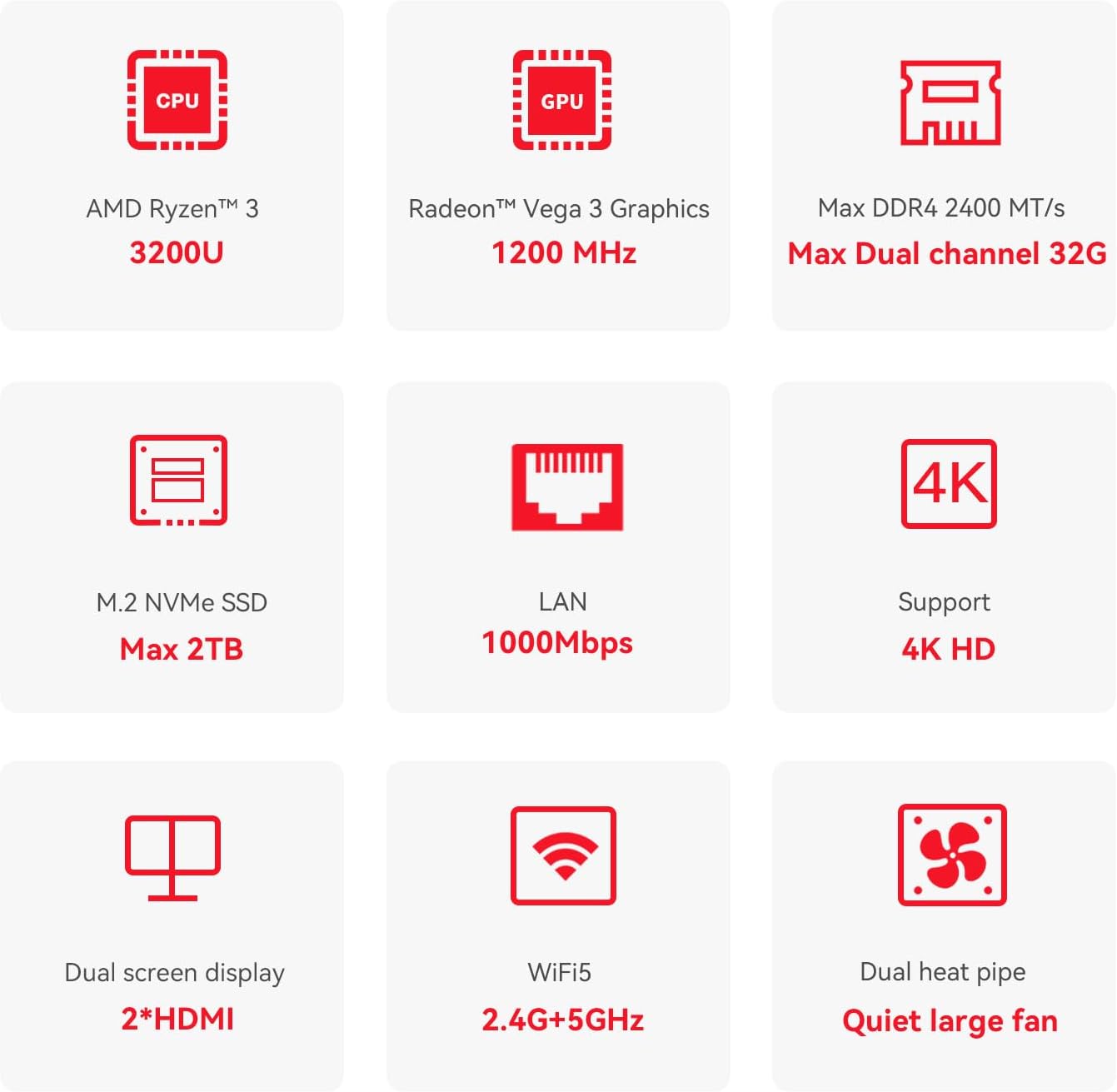
Опис: This diagram highlights the core specifications and features of the Beelink SER3 Mini PC, such as its AMD Ryzen 3 3200U CPU, Radeon Vega 3 Graphics, expandable DDR4 RAM, M.2 NVMe SSD support, 4K display capability, dual HDMI outputs, WiFi 5, 1000Mbps LAN, and efficient cooling system.
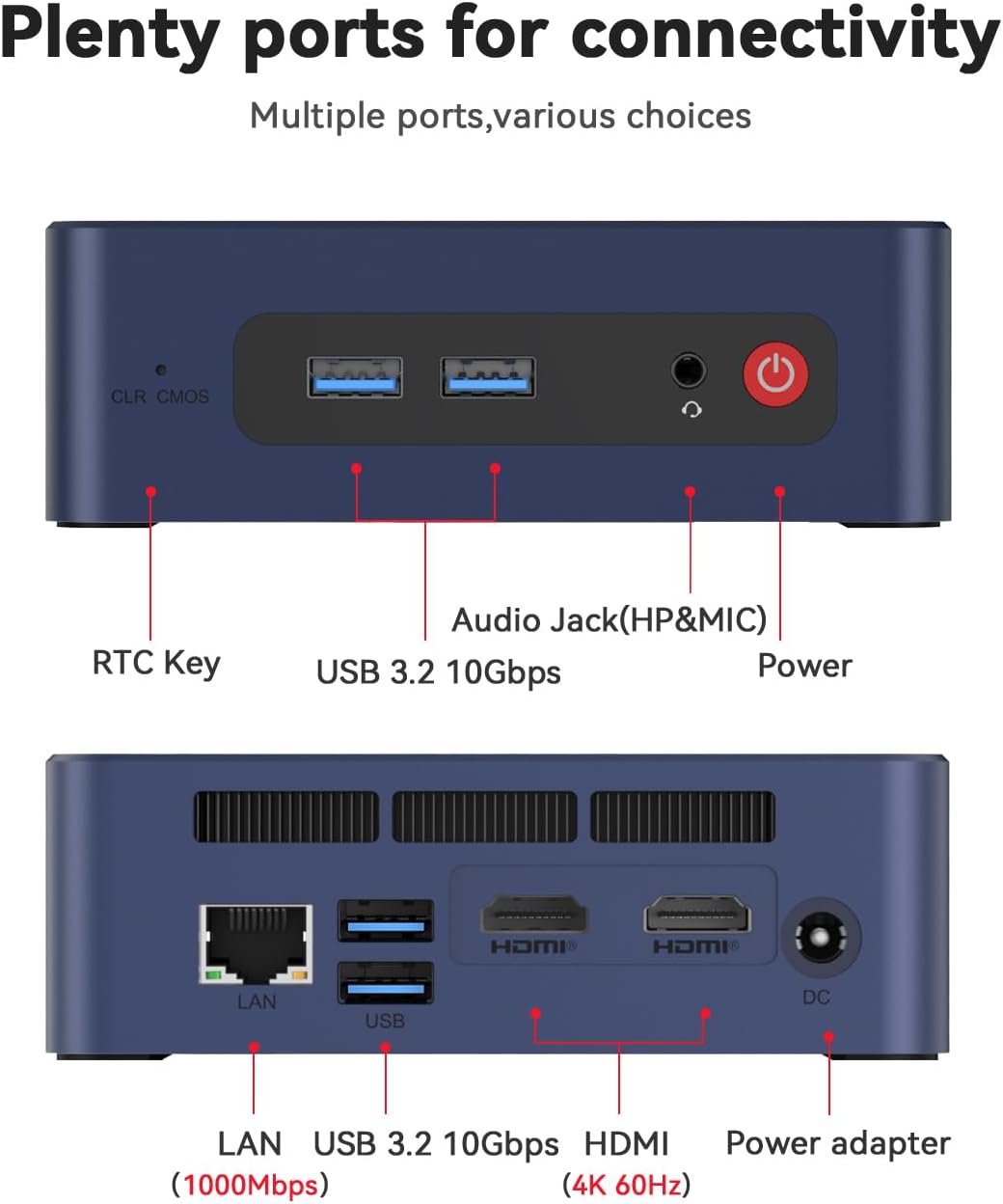
Опис: Ова слика пружа детаљан view of the front and rear ports of the Beelink SER3 Mini PC, illustrating the location of the RTC Key, USB 3.2 ports, Audio Jack, Power button, LAN port, HDMI outputs, and DC power input.
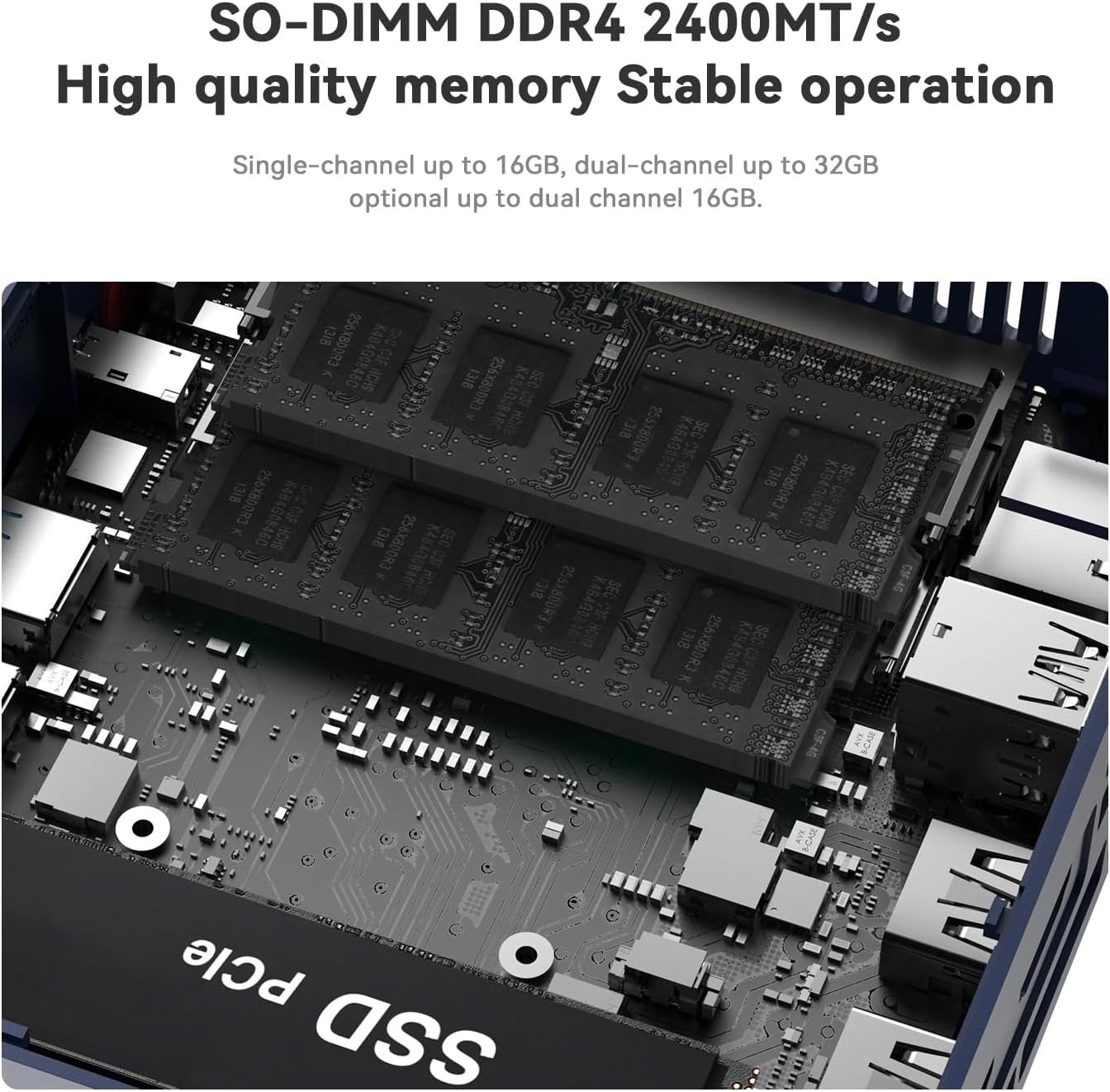
Опис: Унутрашњи view of the Beelink SER3 Mini PC, showcasing the SO-DIMM DDR4 memory slots and the M.2 NVMe SSD slot, indicating upgrade possibilities.
4. Водич за подешавање
4.1 Почетно повезивање
- Повежи екран: Use an HDMI cable to connect your monitor(s) to the HDMI ports on the back of the Mini PC. The device supports dual 4K displays.
- Повежите периферне уређаје: Plug in your USB keyboard and mouse into the available USB 3.2 ports.
- Прикључите напајање: Insert the power adapter into the DC Jack on the Mini PC and then plug it into a power outlet.
- Укључено: Press the power button located on the front of the Mini PC.

Опис: This image demonstrates the Beelink SER3 Mini PC connected to two external monitors, highlighting its dual-screen display capability for enhanced productivity.
4.2 Мрежна веза
- Жична веза: Connect an Ethernet cable from your router or modem to the RJ45 LAN port on the Mini PC.
- Бежична веза: Once powered on, Windows 11 Pro will guide you through connecting to a Wi-Fi network. The device supports WiFi 5 (802.11ac).
4.3 Монтажа на зид (опционо)
The Beelink SER3 Mini PC can be mounted behind a monitor using the included wall-mounted bracket for a clutter-free setup.
- Attach the bracket to the Mini PC using the provided screws.
- Fix the bracket to the back of your display (if VESA compatible) or a wall using appropriate screws.

Опис: This diagram visually explains how to easily install the Beelink SER3 Mini PC using the provided wall-mounted bracket, showing it attached to the back of a monitor.
5. Упутство за употребу
5.1 Прво покретање и подешавање Windows-а
On the first boot, follow the on-screen instructions to complete the Windows 11 Pro setup, including language selection, network connection, and user account creation.
5.2 Дневни рад
- Укључивање/искључивање: Press the power button to turn the device on. To turn off, use the Windows Shut Down option or press and hold the power button for a few seconds.
- Поново покрени: Use the Windows Restart option for system reboots.
- Режим спавања: The system will enter sleep mode after a period of inactivity, or you can manually select it from the Windows power options.
5.3 Dual Display Configuration
With two HDMI ports, you can extend your desktop across two screens or duplicate your display. Configure these settings through Windows Display Settings (Right-click on desktop > Display settings).
6. Одржавање
6.1 Чишћење
- Regularly clean the exterior of the Mini PC with a soft, dry cloth.
- Use compressed air to gently clear dust from the ventilation openings to ensure proper airflow and cooling.
6.2 Ажурирања софтвера
Keep your Windows operating system and drivers updated to ensure optimal performance and security. Windows Update will typically handle this automatically, but you can check manually via Settings > Windows Update.
6.3 Проширење складишног простора
The Mini PC supports storage expansion:
- An additional 2.5-inch SATA HDD or SSD (500GB~2TB) can be installed.
- The M.2 PCIe 3.0 X4 SSD can be upgraded to a larger capacity (up to 2TB).
6.4 Систем хлађења
The Beelink SER3 Mini PC features a large fan and dual heat conduction tubes for efficient heat dissipation. Ensure the vents are not obstructed to maintain optimal operating temperatures.

Опис: Ова слика пружа унутрашњи view of the Beelink SER3 Mini PC's cooling solution, highlighting the large fan and dual heat pipes designed to efficiently dissipate heat and maintain system stability.
КСНУМКС. Решавање проблема
If you encounter issues with your Beelink SER3 Mini PC, refer to the following common solutions:
| Проблем | Могући узрок | Решење |
|---|---|---|
| No power/Device does not turn on | Power adapter not connected or faulty; Power button issue | Ensure power adapter is securely connected to both the Mini PC and a working power outlet. Try a different outlet. |
| Нема приказа на монитору | HDMI cable loose or faulty; Incorrect input selected on monitor | Check HDMI cable connections. Ensure your monitor is set to the correct HDMI input source. Try a different HDMI cable or monitor. |
| Wi-Fi or Bluetooth not working | Drivers not installed; Wireless adapter disabled | Check Device Manager in Windows for wireless adapter status. Ensure Wi-Fi/Bluetooth is enabled in Windows settings. Update drivers if necessary. |
| Систем је спор или не реагује | Too many applications running; Insufficient RAM; Overheating | Close unnecessary applications. Check Task Manager for resource usage. Ensure proper ventilation and clean dust from vents. Consider upgrading RAM or SSD if frequently slow. |
| Cannot connect to LAN | Ethernet cable loose or faulty; Network driver issue | Check Ethernet cable connection. Verify network settings in Windows. Update LAN drivers. |
If the problem persists after attempting these solutions, please contact Beelink customer service for further assistance.
8. Спецификације
Detailed technical specifications for the Beelink SER3 3200U Mini PC:

Опис: This image presents a comprehensive table of the Beelink SER3 Mini PC's product specifications, detailing its dimensions, CPU, graphics, system disk, internal slots, interfaces, wireless LAN, power components, operating environment, storage environment, accessories, and additional functions.
| Феатуре | Детаљ |
|---|---|
| Бранд | Беелинк |
| Број модела | СЕР |
| Оперативни систем | Виндовс 11 Про |
| ЦПУ модел | АМД Ризен 3 3200У |
| Брзина процесора | 2.6 GHz (up to 3.5 GHz boost) |
| Грапхицс Цопроцессор | AMD Radeon Vega 3 Graphics (1200MHz) |
| Капацитет меморије | 16 GB DDR4 (2400 MHz, expandable to 32 GB) |
| Опис чврстог диска | 500GB NVMe M.2 SSD (PCIe 3.0 X4) |
| Additional Storage Support | 1x 2.5-inch SATA HDD/SSD slot (500GB~2TB) |
| Бежична технологија | Wi-Fi 5 (802.11ac), Bluetooth 5.0 |
| Етхернет | 1000М ЛАН (РЈ45) |
| Видео Оутпут | 2x HDMI (supports 4K@60Hz dual display) |
| УСБ портови | 4к УСБ 3.2 10Гбпс |
| Аудио Јацк | 1x HP&MIC Audio Jack |
| Повер Инпут | ДЦ прикључак (19В / 3.42А) |
| Димензије | 124 к 113 к 42 мм |
| Тежина артикла | 0.95 килограма |
| Метод хлађења | Air (Quiet large fan, dual heat pipe) |
9. Гаранција и подршка
Beelink is committed to providing excellent customer service and product reliability.
- гаранција: Your Beelink SER3 3200U Mini PC comes with a 3-year worry-free warranty.
- техничка подршка: Lifetime technical support is available for all Beelink products.
- Служба за кориснике: 24-hour customer service is provided to assist with any inquiries or issues.
For support, please refer to the contact information provided in your product packaging or visit the official Beelink webсајту.