
Увод
The TAXNELE THC30A is a digital programmable timer switch designed for automatic control of various electrical equipment. It features daily and weekly programming capabilities with up to 20 ON/OFF settings, a manual override function, and a built-in lithium battery for power-off memory. This manual provides detailed instructions for installation, operation, and maintenance to ensure safe and efficient use of your timer switch.
Безбедносне информације
- Уверите се да је напајање искључено пре инсталације или одржавања.
- Инсталацију треба да изврши квалификовани електричар или стручна особа.
- Do not exceed the maximum load capacity of 30A / 5000W.
- Држите уређај даље од воде и екстремних температура.
- Verify correct wiring connections to prevent damage to the device or connected appliances.
Карактеристике производа
- Програмабилна контрола: Up to 20 ON/OFF settings per day or week.
- Меморија за искључење: Built-in 3V lithium battery maintains timing, display, and data storage for up to 3 years during power interruptions.
- Висока прецизност: Industrial-grade chip for accurate timing.
- Ручно замена: Allows temporary or permanent manual control.
- ЛЦД екран: Clear digital display for easy programming and monitoring.
- Din Rail Mount: Designed for easy installation on a standard DIN rail.
- Широка примена: Suitable for street lights, neon lamps, advertising signs, production equipment, and home appliances.

Figure 1: The THC30A timer switch highlighting its power-off memory function, which retains data for up to 3 years using a built-in CR2032 lithium battery.

Figure 2: The THC30A timer switch featuring a 30A big load relay for stable and safe operation with various electrical loads.
Product Components and Display
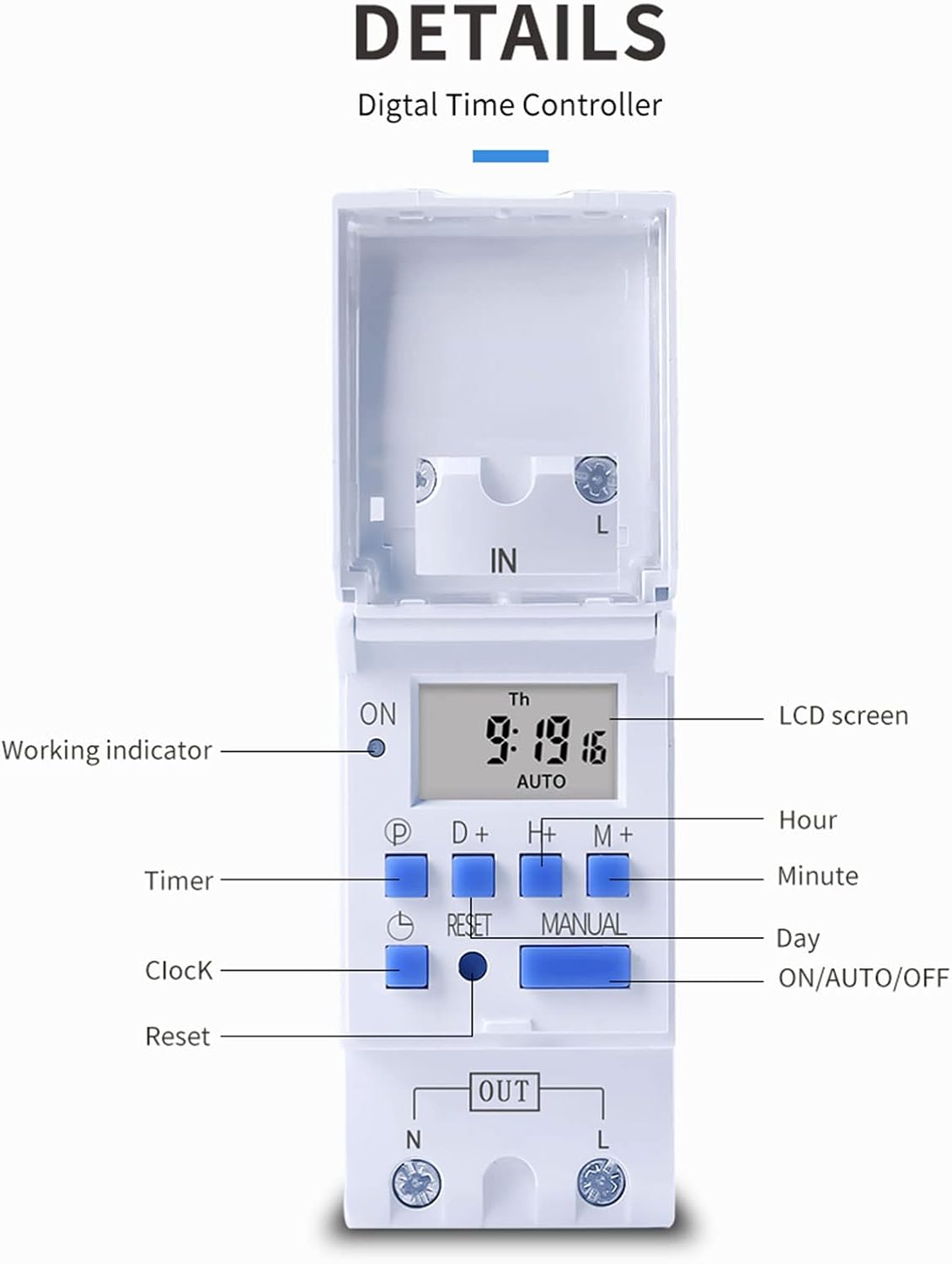
Слика 3: Детаљно view of the THC30A timer switch's LCD screen and control buttons. Labels include Working indicator, Timer, Clock, Reset, P (Program), D+ (Day), H+ (Hour), M+ (Minute), Manual, and ON/AUTO/OFF status.
- ЛЦД екран: Displays current time, day, and ON/OFF status.
- Радни индикатор: LED light indicating operation status.
- П дугме: Enters programming mode.
- D+ Button: Adjusts day in clock setting or program.
- H+ Button: Adjusts hour in clock setting or program.
- M+ Button: Adjusts minute in clock setting or program.
- Дугме сата: Returns to clock display or exits programming mode.
- Дугме за ресетовање: Clears all settings and resets the timer.
- Ручно дугме: Toggles between ON, AUTO, and OFF modes.
Спецификације
| Параметар | Валуе |
|---|---|
| Модел | ТХЦ30А |
| Цуррент Ратинг | 30А |
| Повер Ратинг | 5000В |
| Волtagе Опције | 12V DC AC, 24V DC AC, 48V DC AC, 110V AC, 220V AC |
| Временска грешка | ≤2 seconds/day |
| Дисплаи | ЛЦД |
| Временски опсег | 1 minute to 168 hours (7 days) |
| ОН/ОФФ подешавања | 20 група |
| Радна температура | -20℃ до 50℃ |
| Димензије | КСНУМКС к КСНУМКС к КСНУМКСмм (КСНУМКС к КСНУМКС к КСНУМКС инча) |
| Повер Ресерве | 3V Lithium battery (CR2032 type) for 3 years data retention |

Figure 4: Dimensions of the THC30A timer switch, showing measurements for height, width, and depth for proper installation planning.
Подешавање и инсталација
1. Монтажа
The THC30A timer switch is designed for DIN rail mounting. Securely attach the device to a standard 35mm DIN rail in an appropriate electrical enclosure.
2. Ожичење
УПОЗОРЕЊЕ: Ensure all power is disconnected before performing any wiring.
Connect the input power supply to the "IN" terminals (N for Neutral, L for Live). Connect the load (e.g., light, appliance) to the "OUT" terminals (N for Neutral, L for Live). The timer acts as a switch for the live wire. Refer to the wiring diagram below for correct connections.

Figure 5: Simplified wiring diagram for the THC30A timer switch. The new version offers direct power output, simplifying connections compared to older models.
- Улаз (ИН): Connect your main power supply (e.g., AC 12V, 24V, 48V, 110V, 220V) to these terminals.
- Излаз (ОУТ): Connect your electrical load (e.g., light, motor) to these terminals. The timer controls the power flow to this output.
Упутство за употребу
1. Initial Setup / Reset
Upon first use or after a prolonged power outage, the display may be blank. Press the Ресетуј button (located in a small hole, use a pointed object) to clear all settings and initialize the timer. The LCD will display "0:00" and "AUTO".
2. Подешавање тренутног времена и дана
- Притисните и држите Сат дугме.
- Док држи Сат, притисните D+ to set the current day (Monday to Sunday).
- Док држи Сат, притисните H+ to set the current hour (0-23).
- Док држи Сат, притисните M+ to set the current minute (0-59).
- Отпустите Сат дугме. Време је сада подешено.
3. Програмирање циклуса УКЉУЧИВАЊА/ИСКЉУЧИВАЊА
Тајмер подржава до 20 програма за укључивање/искључивање. Сваки програм се састоји од времена укључивања и времена искључивања.
- Притисните тастер P button once. The display will show "1 ON". This is for the first ON setting.
- Притисните D+ to select the day(s) for this ON event. You can choose a single day, specific days, or blocks of days (e.g., Mon-Fri, Sat-Sun, Mon-Sun).
- Притисните H+ to set the hour for the first ON event.
- Притисните M+ to set the minute for the first ON event.
- Притисните тастер P button again. The display will show "1 OFF". This is for the first OFF setting.
- Поновите кораке 2-4 да бисте подесили дан(е), сат и минут за први ИСКЉУЧЕНИ догађај.
- Наставите да притискате P to cycle through "2 ON", "2 OFF", up to "20 ON", "20 OFF" and set additional programs as needed.
- Након подешавања свих жељених програма, притисните дугме Сат button to exit programming mode and return to the current time display.
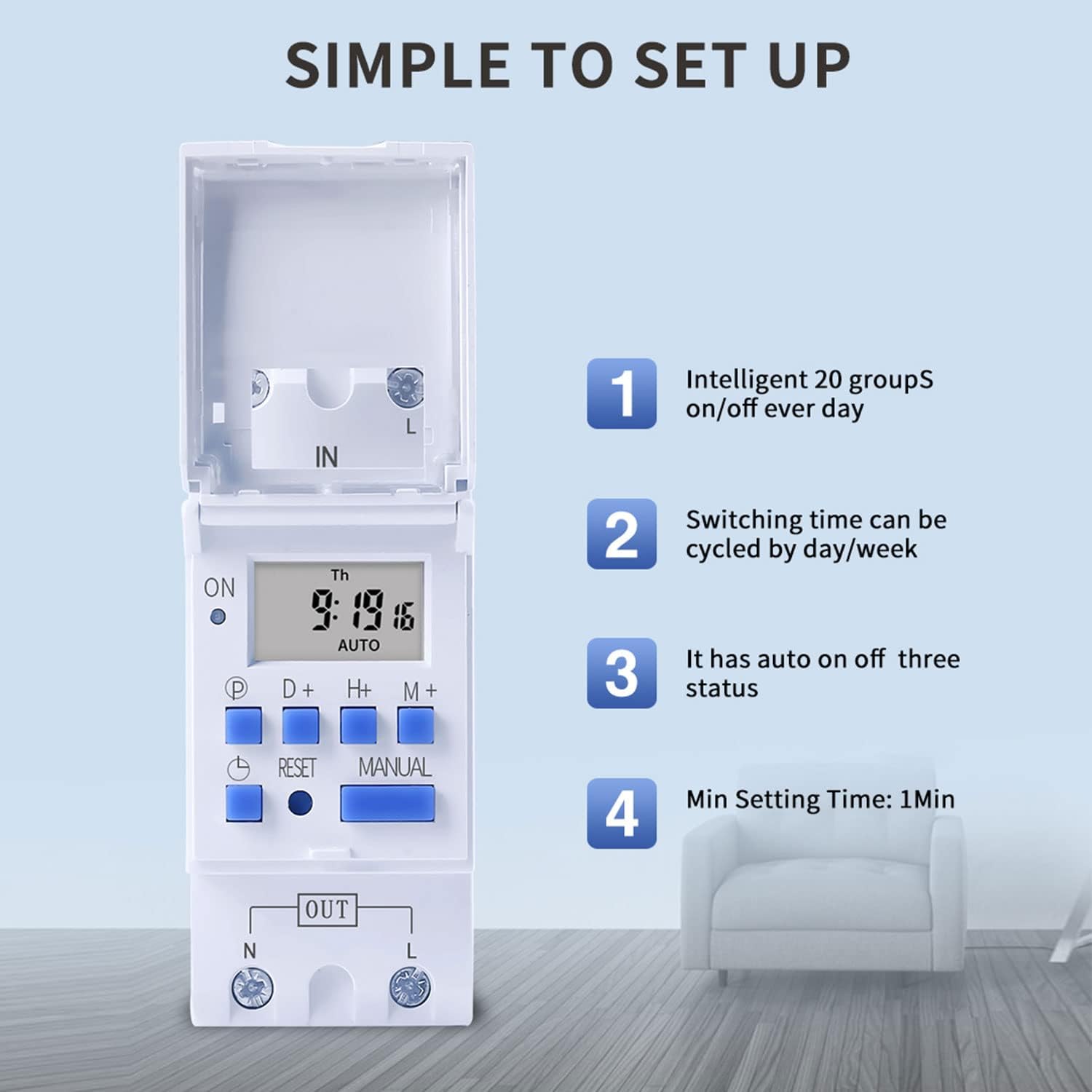
Figure 6: Visual guide to the simple setup of the THC30A timer, highlighting its 20 ON/OFF groups, daily/weekly cycling, auto ON/OFF status, and minimum 1-minute setting time.
4. Мануал Оверриде
Притисните тастер Мануал button to cycle through the output modes:
- НА: The output is continuously ON, overriding all programs.
- АУТО: The output operates according to the programmed ON/OFF cycles. This is the standard operating mode.
- ВАН: The output is continuously OFF, overriding all programs.
Ensure the timer is in АУТО mode for programmed operations to function.
Одржавање
- Keep the timer clean and free from dust. Use a dry, soft cloth for cleaning.
- Немојте користити абразивна средства за чишћење или раствараче.
- The internal lithium battery (CR2032) has a long lifespan (up to 3 years). If the display consistently goes blank after power outages, the battery may need replacement. This should be done by a qualified technician.
Решавање проблема
| Проблем | Могући узрок | Решење |
|---|---|---|
| Екран је празан. | Нема напајања; унутрашња батерија је испражњена. | Check power connections. Press the Reset button. If problem persists, internal battery may need replacement. |
| Timer does not switch ON/OFF as programmed. | Timer is not in AUTO mode; incorrect program settings; current time/day is wrong. | Притисните Мануал until "AUTO" is displayed. Verify program settings (ON/OFF times, days). Check and correct current time and day. |
| Output is always ON or always OFF. | Тајмер је у ручном режиму УКЉУЧЕНО или ИСКЉУЧЕНО. | Притисните Мануал until "AUTO" is displayed. |
| Programs are lost after power outage. | Internal backup battery is depleted. | The internal CR2032 battery may need replacement. Contact support if necessary. |
Апликације
The TAXNELE THC30A timer switch is versatile and can be used in various applications to automate electrical devices:

Слика 7: Прamples of common applications for the THC30A timer switch, including street light control, home appliance control, battery charging control, and advertising light control.
- Street Light Control: Automate the turning ON/OFF of street lights based on time.
- Home Appliance Control: Schedule operation of water heaters, fans, or other household devices.
- Battery Charging Control: Manage charging cycles for batteries to prevent overcharging.
- Advertising Light Control: Program display times for neon signs and advertising boards.
- Production Equipment: Control machinery operation in industrial settings.
Гаранција и подршка
For warranty information or technical support, please refer to the contact details provided with your purchase or visit the official TAXNELE webсајт. Сачувајте рачун као доказ о куповини.