
Увод
This manual provides detailed instructions for the setup, operation, and maintenance of your ATTACK SHARK Wireless Bluetooth/USB Wired Gaming Mechanical Keyboard. This compact 100-key keyboard features RGB backlighting, hot-swappable switches, and multiple connectivity options for versatile use across various devices.

Image: The ATTACK SHARK Wireless Mechanical Keyboard, showcasing its 100-key layout, RGB backlighting, orange coiled USB-C cable, and a cloud-shaped wrist rest.
Садржај пакета
Проверите да ли су све ставке присутне у вашем пакету:
- ATTACK SHARK Wireless Mechanical Keyboard
- Cloud Keyboard Wrist Rest
- USB-C to USB-A Data Cable (Coiled)
- Поклопац за тастере и извлакач прекидача
- 2.4ГХз УСБ пријемник
- Additional Switches (Red Switch type)
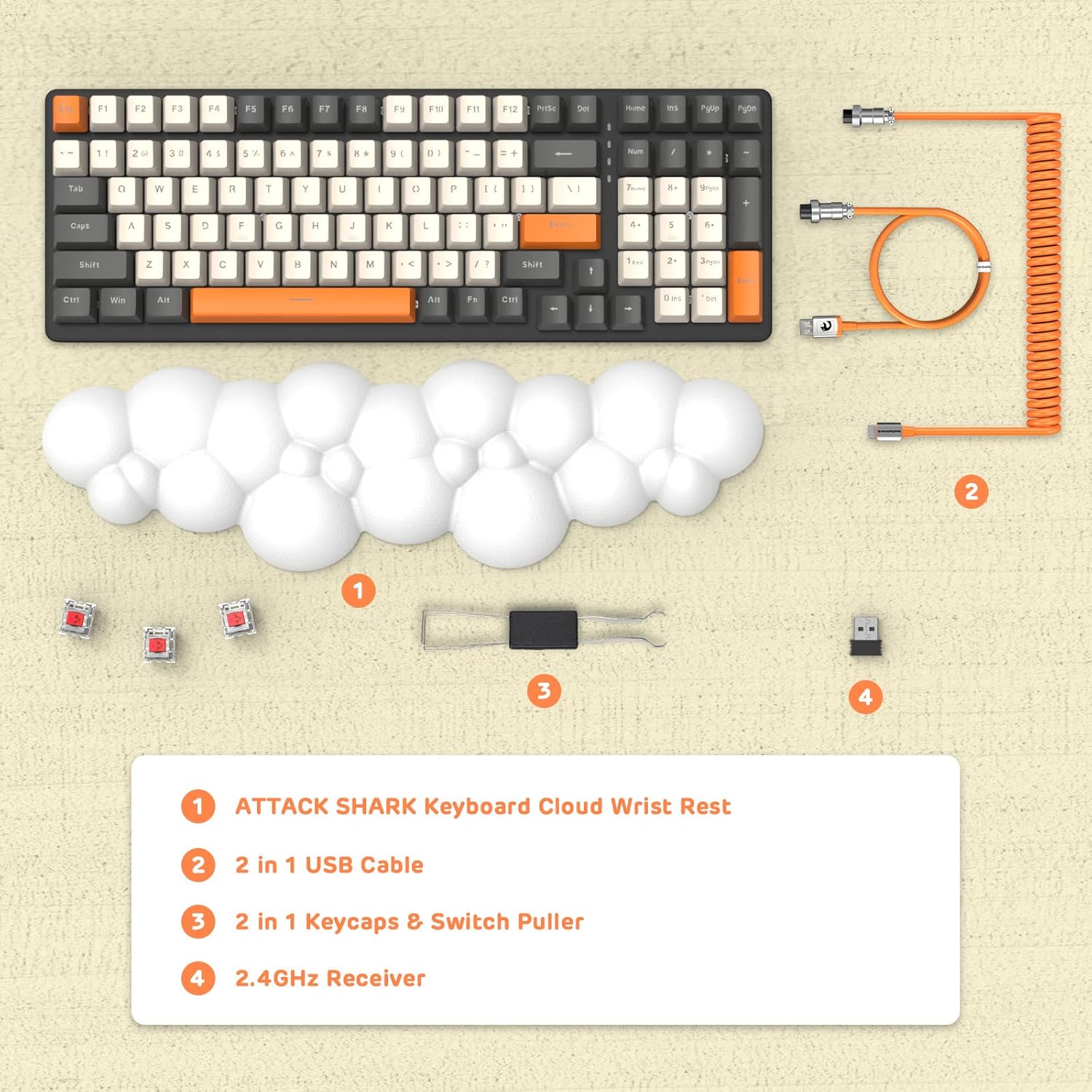
Слика: Изнад главе view displaying the keyboard, cloud wrist rest, coiled USB cable, keycap and switch puller, and 2.4GHz USB receiver, along with spare switches.
Сетуп
The keyboard supports three connection modes: Bluetooth 5.0, 2.4GHz Wireless, and USB-C Wired.
1. Жична веза (USB-C)
- Connect the USB-C end of the provided coiled cable to the keyboard's USB-C port.
- Повежите USB-A крај кабла са доступним USB портом на рачунару.
- The keyboard will automatically switch to wired mode (indicated by FN+5).

Image: A visual representation of the keyboard connecting to various devices (laptop, tablet, desktop, smartphone) via wired USB, 2.4GHz wireless, and Bluetooth.
2. Бежична веза од 2.4 GHz
- Locate the 2.4GHz USB receiver.
- Укључите УСБ пријемник у слободан УСБ порт на рачунару.
- Притисните ФН + 4 on the keyboard to activate 2.4GHz wireless mode. The indicator light will show the connection status.
3. Блуетоотх веза
The keyboard can store up to three Bluetooth devices.
- Притисните и држите ФН + 1, ФН + 2, или ФН + 3 for 3-5 seconds to enter Bluetooth pairing mode for the desired channel. The indicator light will flash rapidly.
- On your device (e.g., laptop, tablet, smartphone), navigate to Bluetooth settings and search for available devices.
- Select "ATTACK SHARK Keyboard" (or similar name) from the list to pair.
- Када се упари, индикаторска лампица ће престати да трепери и остати упаљена.
- Да бисте пребацивали између упарених Bluetooth уређаја, једноставно притисните ФН + 1, ФН + 2, или ФН + 3.
Упутство за употребу
RGB контрола позадинског осветљења
The keyboard features customizable RGB backlighting with multiple modes.
- Пребаците режим позадинског осветљења: Притисните ФН + ИНС да бисте се пребацивали кроз различите RGB светлосне ефекте.
- Подесите осветљеност: Притисните ФН + ↑ (Стрелица нагоре) за повећање осветљености, ФН + ↓ (Стрелица надоле) да бисте смањили осветљеност.
- Подесите брзину: Притисните ФН + ← (Left Arrow) to decrease effect speed, ФН + → (Стрелица удесно) да бисте повећали брзину ефекта.

Image: The keyboard displaying various RGB lighting patterns, with key combinations for switching modes and adjusting brightness/speed.
Прекидачи са заменљивом брзином
The keyboard's PCB supports 3-pin mechanical switches, allowing for easy replacement without soldering. This feature enables customization of typing feel and extends the keyboard's lifespan.
- Користите приложену алатку за извлачење капица тастера да бисте пажљиво уклонили жељену капицу тастера.
- Use the switch puller to gently grasp and remove the switch from the PCB.
- Align the pins of the new 3-pin switch with the holes on the PCB and press firmly until it clicks into place.
- Замените поклопац тастера.

Слика: Детаљна view of the keyboard's PCB with a switch removed, demonstrating the hot-swappable feature. Spare red switches are also shown.
Батерија и пуњење
The keyboard is equipped with a 4000mAh lithium battery.
- Трајање батерије: Up to 200 hours of use with the backlight turned off.
- Пуњење: Connect the keyboard via the USB-C cable to a power source. The charging indicator light will show the charging status.
- Лов Волtagе Индикатор: The keyboard features a low voltage indicator to alert you when charging is required.

Image: The keyboard shown from the side, emphasizing its 4000mAh lithium battery capacity.
Одржавање
Да бисте осигурали дуготрајност и оптималне перформансе ваше тастатуре:
- Чишћење: Use a soft, dry cloth to wipe the keyboard surface. For deeper cleaning, remove keycaps using the provided puller and use compressed air to clear debris from between switches.
- Ослонац за зглоб: The PU material of the wrist rest is durable and washable. Clean with a damp крпом и благим сапуном ако је потребно.
- Складиштење: Чувајте тастатуру на хладном и сувом месту, даље од директне сунчеве светлости и екстремних температура.
- Избегавајте течности: Do not expose the keyboard to liquids. In case of spills, immediately disconnect power and allow it to dry completely before use.
Решавање проблема
| Иссуе | Могући узрок | Решење |
|---|---|---|
| Тастатура не реагује у бежичном режиму. | Low battery, incorrect mode selected, receiver not connected, or Bluetooth not paired. | Charge the keyboard. Ensure correct mode (FN+4 for 2.4G, FN+1/2/3 for Bluetooth) is selected. Verify 2.4G receiver is securely plugged in. Re-pair Bluetooth if necessary. |
| Keys are "sticking" or registering multiple inputs. | Debris under keycap/switch, faulty switch. | Remove keycap and switch, clean thoroughly with compressed air. If issue persists, replace the switch using the hot-swappable feature. |
| RGB backlight not working or dim. | Backlight turned off, brightness set too low, or low battery. | Press FN+INS to cycle modes. Adjust brightness with FN+↑ / FN+↓. Charge the keyboard. |
| Keyboard not recognized by device. | Driver issue, incorrect connection mode, or device compatibility. | Ensure correct connection mode is active. Try a different USB port or device. For wired mode, ensure the cable is fully inserted. Check device's operating system for necessary drivers (usually plug-and-play). |
Спецификације
- Модел: 3b5c1fdb-29da-409c-b4b7-12e9e72fb741
- Повезивање: Bluetooth 5.0, 2.4GHz Wireless (RF), USB-C Wired
- Изглед: Compact 100 Keys (98% layout)
- Прекидачи: Hot-Swappable 3-pin Mechanical (Red Switch variant)
- Позадинско осветљење: RGB позадинско осветљење (9 режима)
- батерија: 4000мАх литијумска батерија
- Компатибилни уређаји: Laptop, PC, Tablet (Mac/Win Supported)
- Материјал: Polyurethane (PU) for wrist rest
- Димензије: 16.97 x 6.42 x 2.52 инча (паковање)
- Тежина артикла: 2.94 фунти
- Посебне карактеристике: Ergonomic design, Custom Coiled Aviator Keyboard Cable, Keycap and Switch Puller included.
Гаранција и подршка
For warranty information and technical support, please refer to the documentation provided with your purchase or visit the official ATTACK SHARK webсајт. Сачувајте доказ о куповини за евентуалне рекламације по гаранцији.
Произвођач: АТТАЦК СХАРК
Датум прве доступности: 8. маја 2023. године