
VAIO VJPF11C11N
VAIO Pro PF (VJPF11C11N) Notebook PC User Manual
1. Увод
This manual provides essential information for setting up, operating, maintaining, and troubleshooting your VAIO Pro PF (Model: VJPF11C11N) notebook PC. Please read this manual thoroughly before using your device to ensure proper and safe operation.
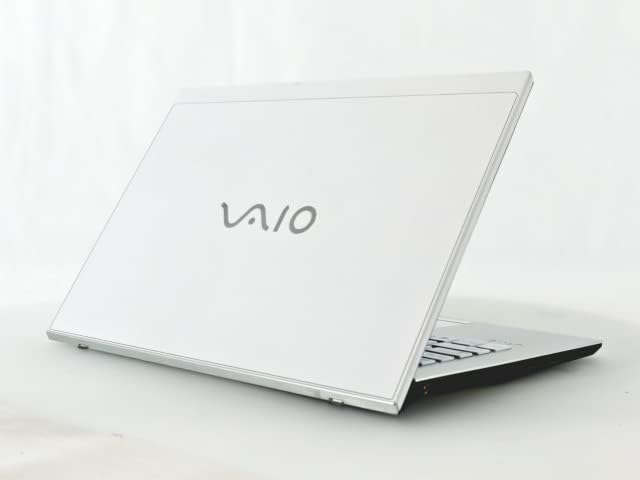
Figure 1: VAIO Pro PF Notebook PC
The VAIO Pro PF is a lightweight and compact mobile notebook designed for productivity. It features an 11.6-inch Full HD display, an Intel 8th Generation Core i5-8250U processor, 8GB of RAM, and a 256GB SSD, running on Windows 11 Pro. The device also includes a backlit keyboard for comfortable typing in various lighting conditions.
2. Подешавање
2.1 Распакивање
Пажљиво извадите све компоненте из паковања. Уверите се да су присутне следеће ставке:
- VAIO Pro PF Notebook PC
- АЦ адаптер и кабл за напајање
- Документација (овај приручник, информације о гаранцији)
2.2 Повезивање на напајање
Before initial use, connect the AC adapter to the laptop's power input port and then plug the power cord into a wall outlet. Allow the battery to charge fully.
2.3 Почетно укључивање и подешавање Windows-а
Press the power button to turn on the laptop. Follow the on-screen instructions to complete the initial Windows 11 Pro setup, including language selection, network connection, and user account creation.
3. Operating Your VAIO Pro PF
3.1 Тастатура и тачпед
The VAIO Pro PF features a full-sized keyboard with a backlight for improved visibility. The touchpad located below the keyboard supports multi-touch gestures for navigation.

Слика 2: Распоред тастатуре и тачпеда
3.2 Повезивање екстерних уређаја
Ваш лаптоп је опремљен разним портовима за повезивање екстерних уређаја:
- УСБ 3.0 портови (к3): For connecting USB devices such as external hard drives, mice, or keyboards.
- ХДМИ порт: For connecting to external displays or projectors with HDMI input.
- D-SUB15 (VGA) Port: For connecting to older external displays or projectors with VGA input.
- Wired LAN Port: For connecting to a wired network using an Ethernet cable.
- Слушалице: За повезивање слушалица или екстерних звучника.
3.3 Бежично повезивање
The VAIO Pro PF supports both Wi-Fi and Bluetooth connectivity:
- Wi-Fi (802.11n): To connect to a wireless network, go to Windows Settings > Network & Internet > Wi-Fi, turn Wi-Fi on, and select your desired network.
- Блуетоотх: To connect Bluetooth devices, go to Windows Settings > Bluetooth & devices, turn Bluetooth on, and pair your device.
3.4 Коришћењем Web Камера
Интегрисани web camera can be used for video calls and conferences. Access it through applications like Camera, Microsoft Teams, or Zoom.
4. Одржавање
4.1 Чишћење лаптопа
To clean the exterior of your laptop, use a soft, lint-free cloth slightly dampened with water or a mild, non-abrasive cleaning solution. Avoid spraying liquids directly onto the device. For the screen, use a specialized screen cleaner.
4.2 Ажурирања софтвера
Regularly check for and install Windows updates to ensure your system has the latest security patches and performance improvements. Go to Windows Settings > Windows Update.
4.3 Одржавање батерије
To prolong battery life, avoid extreme temperatures and fully discharging the battery frequently. For long-term storage, charge the battery to about 50-70%.
КСНУМКС. Решавање проблема
This section addresses common issues you might encounter with your VAIO Pro PF.
| Проблем | Решење |
|---|---|
| Лаптоп се не укључује. | Ensure the AC adapter is securely connected and the power outlet is functional. Try holding the power button for 10-15 seconds. |
| Проблеми са Wi-Fi везом. | Check if Wi-Fi is enabled in Windows Settings. Restart your router and the laptop. Ensure you are within range of the Wi-Fi network. |
| Позадинско осветљење тастатуре не ради. | Check if the backlight function key (often Fn + F key) is enabled. Adjust brightness settings if available. |
| Спољни екран није детектован. | Ensure the cable is securely connected to both the laptop and the display. Use Windows display settings to detect or extend displays. Try a different cable or port if available. |
6. Спецификације
| Феатуре | Детаљ |
|---|---|
| Назив модела | VAIO Pro PF (VJPF11C11N) |
| Бранд | VAIO (Manufacturer: SONY) |
| Величина екрана | 11.6 инча |
| Резолуција | 1920x1080 pixels (Full HD) |
| ЦПУ | Intel Core i5-8250U (8th Gen, 4 Cores, 8 Threads, 1.6 GHz base, up to 3.4 GHz) |
| РАМ | 8 ГБ ДДР4 СДРАМ |
| Складиштење | 256 ГБ ССД (Солид Стате Дриве) |
| Оперативни систем | Виндовс 11 Про (64-бит) |
| Графика | Интегрисана Интел Грапхицс |
| Бежично повезивање | Wi-Fi (802.11n), Bluetooth |
| Портс | 3x USB 3.0, 1x HDMI, 1x D-SUB15 (VGA), 1x Wired LAN, 1x Headphone Jack |
| Web Камера | Интегрисано |
| Тастатура | Тастатура са позадинским осветљењем |
| Тежина | Приближно 0.87 кг (870 г) |
| Први доступан датум | 10. маја 2023. године |
7. Гаранција и подршка
For information regarding your product's warranty, please refer to the warranty card included with your purchase or visit the official VAIO support website. For technical assistance, driver downloads, or further inquiries, please contact VAIO customer support through their official channels.
Ask a question about this manual
Ask about setup, troubleshooting, compatibility, parts, safety, or missing instructions. Manuals+ will review the question and use this page’s manual context to help answer it.