
FAO Schwarz Thunderbolt Jet X2
Упутство за употребу дрона FAO Schwarz Thunderbolt Jet X2
Model: Thunderbolt Jet X2 | Brand: FAO Schwarz
Увод
Welcome to the user manual for your new FAO Schwarz Thunderbolt Jet X2 Drone. This manual provides essential information for safe operation, setup, maintenance, and troubleshooting. Please read it thoroughly before operating your drone to ensure a safe and enjoyable experience.
Безбедносне информације
- Увек користите дрон на отвореним, чистим површинама, даље од људи, животиња и препрека.
- Do not fly near airports, power lines, or restricted airspace.
- Ensure the drone's battery and remote control batteries are fully charged before each flight.
- Држите прсте, косу и лабаву одећу даље од ротирајућих пропелера.
- Не радите при јаком ветру или неповољним временским условима.
- За млађе кориснике се препоручује надзор одраслих.
Шта је у кутији
Проверите да ли су све компоненте присутне:
- FAO Schwarz Thunderbolt Jet X2 Drone
- Ремоте Цонтрол
- Пуњива батерија за дрон
- УСБ кабл за пуњење
- Резервни пропелери (ако су укључени)
- Кориснички приручник (овај документ)
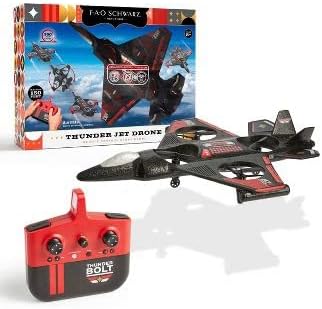
Image: The Thunderbolt Jet X2 Drone, its remote control, and the product packaging, showing the main components included.
Сетуп
1. Пуњење батерије дрона
- Locate the rechargeable drone battery.
- Повежите батерију са приложеним УСБ каблом за пуњење.
- Plug the USB cable into a standard USB power source (e.g., computer USB port, USB wall adapter).
- The indicator light on the USB cable will show charging status (e.g., red for charging, off for fully charged).
- Пуњење обично траје отприлике 60-90 минута. Немојте препунити.
2. Инсталирање батерија у даљински управљач
- Отворите одељак за батерије на задњој страни даљинског управљача.
- Insert 3x AAA batteries (not included) into the compartment, ensuring correct polarity (+/-).
- Добро затворите одељак за батерије.

Слика: Детаљна view of the remote control for the Thunderbolt Jet X2 Drone, highlighting its buttons and joysticks.
3. Упаривање дрона и даљинског управљача
- Поставите дрон на равну, равну површину.
- Turn on the drone by pressing its power button. The drone's lights will flash.
- Укључите даљински управљач.
- Потисните леви џојстик (гас) до краја нагоре, а затим до краја надоле.
- The drone's lights will become solid, indicating successful pairing.
Управљање дроном
Основне контроле
- Леви џојстик (гас): Up to ascend, down to descend.
- Right Joystick (Directional): Forward to move forward, backward to move backward, left to move left, right to move right.
- Дугмад за скраћивање: Used to fine-tune the drone's stability if it drifts in any direction.
- One-Key Take-off/Landing Button: Притисните да бисте аутоматски полетели или слетели.
- Дугме за окретање од 360°: Press this button, then push the right joystick in any direction to perform a flip.

Image: The Thunderbolt Jet X2 Drone flying in the air, with a hand holding the remote control in the foreground, illustrating active operation.
Први лет
- Ensure you are in a safe, open area.
- Поставите дрон на равну површину.
- Press the One-Key Take-off button, or slowly push the left joystick up to ascend.
- Practice hovering at a low altitude first.
- Use the right joystick for directional control.
- To land, press the One-Key Landing button or slowly pull the left joystick down until the drone lands.

Image: Three Thunderbolt Jet X2 Drones shown in different aerial maneuvers, demonstrating its agility and flight capabilities.
Одржавање
- Чишћење: Use a soft, dry cloth to clean the drone and remote control. Do not use water or harsh chemicals.
- Инспекција пропелера: Regularly check propellers for damage (bends, cracks). Replace damaged propellers immediately using the provided spares.
- Одржавање батерије: Store batteries in a cool, dry place. Do not leave batteries fully discharged for extended periods.
- Складиштење: When not in use, store the drone and remote in a safe place, away from direct sunlight and extreme temperatures.
Решавање проблема
| Проблем | Могући узрок | Решење |
|---|---|---|
| Дрон не реагује на даљински управљач. | Није упарено; слаба батерија; ван домета. | Re-pair drone and remote; charge drone battery; replace remote batteries; ensure within 300 feet range. |
| Дрон лебди током лета. | Needs trimming; uneven take-off surface. | Use trim buttons to adjust; ensure drone is on a flat surface before take-off. |
| Пропелери се не окрећу. | Obstruction; damaged propeller; motor issue. | Check for obstructions; replace damaged propellers; contact support if motor issue suspected. |
Спецификације
| Феатуре | Детаљ |
|---|---|
| Бранд | ФАО Шварц |
| Назив модела | Thunderbolt Jet X2 |
| Боја | Црно |
| Резолуција снимања видео записа | 480п |
| Технологија повезивања | УСБ |
| Ниво вештине | Бегиннер |
| Капацитет батерије | 850 Милиamp Сати |
| Формат видео снимања | МП4 |
| Максимални домет | 300 стопа |
| Материјал | Пластика |
| Тежина артикла | 1.61 фунти |
| Димензије пакета | 17.48 к 12.68 к 4.37 инча |
Гаранција и подршка
For warranty information or technical support, please refer to the contact details provided on the product packaging or visit the official FAO Schwarz webсајт. Сачувајте рачун као доказ о куповини.
Ask a question about this manual
Ask about setup, troubleshooting, compatibility, parts, safety, or missing instructions. Manuals+ will review the question and use this page’s manual context to help answer it.