
1. Увод
The MOBI CONNECT Smart DualScan Bluetooth Thermometer (Model 700026) is designed for accurate and versatile temperature measurement. It offers multiple reading methods including ear, forehead, room, and object temperature. This device features a backlit screen, LED fever indicators, and memory recall for up to 20 previous readings. It supports both Fahrenheit and Celsius modes and can connect via Bluetooth to the MOBI Smart App for enhanced tracking and management capabilities.

Image: The MOBI CONNECT Smart DualScan Bluetooth Thermometer, its packaging, and a smartphone displaying the companion app.
2. Садржај пакета
Проверите да ли су све ставке присутне у пакету:
- 1 x MOBI CONNECT Smart DualScan Bluetooth Thermometer
- 1 x Protective Cap (for forehead mode)
- 1 к Торбица за чување
- 1 к Упутство за употребу
- 1 к Водич за брзи почетак
- 2 к ААА батерије

Слика: Детаљна view of the thermometer with its components labeled for easy identification.
3. Подешавање
3.1. Инсталација батерије
- Open the battery compartment cover located on the back of the thermometer.
- Уметните две ААА батерије, водећи рачуна о исправном поларитету (+/-).
- Добро затворите поклопац одељка за батерије.
3.2. Укључивање/искључивање
- Да бисте укључили, притисните SCAN/Power button. The device will perform a self-test and display the last reading.
- The thermometer will automatically power off after approximately 30 seconds of inactivity to conserve battery life.
3.3. Switching Temperature Units (Fahrenheit/Celsius)
Када је уређај укључен, притисните и држите МОДЕ button for 3 seconds to switch between Fahrenheit (°F) and Celsius (°C).
4. Радни режими
4.1. Мерење чела
- Ensure the protective cap is on the probe.
- Притисните тастер SCAN/Power дугме за укључивање термометра.
- Position the thermometer approximately 0.5 to 1 inch (1-2.5 cm) from the center of the forehead.
- Притисните и држите СЦАН button. A beep will sound, and the temperature will be displayed on the LCD screen.

Image: Demonstrating forehead temperature measurement.
4.2. Мерење уха
- Gently remove the protective cap from the probe.
- Притисните тастер SCAN/Power дугме за укључивање термометра.
- Carefully insert the probe into the ear canal. For children under 1 year, gently pull the ear straight back. For children over 1 year and adults, gently pull the ear up and back.
- Притисните и држите СЦАН button. A beep will sound, and the temperature will be displayed on the LCD screen.

Image: Removing the protective cap for ear measurement.

Image: Demonstrating ear temperature measurement.
4.3. Room and Object Temperature Measurement
The thermometer can also measure ambient room temperature and the temperature of objects (e.g., liquids, surfaces). To switch to these modes, press the МОДЕ button repeatedly until the desired icon (room or object) appears on the display. Then, point the thermometer at the object or area and press СЦАН.
4.4. Fever Indicator
The LCD display changes color to indicate temperature status:
- Зелено позадинско осветљење: Indicates a normal body temperature.
- Црвено позадинско осветљење: Indicates a high body temperature (fever warning).
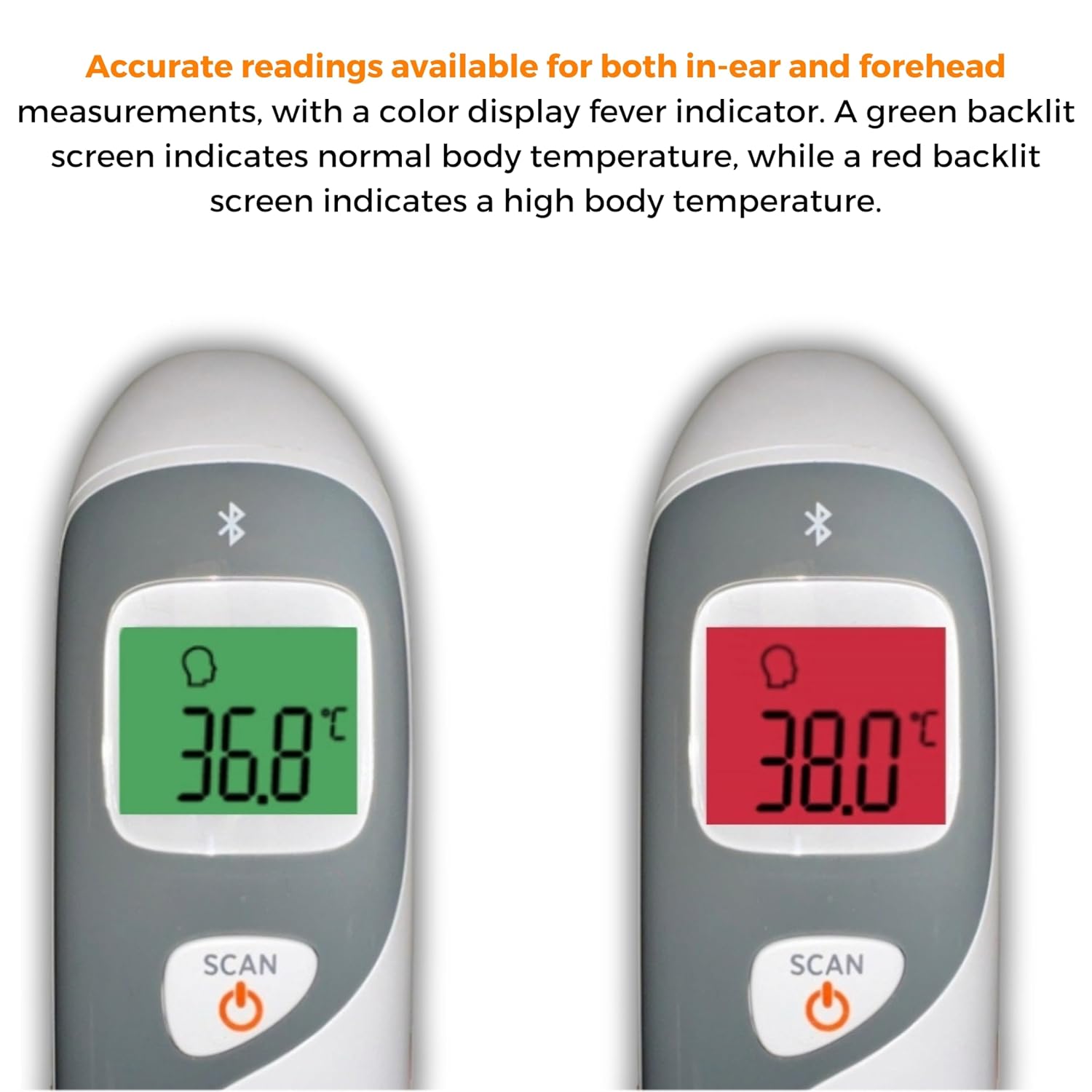
Image: The thermometer's color-changing LCD display indicating normal (green) and high (red) temperatures.
4.5. Подсећање меморије
The thermometer stores the last 20 temperature readings. To access these readings, press the MEM/MUTE button while the device is on. Each press will cycle through the stored readings.
5. Bluetooth Connectivity and MOBI Smart App
The MOBI CONNECT Smart DualScan Thermometer can be used independently or paired with your smartphone via Bluetooth for enhanced tracking and features through the MOBI Smart App.
5.1. Преузимање и упаривање апликације
- Download the "MOBI Smart" app from your device's app store (available on iOS and Android).
- Уверите се да је Блуетоотх омогућен на вашем паметном телефону.
- Open the MOBI Smart App and follow the on-screen instructions to pair your thermometer.
5.2. Функције апликације
- Аутоматско праћење: Automatically records temperature readings from the thermometer.
- Мултипле Усер Проfiles: Create and manage profiles for each family member to track their health data independently.
- Евидентирање података: Add comments to each reading for context.
- Reporting & Graphs: View powerful reports and graphs for daily, weekly, monthly, or yearly temperature trends.
- Опције извоза: Export data for sharing with healthcare professionals.
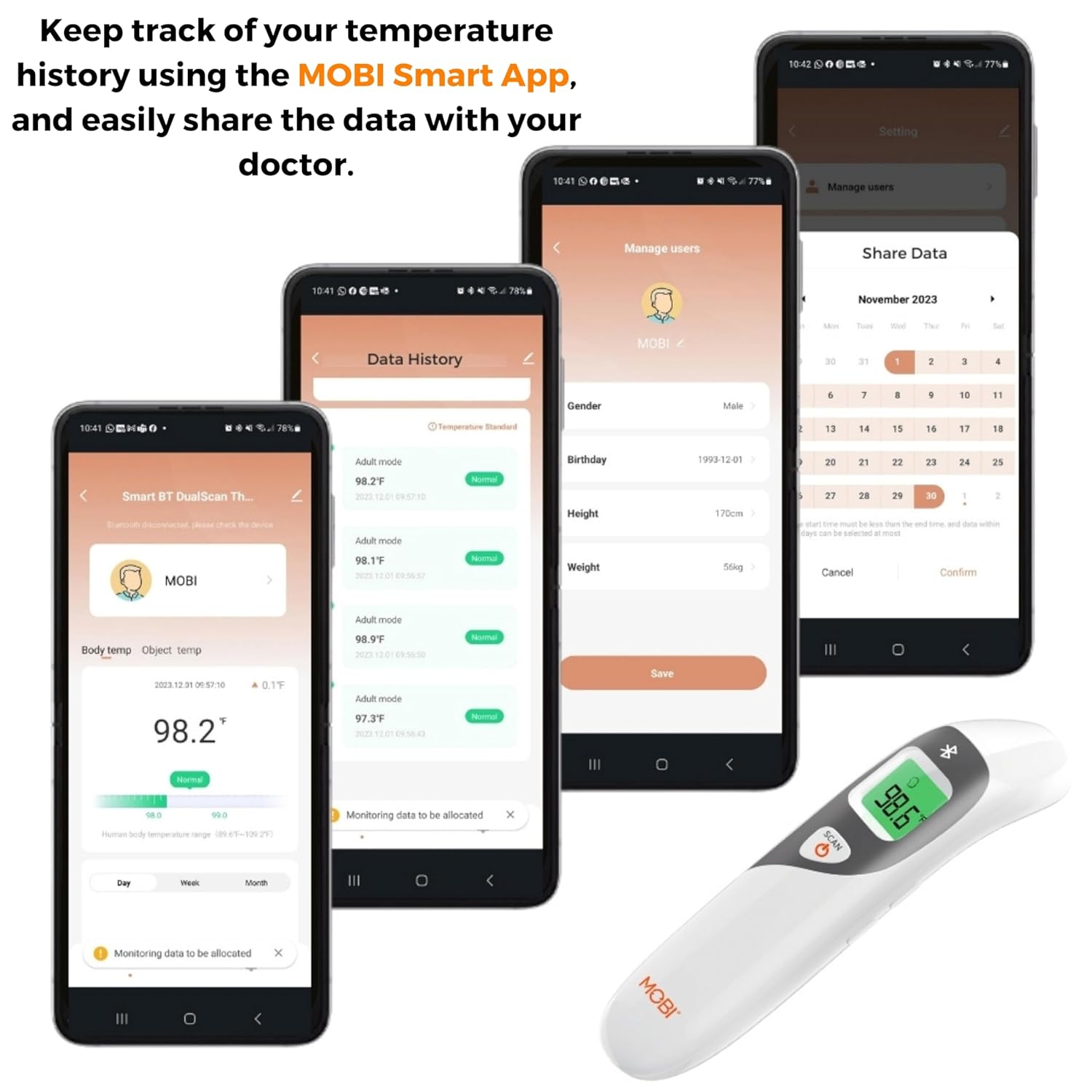
Image: Screenshots of the MOBI Smart App interface, showing data tracking and user management.
5.3. Званични видео производа
Видео: Званичник прекоview of the MOBI Smart DualScan Bluetooth Ear & Forehead Thermometer, demonstrating its features and usage.
6. Одржавање
6.1. Чишћење
To clean the thermometer, wipe it with a soft, damp cloth. Do not immerse the device in water or use abrasive cleaners. Ensure the probe is clean before each use, especially for ear measurements.
6.2. Складиштење
Store the thermometer in its protective pouch in a cool, dry place, away from direct sunlight and extreme temperatures. Remove batteries if the device will not be used for an extended period.
КСНУМКС. Решавање проблема
- "Lo" or "Hi" Reading: Indicates a temperature outside the measurable range. Ensure proper placement and try again.
- Нетачна очитавања:
- Check for proper probe placement (ear or forehead).
- Уверите се да је сонда чиста.
- Verify the correct mode (Adult/Child/Object) is selected if applicable.
- Allow the thermometer to acclimate to room temperature for 30 minutes if it has been in a significantly different environment.
- Проблеми са Блуетоотх везом:
- Уверите се да је Блуетоотх омогућен на вашем паметном телефону.
- Restart the thermometer and the MOBI Smart App.
- Ensure the thermometer is within range of your smartphone.
- Без приказа: Проверите инсталирање батерије и замените батерије ако је потребно.
8. Спецификације
| Број модела | 700026 |
| Извор напајања | Напајање батеријама (2 x AAA) |
| Дисплаи Типе | ЛЦД са позадинским осветљењем |
| Повезивање | Блуетоотх |
| Режими мерења | Ear, Forehead, Room, Object |
| Јединице температуре | Фаренхајт (°Ф) / Целзијус (°Ц) |
| Мемори Рецалл | Последњих 20 очитавања |
| Нега производа | Обрисати |
| Материјал | Пластика |
| Произвођач | Mobi Technologies Inc. |
9. Гаранција и подршка
For warranty information or technical support, please contact Mobi Technologies Inc. directly. Refer to the product packaging or the official MOBI webсајт за најновије контакт информације.