
Увод
Welcome to the user manual for your Qubo NEO2NW mobile phone. This device is specifically designed for seniors, featuring large buttons, a clear display, and essential functions for easy communication. Please read this manual carefully to understand how to use your phone safely and effectively.
Производ је завршенview
The Qubo NEO2NW is a user-friendly flip phone equipped with features tailored for convenience and safety.

слика: The Qubo NEO2NW flip phone in its open position, displaying its large, easy-to-read keypad and clear screen. A charging dock is visible in the background, indicating its charging method.

слика: A black flip phone displaying the digital time '22:10' on its screen. This image provides multiple views of the phone, highlighting its large keypad and clear display.
Кључне карактеристике:
- Large buttons for easy dialing and navigation.
- Clear 2.4-inch display with adjustable font size.
- SOS emergency button for quick contact with pre-set numbers.
- Loud ringtone and speaker for improved audibility.
- Charging dock for convenient and stable charging.
- Basic functions: Call, SMS, Phonebook, Alarm Clock, Camera, FM Radio, Torch.
Сетуп
1. Распакивање и компоненте
Carefully unpack your Qubo NEO2NW phone and ensure all components are present.

слика: Ан оверview of the box contents, including the Qubo NEO2NW phone, its charging dock, a USB cable, a power adapter, the battery, and printed user manuals.
2. Инсталирање SIM картице и батерије
- Уклоните задњу маску телефона.
- Insert your Micro SIM card(s) into the designated slot(s) (supports Dual SIM).
- If desired, insert a MicroSD memory card (up to 32GB) into the memory card slot.
- Insert the 800mAh Lithium-ion battery, ensuring the contacts align.
- Вратите задњи поклопац.
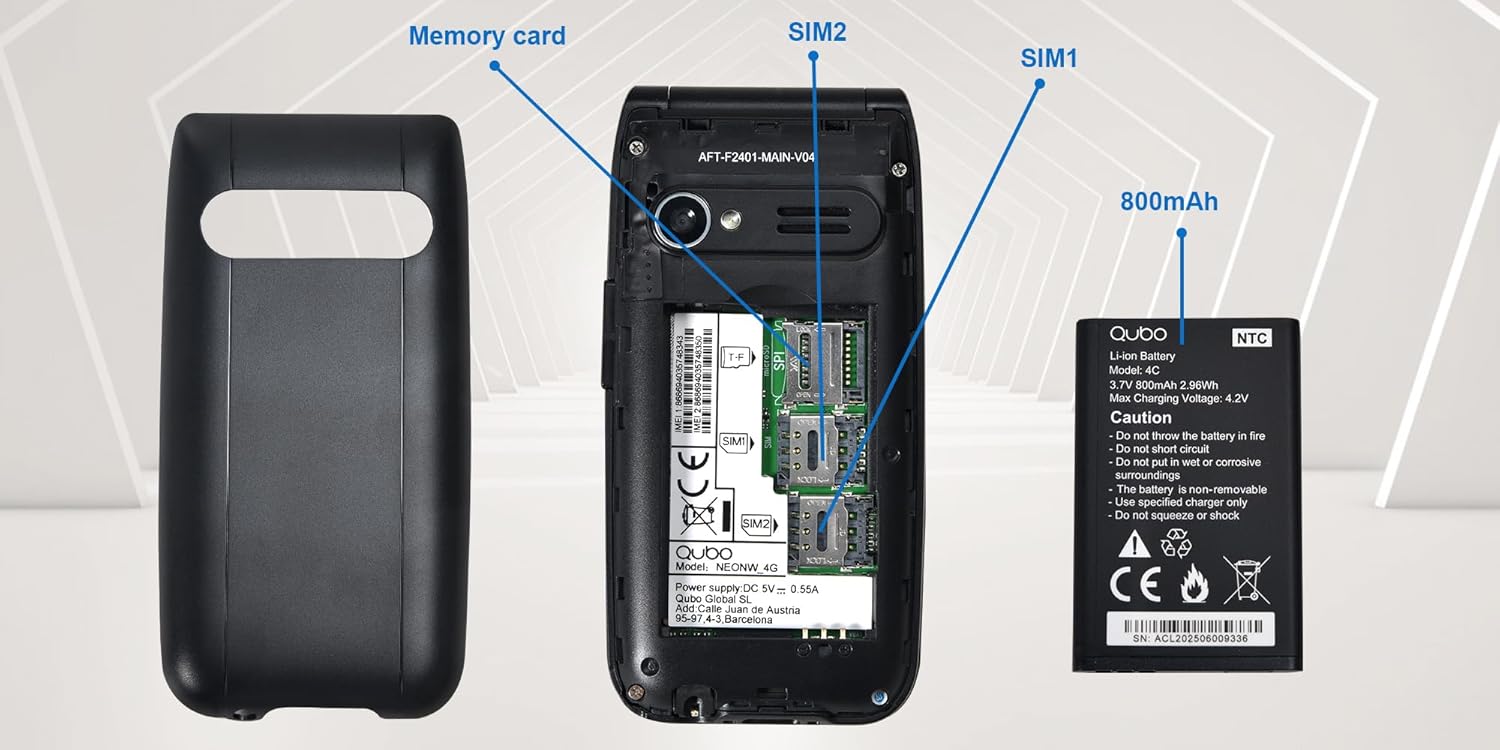
слика: Детаљно view of the phone's interior, highlighting the slots for two Micro SIM cards (SIM1, SIM2) and a memory card. The 800mAh battery is shown separately.
3. Пуњење телефона
Пре прве употребе, потпуно напуните телефон.
- Connect the USB Type-C cable to the phone and the power adapter. Plug the adapter into a wall outlet.
- Alternatively, place the phone in the charging dock. Ensure it is seated correctly and the charging indicator appears on the screen.
- Потпуно пуњење траје око 2.3 сата.

слика: This image shows the Type-C charging interface on the Qubo NEO2NW phone, along with an illustration of its battery compartment and icons indicating low power consumption and power-saving technology.
Упутство за употребу
1. Укључивање/искључивање
- Да бисте укључили: Притисните и држите Напајање/Завршавање позива button (red button) until the screen lights up.
- Да бисте искључили напајање: Притисните и држите Напајање/Завршавање позива button until the power off options appear, then select 'Power off'.
2. Упућивање и примање позива
- За бирање: Унесите број телефона помоћу тастатуре и притисните тастер Цалл button (green button).
- Из телефонског именика: Navigate to the Phonebook, select a contact, and press the Цалл дугме.
- Да одговори: Када телефон зазвони, притисните тастер Цалл дугме.
- Да бисте завршили позив: Притисните тастер Напајање/Завршавање позива дугме.
3. Слање и примање СМС порука
- Идите до Порука мени.
- Select 'New Message' to compose.
- Унесите број примаоца или га изаберите из контаката.
- Унесите своју поруку помоћу тастатуре.
- Притисните „Пошаљи“.
4. Функција SOS хитних случајева
The SOS button allows you to quickly contact pre-set emergency numbers.
- Подешавање СОС бројева: Иди на Settings > SOS Settings to add up to 5 emergency contacts.
- Активирање СОС-а: In an emergency, press and hold the СОС button on the back of the phone for a few seconds.
- The phone will automatically call the pre-set numbers in sequence until one answers. It will also send an emergency SMS to these contacts.

слика: This image demonstrates the SOS emergency call feature. It shows the Qubo NEO2NW phone with a highlighted SOS button and a visual representation of how it connects to up to 5 pre-programmed family numbers in an emergency.
5. Display and Font Settings
The phone features a 2.4-inch screen with options for large fonts for better readability.

слика: The Qubo NEO2NW phone's screen displaying large, clear fonts and the option to switch font sizes. The image also points out the loud ringtone capability and the large, tactile buttons on the keypad.
Одржавање
- Држите телефон сувим. Влага може оштетити електронска кола.
- Избегавајте екстремне температуре. Високе температуре могу скратити век трајања електронских уређаја и оштетити батерије.
- Не користите јаке хемикалије, раствараче за чишћење или јаке детерџенте за чишћење телефона. Обришите га меком,amp тканина.
- Handle the phone gently. Do not drop, knock, or shake it.
- Use only Qubo-approved batteries, chargers, and accessories.
Решавање проблема
| Проблем | Могући узрок | Решење |
|---|---|---|
| Телефон се не укључује | Батерија је испражњена или није правилно постављена. | Пуните батерију најмање 30 минута. Уверите се да је батерија правилно уметнута. |
| Не могу да упућујем или примам позиве | Нема SIM картице, SIM картица није активна или је ван домета мреже. | Ensure SIM card is inserted and active. Check network signal. Contact your service provider. |
| SOS дугме не ради | SOS numbers not set or incorrect. | Verify that emergency numbers are correctly configured in SOS settings. Ensure sufficient network signal. |
| Лош квалитет звука | Low volume, poor network, or speaker/microphone obstruction. | Adjust call volume. Move to an area with better network coverage. Ensure speaker and microphone are clear. |
Спецификације
| Феатуре | Детаљ |
|---|---|
| Назив модела | Qubo Flip Phone Charging Dock |
| Величина екрана | 2.4 инча |
| Резолуција екрана | 240 к 320 пиксела |
| Оперативни систем | КаиОС |
| РАМ | 64 МБ |
| Брзина процесора | 260 МХз |
| Целлулар Тецхнологи | 2G, 3G (GSM, UMTS) |
| Слотови за СИМ картице | Dual SIM (Micro SIM) |
| Max Flash Memory Support | 32 GB (MicroSD) |
| Задња камера | 0.3 МП |
| Капацитет батерије | 800 mAh (литијум-јонска) |
| Време пуњења | Прибл. 2.3 сата |
| Талк Тиме | Прибл. 4 сата |
| Време приправности | Приближно 8 дана |
| Повезивање | USB Type-C, 3.5 mm прикључак за слушалице |
| Димензије | 10.5 к 5.3 к 1.7 цм |
| Посебне карактеристике | SOS Button, FM Radio, Torch, GPS |
Гаранција и подршка
For warranty information, please refer to the warranty card included in your product packaging. For technical support or further assistance, please contact Qubo customer service.
- Произвођач: Кубо
- ASIN: B0C5GXR2VR
- Број модела: 6e39af81-1411-4b00-b5ae-d8778c6ab86c
- Контакт: Refer to the official Qubo website or documentation for up-to-date contact information.