
1. Увод
This manual provides comprehensive instructions for the GAIN EXPRESS PHC-342_EU Digital pH/ORP/Temperature 3-in-1 Water Quality Controller. This device is designed for precise and continuous monitoring of pH, Oxidation-Reduction Potential (ORP), and temperature in various water environments. Featuring Wi-Fi connectivity, it allows for remote data access, real-time monitoring, and control of external devices through its output relays. Please read this manual thoroughly before operation to ensure proper use and optimal performance.
2. Садржај пакета
- 1 x 3-in-1 Controller Unit
- 1 x pH Probe
- 1 x ORP Probe
- 1 к сонда за температуру
- 3 x pH Buffer Powders (pH 4.0, pH 6.86, pH 9.18)
- 1 x ORP Buffer Powder (256 mV)
- 2 к усисне чаше
- 4 к завртњи
- 1 к напајање
- КСНУМКС к енглески упутство за употребу
This image shows all components included in the package: the main controller unit, pH and ORP probes, temperature probe, buffer powders, suction cups, screws, power supply, and the instruction manual.
3. Кључне карактеристике
- Smart Wi-Fi Control: Compatible with iOS and Android systems for remote viewing of current and historical pH/ORP data.
- Праћење 24.: Continuous online monitoring and control capabilities for pH and ORP.
- Output Power Relays: Connect external devices (e.g., oxygen pump, CO2 regulator, O3 ozonizer) to pH or ORP output sockets.
- Интерфејс прилагођен кориснику: Separate electrodes for pH, ORP, and temperature ensure quick response and stable readings. Backlight control for easy viewинг.
- Прилагодљиви аларми: Set upper and lower pH/ORP limits via the mobile application; receive smartphone notifications when limits are exceeded.
- Евидентирање података: Access and analyze historical data curves for pH and ORP over the last 30 days within the app.
- High-Precision Replaceable Electrodes: Quick response and stable readings. Standard BNC connectors allow for easy replacement of pH or ORP probes.
- Дизајн за монтажу на зид: Погодна инсталација.
- Easy 3-Point pH Calibration: Simplifies the calibration process.
- Simultaneous Measurement: Displays pH, ORP, and Temperature concurrently on the LCD.
4. Подешавање и инсталација
Follow these steps to set up your GAIN EXPRESS PHC-342_EU controller:
- Монтажа контролера: Use the provided screws and suction cups to mount the controller unit and the power outlet module in a suitable location. Ensure it is away from direct water splashes. The wall mount design allows for secure placement.
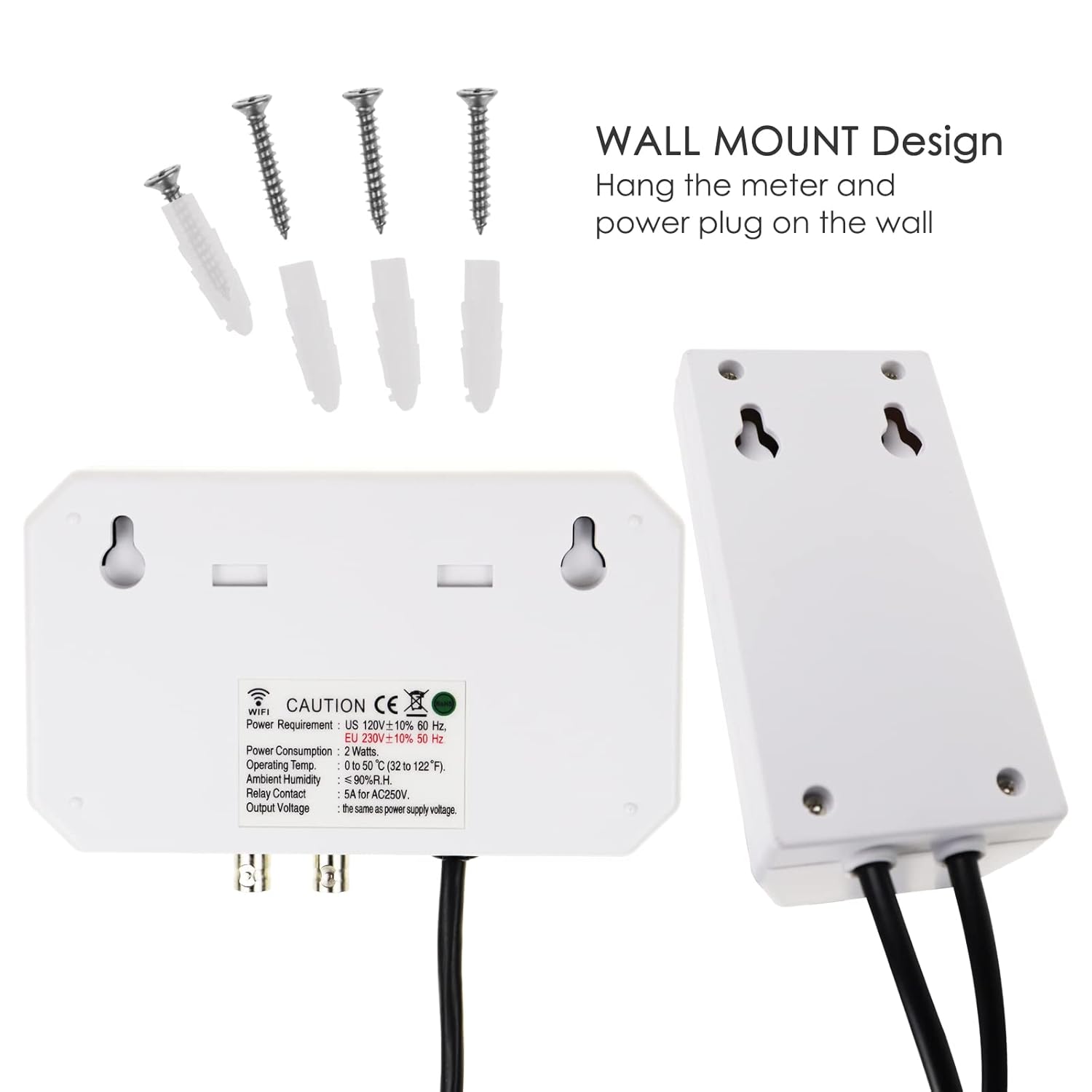
This image illustrates the wall mount design of the controller unit, showing the mounting holes and the separate power outlet module.
- Connecting the Probes:
- Connect the pH probe to the BNC connector labeled "pH" on the controller.
- Connect the ORP probe to the BNC connector labeled "ORP" on the controller.
- Connect the temperature probe to the jack labeled "TEMP" on the controller.

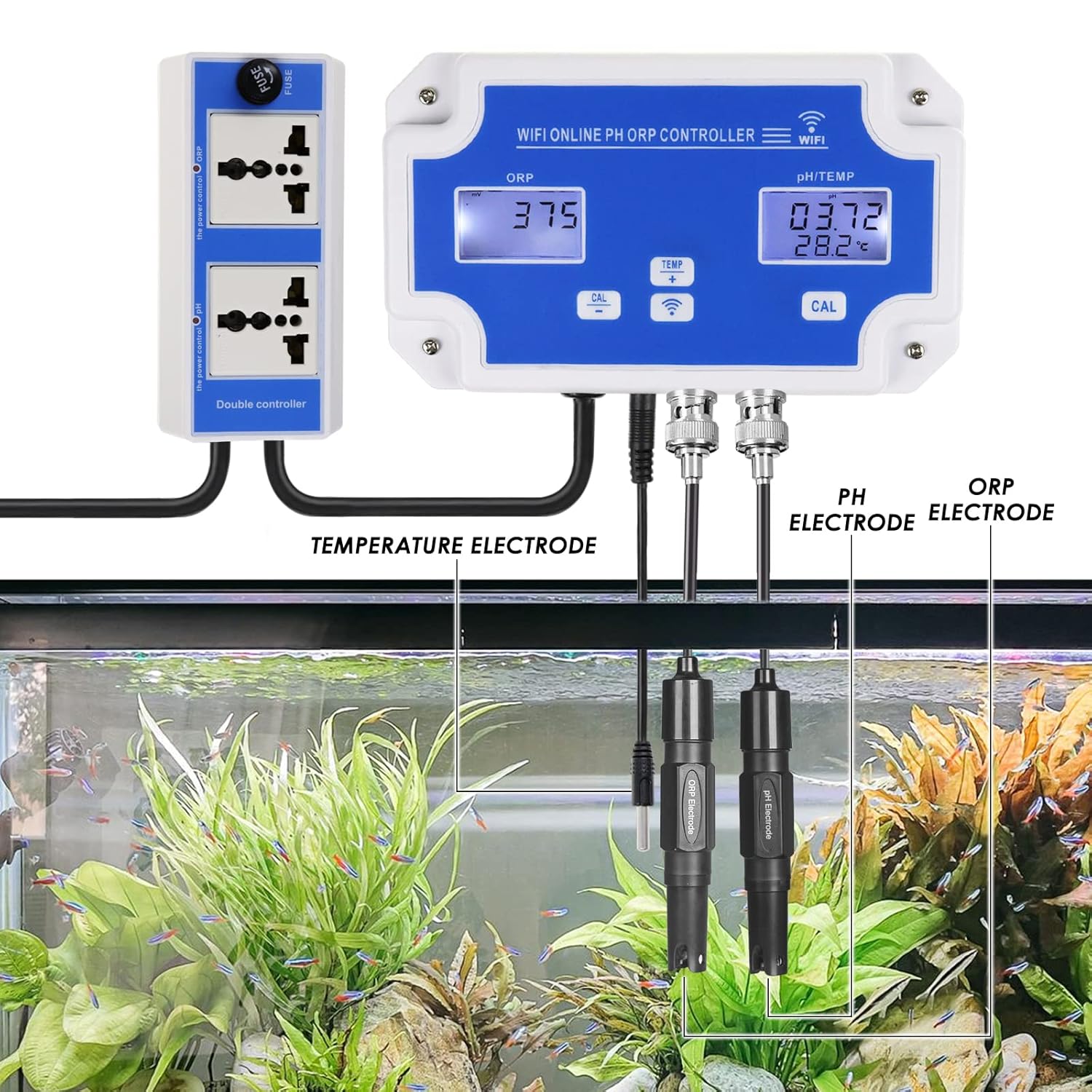
This image displays the pH and ORP electrodes, highlighting their BNC type connectors, and the temperature probe with its jack.
- Placing the Probes: Submerge the pH, ORP, and temperature probes into the water body you wish to monitor (e.g., aquarium, hydroponic system). Ensure the probes are fully immersed and securely positioned.

This image shows the GAIN EXPRESS controller connected and installed in an aquarium, with the pH, ORP, and temperature probes submerged in the water.
- Прикључак за напајање: Connect the power supply to the controller unit and then plug it into a standard AC outlet (AC120V or AC220V, depending on your region). The LCD screen will illuminate.
- Ви-Фи веза: Ensure your Wi-Fi network is 2.4 GHz for compatibility with the device and its mobile application. Refer to the separate Wi-Fi setup guide for detailed instructions on connecting the controller to your network and mobile app.
5. Основна операција
Once the controller is powered on and probes are submerged, it will begin displaying real-time pH, ORP, and temperature readings on its LCD screen.
- Приказ у реалном времену: The LCD shows current pH, ORP, and temperature values.
- Контрола позадинског осветљења: The controller features backlight control for improved visibility in various lighting conditions.
- Компензација температуре: The device automatically compensates for temperature variations in measurements within the range of 0~50°C.
6. Калибрација
Regular calibration ensures the accuracy of your pH and ORP readings. The pH electrode requires 3-point calibration.
- пХ калибрација:
- Prepare the pH buffer solutions (pH 4.0, pH 6.86, pH 9.18) using the provided powders and distilled water.
- Press the "CAL" button next to the pH/TEMP display on the controller.

Ова слика пружа крупни план view of the controller's display, highlighting the "CAL" button used for calibration.
- Follow the on-screen prompts or refer to the detailed calibration steps in the separate English Instruction Manual for precise instructions on calibrating with the three buffer solutions.
- ORP Calibration:
- Prepare the 256 mV ORP buffer solution.
- Refer to the separate English Instruction Manual for specific ORP calibration procedures.
7. Mobile Application Monitoring
The controller supports remote monitoring via a dedicated mobile application, compatible with both iOS and Android devices.
- Инсталација апликације: Download and install the "WiFi Online Control Monitor" app from your device's app store.
- Упаривање уређаја: Follow the in-app instructions to pair your controller with the mobile application. (Note: Wi-Fi must be 2.4 GHz).
- Подаци у реалном времену: View current pH, ORP, and temperature data remotely from your smartphone.

This image shows a smartphone screen displaying the mobile application interface, which provides real-time monitoring of pH, ORP, and temperature data.
- Историјски подаци: Access and analyze historical data curves for pH and ORP over the last 30 days.
- Подешавања аларма: Set custom upper and lower alarm limits for pH and ORP directly within the app. Receive push notifications on your smartphone if measurements fall outside these set limits.
8. Output Relay Control
The controller features output power relays that allow you to connect and control external devices based on your set pH or ORP parameters.
- Повезивање уређаја: Plug your external device (e.g., CO2 regulator, ozonizer, dosing pump) into the corresponding pH or ORP output socket on the power outlet module.
- Setting Control Points: Use the mobile application to define your desired pH or ORP set points.
- Automated Control: The output relay will activate (turn on your connected device) when the measured pH or ORP value goes above or below your selected set point, helping to maintain optimal water conditions automatically.

This diagram illustrates how the pH-ORP controller integrates with an aquarium system, showing connections to a CO2 reactor, solenoid valve, and O3 generator via the control output and power outlet.
9. Одржавање
Proper maintenance ensures the longevity and accuracy of your controller and probes.
- Чишћење електрода: Regularly clean the pH and ORP electrodes according to their specific cleaning instructions to prevent buildup and ensure accurate readings.
- Замена електроде: The high-precision electrodes are replaceable. If readings become unstable or inaccurate despite calibration, consider replacing the pH or ORP probe. Ensure replacement probes use standard BNC connectors.
- Заштита осигурача: The power outlet module includes a fuse for protection. If the unit loses power unexpectedly, check and replace the fuse if necessary.
10. Спецификације
| Параметар | Валуе |
|---|---|
| pH Measurement Range | 0.00 ~ 14.00 пХ |
| ORP Measurement Range | -2000mv ~ 2000mv |
| Опсег мерења температуре | 0 ~ 50°Ц (32 ~ 122°Ф) |
| пХ резолуција | 0.01 пХ |
| ORP Resolution | 1 мв |
| Температурна резолуција | 0.1 °Ц (0.2 °Ф) |
| Тачност пХ | ± 0.1 пХ |
| ORP Accuracy | ± 5 mv |
| Прецизност температуре | ± 1.0 °Ц |
| Alarm Setting Range (pH) | 0.00 ~ 14.00 пХ |
| Alarm Setting Range (ORP) | -2000mv ~ 2000mv |
| Повер Суппли | АЦ120В или АЦ220В |
| Температурна компензација | 0 ~ 50°Ц |
| Радна температура | 0 ~ 50°Ц |
| Димензије контролера | 160 к 106 к 40 мм (6.29 к 4.17 к 1.57 инча) |
| Power Outlet Module Dimensions | 130 к 65 к 55 мм (5.11 к 2.55 к 2.16 инча) |
| Тежина | Прибл. 360г |
| Захтеви за Ви-Фи | 2.4 ГХз |
| Број модела | PHC-342_EU |
| Произвођач | Гаин Екпресс Холдингс Лтд. |
| Земља порекла | Кина |

This image provides detailed dimensions of both the main controller unit and the separate power outlet module, indicating their length, width, and height in millimeters and inches.
КСНУМКС. Решавање проблема
If you encounter any issues with your controller, please consider the following:
- Нема напајања: Ensure the power supply is correctly connected and the outlet is functional. Check the fuse in the power outlet module.
- Нетачна очитавања: Perform a calibration for pH and ORP. Ensure probes are clean and properly submerged. If issues persist, consider replacing the probes.
- Проблеми са Ви-Фи везом: Verify your Wi-Fi network is 2.4 GHz. Ensure the controller is within range of your router. Re-pair the device with the mobile application if necessary.
- Апликација не приказује податке: Check your internet connection and ensure the controller is successfully connected to Wi-Fi.
For further assistance, please refer to the full English Instruction Manual or contact customer support.