
Увод
This manual provides detailed instructions for the TELE System 27-inch Full HD LED TV, model palco hevc s2. Please read this manual carefully before using the product to ensure proper operation, maximize its lifespan, and understand its features. Keep this manual for future reference.
1. Подешавање
1.1 Распакивање
Пажљиво извадите телевизор и сву додатну опрему из паковања. Уверите се да су све компоненте присутне:
- TELE System 27-inch Full HD LED TV
- Ремоте Цонтрол
- Повер Цабле
- Кориснички приручник (овај документ)
- Компоненте ТВ постоља (ако је применљиво)
1.2 Причвршћивање постоља или монтажа на зид
За монтажу постоља:
- Поставите телевизор екраном надоле на меку, чисту површину како бисте спречили огреботине.
- Поравнајте компоненте постоља са отворима за монтажу на дну телевизора.
- Причврстите постоље помоћу приложених завртња. Немојте превише затезати.
За зидну монтажу:
This TV supports wall mounting. Refer to the specific instructions provided with your wall mount kit for proper installation. Ensure the wall mount is compatible with the TV's VESA mounting pattern and weight.
1.3 Повезивање напајања
Connect the power cable to the TV's power input, then plug the other end into a suitable electrical outlet. The TV will enter standby mode.
1.4 Повезивање екстерних уређаја
Use the available ports on the TV to connect your external devices:
- ДВИ: For high-definition video and audio from devices like Blu-ray players, game consoles, or set-top boxes.
- УСБ: За повезивање УСБ уређаја за складиштење података ради репродукције медија files.
- Антена/кабл: Connect your DVB-T2 antenna for digital terrestrial television reception.
1.5 Прво подешавање
При првом укључивању, телевизор ће вас водити кроз процес почетног подешавања. То обично укључује:
- Избор језика.
- Избор земље/региона.
- Automatic channel scanning for DVB-T2 broadcasts.
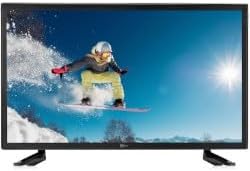
Ова слика приказује предњи део view of the TELE System 27-inch Full HD LED TV, model palco hevc s2, with its stand attached. The screen displays a vibrant image of a snowboarder in action, highlighting the display quality.
2. Упутство за употребу
2.1 Основне контроле
Use the remote control to operate your TV. Key functions include:
- Дугме за напајање: Turns the TV on or off (standby mode).
- Појачавање/утишавање: Подешава ниво звука.
- Канал горе/доле: Мења ТВ канале.
- Дугмад са бројевима (0-9): Директан избор канала.
- Искључи звук: Silences the TV sound.
2.2 Избор улаза
Притисните тастер ИЗВОР or ИНПУТ button on your remote control to cycle through available input sources (e.g., HDMI1, HDMI2, USB, DVB-T2). Select the desired input for your connected device.
2.3 Навигација кроз мени
Притисните тастер МЕНУ button to access the TV's main menu. Use the arrow buttons (Up, Down, Left, Right) to navigate through options and the OK or ЕНТЕР button to confirm selections. The menu allows you to adjust picture settings, sound settings, channel settings, and more.
2.4 DVB-T2 Tuner Usage
After completing the channel scan during initial setup, you can access digital terrestrial channels. Use the Channel Up/Down buttons or direct number input to switch channels. The TV supports DVB-T2 for high-quality digital broadcast reception.
2.5 Репродукција USB медија
Insert a USB storage device into the TV's USB port. The TV should automatically detect the device and prompt you to open the media browser. You can then navigate and play supported video, audio, and image fileс сачуване на УСБ уређају.
3. Одржавање
3.1 Cleaning the Screen and Casing
- Екран: Нежно обришите екран меком крпом која не оставља влакна. За тврдокорне мрље, благо обришитеampОбришите крпу водом или специјализованим средством за чишћење екрана. Никада не прскајте течност директно на екран.
- Casing: Користите меку, суву крпу да обришете телевизорasing. Avoid using abrasive cleaners, waxes, or solvents as they can damage the finish.
Важно: Увек искључите телевизор из утичнице пре чишћења.
3.2 Ажурирања софтвера
The TV's software may receive updates to improve performance or add new features. Check the TV's menu for a 'Software Update' or 'System Update' option. Follow the on-screen instructions carefully if an update is available. (Note: Software update guarantee information is not available for this model.)
3.3 Мере предострожности
- Не блокирајте отворе за вентилацију.
- Не излажите телевизор киши или влази.
- Избегавајте постављање телевизора на директно сунчево светло или близу извора топлоте.
- Не отварајте телевизорasinг; све сервисирање препустите квалификованом особљу.
КСНУМКС. Решавање проблема
Пре него што контактирате подршку, испробајте следећа решења за уобичајене проблеме:
| Проблем | Могуће решење |
|---|---|
| Но Повер | Ensure the power cable is securely plugged into both the TV and the wall outlet. Check if the outlet is working by plugging in another device. |
| Нема слике, али је звук присутан | Проверите улазни извор. Притисните ИЗВОР button on the remote to ensure the correct input (e.g., HDMI1) is selected. |
| Нема звука, али је слика присутна | Check the volume level and ensure the TV is not muted. If using external audio, ensure it is correctly connected and powered on. |
| Даљински управљач не ради | Замените батерије у даљинском управљачу. Уверите се да нема препрека између даљинског управљача и инфрацрвеног сензора телевизора. |
| Poor DVB-T2 Signal/No Channels | Check your antenna connection. Try repositioning the antenna or performing a new channel scan in the TV's menu. |
| USB Media Not Playing | Ensure the USB device is formatted correctly (e.g., FAT32) and the media files are in a supported format. Try another USB device. |
5. Спецификације
The following are the technical specifications for the TELE System 27-inch Full HD LED TV (Model: palco hevc s2):
- Назив модела: palco hevc s2
- Величина екрана: 27 инча
- Технологија приказа: ЛЕД
- Резолуција: 1080p (Full HD)
- Брзина освежавања: 120 херца
- Технологија тјунера: ДВБ-Т2
- Хардверски интерфејс: ХДМИ
- Укупан број УСБ портова: 1
- Размера: 16:9
- Режим аудио излаза: Стерео
- Surround Configuration: 2.0
- Тип монтаже: Валл Моунт
- Посебна карактеристика: Флат Сцреен
- Модел година: 2010
Specifications are subject to change without notice. For the most up-to-date information, please refer to the product packaging or manufacturer's webсајту.
6. Информације о гаранцији
This TELE System TV comes with a manufacturer's warranty. The specific terms and duration of the warranty may vary by region and retailer. Please retain your proof of purchase for warranty claims. For detailed warranty information, refer to the warranty card included with your product or visit the official TELE System webсајту.
7. Корисничка подршка
If you encounter issues that cannot be resolved using the troubleshooting guide, or if you require further assistance, please contact TELE System customer support. Contact details can typically be found on the official TELE System webсајту или на паковању производа.
Подршка на мрежи: Visit the official TELE System webсајт за често постављана питања, чланке подршке и контакт форме.
Телефонска подршка: Check the TELE System webсајт за регионалне контакт бројеве.