
1. Безбедносне информације
ОПРЕЗ!
- The device may only be used with the supplied power adapter.
- The device is powered by electricity. Caution is advised. Improper use carries the risk of fire, electric shock, and even death.
- Failure to follow instructions can lead to incorrect installation, damaging the device or endangering the user's life.
- The desk frame must not be modified or rebuilt in any way.
- Disconnect the desk from the power supply before performing maintenance.
- Do not use the product before assembly is complete.
- Не користите оштре предмете, као што су нож или маказе, приликом распакивања.
- Assembly should be performed at a safe distance from furniture and other obstacles.
- Assembly should be performed out of reach of children, as some parts have sharp edges or may pose a choking hazard.
- Do not use the desk for purposes other than those originally specified by the manufacturer.
- The product is intended for use on a flat and stable surface.
- To prevent damage to the product and risk of injury, check the maximum load capacity of the product (70 kg) and do not exceed it.
- Do not place your entire body weight on the tabletop. The product is intended for use by one person.
- Do not place flammable materials near the device, as there is a risk of fire.
- To prevent damage, keep the product away from direct sunlight.
- It is recommended that the user retighten screws if they become loose.
- Do not disassemble any parts beyond the original installation procedures.
- For general cleaning and maintenance of the desk, use a soft cloth with a mild cleaning agent.
2. Подешавање и монтажа
The MARK ADLER Leader 7.0 desk is designed for straightforward assembly. Please follow the detailed instructions provided in the separate assembly guide included with your product packaging.
2.1 Распакивање
- Carefully remove all components from the packaging. Avoid using sharp objects like knives or scissors directly on the packaging to prevent scratching or damaging the desk parts.
- Verify that all parts listed in the assembly guide are present and undamaged.
2.2 Постављање
- Choose a flat, stable, and level surface for the desk. Uneven surfaces can affect the desk's stability and electric mechanism.
- Ensure there is sufficient space around the desk for safe operation, especially when adjusting height, to avoid collisions with walls or other furniture.
- Keep the desk away from direct sunlight and sources of heat or moisture to prevent material damage.
2.3 Кораци монтаже
- Refer to the dedicated assembly manual for step-by-step instructions.
- Ensure all connections are secure and screws are tightened appropriately.
- Do not connect the desk to power until assembly is fully completed and verified.

Figure 1: Desk Dimensions and Height Range

Figure 2: Desk in Sitting and Standing Positions
3. Упутство за употребу
The MARK ADLER Leader 7.0 desk features an intuitive control panel for easy height adjustment and memory functions.
3.1 Контролна табла прекоview

Слика 3: Контролна табла
Контролна табла обично укључује:
- Дигитални екран: Shows the current desk height in centimeters.
- Up (A) and Down (V) Buttons: Used to manually adjust the desk height.
- Дугмад за меморију (1, 2, 3): Store and recall preferred height settings.
- Set (S) Button: Used to save a height setting to a memory button.
3.2 Подешавање висине
- Притисните и држите Горе (А) дугме за подизање стола.
- Притисните и држите Доле (V) дугме за спуштање стола.
- Release the button when the desired height is reached. The desk will move smoothly and quietly.
3.3 Подешавање пресета меморије
To save a specific height setting:
- Adjust the desk to your desired height using the Up (A) or Down (V) buttons.
- Притисните тастер Set (S) button. The display may flash or show 'S'.
- Within a few seconds, press one of the memory buttons (1, 2 или 3) to save the current height to that position. The display may confirm the setting.
3.4 Using Memory Presets
To recall a saved height setting:
- Simply press the desired memory button (1, 2 или 3). Сто ће се аутоматски померити на сачувану висину.
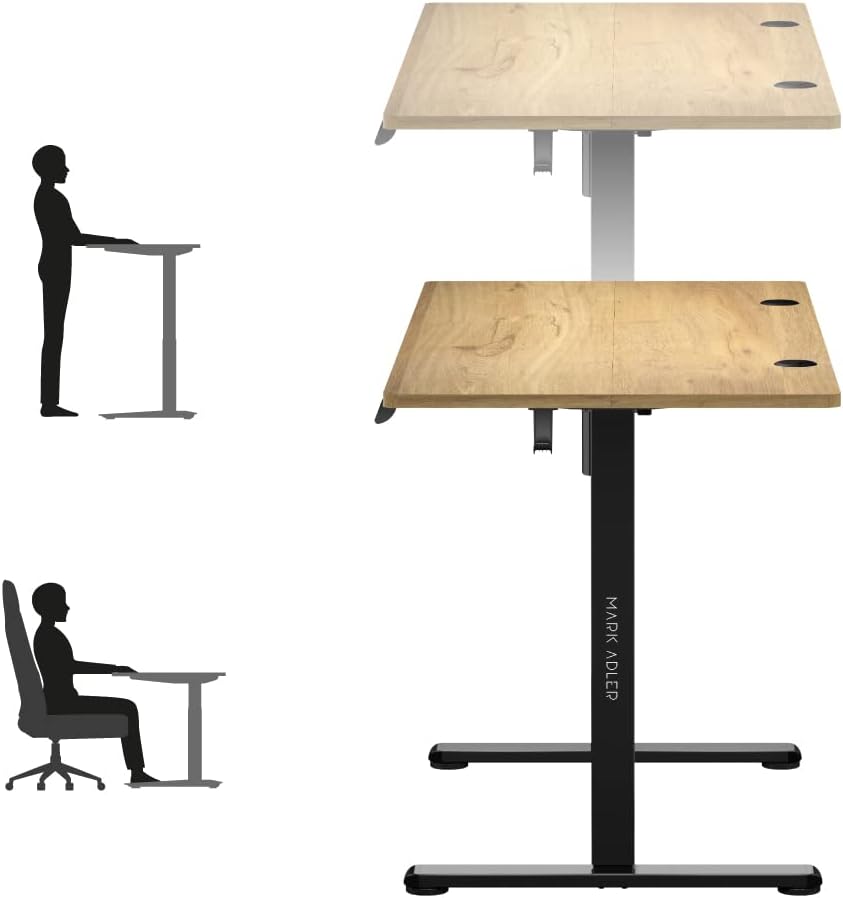
Figure 4: Ergonomic Use - Sitting and Standing
3.5 Управљање кабловима
The desk includes integrated cable entries to help organize your workspace.

Figure 5: Cable Grommet
3.6 Headphone Hook
A convenient hook is provided for hanging headphones or other accessories.

Figure 6: Headphone Hook
4. Одржавање
Proper maintenance ensures the longevity and safe operation of your MARK ADLER Leader 7.0 desk.
- Чишћење: За опште чишћење користите меку крпу dampened with a mild cleaning agent. Avoid abrasive cleaners or harsh chemicals that could damage the surface.
- Искључивање струје: Always disconnect the desk from the power supply before performing any cleaning or maintenance tasks.
- Затезање завртња: Periodically check all screws and connections. If any feel loose, gently retighten them to ensure stability.
- Брига о животној средини: Keep the desk away from direct sunlight, extreme temperatures, and high humidity to prevent material degradation.
- Без измена: Do not attempt to modify or disassemble any parts of the desk frame or electric mechanism beyond the original installation procedures. Unauthorized modifications can void your warranty and pose safety risks.
КСНУМКС. Решавање проблема
If you encounter any issues with your MARK ADLER Leader 7.0 desk, please refer to the following common troubleshooting steps:
5.1 Desk Not Moving
- Проверите везу за напајање: Ensure the power cable is securely plugged into both the desk and a working wall outlet.
- Проверите адаптер за напајање: Verify that the power adapter is the one supplied with the desk and is functioning correctly.
- Механизам ресетовања: Some electric desks have a reset function. Consult your assembly guide or contact support for specific reset procedures if available.
5.2 Uneven Movement or Noise
- Проверите да ли има препрека: Ensure there are no objects obstructing the desk's movement path, either above or below the tabletop.
- Дистрибуција тежине: Make sure the weight on the desk is evenly distributed and does not exceed the maximum load capacity of 70 kg.
- Лабави завртњи: Check and tighten any loose screws on the frame or tabletop connections.
5.3 Control Panel Not Responding
- Циклус напајања: Disconnect the power for 30 seconds, then reconnect it.
- Кабловска веза: Ensure the control panel cable is securely connected to the desk's motor unit.
Ако ови кораци не реше проблем, обратите се корисничкој подршци за додатну помоћ.
6. Спецификације
| Феатуре | Детаљ |
|---|---|
| Бранд | МАРК АДЛЕР |
| Број модела | Вођа 7.0 |
| Боја | Oak (top), Black (frame) |
| Димензије производа (Д к Ш к В) | 120 к 60 к 72-118 цм |
| Материјал | Oak wood, Alloy steel, Metal |
| Посебна карактеристика | Electric height adjustment |
| Тежина артикла | 20.7 килограма |
| Максимални капацитет оптерећења | 70 кг |
| Опсег подешавања висине | 72 цм до 118 цм |
| Цонтрол Панел | Digital display, 3 memory presets |
| Цабле Манагемент | 2 integrated cable entries |
7. Гаранција и подршка
7.1 Информације о гаранцији
For detailed information regarding the product warranty, please refer to the warranty card included with your purchase or contact the retailer/manufacturer directly. Warranty terms typically cover manufacturing defects under normal use.
7.2 Корисничка подршка
If you have any questions, require technical assistance, or need to report an issue that cannot be resolved using the troubleshooting guide, please contact MARK ADLER customer service or your point of purchase. Have your product model number (Leader 7.0) and purchase date ready when contacting support.