
1. Увод
This manual provides detailed instructions for the installation, setup, operation, and maintenance of your Decdeal WKQ-BL WLAN Thermostat. This programmable room thermostat is designed for water underfloor heating systems and features remote control via the Tuya app. Please read this manual thoroughly before installation and use to ensure proper function and safety.
2. Безбедносне информације
- Инсталацију мора обавити квалификовани електричар у складу са локалним електричним прописима.
- Ensure the power supply is disconnected before installation or maintenance to prevent electric shock.
- This thermostat is designed for 230V systems. Verify your system's voltagе пре повезивања.
- Do not use this thermostat for electric underfloor heating systems. It is specifically for water underfloor heating and boiler-controlled heating.
- Држите уређај даље од воде и окружења са високом влажношћу.
3. Производ је готовview
The Decdeal WKQ-BL WLAN Thermostat offers precise temperature control for your home. It features an LCD display, Wi-Fi connectivity for remote control via the Tuya app, and a 6+1 programmable function for customized heating schedules.
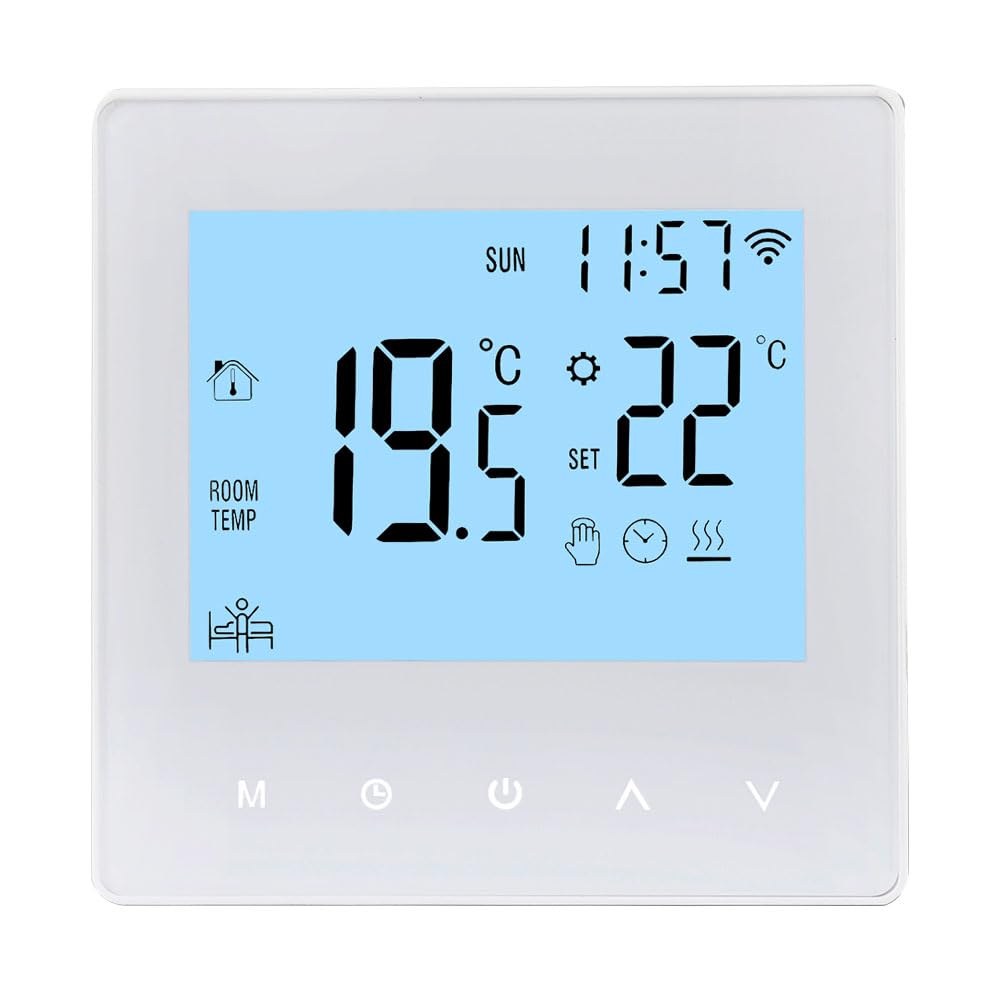
Image: The Decdeal WKQ-BL WLAN Thermostat shown alongside its control interface on the Tuya mobile application. This illustrates the remote control capability.

Слика: Детаљна view of the Decdeal WKQ-BL thermostat's LCD screen and physical buttons. Labels indicate functions such as Time, Week, Room Temperature, Heat indicator, Programming, Manual mode, Mode selection, Clock setting, Power, Up, Down, and Wi-Fi status.
4. Инсталација
The thermostat is designed for wall mounting. Ensure the installation location is free from direct sunlight, drafts, or other heat sources that could affect temperature readings. Connect the thermostat to your water underfloor heating system's wiring according to the provided wiring diagram (not included in this general manual, refer to product packaging for specific diagrams). Remember to disconnect power before beginning installation.
5. Подешавање
5.1 Почетно укључивање
After successful installation and power connection, the thermostat's LCD screen will illuminate, displaying current room temperature and time.

Image: The Decdeal WKQ-BL thermostat displaying its LCD color screen, showing room temperature, set temperature, time, and Wi-Fi status in a living room setting.
5.2 Wi-Fi and App Connection (Tuya App)
- Download the Tuya Smart app from your mobile device's app store.
- Региструјте се или се пријавите на свој Tuya Smart налог.
- Ensure your mobile phone's Wi-Fi and Bluetooth are enabled simultaneously.
- Switch your Wi-Fi network to a 2.4GHz band or use a mobile phone hotspot for the initial connection process.
- Follow the in-app instructions to add your Decdeal WKQ-BL thermostat. This typically involves putting the thermostat into pairing mode (refer to the device's specific instructions for pairing mode activation, usually by holding a button).
- Once connected, you can control the thermostat remotely via the Tuya app.
6. Упутство за употребу
6.1 Manual and Automatic Operation
The thermostat supports both manual and automatic (programmable) operation modes. You can switch between these modes using the designated button on the thermostat or through the Tuya app.

Image: A hand interacting with the Decdeal WKQ-BL thermostat, illustrating its manual and automatic operation capabilities. The display shows current temperature and settings.
6.2 Programming Function (6+1 Schedule)
The thermostat features a 6+1 programming function, allowing you to set different temperature schedules for weekdays (6 periods) and weekends (1 period). This optimizes energy consumption and comfort.

Image: A table illustrating the programming options for the Decdeal WKQ-BL thermostat, showing key, option, icon, time, and adjustable default temperatures for workday and holiday schedules. Below the table, the thermostat is shown in a living room setting, with the Tuya app on a phone.
Да бисте подесили програм:
- Access the programming menu on the thermostat or via the Tuya app.
- For each period (e.g., morning, day, evening, night for weekdays, and specific times for holidays), set the desired start time and target temperature.
- Save your settings. The thermostat will then automatically adjust the heating according to your schedule.
7. Одржавање
To ensure optimal performance and longevity of your thermostat, follow these simple maintenance guidelines:
- Clean the thermostat's screen and casinРедовно бришите меком, сувом крпом. Избегавајте абразивна средства за чишћење или раствараче.
- Do not attempt to open or repair the thermostat yourself. Refer to qualified service personnel for any issues.
- Ensure the area around the thermostat is clear of obstructions that could block airflow or affect temperature readings.
КСНУМКС. Решавање проблема
| Проблем | Могући узрок | Решење |
|---|---|---|
| Термостат се не укључује | Нема напајања; неправилно ожичење | Проверите прекидач; проверите ожичење (консултујте електричара ако нисте сигурни). |
| Cannot connect to Wi-Fi/Tuya app | Incorrect Wi-Fi band; Bluetooth off; incorrect pairing procedure | Ensure 2.4GHz Wi-Fi; enable Bluetooth; follow app pairing instructions carefully. |
| Очитавање температуре делује нетачно | Thermostat exposed to drafts/direct sunlight; sensor issue | Relocate thermostat if possible; ensure no external factors are influencing the sensor. |
| Heating not turning on/off as scheduled | Incorrect programming; thermostat in manual mode | Review and adjust programming schedule; ensure thermostat is in automatic mode. |
9. Спецификације
| Феатуре | Спецификација |
|---|---|
| Бранд | Децдеал |
| Назив модела | WKQ-BL |
| Димензије производа | 3.9 Д x 8.6 Ш x 8.6 В цм |
| Тип контроле | Google Assistant, Remote Control (via app) |
| Посебна карактеристика | Remote control via app, programmable |
| Боја | Светло плава |
| Специфичне употребе | Boiler-controlled heating, water underfloor heating |
| Тип контроле температуре | Програмабилно |
| Технологија повезивања | Ви-Фи |
| Извор напајања | Цордед Елецтриц |
| Волtage | 230 Волтс |
| Дисплаи Типе | ЛЦД |
| Цоммуницатион Протоцол | Ви-Фи |
| Тип монтаже | Валл Моунт |
| Позадинско осветљење | Да |
| Тежина артикла | 210 грама |
| Облик | Скуаре |
| Стиле | Цомпацт |
| Материјал | акрилонитрил бутадиен стирен (АБС) |
10. Гаранција и подршка
For warranty information or technical support, please refer to the documentation included with your product packaging or contact Decdeal customer service. Keep your purchase receipt as proof of purchase.