
1. Увод
This manual provides instructions for the proper use and care of your Docooler Portable USB Cassette Player. This device allows you to play audio cassettes and convert their content into digital MP3 files via a USB connection to a computer. Please read this manual thoroughly before operating the device to ensure optimal performance and longevity.
2. Производ је готовview
The Docooler Portable USB Cassette Player is a compact, handheld device designed for playing and digitizing audio cassettes. It features a transparent casing, allowing visibility of the internal mechanism.
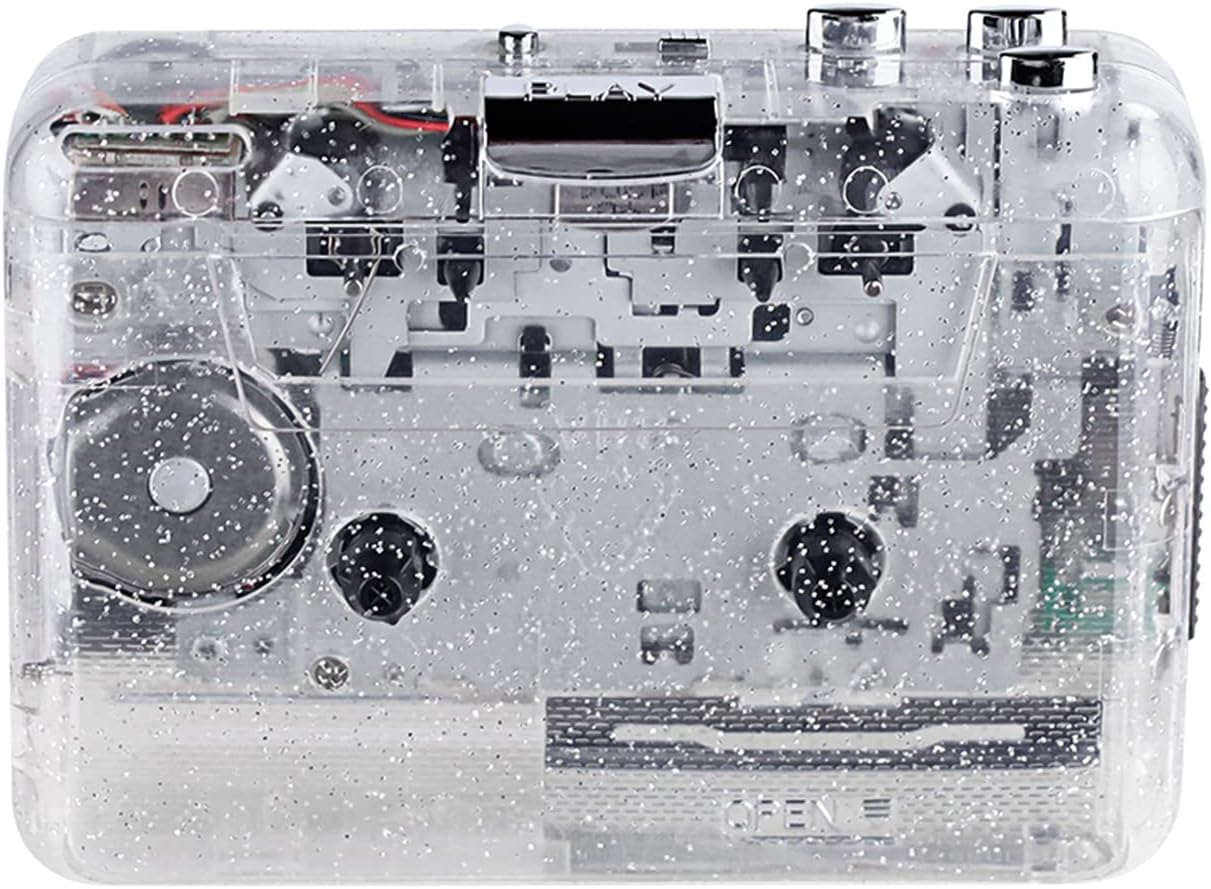
Слика 1: Предња страна view of the Docooler Portable USB Cassette Player, showcasing its transparent design.

Figure 2: Various angles of the cassette player, including top, side, and open views.
Садржај пакета:
- Docooler Portable USB Cassette Player
- УСБ кабл
- Кориснички приручник (овај документ)
- Headphones (may vary by package)
3. Подешавање
3.1 Напајање
The cassette player can be powered by either batteries or a USB connection.
Инсталација батерије:
- Пронађите одељак за батерију на уређају.
- Отворите поклопац одељка за батерије.
- Уметните 2 x AA батерије (нису укључене), водећи рачуна о исправном поларитету (+/-).
- Добро затворите поклопац одељка за батерије.
УСБ Снага:
Connect the provided USB cable to the player's USB port and the other end to a powered USB port on your computer or a USB wall adapter. The device will draw power from the USB connection.
4. Упутство за употребу
4.1 Playing a Cassette Tape
- Open the cassette compartment cover.
- Insert an audio cassette tape with the open edge facing upwards.
- Чврсто затворите поклопац одељка за касету.
- Повежите слушалице или екстерне звучнике на 3.5 мм аудио излаз.
- Притисните тастер ПЛАИ дугме за почетак репродукције.
- Користите СТОП дугме за заустављање репродукције.
- Користите FF (брзо премотавање унапред) и РЕВ (премотавање уназад) дугмад за навигацију кроз траку.
- Adjust the volume using the volume control dial.
- The "DIR" button allows you to quickly flip the tape direction. The "play mode" button can be used to reverse playback once or an unlimited number of times.

Figure 3: The cassette player in use, demonstrating tape insertion and playback setup.

Figure 4: Users listening to audio through headphones connected to the cassette player.
4.2 Converting Tapes to MP3 Files
The Docooler Portable USB Cassette Player can convert your analog cassette audio into digital MP3 files. This process requires a computer and compatible audio recording software (not included).
- Ensure the cassette player is powered (via batteries or USB).
- Connect the cassette player to your computer using the provided USB cable.
- Install and open your preferred audio recording software on your computer. Software such as Audacity (free and open-source) is commonly used for this purpose.
- Configure your recording software to recognize the cassette player as an audio input device.
- Insert the cassette tape you wish to convert into the player.
- Start recording in your software, then press the ПЛАИ button on the cassette player.
- Monitor the recording process. Once the tape has finished playing, stop the recording in your software.
- Save the recorded audio as an MP3 file на вашем рачунару.

Figure 5: Illustration of the process to convert cassette audio to MP3 files using the player and a computer.
5. Одржавање
5.1 Чишћење уређаја
- Обришите спољашњост плејера меком, сувом крпом.
- Do not use liquid cleaners or abrasive materials, as they may damage the surface.
- Periodically clean the tape heads and pinch rollers using a cotton swab lightly dampпремазано изопропил алкохолом како би се осигурао оптималан квалитет звука и спречило оштећење траке.
5.2 Складиштење
- Када се не користи дуже време, извадите батерије да бисте спречили цурење.
- Чувајте плејер на хладном и сувом месту, даље од директне сунчеве светлости и екстремних температура.
КСНУМКС. Решавање проблема
| Проблем | Могући узрок | Решење |
|---|---|---|
| Нема струје | Dead batteries; USB cable not connected properly. | Replace batteries; ensure USB cable is securely connected. |
| Нема звука | Headphones/speakers not connected; volume too low; dirty tape heads. | Connect audio output device; increase volume; clean tape heads. |
| Poor sound quality (hissing, muffled) | Dirty tape heads; worn-out tape; low battery. | Clean tape heads; try a different tape; replace batteries. |
| Tape not playing or moving | Tape jammed; mechanism issue; low battery. | Check tape for damage; replace batteries. |
| Cannot convert to MP3 | USB connection issue; software not configured correctly; no recording software. | Ensure USB is connected; check software settings; install compatible recording software. |
7. Спецификације
- Модел: B0C69FDZF6
- Напајање: 2 x AA Batteries or USB 5V DC
- Интерфејс: УСБ 2.0
- Аудио излаз: 3.5 мм стерео прикључак
- Димензије: 7.2 к 5.91 к 1.54 инча (приближно)
- Тежина: 9.6 унце (приближно)
- Произвођач: Доцоолер
8. Безбедносне информације
- Не излажите уређај води или прекомерној влази.
- Избегавајте испуштање или излагање уређаја јаким ударима.
- Не покушавајте сами да растављате или поправљате уређај. Обратите се квалификованом сервисеру.
- Чувати ван домашаја деце.
- Батерије одложите у складу са локалним прописима.
9. Гаранција и подршка
For warranty information or technical support, please refer to the documentation included with your purchase or contact Docooler customer service through their official website or the retailer where the product was purchased. Please have your model number (B0C69FDZF6) and purchase date available when contacting support.