

1. Увод
This manual provides instructions for the installation, operation, and maintenance of your TEEHO Fingerprint Door Lock. Please read this manual thoroughly before installation and use to ensure proper function and safety.
The TEEHO Fingerprint Door Lock offers multiple access methods including fingerprint recognition, keypad codes, and traditional keys. It is designed for residential door security and keyless access control.
2. Садржај пакета
- Fingerprint Keypad Door Lock (Exterior and Interior Assemblies)
- 2 Passage Door Knobs / Levers
- Деадболт Латцх
- Стрике Плате
- Монтажни хардвер
- Keys (for emergency override)
- Шаблон за инсталацију
3. Подешавање и инсталација
Before installation, ensure your door meets the required dimensions for compatibility.

Image: Diagram illustrating door compatibility and dimensions for installation, including backset (2-3/8" or 2-3/4"), door thickness (1-3/8" to 2"), and bore hole diameter (2-1/8").
3.1 Припрема врата
- Verify door thickness and backset measurement.
- Use the provided template to mark and drill holes if necessary. The lock is suitable for 2-1/8" (54mm) door holes.
3.2 Инсталирање браве засун
- Insert the deadbolt latch into the door edge. Ensure the 'UP' arrow is pointing upwards.
- Причврстите завртњима.
3.3 Installing the Exterior Assembly
- Feed the cable through the door hole, below the deadbolt latch.
- Align the exterior assembly with the deadbolt and door holes.
3.4 Инсталирање унутрашњег склопа
- Повежите кабл са спољашњег склопа на унутрашњи склоп.
- Mount the interior assembly, ensuring proper alignment.
- Причврстите монтажним завртњима.
3.5 Инсталација батерије
- Уклоните поклопац батерије на унутрашњем склопу.
- Insert 4 AA alkaline batteries (not included), observing polarity.
- Вратите поклопац батерије.
3.6 Installing Passage Door Levers
- Install the passage door levers according to their specific instructions.
4. Упутство за употребу
4.1 Откључавање отиском прста
The lock features 3D biometric fingerprint recognition. It can recognize your fingerprint in approximately 0.3 seconds and unlock the door in 1 second.
- Поставите регистровани прст на сензор отиска прста.
- The lock will unlock upon successful recognition.

Image: A person using their finger on the fingerprint sensor of the TEEHO door lock for quick unlocking.
4.2 Keyless Entry (Keypad)
The lock supports up to 20 access codes, each 4-10 digits long.
- Enter your registered access code on the keypad.
- Press the '#' key (or equivalent confirmation key).
- Брава ће се откључати.
Лозинка против шпијунирања
To prevent others from guessing your code, you can enter random digits before or after your actual access code.

Image: Illustration of the anti-peep function, showing random digits entered before and after the actual password on the backlit keypad.
4.3 One-Time PIN Code
Generate a temporary PIN code for guests, cleaners, or delivery staff. This code will be automatically deleted after a single use.

Image: A person receiving a one-time PIN code on their phone for temporary access to the door.
4.4 Auto-Lock Function
The lock can be configured to automatically lock after a set period. This period can be adjusted between 10 and 99 seconds.
4.5 One-Touch Locking
To manually lock the door instantly, press and hold any key on the keypad for 2 seconds.
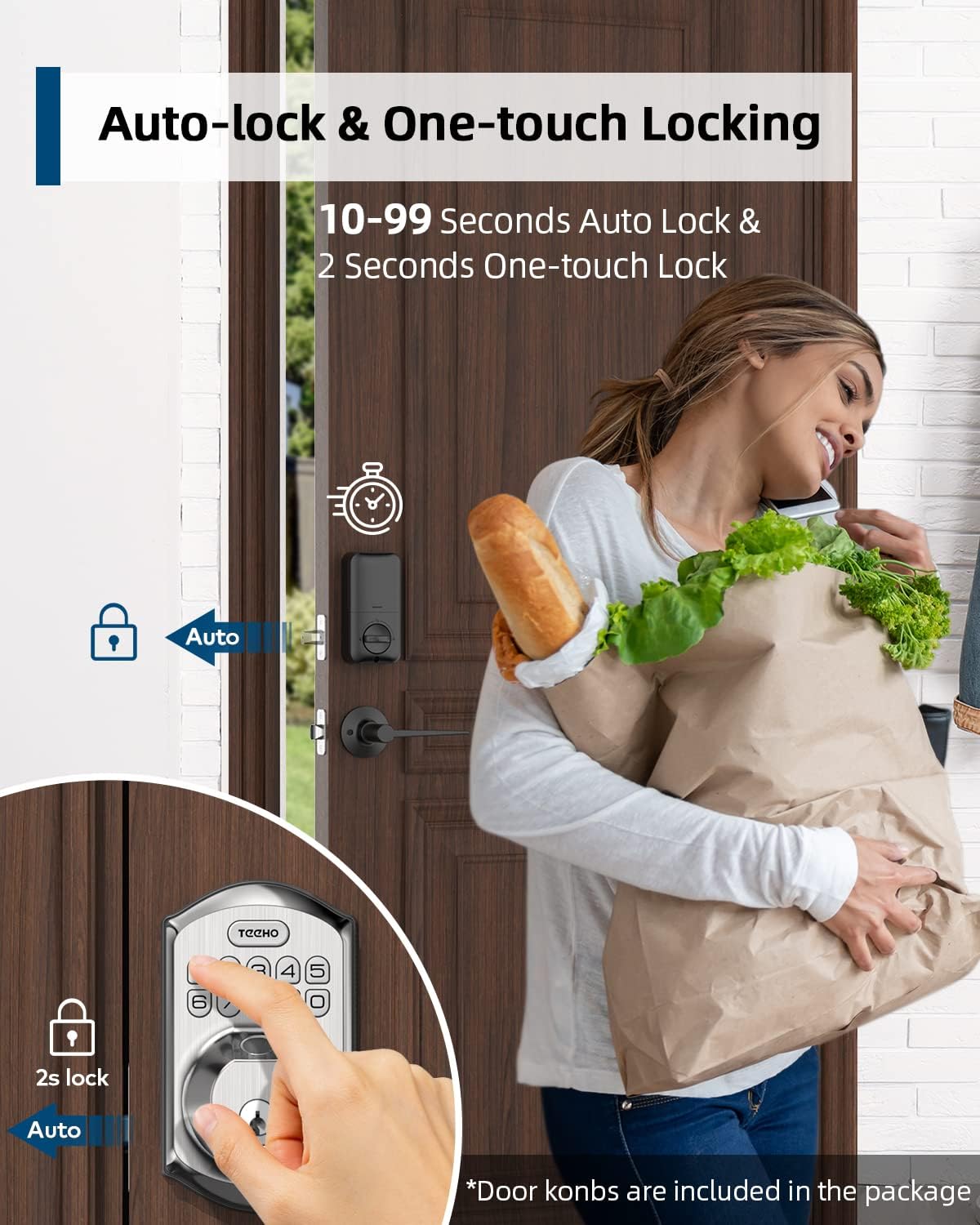
Image: Illustration showing the auto-lock function (10-99 seconds) and one-touch lock function (2 seconds hold) on the TEEHO door lock.
4.6 Додатне функције
- Режим искључивања звука: Disables keypad sounds for quiet operation.
- Режим одмора: Enhances security when you are away for extended periods.
- Тастатура са позадинским осветљењем: Побољшава видљивост у условима слабог осветљења.
5. Одржавање
5.1 Замена батерије
The lock is powered by 4 AA batteries, providing up to 1 year of battery life. The lock features a low battery indicator.

Слика: Прекоview of lock features including 20 fingerprints, 20 user codes, auto-lock, IP54 waterproof rating, one-time PIN code, one-touch locking, low battery indicator, and up to 1 year battery life.
- When the low battery indicator appears, replace all 4 AA batteries promptly.
- Use new alkaline batteries for optimal performance.
5.2 Чишћење
Wipe the lock's exterior with a soft, damp крпом. Избегавајте абразивна средства за чишћење или раствараче који би могли оштетити завршну обраду или електронске компоненте.
5.3 Отпорност на временске услове
Брава има IP54 степен отпорности на временске услове, пружајући заштиту од прашине и прскања воде. Иако је издржљива, избегавајте директно излагање јакој киши или дуже потапање.
КСНУМКС. Решавање проблема
- Брава не реагује: Check battery level. Replace batteries if low. Ensure cables are securely connected.
- Отисак прста није препознат: Ensure your finger is clean and dry. Try placing your finger at different angles. Re-register your fingerprint if issues persist.
- Keypad not working: Verify battery power. Ensure you are entering the correct code. Check for any physical damage to the keypad.
- Аутоматско закључавање се не активира: Check the auto-lock settings to ensure it is enabled and the delay time is set correctly.
- Брава је лабава: Tighten mounting screws on both interior and exterior assemblies.
7. Спецификације
| Феатуре | Детаљ |
|---|---|
| Бранд | ТЕЕХО |
| Модел | B0C69VNJ27 |
| Посебна карактеристика | Отисак прста |
| Тип закључавања | Тастатура |
| Материјал | Никл |
| Препоручена употреба | Residential door security and keyless access control |
| Стиле | Модерна |
| Боја | Сатин Ницкел |
| Број комада | 1 (set includes lock and 2 passage door knobs) |
| Укључене компоненте | Fingerprint keypad door lock, 2 passage door knobs, door levers |
| Тип контролера | Hand Control, Mechanical knob |
| Контролни метод | Додирните |
| Извор напајања | 4 AA Batteries (Alkaline recommended) |
| Трајање батерије | До 1 године |
| Отпорност на временске услове | ИП54 |
| ANSI Rating | Оцена 3 |
8. Гаранција и подршка
8.1 Информације о гаранцији
Specific warranty details are not provided within this manual. Please refer to the product packaging, the manufacturer's official website, or your purchase documentation for comprehensive warranty information.
8.2 Корисничка подршка
For technical assistance, troubleshooting beyond this manual, or inquiries regarding your TEEHO Fingerprint Door Lock, please contact TEEHO customer support through their official webсајт или продавницу где је производ купљен.