
Увод
This manual provides detailed instructions for the setup, operation, and maintenance of your TONOR TW630 UHF Dual Wireless Microphone System. Please read this manual thoroughly before using the product to ensure proper function and longevity.
Шта је у кутији
Проверите да ли су све ставке наведене у наставку укључене у ваш пакет:
- 2 ручна микрофона
- 1 x Receiver with 6.35mm Plug
- 2 x Prstenovi protiv klizanja
- 2 x Mic Covers (Foam Windscreens)
- 1 к УСБ кабл за пуњење
- 1 к Упутство за употребу

Image: All components included in the TONOR TW630 package.
Производ је завршенview
The TONOR TW630 system features two durable metal handheld microphones and a compact plug-in receiver, designed for clear audio transmission over a UHF frequency band.

Слика: Детаљна view of the microphone, showing its display, power button, and channel switch button.
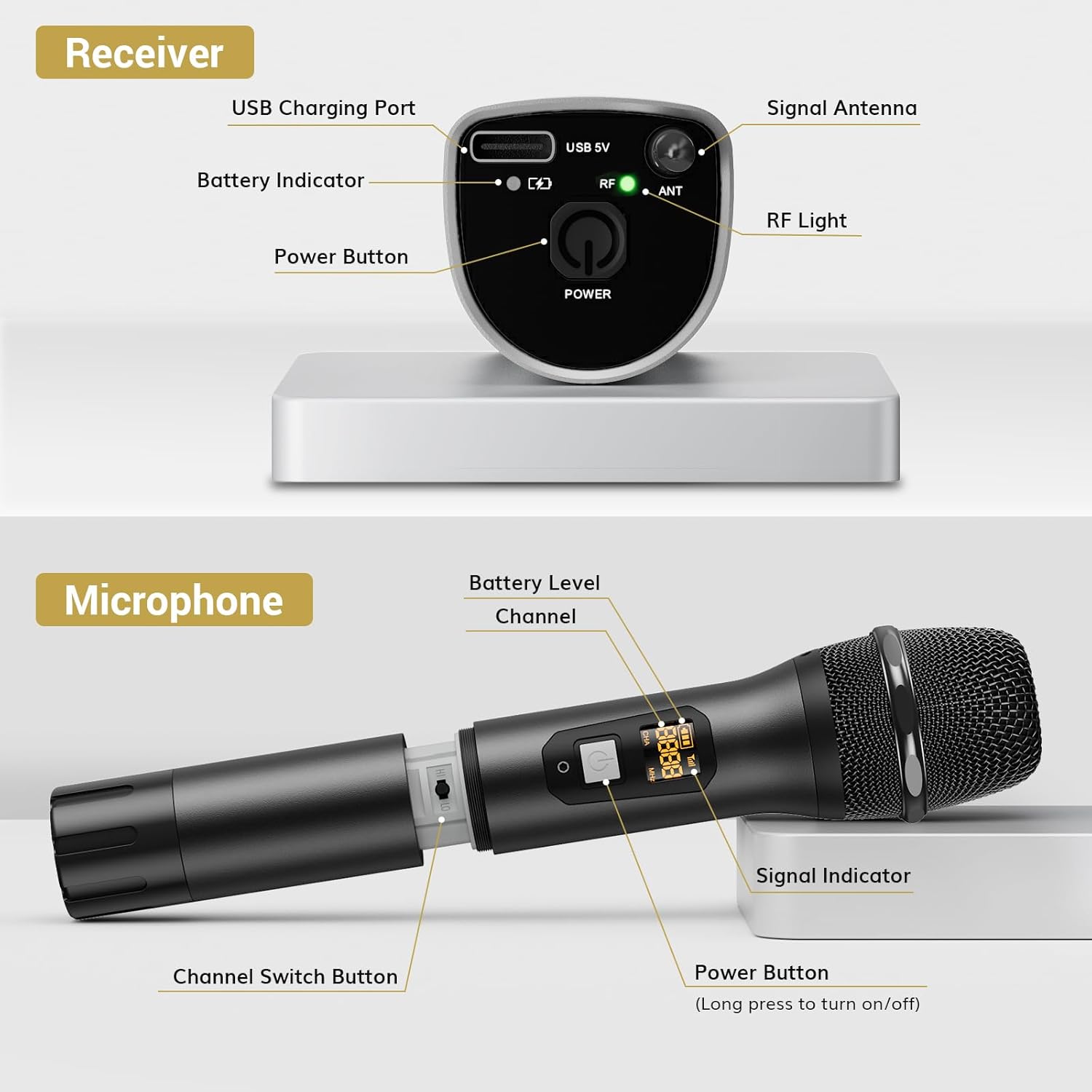
Слика: Детаљна view of the receiver, highlighting its charging port, antenna, and indicator lights.
Кључне карактеристике:
- Бежична слобода: Up to 200ft (60m) operating range (line of sight).
- Стабилан сигнал: 15 adjustable channels to minimize interference.
- Издржљива конструкција: Microphones and receiver are made of rugged metal.
- Продужено трајање батерије: Receiver provides up to 6 hours of use on a 2-3 hour charge.
Водич за подешавање
1. Напајање
- микрофони: Each microphone requires 2 x AA batteries (not included). Open the battery compartment at the bottom of the microphone and insert the batteries, observing polarity.
- Пријемник: The receiver has a built-in rechargeable battery. Charge it using the provided USB cable and a 5V adapter (not included). A full charge takes approximately 2-3 hours and provides up to 6 hours of operation.

Image: Instructions for powering the microphone with AA batteries and charging the receiver via USB.
2. Pairing the Microphones and Receiver
The system is designed for automatic pairing:
- Turn on both the microphone(s) and the receiver.
- The receiver will automatically sync its frequency with the microphone(s). The RF light on the receiver will illuminate when a stable connection is established.
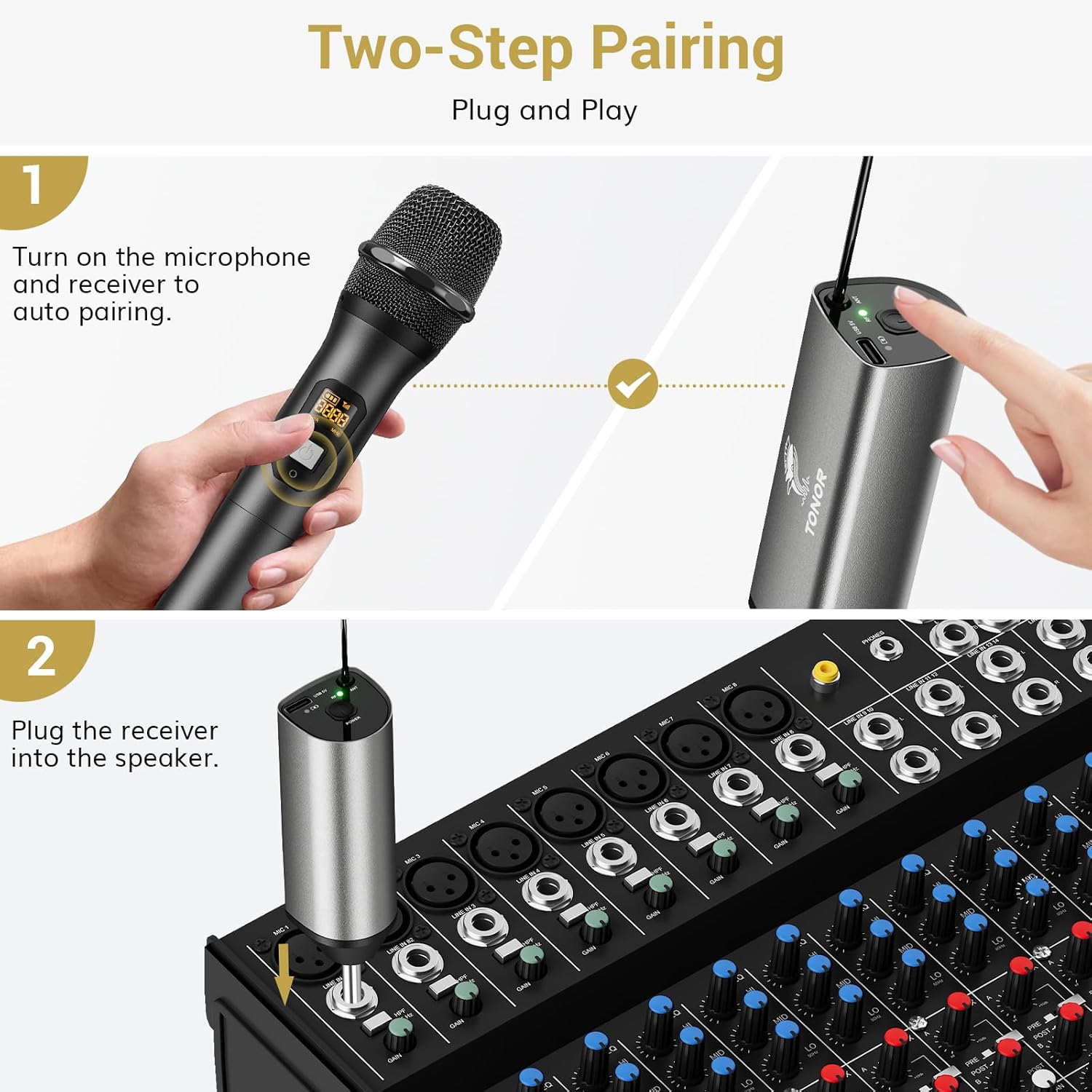
Image: Visual guide for the two-step pairing process and connecting the receiver.
3. Connecting to Audio Devices
Plug the 6.35mm receiver directly into the "MIC IN" input of compatible audio equipment.
- Компатибилни уређаји: Powered speakers, karaoke machines, amplifiers, mixers, and audio interfaces.
- Некомпатибилни уређаји: This system is not compatible with phones, computers, or tablets directly. An additional 3.5mm (1/8") adapter is required for these devices (not included).

Слика: прamples of compatible audio devices and correct input connection.
Упутство за употребу
Пребацивање канала
The TW630 system offers 15 adjustable channels to avoid interference. If you experience signal issues or are using multiple sets simultaneously, you can change the microphone's channel:
- To switch channels, briefly press the "Channel Switch Button" located inside the microphone's battery compartment (after unscrewing the bottom part).
- The display on the microphone will show the current channel (CHA) and frequency (MHz).
- The receiver will automatically adjust to the new channel.

Image: Guide to changing microphone channels.
Using Multiple Microphone Sets
Up to 15 sets of TONOR TW630 systems can be used simultaneously without interference. Ensure each set operates on a different channel to prevent signal conflicts.
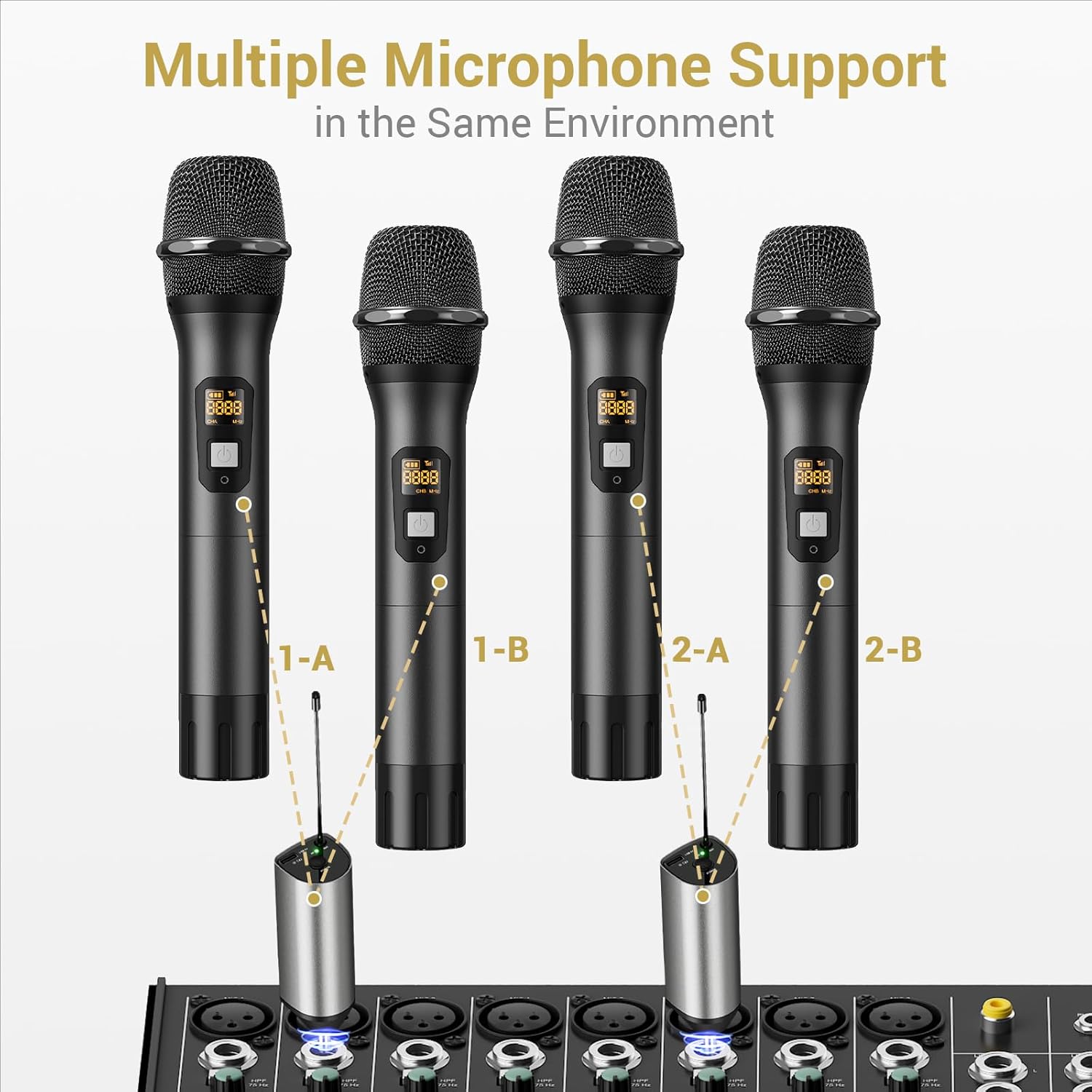
Image: Setup for using multiple microphone systems in the same environment.
Одржавање
- Чишћење: Wipe the microphones and receiver with a soft, dry cloth. Do not use liquid cleaners or solvents.
- Одржавање батерије: Remove AA batteries from microphones if not in use for extended periods to prevent leakage. Recharge the receiver regularly to maintain battery health.
- Складиштење: Систем чувајте на хладном и сувом месту, даље од директне сунчеве светлости и екстремних температура.
- Microphone Covers: Use the provided foam mic covers to protect against wind noise and moisture.
Решавање проблема
| Проблем | Могући узрок | Решење |
|---|---|---|
| Нема звука из микрофона |
|
|
| Сметње или лош квалитет звука |
|
|
| Receiver not charging |
|
|
Спецификације
| Феатуре | Детаљ |
|---|---|
| Бранд | ТОНОР |
| Назив модела | ТВ630 |
| Број модела ставке | ТН120106 |
| Технологија повезивања | УХФ |
| Тип конектора | 6.35 мм прикључак |
| Фактор форме микрофона | Хандхелд |
| Материјал | Метал |
| Број канала | 15 |
| Аудио Осетљивост | 52 децибела |
| Однос сигнала и шума | 70 дБ |
| Полар Паттерн | Једносмерно |
| Извор напајања | Battery Powered (Microphones: 2x AA each; Receiver: Rechargeable Lithium Ion) |
| Време пуњења пријемника | 2-3 сати |
| Радно време пријемника | До 6 сати |
| Оперативни опсег | 200ft / 60m (line of sight) |
| Тежина артикла | 1.32 фунти (600 грама) |
| Димензије пакета | 11.18 к 6.42 к 2.99 инча |
Безбедносне информације
- Не излажите производ води или прекомерној влази.
- Избегавајте испуштање или излагање производа јаким ударима.
- Use only a 5V adapter for charging the receiver to prevent damage.
- Чувати ван домашаја деце.
- Не покушавајте сами да растављате или поправљате уређај. Обратите се квалификованом сервисеру.
Гаранција и подршка
For warranty information and technical support, please refer to the official TONOR website or contact TONOR customer service directly. Keep your purchase receipt for warranty claims.
You can visit the TONOR store on Amazon for more information: TONOR Store