
1. Увод
Хвала вам на куповиниasing the CANYON BSP-8 Bluetooth Speaker. This manual provides essential information for the safe and efficient use of your device. Please read it thoroughly before operation and retain it for future reference.
Кључне карактеристике:
- Аудио излаз од 10 W: Пружа јасан и снажан звук.
- Блуетоотх КСНУМКС: For stable and energy-efficient wireless connection up to 10 meters.
- RGB позадинско осветљење: Integrated lighting for enhanced ambiance.
- Прави бежични стерео (ТВС): Connect two BSP-8 speakers for a full stereo sound experience.
- Више опција репродукције: Supports Bluetooth, AUX, USB, and MicroSD card inputs.
- Преносиви дизајн: Compact size with a convenient hanger for easy transport.
- Дуг век трајања батерије: До 3 сати играња са једним пуњењем.
2. Безбедносне информације
- Не излажите звучник екстремним температурама, директној сунчевој светлости или високој влажности.
- Избегавајте испуштање или излагање звучника јаким ударима.
- Do not disassemble or attempt to repair the speaker yourself. Contact qualified service personnel.
- Keep the speaker away from water and other liquids. It is not waterproof.
- Користите само приложени кабл за пуњење или сертификовани Type-C кабл за пуњење.
- Одложите батерију и звучник у складу са локалним прописима.
3. Садржај пакета
- CANYON BSP-8 Bluetooth Speaker
- УСБ кабл за пуњење типа Ц
- Упутство за употребу
4. Производ је готовview
Упознајте се са компонентама и контролама звучника.
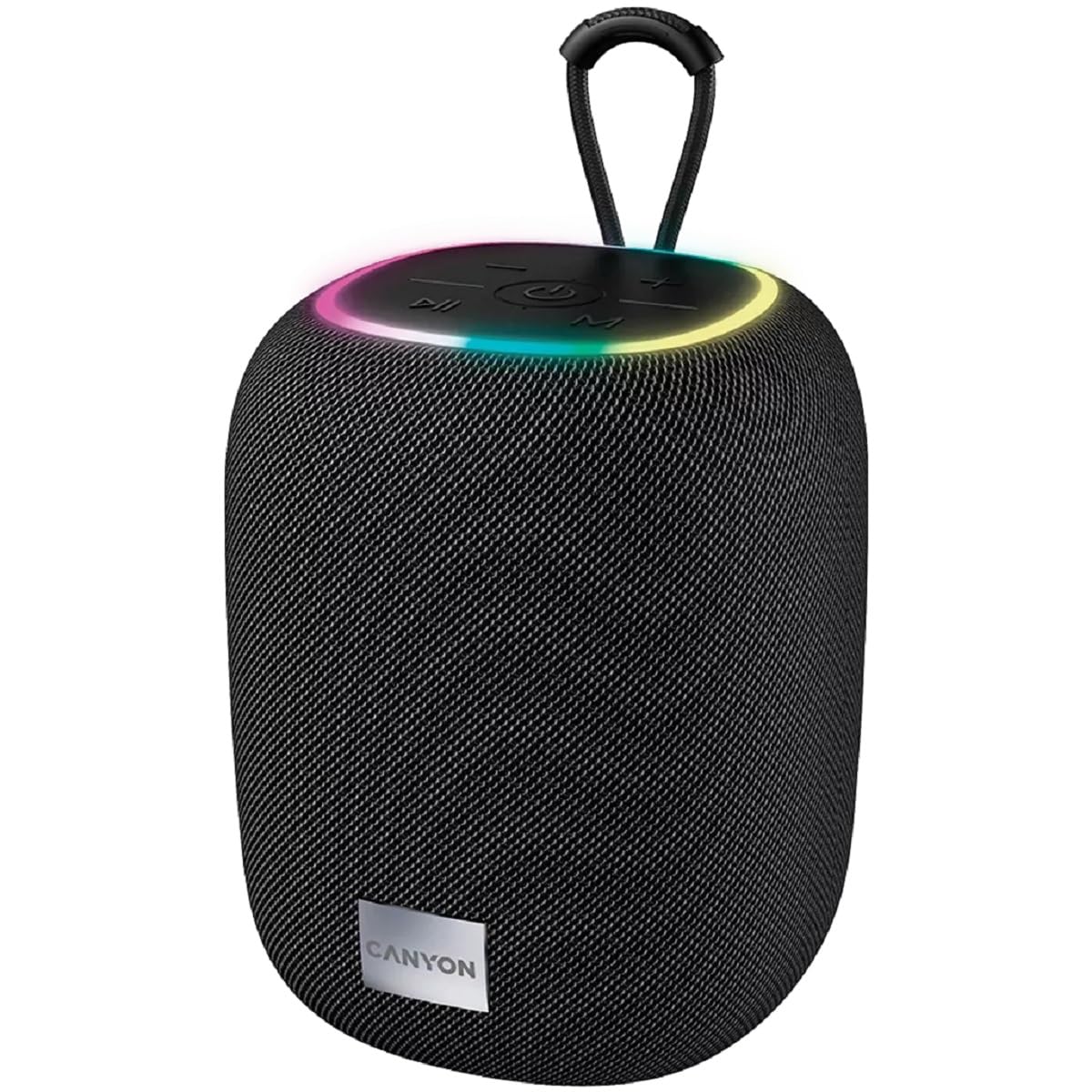
Слика 1: Врх view of the CANYON BSP-8 speaker, showing the control buttons, RGB backlight, and integrated hanger.
Контролна дугмад (горњи панел):
- Дугме за напајање: Притисните и држите да бисте укључили/искључили. Кратко притисните за репродукцију/паузирање.
- Дугме за смањивање јачине звука / претходну нумеру: Кратак притисак за смањивање јачине звука. Дуг притисак за претходну нумеру.
- Дугме за појачавање јачине звука / следећу нумеру: Кратак притисак за појачавање звука. Дуг притисак за следећу нумеру.
- Дугме за режим (М): Short press to switch between Bluetooth, AUX, USB, and MicroSD modes.

Слика 2: Позади view of the CANYON BSP-8 speaker, illustrating the various input ports including AUX, USB, TF (MicroSD) card slot, and DC5V Type-C charging port.
Input Ports (Rear Panel):
- АУКС порт: За повезивање екстерних аудио уређаја путем 3.5 мм аудио кабла.
- УСБ порт: За репродукцију звука са УСБ флеш диска.
- TF Card Slot (MicroSD): For playing audio from a MicroSD card.
- DC5V (Type-C) Port: За пуњење звучника.
5. Подешавање
5.1 Пуњење звучника
- Connect the provided USB Type-C cable to the DC5V port on the speaker.
- Connect the other end of the cable to a USB power adapter (5V/1A recommended) or a computer's USB port.
- Индикаторска лампица пуњења ће се упалити. Искључиће се или променити боју када се потпуно напуни.
Note: For optimal battery life, fully charge the speaker before first use.

Image 3: Illustration showing the 1800 mAh battery capacity and up to 3 hours of playtime for the CANYON BSP-8 speaker.
5.2 Укључивање/искључивање
- За укључивање: Press and hold the Power button for approximately 3 seconds. You will hear an audible prompt.
- За искључивање: Press and hold the Power button for approximately 3 seconds. You will hear an audible prompt.
5.3 Блуетоотх упаривање
- Укључите звучник. Аутоматски ће ући у режим упаривања путем Bluetooth-а, што ће бити назначено трепћућим LED светлом.
- Омогућите Блутут на свом мобилном уређају (паметном телефону, таблету, рачунару).
- Тражи available Bluetooth devices and select "CANYON BSP-8" from the list.
- Once paired, the LED light will stop flashing, and you will hear a confirmation sound.
Note: The speaker will automatically reconnect to the last paired device if it is within range and Bluetooth is enabled.

Image 4: Illustration highlighting the stable and energy-efficient Bluetooth 5.2 connection with an operating range of up to 10 meters.
5.4 Упаривање са правим бежичним стерео (TWS) системом
To connect two CANYON BSP-8 speakers for a stereo sound experience:
- Ensure both BSP-8 speakers are powered on and not connected to any Bluetooth device.
- На једном звучнику (ово ће бити примарни звучник), двапут притисните дугме за напајање. Ући ће у TWS режим упаривања.
- The two speakers will automatically search for and connect to each other. You will hear a confirmation sound once connected.
- Once TWS is established, connect your mobile device to the primary speaker via Bluetooth as described in section 5.3.
Note: TWS mode only works with two identical CANYON BSP-8 speakers.
6. Упутство за употребу
6.1 Репродукција звука
- Блуетоотх режим: Након успешног упаривања, звук са повезаног уређаја ће се репродуковати кроз звучник.
- АУКС режим: Connect a 3.5mm audio cable from your external audio device to the AUX port on the speaker. Press the 'M' button to switch to AUX mode.
- УСБ режим: Insert a USB flash drive into the USB port. The speaker will automatically switch to USB mode and begin playing audio files. If not, press the 'M' button.
- Режим МицроСД картице: Insert a MicroSD card into the TF card slot. The speaker will automatically switch to MicroSD mode and begin playing audio files. If not, press the 'M' button.
6.2 Контрола репродукције
- Пусти/паузирај: Кратко притисните дугме за напајање.
- Појачавање звука: Кратко притисните дугме за појачавање јачине звука (+).
- Смањивање јачине звука: Кратко притисните дугме за смањивање јачине звука (-).
- Следећа нумера: Дуго притисните дугме за појачавање јачине звука (+).
- Претходни запис: Дуго притисните дугме за смањивање јачине звука (-).
6.3 RGB Backlight
The speaker features an integrated RGB backlight on the top panel. The backlight activates automatically when the speaker is powered on. There are no specific controls for changing the RGB pattern or turning it off/on independently of the speaker's power state.