
1. Производ је готовview
The Yaheetech Nightstand with 3 Drawers and Charging Station is designed to provide convenient storage and power access for your bedroom or living space. It features three spacious drawers for organized storage and an integrated charging station with two power outlets and two USB ports, allowing you to charge electronic devices easily.

Слика 1.1: Assembled Yaheetech Nightstand. This image shows the complete nightstand with its three drawers and the integrated charging station on top.

Слика 1.2: Yaheetech Nightstand positioned next to a sofa, demonstrating its use as a side table with a lamp and charging devices.
2. Садржај пакета
Before assembly, please verify that all components and hardware listed below are present and undamaged. Refer to the installation video for a visual guide to identifying each part.

Слика 2.1: All parts and hardware laid out for assembly. This image displays the various wooden panels, drawer slides, and fasteners included in the package.
Листа делова:
- Горња плоча
- Бочне плоче (2)
- Доња табла
- Задњи панел
- Фронтални делови фиока (3)
- Бочне плоче фиоке (6)
- Задње плоче фиоке (3)
- Доње плоче фиоке (3)
- ноге (4)
- Јединица за пуњење
Листа хардвера:
- Вијци (разних величина)
- Вооден Довелс
- Cam Locks and Cam Bolts
- Клизне фиоке (6 пари)
- Drawer Pulls (3)
- Клип за кабл за напајање
- Allen Wrench (if applicable)
3. Безбедносна упутства
- Увек састављајте производ на мекој, чистој површини како бисте спречили огреботине.
- Уверите се да су сви завртњи и причвршћивачи добро затегнути пре употребе. Периодично проверавајте и по потреби поново затегните.
- Do not exceed the maximum recommended load capacity of 106 pounds for the top surface.
- Држите мале делове и хардвер даље од деце како бисте спречили опасност од гушења.
- For electrical safety, do not overload the power outlets or USB ports. Ensure the power cord is not pinched or damaged.
- Do not expose the nightstand to excessive moisture or direct sunlight.
- Use only the provided hardware for assembly. Substituting parts may compromise stability and safety.
4. Упутство за монтажу
Follow these steps carefully for proper assembly. It is recommended to have two people for certain steps to ensure stability and ease of construction. An installation video is provided below for visual guidance.
Видео 4.1: Installation video for the Yaheetech Nightstand. This video provides a step-by-step visual guide to assembling the nightstand, including attaching drawer slides, constructing the frame, and installing the charging station.
Водич корак по корак:
- Assemble the Drawers:
- Attach the drawer side panels to the drawer front and back panels using the provided screws and dowels.
- Slide the drawer bottom panel into the grooves.
- Secure the drawer pulls to the drawer fronts.
- Attach the drawer slides (H-2(L) and H-2(R)) to the sides of each drawer using screws.
- Саставите главни оквир:
- Attach the side panels to the bottom panel using cam locks and cam bolts.
- Причврстите задњу плочу на склопљени оквир.
- Attach the main drawer slides (H-1(L) and H-1(R)) to the inner sides of the main frame using screws. Ensure they are aligned correctly for smooth drawer operation.
- Причврстите ноге:
- Insert the wooden dowels into the designated holes on the bottom panel.
- Attach the four solid rubberwood legs to the bottom panel, aligning them with the dowels and securing them with screws.

Слика 4.1: This image highlights the robust construction of the solid rubberwood legs, emphasizing their strength and stability compared to MDF legs.
- Инсталирајте горњи панел:
- Place the top panel onto the assembled frame, aligning the pre-drilled holes.
- Secure the top panel using screws.
- Инсталирајте станицу за пуњење:
- Carefully feed the power cord of the charging station through the cutout on the top panel.
- Insert the charging station unit into the opening on the top panel.
- Secure the charging station with the provided screws.

Слика 4.2: Детаљно view of the charging station, showing 2 AC outlets (125V/12A), 2 USB ports (5V/2A), a power switch, and the 6.5-foot power cord with a hook & loop strap for management.
- Уметните фиоке:
- Carefully slide each assembled drawer into the corresponding drawer slides on the main frame.
- Ensure smooth operation. If a drawer is stiff, check alignment of the slides.

Слика 4.3: Цлосе-уп view illustrating the smooth operation of the drawer slides, designed for quiet and effortless opening and closing.
5. Operating Instructions (Charging Station)
Интегрисана станица за пуњење пружа практичан приступ напајању за ваше електронске уређаје.
- Прикључак за напајање: Plug the 6.5-foot power cord into a standard 120V AC wall outlet.
- АЦ утичнице: The charging station includes two 125V/12A AC outlets. Use these for devices requiring standard wall power, such as lamps, laptops, or small appliances.
- УСБ портови: Два УСБ порта од 5V/2A доступна су за пуњење паметних телефона, таблета и других УСБ уређаја.
- Прекидач: A master power switch controls the flow of electricity to both the AC outlets and USB ports. Press the switch to turn the charging station ON or OFF.
- Управљање кабловима: Use the included hook & loop strap to manage excess power cord length and keep your space tidy.
Важно: Do not exceed the maximum electrical load capacity of the charging station. Avoid plugging in high-power appliances that may draw more than 12A. If the charging station trips a circuit breaker, unplug devices and reset the breaker before resuming use.
6. Одржавање и њега
Правилна нега ће помоћи у одржавању изгледа и дугог века трајања вашег ноћног сточића.
- Чишћење: Обришите површину меком, дamp крпом. За тврдокорне мрље користите благо, неабразивно средство за чишћење. Одмах осушите чистом крпом.
- Просипање: The nightstand features a water-resistant painting. Promptly wipe up any spills to prevent damage to the finish.
- Избегавајте оштре хемикалије: Do not use abrasive cleaners, ammonia-based products, or silicone-based polishes, as these can damage the finish.
- Слајдови за фиоке: Периодично проверавајте клизаче фиоке да ли се крећу глатко. Ако постану крути, може се нанети мала количина силиконског мазива.
- Причвршћивачи: Regularly check all screws and bolts to ensure they remain tight. Re-tighten as needed to maintain structural integrity.

Слика 6.1: Demonstrates wiping water droplets from the nightstand surface, highlighting its easy-to-clean and water-resistant properties.
КСНУМКС. Решавање проблема
If you encounter any issues with your Yaheetech Nightstand, refer to the following common problems and solutions:
| Проблем | Могући узрок | Решење |
|---|---|---|
| Фиоке се не померају глатко. | Неправилно поравнате клизне линије фиоке или лабави шрафови. | Check the alignment of the drawer slides on both the drawer and the main frame. Tighten all screws securing the slides. Apply a small amount of silicone lubricant if needed. |
| Charging station not powering devices. | Power cord not plugged in, power switch off, or circuit overload. | Ensure the power cord is securely plugged into a working wall outlet. Check if the power switch on the charging station is ON. Unplug some devices if overloaded and check your household circuit breaker. |
| Nightstand feels wobbly. | Лабави причвршћивачи или нераван под. | Tighten all assembly screws and bolts. Ensure the nightstand is placed on a level surface. If necessary, use furniture pads under the legs to stabilize. |
8. Спецификације
- Димензије производа: 15.75 к 15.75 к 23.62 инча (Д к Ш к В)
- Тежина артикла: 27.2 фунти
- Максимално препоручено оптерећење: 106 pounds (top surface)
- Drawer Storage Space: 10 к 11.3 к 4 инча (Ш к Д к В)
- Материјали: CARB P2 MDF board, Solid Rubberwood legs
- станица за пуњење:
- АЦ утичнице: 2 (125V/12A)
- USB Ports: 2 (5V/2A)
- Дужина кабла за напајање: 6.5 стопа
- Потребна монтажа: Да
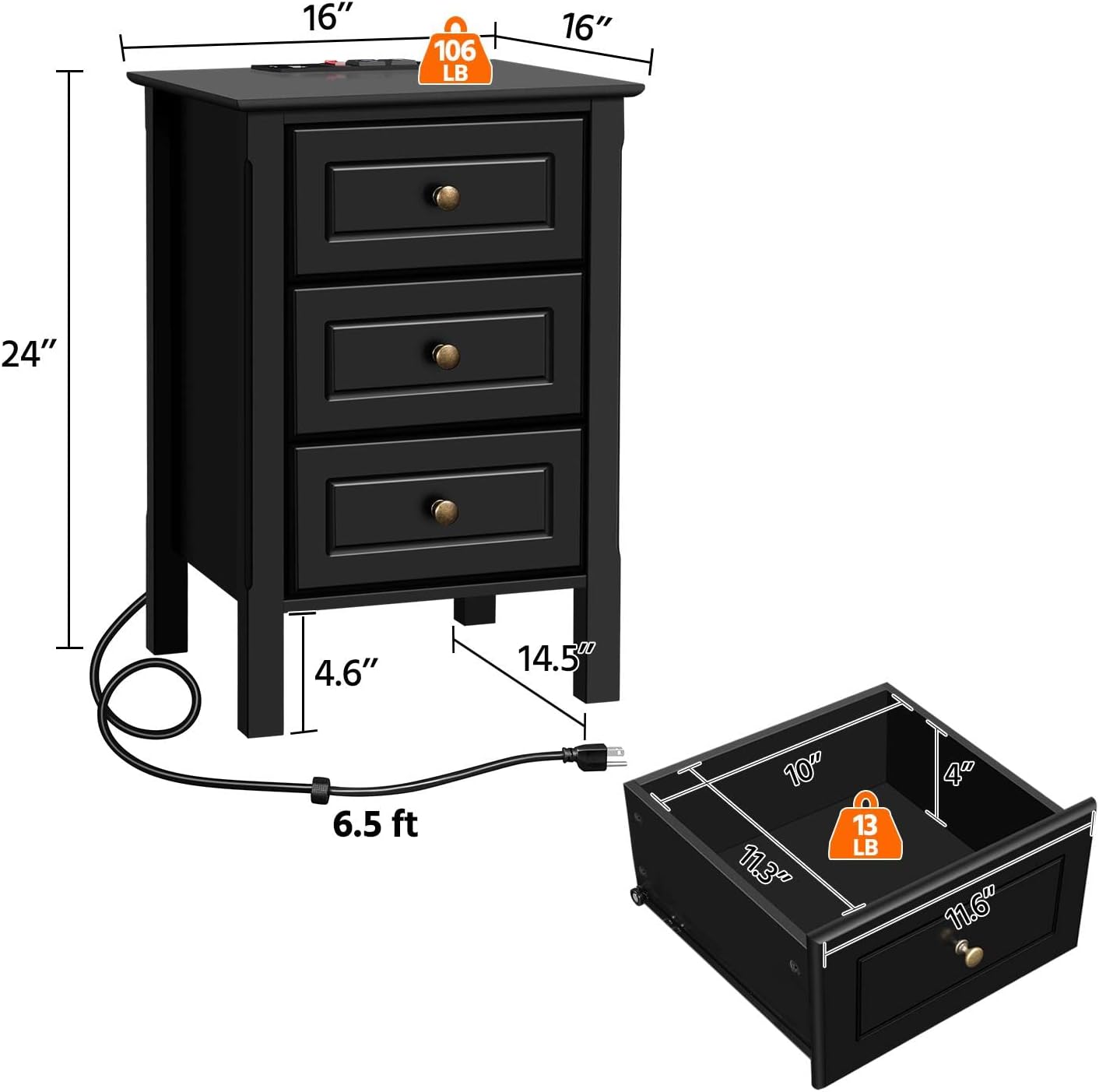
Слика 8.1: Diagram illustrating the overall dimensions of the nightstand (16" W x 16" D x 24" H) and the internal dimensions of a drawer (10" W x 11.3" D x 4" H), along with weight capacities.
9. Гаранција и подршка
For warranty information, technical support, or any questions regarding your Yaheetech Nightstand, please contact Yaheetech customer service. Refer to the product packaging or the official Yaheetech webсајт за контакт детаље.
Произвођач: Иахеетецх