
Увод
Welcome to your new Podofo 9.3-inch Portable Car Stereo. This device integrates a high-resolution 2.5K dual dash cam with advanced connectivity features like Wireless Apple CarPlay and Android Auto. Designed for ease of use and enhanced driving safety, this manual will guide you through its installation, operation, and maintenance to ensure you get the most out of your product.
Производ је завршенview
Кључне карактеристике:
- Portable Car Audio Receiver: Enjoy wireless CarPlay and Android Auto without replacing your main unit. This is a true plug-and-play device.
- Бежични CarPlay/Android Auto: Connect your smartphone via Bluetooth and Wi-Fi for safe access to music, navigation, calls, and messages. Supports voice control via Siri Assistant for a safer and more comfortable driving experience.
- Dual Camera Safe Driving & HD Loop Recording: This touchscreen dashcam supports split-screen display, showing front and rear views simultaneously. It includes a 64GB TF card for continuous video recording from both cameras. The front camera's angle is adjustable.
- Stable Bluetooth & FM Transmission: When connected to your mobile phone via Bluetooth, you can answer/make calls and play music hands-free. For louder sound, transmit audio to your car's speakers by setting the same FM radio channel on the device and your car's radio.
- HD IPS Touch Screen: Features a 9.3-inch high-definition IPS touch screen with a 1600x600 resolution and a 178° viewing angle, providing a superior visual experience and clearer navigation instructions.
- Easy Installation & Wide Compatibility: Plug and play directly into the dashboard via the cigarette lighter port. No need to disassemble the car console or replace the original radio. Compatible with a wide range of car brands.
Диаграм производа

This image shows the main unit of the Podofo 9.3-inch portable car stereo, highlighting its large touchscreen display with app icons for phone, music, maps, and messages. It also illustrates the wireless CarPlay and Android Auto connectivity with a smartphone.
Садржај пакета
Следеће ставке су укључене у пакет вашег производа:
- Главна јединица дисплеја
- Pull Back Camera (Rear View Камера)
- ТФ картица (64 ГБ укључено)
- Power Cord (for cigarette lighter)
- Продужни кабл за камеру
- Монитор Басе
- Налепница за причвршћивање носача
- Цамера Аццессориес
- Упутство за употребу
- AUX кабл од 3 м

This image displays all components included in the package: the main display unit, a rear view camera, a 64GB TF card, power cord, camera extension cord, monitor base, bracket fixing stickers, camera accessories, a user manual, and a 3m AUX cable.
Водич за подешавање
1. Монтирање главне јединице
Place the monitor base on a flat, stable surface on your dashboard. Secure it using the provided bracket fixing stickers. Ensure the unit does not obstruct your view или ометају контроле вожње.

This diagram illustrates the simple installation process. The main unit is placed on the dashboard using its base, and the power cord is plugged into the car's cigarette lighter socket. The image also shows the adjustable lens of the front camera.
2. Прикључак за напајање
Connect the power cord to the main unit and plug the other end into your car's cigarette lighter socket. The unit is compatible with 7-32V power supplies.
3. Позади View Инсталација камере (опционо)
Mount the pull back camera at the rear of your vehicle. Connect the camera to the main unit using the camera extension cord. For automatic display when reversing, connect the red wire of the camera extension cord to your car's reverse light anode (positive wire).
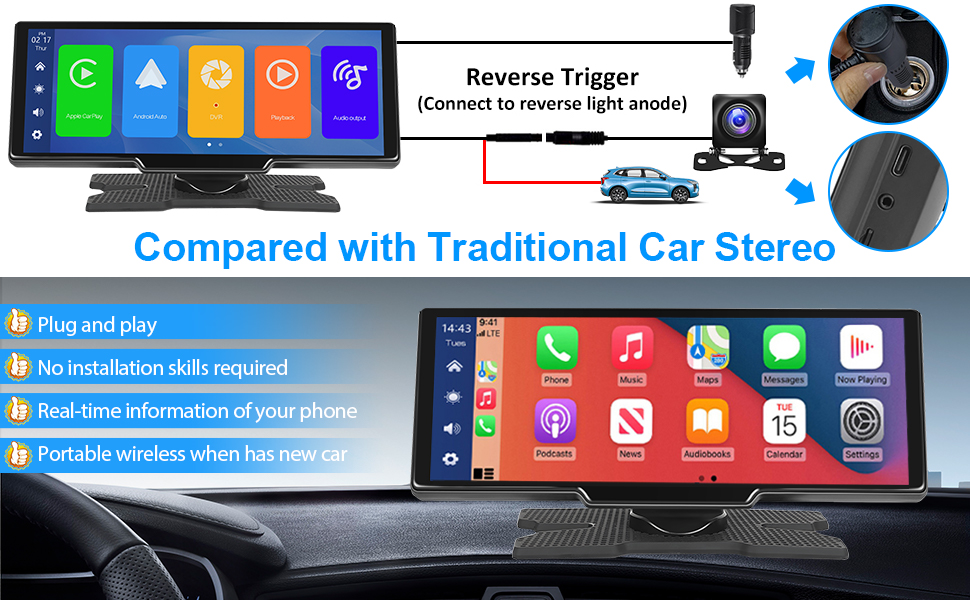
This image shows how to connect the rear view camera. The camera connects to the main unit via an extension cable, and a red wire from this cable needs to be connected to the car's reverse light power source for automatic activation.
Упутство за употребу
1. Прво укључивање
Once connected to power, the device will automatically turn on. Follow the on-screen prompts for initial setup, including language selection.
2. Бежична веза са CarPlay-ом / Android Auto-ом
- Омогућите Блуетоотх и Ви-Фи на свом паметном телефону.
- On the car stereo, navigate to the CarPlay or Android Auto icon.
- Тражи the device's Bluetooth name on your phone and pair them.
- Confirm the connection on both devices. The system will then automatically connect via Wi-Fi for full functionality.
This image illustrates the wireless CarPlay and Android Auto interface on the car stereo, along with a smartphone showing its Bluetooth and Wi-Fi connection status, indicating how to link the devices.
3. Using the Dash Cam
The device features a 2.5K front dash cam and a 1080P rear dash cam. Video recording starts automatically when the device powers on. The included 64GB TF card stores recordings in a loop. You can view recordings and adjust settings through the device's menu. The front camera's angle can be adjusted manually.

This image shows the dual dash cam functionality, with a view from the front camera displaying the road ahead and a view from the rear camera showing the parking area. It highlights the 2.5K front and 1080P rear recording capabilities.
4. Bluetooth Music and Calls
After pairing your phone via Bluetooth, you can stream music directly to the car stereo. Use the touchscreen or voice commands to control playback. For hands-free calling, accept or make calls directly from the device's interface.
5. FM предајник
To output audio to your car's existing speakers, activate the FM Transmitter function on the device. Select an unused FM frequency on the car stereo and tune your car's radio to the same frequency. This will transmit the audio from the car stereo to your car's sound system.

This image shows the FM Transmitter interface on the car stereo, indicating how to set the frequency to broadcast audio to the car's radio.
6. АУКС прикључак
For a wired audio connection, use the provided 3m AUX cable to connect the car stereo's AUX output to your car's AUX input. Select AUX mode on the car stereo.

This image highlights the TF card slot and AUX port on the side of the car stereo, demonstrating options for media input.
7. Управљање гласом
Utilize voice commands (e.g., "Hey Siri" or "OK Google") through your connected smartphone for navigation, music playback, and other functions, ensuring a safer driving experience.

This image shows the voice control feature in action, with speech bubbles indicating commands like "Hi Siri, Call Bob" and "OK Google, Navigate to Park."
Одржавање
- Чишћење: Користите меку, суву крпу за чишћење екрана и спољашњости. Избегавајте абразивна средства за чишћење или раствараче.
- температура: Не излажите уређај екстремним температурама (врућим или хладним) током дужег временског периода.
- Складиштење: If storing the device for a long time, disconnect it from power and keep it in a cool, dry place.
- Ажурирања софтвера: Проверите произвођача website periodically for any available firmware updates to ensure optimal performance.
Решавање проблема
| Проблем | Могући узрок | Решење |
|---|---|---|
| Уређај се не укључује. | No power connection or faulty power cord. | Ensure the power cord is securely plugged into the cigarette lighter socket and the device. Check car's fuse for the cigarette lighter. |
| Cannot connect to Wireless CarPlay/Android Auto. | Bluetooth/Wi-Fi issues, incorrect pairing. | Ensure Bluetooth and Wi-Fi are enabled on your phone and the device. Forget the device on your phone's Bluetooth settings and try pairing again. Restart both devices. |
| No sound or poor sound quality via FM Transmitter. | Incorrect FM frequency, interference. | Ensure the car stereo and your car's radio are tuned to the exact same unused FM frequency. Try a different frequency. Ensure the volume on both devices is adequate. |
| Dash cam not recording. | TF card full or faulty, recording settings. | Check if the 64GB TF card is inserted correctly. Format the TF card (this will erase all data). Check recording settings in the device menu. |
| Device reboots unexpectedly. | Power instability, software issue. | Ensure stable power supply. If the issue persists, try a factory reset (refer to user manual for specific steps) or contact customer support. |
| Позади view камера не приказује. | Incorrect wiring, camera malfunction. | Verify the camera extension cord is securely connected. Ensure the reverse trigger wire is correctly connected to the car's reverse light anode. |
Спецификације
- Бренд: Подофо
- Модел: 9.3 Inch Portable Car Stereo with 2.5K Dual Dash Cam
- Технологија повезивања: AUX, FM, Bluetooth
- Тип контролера: Android, Google Assistant, iOS
- Посебне карактеристике: Apple CarPlay, Android Auto, Mirror Link
- Компатибилни уређаји: Звучник, паметни телефон
- Укупни ХДМИ портови: 1
- Режим аудио излаза: Стерео
- Конфигурација канала сурроунд звука: 2.1
- Видео Енцодинг: F4V, MOV, MP4, TS
- Боја: Tipo1 9,3'' Dash Cam+64G Card
- Излазна снага: 6 Ваттс
- Број аудио канала: 2
- Internet Applications: Android Auto, Apple CarPlay
- Метод контроле: Додир, глас
- Тип аудио излаза: Bluetooth, FM, Speakers
- Бежична технологија: Блуетоотх
- Улазна снага: 7-32В
Гаранција и подршка
This product comes with a standard manufacturer's warranty. Please refer to the warranty card included in your package for specific terms and conditions. For technical support, troubleshooting assistance, or warranty claims, please contact the seller, Motorsi Tech, or visit the official Podofo webсајт за додатне информације.
продавац: Motorsi Tech
Бранд Webсајт: Подофо продавница на Амазону