
1. Увод
This user manual provides detailed instructions for the installation, operation, and maintenance of your new Generic Android 15 7-inch Car Stereo. This head unit is specifically designed for Renault Megane 3 models manufactured between 2009 and 2014. Please read this manual thoroughly before installation and use to ensure proper function and safety.
Key features include an Android 15 operating system, 7-inch QLED touchscreen, integrated DSP amplifier, wired CarPlay, Bluetooth, GPS navigation, Wi-Fi, and 4G connectivity. It supports various multimedia formats and offers advanced functionalities like split-screen and Picture-in-Picture.
2. Безбедносне информације
- Препоручена професионална инсталација: Due to the complexity of car electrical systems, professional installation is highly recommended to prevent damage to the unit or vehicle.
- Напајање: Ensure the car stereo is connected to a 12V DC power supply with negative grounding.
- Безбедност вожње: Do not operate the unit's advanced features or watch videos that may distract you while driving. Always prioritize road safety.
- Ожичење: Incorrect wiring can cause damage. Refer to the wiring diagram carefully.
- температура: Избегавајте излагање уређаја екстремним температурама или директној сунчевој светлости током дужег периода.
3. Садржај пакета
Проверите да ли се у вашем пакету налазе све ставке наведене у наставку:
- Android Head Unit (1x)
- Power Cable (1x)
- RCA Cable (1x)
- GPS Antenna (1x)
- USB Adapters (Multiple)
- 4G Antenna (1x)
- External Microphone (1x)
- Installation Frame/Mounting Accessories
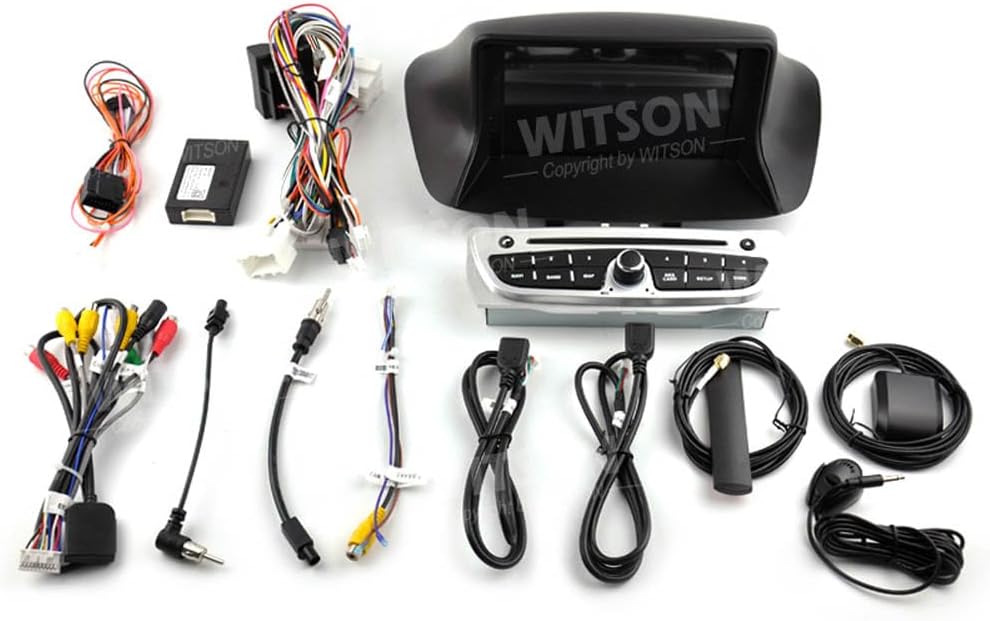
This image displays the complete set of components included with the car stereo, such as the main head unit, various wiring harnesses, GPS antenna, USB cables, and other accessories required for installation.
4. Инсталација
4.1 Провера пре инсталације
Before beginning installation, ensure that the car stereo is compatible with your vehicle's dashboard. Refer to the image below for proper fitment.
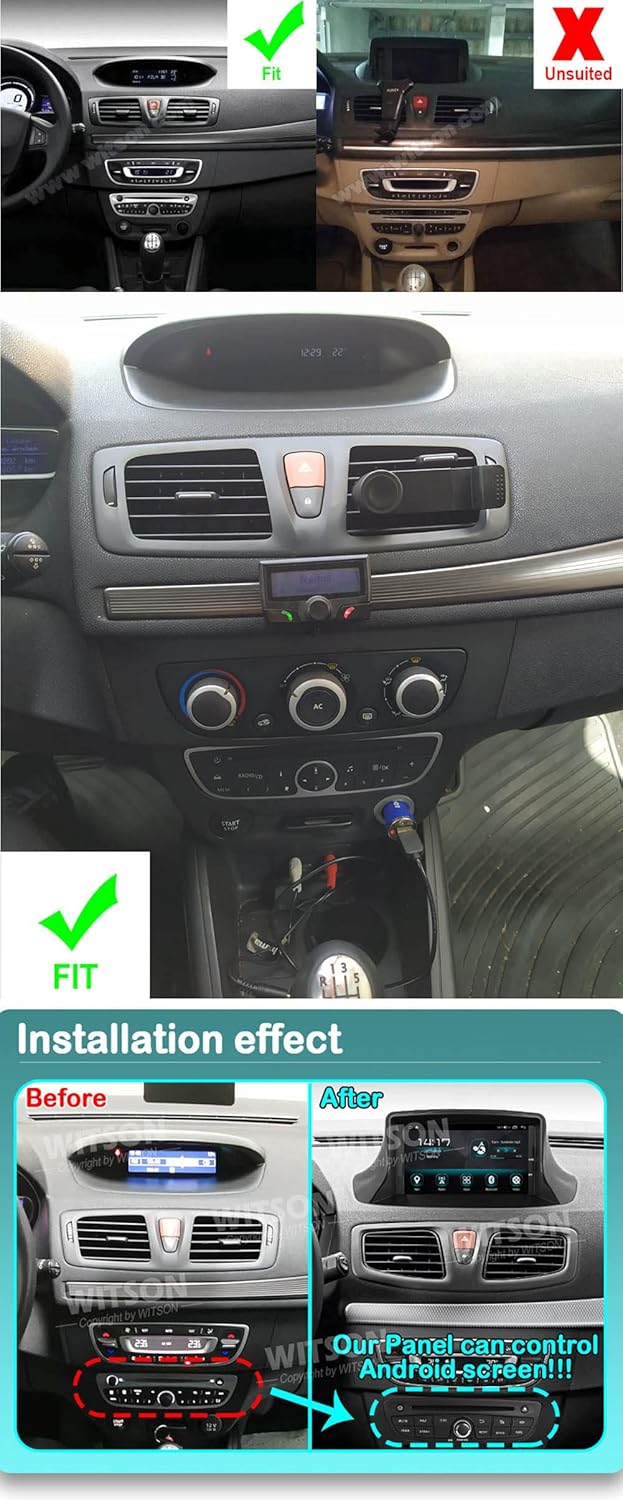
This image illustrates the proper fitment of the car stereo in a Renault Megane 3 dashboard (left side, marked 'Fit') compared to an unsuitable installation (right side, marked 'Unsuited'). Below, it shows the dashboard 'Before' and 'After' the installation of the new Android screen, highlighting the integrated control panel.
4.2 Ожичење и прикључци
Carefully connect all necessary cables according to the provided wiring diagram. Ensure all connections are secure to prevent malfunctions.

Позади view of the car stereo unit, illustrating the different ports and connectors for power, audio, video, and data inputs/outputs.

Детаљно view of the multi-pin connectors and wiring harnesses, essential for connecting the car stereo to the vehicle's electrical system.
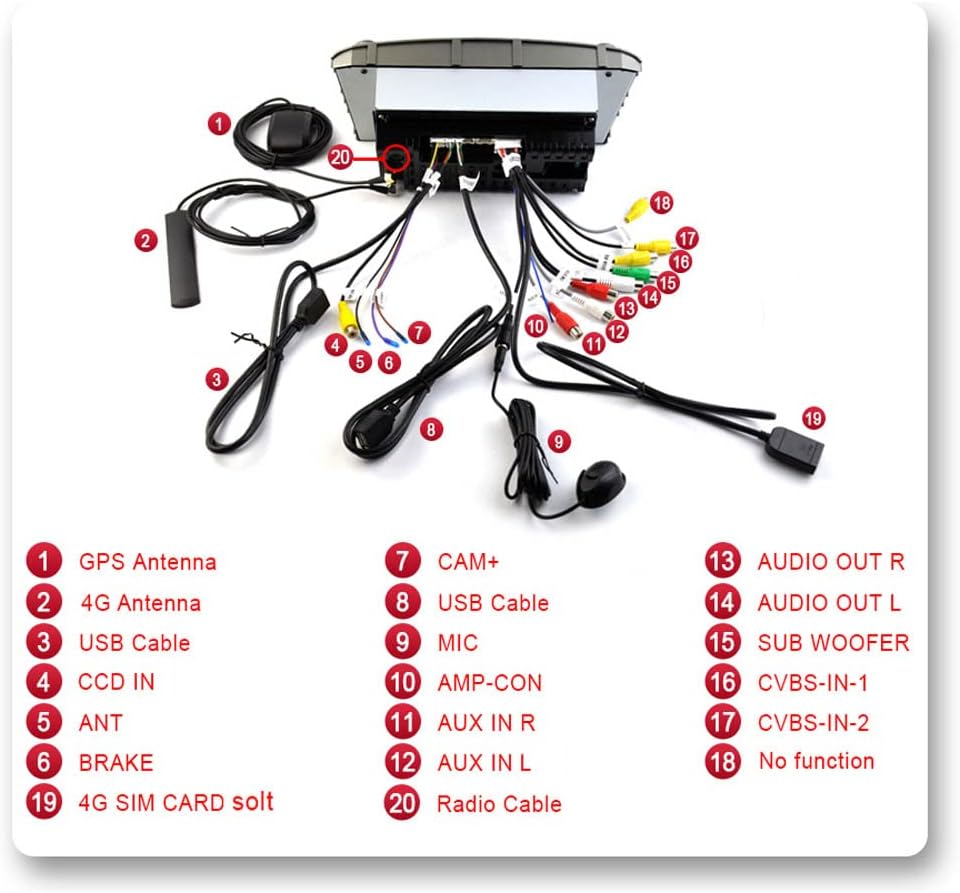
Овај дијаграм пружа свеобухватан прегледview of all connection points on the car stereo, with each port clearly numbered and labeled (e.g., GPS Antenna, 4G Antenna, USB Cable, CAM+, Audio Out, etc.) to guide proper wiring.
4.3 Општи кораци инсталације
- Искључите акумулатор возила како бисте спречили кратке спојеве.
- Carefully remove the original car stereo unit and any associated trim.
- Connect the new car stereo's wiring harness to the vehicle's wiring. Ensure all connections (power, speakers, antenna, etc.) are correct.
- Инсталирајте GPS антену на место са јасним view неба.
- Чврсто монтирајте нову главну јединицу у отвор на контролној табли.
- Поново повежите акумулатор возила.
- Тестирајте све функције пре него што потпуно поново саставите облогу инструмент табле.
5. Почетно подешавање
- Укључено: After installation, turn on your vehicle's ignition to power on the car stereo.
- Подешавања језика и времена: Follow the on-screen prompts to select your preferred language, set the correct time zone, and adjust the date and time.
- Ви-Фи веза: Navigate to the settings menu, select Wi-Fi, and connect to an available network to enable online features and app downloads.
- ГПС подешавање: Ensure the GPS antenna is properly installed. The system should automatically detect satellites. You may need to download or update map data if using offline navigation.
- Учење управљања воланом: If your vehicle has steering wheel controls, go to the settings menu to configure and map the buttons to the stereo's functions.
6. Упутство за употребу

Чист фронт view of the Android 15 car stereo head unit, displaying its 7-inch screen and integrated control buttons.

Приказ композитне сликеasing key features: the Android 15 operating system interface, details about the QLED 1280x720 screen, the integrated DSP (32EQ) for enhanced audio, and various customizable user interface designs.

This image highlights additional functionalities such as 1080P video playback, 4G and Wi-Fi internet connectivity, Bluetooth for hands-free calls and audio streaming, FM/AM RDS radio, split-screen and Picture-in-Picture capabilities, support for optional DAB+ tuner and DVR camera, and USB media playback.
6.1 Андроид 15 оперативни систем
The unit runs on Android 15, providing a familiar smartphone-like interface. Navigate through apps, settings, and features using the touchscreen. The Octa-Core UIS8581A (SC9863A) ARM Cortex-A55 1.6 GHz processor with 2GB RAM and 32GB ROM ensures smooth performance.
6.2 Wired CarPlay
Connect your iPhone via USB to activate wired CarPlay. This integrates your phone's essential features like navigation, music, messages, and calls directly onto the car stereo display, allowing for safe operation while driving.
6.3 Bluetooth функционалност
- Хандс-фрее позивање: Pair your smartphone via Bluetooth to make and receive calls directly from the head unit.
- Аудио стримовање (A2DP): Stream music wirelessly from your paired smartphone to the car stereo.
6.4 ГПС навигација
The integrated GPS module supports both online and offline navigation applications. Download maps for offline use or use online services via Wi-Fi/4G connection.
6.5 Wi-Fi и 4G повезивање
Connect to Wi-Fi hotspots or insert a 4G SIM card (if supported by the specific model) to access the internet, browse the web, and download applications from the Android Store.
6.6 Репродукција мултимедијалног садржаја
Пустите музику, видео записе и view photos from USB drives or TF cards. The unit supports 1080P video playback for a clear visual experience.
6.7 Дигитални звучни процесор (DSP)
The integrated DSP with 48-band EQ allows for precise audio customization, enhancing the sound quality to your preference.
6.8 Контрола на волану
Once configured, use your vehicle's existing steering wheel controls to adjust volume, answer calls, and change tracks, ensuring minimal distraction while driving.
6.9 Подељени екран и слика у слици (PIP)
Utilize the split-screen function to run two applications side-by-side, such as navigation and music. The Picture-in-Picture feature allows you to minimize a video window while using other applications.
6.10 FM/AM RDS Radio
Tune into your favorite FM/AM radio stations. The RDS (Radio Data System) feature displays station information and program details where available.
6.11 Подршка за опциону додатну опрему
The unit supports various optional accessories for extended functionality:
- DAB+ Tuner: За побољшани дигитални радио пријем.
- TPMS (Систем за праћење притиска у гумама): Displays tire pressure data.
- ОБД2: Connects to your vehicle's diagnostic system.
- ДВР камера: Records driving footage.
- Позади View камера: Аутоматски приказује задњи део view при кретању уназад.
- Миррор Линк: Wirelessly mirror your smartphone screen to the head unit.
7. Одржавање
- Чишћење екрана: Use a soft, lint-free cloth to clean the touchscreen. Avoid abrasive cleaners or harsh chemicals.
- Ажурирања софтвера: Периодично проверавајте да ли постоје ажурирања софтвера путем системских подешавања или произвођачевих webсајт како би се осигурале оптималне перформансе и приступ новим функцијама.
- Општа нега: Чувајте јединицу од прашине и влаге.
КСНУМКС. Решавање проблема
Ако наиђете на проблеме, погледајте следеће уобичајене проблеме и решења:
- Нема напајања: Проверите све прикључке за напајање и кутију са осигурачима возила. Уверите се да је паљење укључено.
- Нема звука: Проверите везе звучника. Проверите нивое јачине звука и подешавања аудио излаза. Уверите се да функција искључивања звука није активна.
- ГПС не ради: Уверите се да је GPS антена правилно повезана и да има јасан сигнал view неба. Проверите GPS подешавања у систему.
- Проблеми са Блуетоотх везом: Уверите се да је Bluetooth омогућен и на главној јединици и на паметном телефону. Покушајте да раскинете упаривање и поново упарите уређаје.
- Екран осетљив на додир не реагује: Try restarting the unit. If the problem persists, a factory reset might be necessary (note: this will erase all user data).
- Замрзавање/рушење јединице: Извршите меко ресетовање притиском на дугме за ресетовање (ако је доступно) или искључивањем паљења возила и поновним покретањем.
За сталне проблеме који нису овде обрађени, обратите се корисничкој подршци.
9. Спецификације
| Бранд | Генериц |
| Модел | Android 15 7-inch Car Stereo for Renault Megane 3 (2009-2014) |
| Оперативни систем | Андроид 15 |
| Процесор | Octa-Core UIS8581A (SC9863A) ARM Cortex-A55 1.6 GHz |
| РАМ | 2ГБ |
| РОМ | 32ГБ |
| Величина екрана | 7 инча |
| Дисплаи Типе | КЛЕД ЛЦД |
| Резолуција екрана | 1024к600 |
| Повезивање | Блутут, УСБ, Ви-Фи, 4Г |
| Компатибилни уређаји | Смартпхоне |
| Режим аудио излаза | Стерео |
| Ampлифиер | TDA7850 4 x 50W |
| ДСП | Integrated (48EQ) |
| УПЦ | 671310761471 |
| ASIN | B0C81HXPFX |
10. Гаранција и подршка
10.1 Информације о гаранцији
No specific warranty information is provided in the product details. Please refer to your purchase documentation or contact your retailer for details regarding warranty coverage.
10.2 Корисничка подршка
For technical assistance, troubleshooting, or any questions regarding your Generic Android 15 Car Stereo, please contact the retailer from whom you purchased the product. They will be able to provide the most accurate and timely support.