
МАЛА БУШОНА 4222
SmallRig AP-02 Lightweight Travel Tripod User Manual
Модел: 4222
Марка: SMALLRIG
Увод
The SmallRig AP-02 Lightweight Travel Tripod is designed for photographers and videographers seeking a compact, portable, and stable support solution. Constructed from durable aluminum alloy, this tripod features an innovative center column and square-shaped leg tubes for maximum compactness, making it ideal for travel. It offers versatile shooting angles, a detachable ball head with panoramic capabilities, and integrated expansion points for accessories.

Image: The SmallRig AP-02 Lightweight Travel Tripod shown with its quick release plate, Allen wrenches, and silicone foot pads.
Безбедносне информације
- Ensure all locks are securely tightened before mounting equipment or adjusting the tripod.
- Do not exceed the maximum load capacity of 17.6 lbs (8 kg) to prevent damage to the tripod or attached equipment.
- Avoid placing the tripod on unstable or slippery surfaces.
- Keep hands and fingers clear of moving parts, especially when extending or collapsing legs and the center column.
- Do not leave the tripod unattended with valuable equipment, especially in windy conditions.
- Clean the tripod with a soft, dry cloth. Avoid using harsh chemicals or abrasive materials.
Садржај пакета
Проверите да ли су све ставке наведене у наставку укључене у ваш пакет:
- 1 x SmallRig AP-02 Tripod
- 1 к торба за ношење
- 3 x Silicone Foot Pad
- 2 к имбус кључ
- 1 x QR Plate (Quick Release Plate)
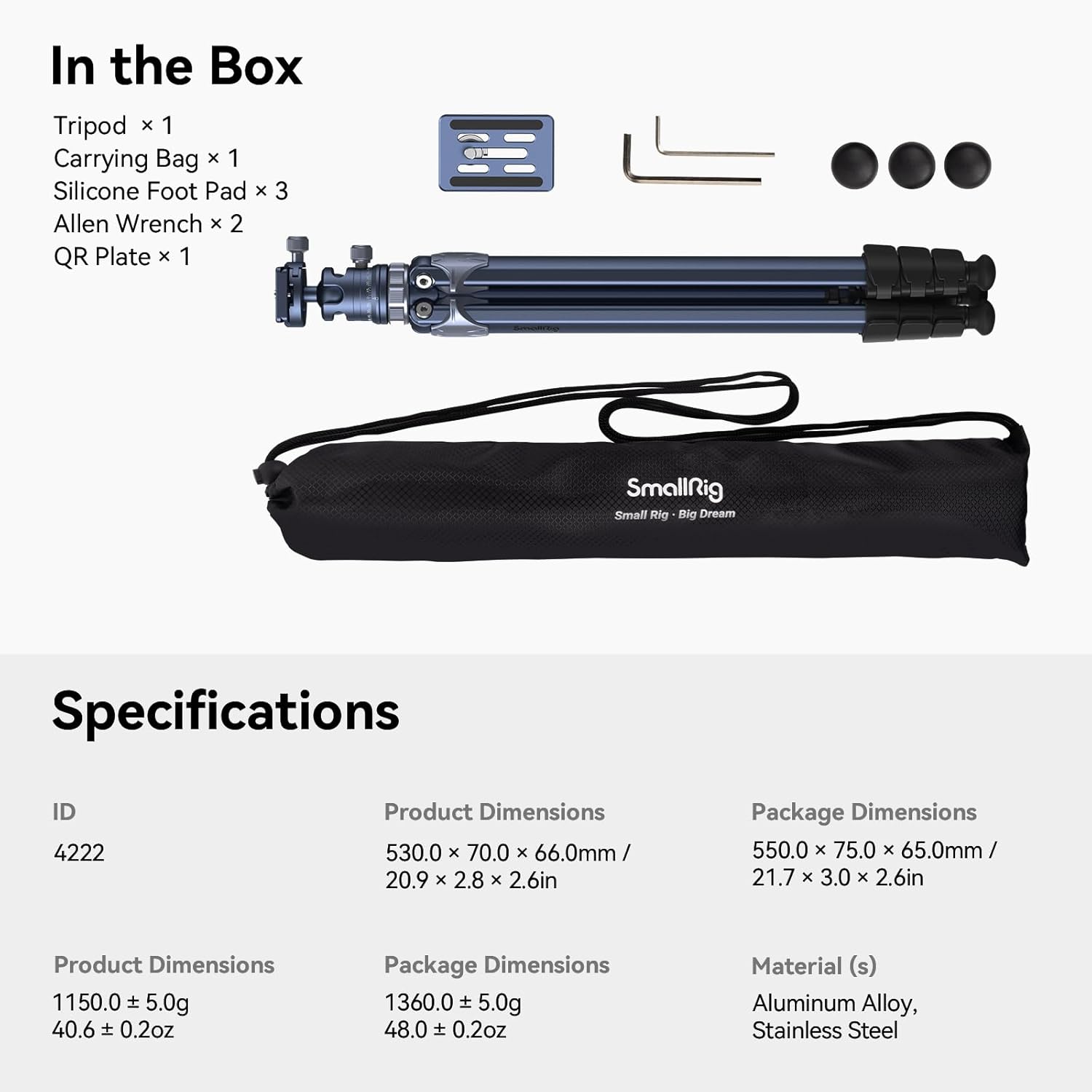
Image: Visual representation of the items included in the SmallRig AP-02 package.
Подешавање и монтажа
1. Распакивање и почетно подешавање
Remove the tripod and all accessories from the carrying bag. The tripod is designed for extreme compactness, featuring square-shaped leg tubes for efficient storage.
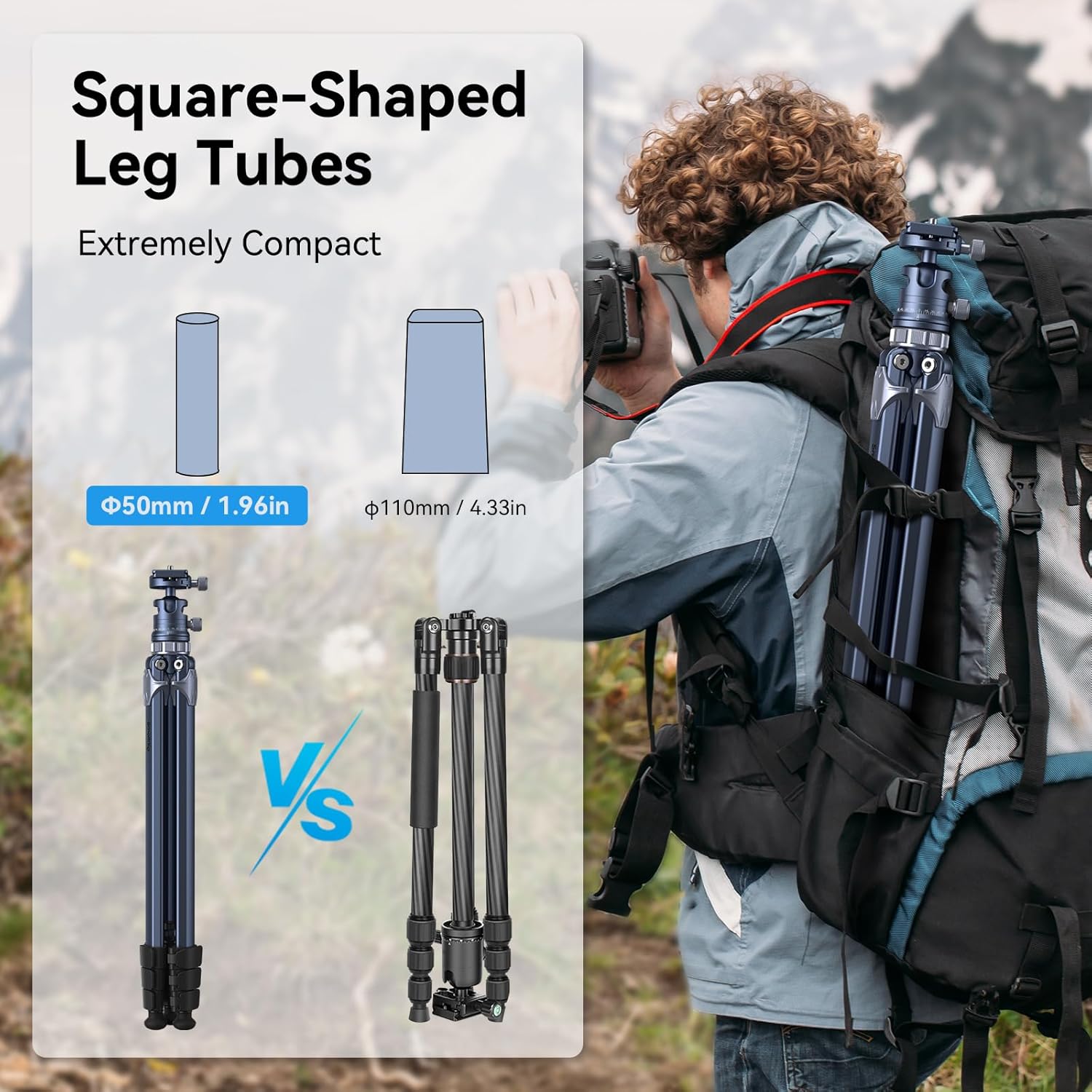
Image: Comparison illustrating the compact design of the SmallRig AP-02's square-shaped leg tubes.
2. Extending the Tripod Legs
To extend the tripod, release the quick release flip-locks on each of the 4-section column legs. Extend the legs to your desired height. The tripod can be adjusted from 16.9 inches (43 cm) to 62.6 inches (160 cm).

Image: The tripod demonstrating its adjustable height capabilities, from folded to maximum extension.
3. Причвршћивање камере
The tripod features a detachable ball head with a quick-release plate. Attach the quick-release plate to the bottom of your camera. Then, slide the plate with your camera into the ball head and secure it using the plate buckle lock. The ball head includes two built-in bubble levels for precise horizontal and vertical leveling.

Слика: Детаљна view of the ball head's features, including the quick release plate and leveling bubbles.
4. Подешавање углова ногу
The tripod allows for quick angle adjustments with a plate buckle, offering three shooting angles: 23°, 55°, and 87°. This versatility enables various shooting scenarios, from standard height to low-angle shots.

Image: The tripod configured for high-angle, low-angle, and inverted center column shooting positions.
5. Utilizing Expansion Threaded Holes
The tripod is equipped with three innovative expansion threaded holes (1/4"-20) for mounting additional equipment such as a magic arm, microphone, monitor, or image transmission equipment. This enhances your shooting experience by allowing for a more comprehensive setup.

Image: Close-up of the tripod highlighting the accessory mounting points and the retractable metal foot nails.
6. Adapting to Terrain with Hidden Foot Nails
For increased stability on uneven or soft terrain, metal foot nails are hidden within the silicone foot pads at the bottom of the stand. These can be deployed by twisting the silicone pads to expose the spikes, providing better grip.
Видео водич за подешавање
Watch this official video for a visual guide on setting up and using your SmallRig AP-02 Lightweight Travel Tripod:
Video: Official SmallRig demonstration of the AP-02 tripod's features, setup, and usage scenarios.
Упутство за употребу
Adjusting Height and Stability
To adjust the tripod's height, open the flip-locks on each leg section and extend or retract the legs as needed. Close the flip-locks firmly to secure the desired height. For maximum stability, ensure the legs are fully spread and the center column is not excessively extended, especially with heavier cameras. The tripod has a maximum bearing capacity of 17.6 lbs (8 kg).
Панорамско снимање
The ball head features a 360° horizontal scale at its base. Loosen the panoramic lock knob, rotate the camera to the desired panoramic position, and then tighten the knob to secure. This allows for smooth and precise panoramic photography.
Low Angle and Macro Photography
For extremely low-angle shots or macro photography, the center column can be inverted. To do this, fully extend the center column, unscrew the hook at the bottom, and then remove the center column. Reinsert it upside down and secure it. This allows your camera to be positioned very close to the ground.
Одржавање
- Чишћење: Обришите статив меком крпомamp cloth after each use, especially if used in dusty, sandy, or wet environments. Ensure all parts are dry before storing.
- подмазивање: Periodically check leg locks and moving parts for smooth operation. If necessary, apply a small amount of silicone-based lubricant to the leg sections to maintain smooth extension and retraction. Avoid oil-based lubricants.
- Складиштење: Store the tripod in its carrying bag in a cool, dry place away from direct sunlight and extreme temperatures.
- инспекција: Regularly inspect the tripod for any signs of wear, damage, or loose components. Tighten any loose screws using the provided Allen wrenches.
Решавање проблема
| Проблем | Могући узрок | Решење |
|---|---|---|
| Tripod feels unstable or wobbly. | Legs not fully extended or locked; center column too high; uneven terrain; overloaded. | Ensure all leg locks are securely fastened. Lower the center column if possible. Adjust leg angles for a wider stance. Deploy metal foot nails on soft ground. Verify equipment weight is within limits. |
| Leg sections are difficult to extend or retract. | Dirt or debris inside leg sections; lack of lubrication. | Clean leg sections thoroughly. Apply a small amount of silicone lubricant if needed. |
| Ball head does not lock securely. | Locking knob not tightened sufficiently; internal mechanism issues. | Ensure the ball head locking knob is fully tightened. If the issue persists, contact customer support. |
| Quick release plate is stuck or difficult to remove. | Plate buckle lock is not fully disengaged; debris. | Ensure the plate buckle lock is completely open. Check for any obstructions or debris around the plate. |
Спецификације
| Феатуре | Детаљ |
|---|---|
| Димензије производа | 20.87 к 2.76 к 63 инча (53.0 к 7.0 к 160 цм) |
| Тежина артикла | 2.54 фунте (1.15 кг) |
| Број модела | 4222 |
| Бранд | МАЛА ПЛАТА |
| Боја | Тамно плава |
| Компатибилни уређаји | Камкордер, Камера |
| Посебне карактеристике | Rotatable, Lightweight, Adjustable |
| Материјал | Алуминијум, нерђајући челик |
| Ограничење тежине | 17.6 фунти (8 кг) |
| Максимална висина | 63 инча (160 цм) |
| Тип главе статива | Балл Хеадс |
Гаранција и подршка
SmallRig products typically come with a limited warranty. For specific warranty details, product registration, or technical support, please visit the official SmallRig webсајт или директно контактирајте њихову корисничку службу. Сачувајте рачун као доказ о куповини.
Више информација и подршке можете пронаћи на Official SmallRig Store on Amazon.
Ask a question about this manual
Ask about setup, troubleshooting, compatibility, parts, safety, or missing instructions. Manuals+ will review the question and use this page’s manual context to help answer it.