
Дела 048-ОПАЦ-6Х
Della 10000 BTU Portable Air Conditioner User Manual
Model: 048-OPAC-6H | Brand: Della
1. Важне информације о безбедности
Please read this manual carefully before operating your portable air conditioner. Keep this manual for future reference. Always follow basic safety precautions to reduce the risk of fire, electric shock, or injury.
- Уверите се да је уређај постављен на равну, стабилну површину како бисте спречили превртање.
- Немојте користити уређај са оштећеним каблом или утикачем.
- Не стављајте прсте или предмете у отвор за улаз или излаз ваздуха.
- Држите уређај даље од запаљивих материјала и отвореног пламена.
- Увек искључите уређај из струје пре чишћења или било каквог одржавања.
- Овај уређај није намењен за употребу од стране особа (укључујући децу) са смањеним физичким, чулним или менталним способностима, или недостатком искуства и знања, осим ако им је дат надзор или упутства о употреби уређаја од стране особе одговорне за њихову безбедност.
2. Производ је готовview
The Della 10000 BTU Portable Air Conditioner is a versatile unit designed to provide cooling, heating, dehumidification, and fan functions for spaces up to 450 sq. ft. It features smart WiFi connectivity for convenient control via a mobile app, a remote control, and an intuitive soft-touch control panel.

Image: Della Portable Air Conditioner unit, remote control, and smartphone displaying the control app.
Key components include the main unit with integrated handle, exhaust hose, window installation kit, and remote control.

Image: Diagram showing the dimensions of the portable air conditioner: 12.2 inches (width) x 12.2 inches (depth) x 27.6 inches (height).
3. Подешавање
3.1 Распакивање
Carefully remove the unit and all accessories from the packaging. Retain the original packaging for future storage or transport. Allow the unit to stand upright for at least 24 hours before initial use to allow the refrigerant to settle.
3.2 Постављање
Place the air conditioner on a firm, level surface in a location that allows for proper air circulation. Ensure there is at least 20 inches (50 cm) of space from walls or other objects to allow for adequate airflow around the unit.
3.3 Уградња комплета за прозоре
The included window kit is designed for easy installation in both horizontal and vertical sliding windows. No drilling is required.

Image: Diagrams illustrating the installation of the window kit in both horizontal and vertical sliding windows, showing compatibility with window openings from 25.5 to 64.1 inches.
- Assemble the window slider kit by sliding the adjustable panels together to fit your window opening. The kit is compatible with window sizes from 25.5 to 64.1 inches.
- Secure the panels with the provided screws.
- Open the window and place the assembled window kit into the window frame. Extend the panels to fit snugly and close the window against the kit to secure it.
- Ensure the window kit is sealed properly to prevent air leakage. Use foam seals if necessary.
3.4 Прикључак издувног црева
- Attach the exhaust hose connector to one end of the exhaust hose.
- Причврстите адаптер комплета за прозоре на други крај издувног црева.
- Insert the exhaust hose connector into the exhaust outlet on the back of the air conditioner unit.
- Insert the window kit adapter into the opening on the window slider kit.
- Уверите се да су сви прикључци безбедни како бисте спречили поновни улазак врућег ваздуха у просторију.
3.5 Прикључак за напајање
Plug the power cord into a grounded 115V/60Hz electrical outlet. Do not use extension cords or power strips.
4. Упутство за употребу
4.1 Контролна табла
The unit features an intuitive soft-touch control panel on the top of the unit.
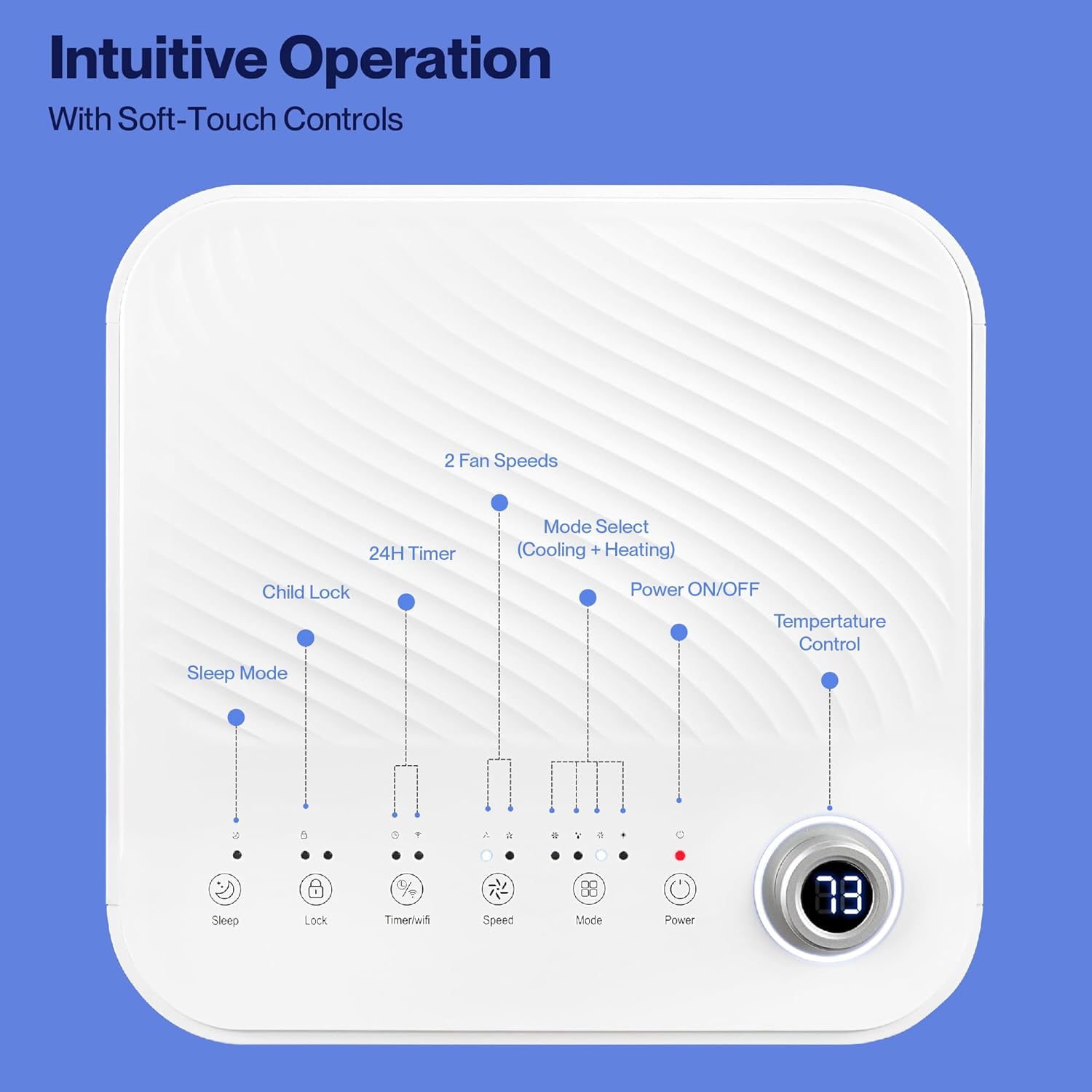
Image: Detailed diagram of the control panel with labels for each button: Sleep, Child Lock, Timer/WiFi, Fan Speed, Mode Select (Cooling + Heating), Power ON/OFF, and Temperature Control with digital display.
- Укључивање/искључивање: Притисните да укључите или искључите јединицу.
- Изаберите режим: Cycle through Cooling, Heating, Dehumidification, Ventilation (Fan), and Sleep modes.
- Контрола температуре: Use the up/down arrows to adjust the desired temperature.
- Брзина вентилатора: Select between 2 fan speeds (Low, High).
- Тајмер: Подесите 24-часовни тајмер за аутоматско укључивање/искључивање.
- Брава за децу: Активира или деактивира функцију заштите деце.
- Режим спавања: Активира режим спавања за тиши рад и постепено подешавање температуре.
4.2 Даљински управљач
The unit comes with a remote control for convenient operation from a distance. All functions available on the control panel can be accessed via the remote.
4.3 WiFi/Smart App Control
Control your Della Portable Air Conditioner from anywhere using the free DELLA+ app on your smartphone. The unit is compatible with Google Assistant and Amazon Alexa for voice control.

Image: A person relaxing on a couch, using a smartphone to control the air conditioner, with text indicating compatibility with Google Assistant and Amazon Alexa.
- Download the DELLA+ app from your smartphone's app store.
- Пратите упутства у апликацији да бисте повезали клима уређај са кућном WiFi мрежом.
- Once connected, you can control modes, temperature, fan speed, and set schedules remotely.
The app also supports Smart Geo Location, allowing the unit to automatically turn on or off based on your proximity to home.

Image: A smartphone screen showing a map with a car icon and a notification indicating the AC unit automatically turned on due to Smart Geo Location.
5. Одржавање
Regular maintenance ensures optimal performance and extends the lifespan of your unit. Always unplug the unit before cleaning.
5.1 Чишћење ваздушног филтера
Ваздушни филтер треба чистити сваке две недеље или чешће, у зависности од употребе и квалитета ваздуха.
- Пронађите панел ваздушног филтера (обично на задњој или бочној страни уређаја).
- Уклоните филтер.
- Оперите филтер топлом водом са сапуном. Добро исперите и оставите да се потпуно осуши на ваздуху пре него што га поново уметнете.
5.2 Испуштање воде
The unit has a self-evaporating system, but in high humidity conditions, water may accumulate. The "Water-full indicator" will illuminate when the water tank needs draining.
- Поставите плитку посуду или посуду испод отвора за одвод (налази се на доњој задњој страни уређаја).
- Уклоните чеп за одвод.
- Allow all accumulated water to drain out.
- Чврсто вратите чеп за одвод.
5.3 Складиштење
Ако складиштите уређај дуже време:
- Испразните сву акумулирану воду.
- Очистите ваздушни филтер.
- Покрените уређај у режиму само вентилатора неколико сати да бисте осушили унутрашњост.
- Искључите кабл за напајање и уредно га намотајте.
- Чувајте уређај на хладном и сувом месту, најбоље у оригиналном паковању.
КСНУМКС. Решавање проблема
Погледајте овај одељак за уобичајене проблеме и њихова решења.
| Проблем | Могући узрок | Решење |
|---|---|---|
| Јединица се не укључује | Нема струје; Кабл за напајање је искључен из струје; Осигурач је активиран; Резервоар за воду је пун | Check power outlet; Plug in power cord; Reset circuit breaker; Drain water tank |
| Уређај се не хлади ефикасно | Air filter dirty; Exhaust hose not properly installed; Room too large; Doors/windows open; Temperature setting too high | Clean air filter; Ensure exhaust hose is sealed; Close doors/windows; Lower temperature setting |
| Јединица је бучна | Unit not on level surface; Air filter dirty; Obstruction in fan | Place unit on level surface; Clean air filter; Check for obstructions |
| Цурење воде | Drain plug loose or missing; Unit tilted | Причврстите чеп за одвод; Уверите се да је уређај раван |
| Проблеми са WiFi везом | Incorrect WiFi password; Unit too far from router; Router issues | Verify password; Move unit closer to router; Restart router |
Ако проблем и даље постоји након што сте испробали ова решења, обратите се корисничкој подршци.
7. Спецификације
| Феатуре | Спецификација |
|---|---|
| Број модела | 048-ОПАЦ-6Х |
| Капацитет хлађења | 10000 БТУ |
| Област покривености | До 450 квадратних метара Фт. |
| Функције | Cooling, Heating, Dehumidifier, Fan, Sleep Mode |
| Волtage | 115 Волтс |
| Ниво буке | 54 дБ |
| Расхладно средство | Р 410А |
| Димензије (Д к Ш к В) | 12.2 к 12.2 к 27.6 инча |
| Материјал | АБС пластика |
| Посебне карактеристике | Portable, Dehumidifier, WiFi Enabled, Remote Control, Built-in Handle, 24-hour timer, Child Lock |
8. Гаранција и корисничка подршка
For warranty information or technical assistance, please refer to the warranty card included with your product or visit the official Della website. You may also contact Della customer support directly for further assistance with troubleshooting or parts replacement.
Ask a question about this manual
Ask about setup, troubleshooting, compatibility, parts, safety, or missing instructions. Manuals+ will review the question and use this page’s manual context to help answer it.