
1. Увод
This manual provides comprehensive instructions for the installation, operation, maintenance, and troubleshooting of the Vivotek FE9391-EHV-V2 12MP Outdoor Fisheye IR Illumination Camera. Please read this manual thoroughly before using the product to ensure proper setup and functionality. Retain this manual for future reference.
2. Производ је готовview
2.1 Кључне карактеристике
- 12 Megapixel Effective Still Resolution for high-quality imaging.
- Fisheye Lens with 1.2mm focal length for wide-area surveillance.
- Integrated IR Illumination for clear night vision up to 20 meters.
- WDR Pro technology for optimal image visibility in high contrast lighting.
- H.265/H.264/MJPEG compression for efficient video streaming.
- IP66-rated weather-resistant enclosure for outdoor use.
- Motion-only alert type for event detection.
- Wi-Fi Connectivity Protocol for flexible network integration.
2.2 Садржај пакета
Проверите да ли су све ставке присутне у пакету:
- Vivotek FE9391-EHV-V2 Camera Unit
- Комплет за монтажу (вијци, анкери)
- Водоотпорни конектор
- Водич за брзу инсталацију
- Software CD (or download link information)
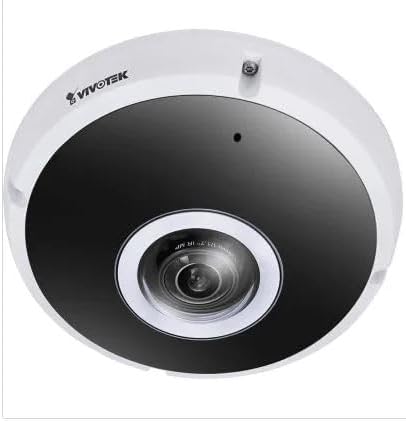
Слика 2.1: Предња страна view of the Vivotek FE9391-EHV-V2 12MP Outdoor Fisheye IR Illumination Camera, showing the lens and IR illuminators.
3. Безбедносне информације
- Пажљиво прочитајте сва упутства пре инсталације и рада.
- Ensure the power source matches the camera's requirements (Corded Electric).
- Не покушавајте да растављате или модификујете камеру. То ће поништити гаранцију.
- Избегавајте усмеравање камере директно ка јаким изворима светлости током дужег временског периода.
- Инсталацију треба да изврши квалификовано особље у складу са локалним електричним прописима.
- Protect cables from being walked on or pinched.
4. Подешавање и инсталација
4.1 Место монтирања
Select a suitable outdoor location for mounting. Consider the desired surveillance area, proximity to power, and network connectivity (Wi-Fi or wired Ethernet). The camera is IP66 rated for outdoor use.

Figure 4.1: Dimensional drawing of the Vivotek FE9391-EHV-V2 camera, showing a diameter of 150mm and height of 68.2mm.
4.2 Физичка инсталација
- Припремите монтажну површину: Use the provided mounting template (if included) to mark drill holes.
- Избушене рупе: Избушите пробне рупе и по потреби уметните анкере у зид.
- Обезбедите камеру: Attach the camera base securely to the mounting surface using the provided screws.
- Повежите каблове:
- Снага: Повежите кабл за напајање са одговарајућим извором напајања.
- Мрежа: Connect an Ethernet cable for wired network access, or ensure Wi-Fi signal strength is adequate for wireless connection. Use the waterproof connector for outdoor Ethernet connections.
- Подесите угао камере: Loosen the adjustment screws (if applicable) to position the fisheye lens for optimal coverage. Tighten screws once adjusted.

Figure 4.2: An Ethernet cable with an RJ45 connector, used for wired network connectivity.
4.3 Почетна конфигурација мреже
After physical installation and power-up, the camera needs to be configured on your network.
- Discover the Camera: Use the Vivotek IP Utility software (available on the manufacturer's webсајт) да бисте открили камеру на вашој мрежи.
- Додели ИП адресу: Assign a static IP address or ensure it obtains an IP address via DHCP.
- Приступ Web Интерфејс: Отвори а web прегледач и унесите ИП адресу камере да бисте јој приступили web-базирани конфигурациони интерфејс.
- Пријава: Enter the default username and password (refer to the Quick Installation Guide for defaults). Change the default password immediately for security.
- Wi-Fi Setup (if applicable): Navigate to the network settings and configure the Wi-Fi connection if you are using wireless connectivity.
5. Упутство за употребу
5.1 Уживо View
Once configured, you can access the live video feed through the web interface or compatible Vivotek surveillance software.
- Web Прегледач: Пријавите се на камеру web interface and navigate to the "Live View„одељак“.
- Surveillance Software: Add the camera to your Vivotek NVR or VMS (Video Management Software) for centralized monitoring.
- Мобилна апликација: Download the Vivotek mobile app and add your camera for remote viewинг.

Слика 5.1: Прample of surveillance footage from multiple cameras displayed on a tablet device, demonstrating remote monitoring capabilities.

Figure 5.2: A monitor displaying a split-screen view of four camera feeds, labeled CAM1 through CAM4, illustrating a typical surveillance setup.
5.2 Снимање и складиштење
The camera supports various recording options:
- Локално складиште: Insert a microSD card (not included) into the camera's slot for edge recording. Configure recording schedules and event triggers (e.g., motion detection).
- Мрежни видео рекордер (NVR): Connect the camera to a compatible NVR for continuous or event-based recording.
- Цлоуд Стораге: Some Vivotek models or third-party services may offer cloud storage integration. Refer to the camera's web interface for specific options.
5.3 Детекција покрета и упозорења
Configure motion detection zones and sensitivity settings in the camera's web interface. When motion is detected, the camera can trigger actions such as:
- Recording video to local storage or NVR.
- Sending email notifications with snapshots.
- Uploading footage to an FTP server.
6. Одржавање
- Чишћење сочива: Gently wipe the camera lens with a soft, clean cloth. For stubborn dirt, use a lens cleaning solution designed for optical surfaces. Do not use abrasive cleaners.
- Чишћење смештаја: Очистите кућиште камере помоћу огласаamp cloth. Avoid using strong detergents or solvents.
- Ажурирања фирмвера: Regularly check the Vivotek website for firmware updates. Updating firmware can improve performance, add features, and enhance security.
- Инспекција каблова: Periodically inspect all cables for signs of wear or damage, especially for outdoor installations.
- Провера животне средине: Ensure the camera's operating environment remains within specified temperature and humidity ranges.
КСНУМКС. Решавање проблема
7.1 Без видео преноса
- Проверите снагу: Ensure the camera is receiving power. Verify power adapter and cable connections.
- Мрежна конекција: Confirm the Ethernet cable is securely connected or that the Wi-Fi signal is strong and the camera is connected to the correct network.
- ИП адреса: Verify the camera's IP address and ensure it is not conflicting with another device on the network.
- заштитни зид: Check if any firewall settings on your network or computer are blocking access to the camera.
7.2 Лош квалитет слике
- Чиста сочива: Уверите се да је објектив камере чист и без прашине или мрља.
- Услови осветљења: Adjust camera settings for optimal exposure in varying light conditions. Ensure IR illuminators are functioning at night.
- Подешавања резолуције: Verify that the video resolution and quality settings are configured appropriately in the camera's web интерфејс.
- Мрежни пропусни опсег: Insufficient network bandwidth can lead to choppy or low-quality video. Check network load.
7.3 Детекција покрета не ради
- Омогући детекцију покрета: Ensure motion detection is enabled in the camera's settings.
- Sensitivity and Zones: Adjust motion detection sensitivity and define detection zones correctly.
- Распоред снимања: Verify that the recording schedule is active for motion-triggered events.
8. Спецификације
| Феатуре | Детаљ |
|---|---|
| Број модела | FE9391-EHV-V2 |
| Ефективна резолуција мировања | 12 МП |
| Ленс | 1.2mm Fisheye Lens |
| IR Illumination Range | 20м |
| ВДР технологија | ВДР Про |
| Видео Цомпрессион | Х.265 / Х.264 / МЈПЕГ |
| Цоннецтивити Протоцол | Ви-Фи |
| Оцена међународне заштите | ИП66 |
| Извор напајања | Цордед Елецтриц |
| Димензије производа (Д к Ш к В) | 5.9 к 5.9 к 2.68 инча (150 к 150 к 68.2 мм) |
| Произвођач | Вивотек Инц. |
| Препоручена употреба | Оутдоор Сецурити |
9. Гаранција и подршка
For warranty information, technical support, and additional resources, please visit the official Vivotek webсајту или се обратите њиховом одељењу за корисничку подршку.
- Произвођач: Вивотек Инц.
- Webсајт: ввв.вивотек.цом (Прampлинк, стварни линк може да варира)
- Контакт: Погледајте на website for regional support contact information.
Please have your model number (FE9391-EHV-V2) and purchase date available when contacting support.