
GALAYOU G7
Galayou G7 Indoor Home Security Camera User Manual
Brand: GALAYOU | Model: G7
1. Увод
The GALAYOU G7 Indoor Home Security Camera provides comprehensive surveillance for your indoor spaces, offering advanced features to ensure the safety and peace of mind for your family, pets, and property. This manual will guide you through the setup, operation, and maintenance of your camera.
Кључне карактеристике:
- Ultra 2K Resolution: Provides clear and vivid image quality with 6X digital zoom.
- Напредни ноћни вид: Enhanced night vision with effective distance up to 33 ft using 6pcs 940nm Infrared Lights.
- 24/7 Real-Time Motion Alert & Smart Siren: Instant detection and push alerts to your phone, with an optional smart siren.
- Двосмерни аудио: Built-in microphone and speaker for remote communication.
- Secure Local & Cloud Storage: Supports up to 128GB micro SD card and encrypted AWS Cloud storage.
- Интеграција паметне куће: Compatible with Amazon Alexa and Google Home for voice control and live-feed viewинг.
- Непрекидно снимање 24/7: Available to all Galayou customers without extra fees.

Image: Visual representation of the Galayou G7 camera's key features including 2K resolution, night vision, two-way audio, 24/7 recording, smart siren, optional storage, push notifications, and compatibility with Alexa.
2. Шта је у кутији
Молимо вас да проверите садржај вашег пакета како бисте били сигурни да су сви предмети присутни:
- Camera body (Galayou G7 Indoor Camera)
- Кабел типа Ц
- Повер Адаптер
- Прибор за монтирање
- Водич за брзу инсталацију

Image: Two Galayou G7 indoor security cameras, white with black camera faces, standing on their bases. This image represents the product as it appears out of the box.
3. Безбедносне информације
Да бисте осигурали безбедан рад и спречили оштећења, молимо вас да се придржавате следећих мера безбедности:
- This device is designed for indoor use only. Do not expose it to water or moisture.
- Користите само испоручени адаптер за напајање.
- Keep the camera away from direct sunlight, heat sources, and strong magnetic fields.
- Не покушавајте сами да расклапате или поправљате камеру. За помоћ контактирајте корисничку подршку.
- Уверите се да је камера безбедно постављена како бисте спречили њен пад.
- Чувати ван домашаја деце и кућних љубимаца.
4. Производ је готовview
Familiarize yourself with the components of your Galayou G7 camera:
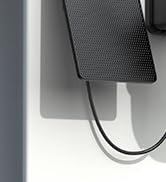
Image: A single Galayou G7 indoor camera, showing its compact design with a black camera lens and a white body and base.
Компоненте камере:
- Објектив камере: Снима видео фооtage.
- Инфрацрвене ЛЕД диоде: Обезбедите осветљење за ноћни вид.
- микрофон: Снима звук за двосмерну комуникацију и детекцију звука.
- говорник: Емитује звук за двосмерну комуникацију и сирену.
- Утор за микро СД картицу: For local storage of video recordings (supports up to 128GB).
- Power Port (Type-C): Повезује камеру са адаптером за напајање.
- Светло индикатора статуса: Indicates the camera's current status (e.g., connected, recording).
5. Водич за подешавање
Follow these steps for initial setup of your Galayou G7 camera:

Image: A three-step visual guide for quick installation. Step 1 shows downloading the Wansview Cloud App, Step 2 shows plugging in the camera, and Step 3 shows connecting to 2.4GHz WiFi via app instructions.
- Download the Wansview Cloud App:
Тражи "Wansview Cloud" in the App Store (iOS) or Google Play Store (Android) and download the application. Create an account or log in if you already have one.
- Укључите камеру:
Connect the Type-C cable to the camera's power port and plug the power adapter into a wall outlet. The camera's status indicator light will turn on.
- Додајте камеру у апликацију:
Отворите Вансview Cloud App. Tap the "+" icon to add a new device. Follow the on-screen instructions to connect the camera to your Ви-Фи мрежа од 2.4 ГХз. (Note: 5GHz Wi-Fi is not supported).
- Монтажа (опционо):
The camera can be placed on a flat surface or mounted on a wall or ceiling using the included mounting accessories. Ensure the camera is positioned to cover your desired viewинг ареа.
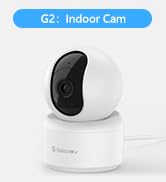
Image: A Galayou G7 camera mounted on a wall, demonstrating a possible installation method.
6. Упутство за употребу
6.1 Уживо View
Once connected, you can access the live video feed from your camera through the Wansview Cloud App. Simply select your camera from the device list to view у реалном времену фооtage.

Image: A side-by-side comparison demonstrating the clarity difference between 1080P Full HD and 2K 3MP (2304x1296) resolution, highlighting the superior detail of 2K.
6.2 Двосмерни аудио
The camera features a built-in microphone and speaker, allowing you to communicate remotely. Tap the microphone icon in the app to speak, and the speaker icon to listen.

Image: A split image showing a woman on her phone and a crying baby in a crib, illustrating the two-way audio feature for remote communication.
6.3 Детекција покрета и упозорења
The camera can detect motion and send real-time alerts to your smartphone. You can customize motion detection sensitivity and set up alert schedules within the app.

Image: A smartphone displaying a "Motion alarm" notification from the Wansview Cloud app, with a live view of a person in a room, demonstrating the instant detection alert feature.
The smart siren feature can be activated to deter intruders when motion is detected.

Image: A dog in a living room with a blue overlay indicating motion detection, showing how the camera identifies movement.
6.4 Ноћни вид
The camera automatically switches to night vision mode in low-light conditions, providing clear black-and-white video up to 33 feet.

Image: A woman in bed viewing her phone, which displays a black-and-white night vision feed of a baby sleeping, illustrating the camera's low-light capabilities.
6.5 Снимање и складиштење
The Galayou G7 supports 24/7 continuous recording. You have two options for video storage:
- Складиштење микро СД картице: Insert a micro SD card (up to 128GB, not included) into the camera's slot for local storage.
- Цлоуд Стораге: Subscribe to the Wansview Cloud service for secure, encrypted cloud storage of your video clips. A 30-day free trial may be available.

Image: A visual representation of local storage (SD card) and cloud storage options, showing video clips flowing into a cloud icon and a camera with an SD card slot.

Image: A smartphone screen displaying a timeline of continuous video recording, with multiple video frames shown above, illustrating the 24/7 continuous recording feature.
6.6 Интеграција паметног дома
The Galayou G7 camera is compatible with Amazon Alexa and Google Home. You can use voice commands to view the live feed on compatible smart displays.
- За Алека: Enable the "Wansview Cloud" skill in the Alexa app and link your account. Then, say "Alexa, show me the [Camera Name]".
- За Гоогле Хоме: Link your Wansview Cloud account in the Google Home app. Then, say "Hey Google, show me the [Camera Name]".

Image: A woman in a kitchen speaking to an Amazon Echo Show device, which displays the live feed from the Galayou camera, demonstrating Alexa integration.
6.7 Дељење уређаја
You can share access to your camera with family members or trusted individuals through the Wansview Cloud App. They will need to download the app and create an account.

Image: A collage of people using their smartphones to view camera feeds, with an overlay showing the device sharing invitation process within the app.
7. Одржавање
- Чишћење: Користите меку, суву крпу за чишћење објектива и кућишта камере. Не користите течна средства за чишћење или аеросоле.
- Ажурирања фирмвера: Regularly check the Wansview Cloud App for available firmware updates. Keeping your camera's firmware up-to-date ensures optimal performance and security.
- Управљање складиштем: Ако користите SD картицу, периодично је поновоview and delete old recordings to free up space. For cloud storage, manage your subscription and recorded events through the app.
КСНУМКС. Решавање проблема
| Проблем | Могући узрок / решење |
|---|---|
| Камера је офлајн / Не могу да се повежем са Wi-Fi мрежом |
|
| Лош квалитет видеа |
|
| Нема упозорења о кретању |
|
| Двосмерни звук не ради |
|
9. Спецификације
| Феатуре | Детаљ |
|---|---|
| Назив модела | G7 |
| Унутрашња/спољна употреба | Индоор |
| Резолуција снимања видео записа | 1296п (2К) |
| Технологија повезивања | Wi-Fi (само 2.4 GHz) |
| Ноћни вид | 33 стопа |
| Опције складиштења | Микро СД картица (до 128 ГБ), складиштење у облаку |
| Двосмерни аудио | Да |
| Тип контролера | Амазон Алека, Гоогле помоћник, апликација |
| Извор напајања | Цордед Елецтриц |
| Тип монтаже | Ceiling Mount, Wall-Mounted, Stand |
| Димензије производа (Д к Ш к В) | 18.19 к 14.69 к 12.8 инча |
| Тежина артикла | 12.3 унци |
10. Гаранција и подршка
For information regarding product warranty, please refer to the warranty card included in your product packaging or the terms and conditions of your purchase. GALAYOU is committed to providing reliable products and excellent customer service.
If you encounter any issues or have questions about your Galayou G7 camera, please contact GALAYOU customer support through the Wansview Cloud App or visit the official GALAYOU webсајт за ресурсе подршке.
Онлине ресурси:
- GALAYOU Amazon Store
- Refer to the "Quick installation guide" included in the package for more detailed steps.