
1. Увод
The ROADOM KC-806 Desktop Portable CD Player is a versatile audio device designed for home use, offering multiple playback options and high-fidelity stereo sound. This manual provides detailed instructions for setting up, operating, and maintaining your CD player.
Кључне карактеристике укључују:
- CD Playback (CD, CD-R, CD-RW, MP3, WMA formats)
- Bluetooth Transmission and Reception
- FM Radio (76.0-108.0MHZ)
- USB Disk Playback and Charging
- АУКС улаз/излаз
- Функција тајмера
- Repeat Playback Modes
- Рад на даљинском управљачу
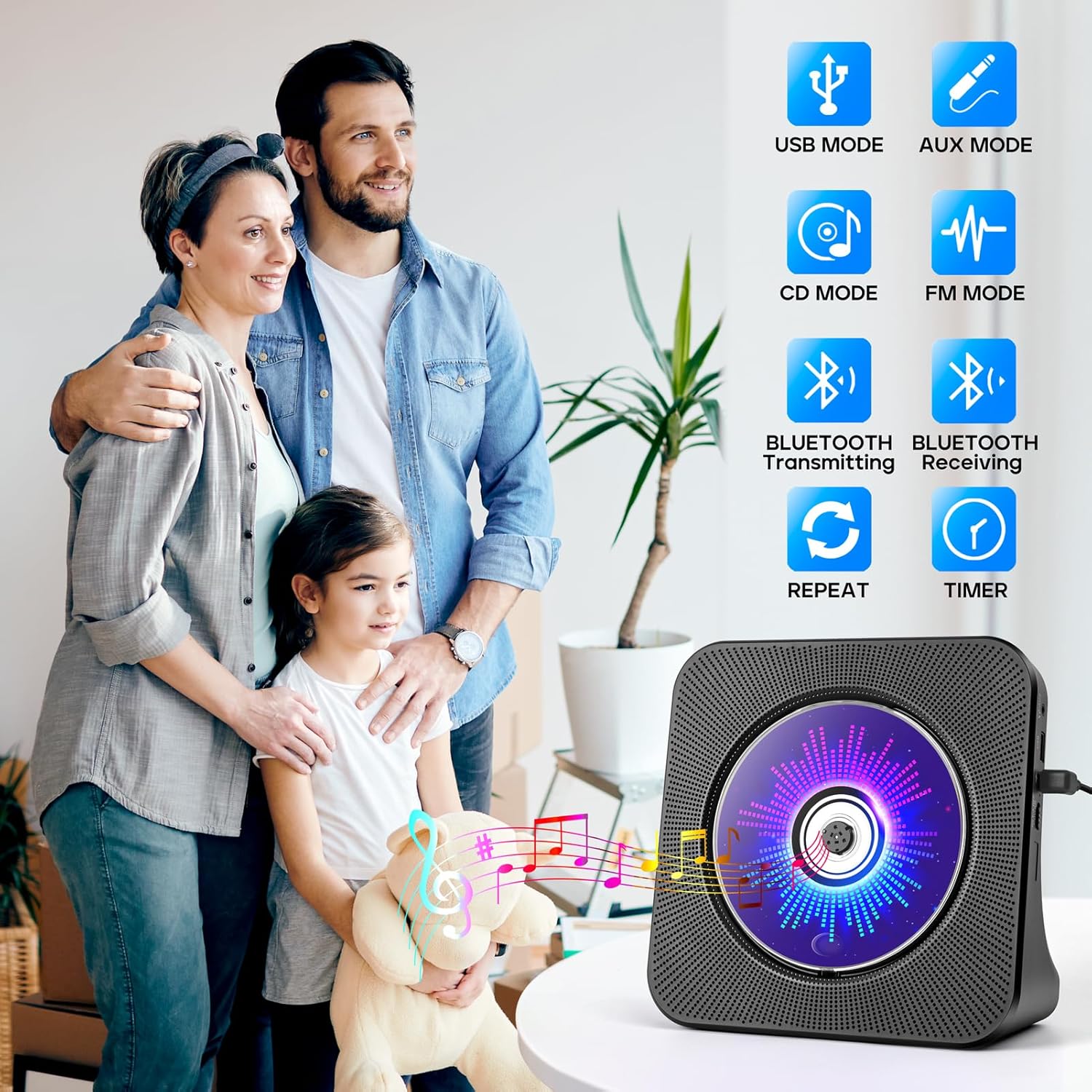
Figure 1.1: The ROADOM KC-806 CD Player highlighting its versatile 8-in-1 functionality.
2. Шта је у кутији
Молимо вас да проверите садржај пакета након распакивања како бисте били сигурни да су сви елементи присутни:
- ROADOM CD Player × 1
- Даљински управљач × 1
- 5В/2А адаптер за напајање × 1
- USB - Type C Power Cable × 1
- Корисничко упутство × 1
- 3.5mm AUX Cable × 1 (not listed in product.whats_in_the_box but shown in image)

Figure 2.1: All items included in the ROADOM KC-806 CD Player package.
3. Производ је готовview
3.1 Предња и бочна страна View

Слика 3.1: Предња страна view of the ROADOM KC-806 CD Player and its remote control.

Слика 3.2: Детаљно view of the ports and controls on the ROADOM KC-806 CD Player.
3.2 Контроле и портови
- АУКС порт: For connecting external audio devices or outputting audio to headphones/speakers.
- USB Port (U Disk): For playing music from a USB flash drive and charging devices.
- Type-C Port (Power Input): Овде прикључите приложени адаптер за напајање.
- Power (ON/OFF) Switch: Да бисте укључили или искључили уређај.
- Status Screen (LED): Displays time, mode, and track information.
- Дугме за режим: Switches between CD, Bluetooth, FM, USB, and AUX modes.
- Volume Buttons (Vol-, Vol+): Подешава јачину звука репродукције.
- Дугмад Претходно/Следеће: Skips tracks or tunes FM radio frequencies.
- Дугме за репродукцију/паузу: Покреће или паузира репродукцију.
4. Подешавање
4.1 Прикључак за напајање
- Connect the USB-C end of the power cable to the Type-C Port (Power Input) on the CD player.
- Connect the USB-A end of the power cable to the 5V/2A Power Adapter.
- Укључите адаптер за напајање у стандардну зидну утичницу.
- Alternatively, you can power the device using a power bank by connecting the USB-A end of the cable to the power bank.
- Flip the Power (ON/OFF) switch to the 'ON' position. The LED screen will light up.

Figure 4.1: Powering the CD player using either a wall adapter or a power bank.
5. Упутство за употребу
5.1 Репродукција ЦД-а
- Gently open the protective dust cover on the front of the CD player.
- Carefully place a CD (CD, CD-R, CD-RW, MP3, or WMA format) onto the spindle, ensuring it is seated correctly.
- Close the dust cover. The player will automatically detect the CD and begin playback.
- If playback does not start, press the 'Mode' button to select 'CD' mode, then press the 'Play/Pause' button.
- Use the 'Previous' and 'Next' buttons to skip tracks.
- Adjust volume with 'Vol-' and 'Vol+' buttons.

Figure 5.1: Opening the protective cover to insert a CD.

Figure 5.2: The CD player supports multiple CD formats.
5.2 Bluetooth повезивање
5.2.1 Bluetooth Receiving (Connect to Phone/Tablet/PC)
- Press the 'Mode' button until 'BLUE' appears on the LED screen, indicating Bluetooth receiving mode.
- On your Bluetooth-enabled device (phone, tablet, computer), search for available Bluetooth devices.
- Select 'ROADOM KC-806' from the list to pair.
- Once connected, you can play audio from your device through the CD player's speakers.

Figure 5.3: Connecting external devices to the CD player via Bluetooth receiving mode.
5.2.2 Bluetooth Transmitting (Connect to Bluetooth Headphones/Speakers)
- Ensure the CD player is in CD, USB, or AUX mode.
- Activate pairing mode on your Bluetooth headphones or external speaker.
- Press and hold the 'Bluetooth' button on the remote control or the 'Mode' button on the unit until the Bluetooth icon flashes on the LED screen, indicating transmitting mode.
- The CD player will automatically search for and connect to nearby Bluetooth audio devices.
- Once connected, audio from the CD player will be transmitted to your Bluetooth headphones or speaker.

Figure 5.4: Transmitting audio from the CD player to Bluetooth headphones or speakers.
5.3 ФМ Радио
- Press the 'Mode' button until 'FM' appears on the LED screen.
- Press the 'Play/Pause' button to initiate an automatic scan for FM stations. The player will save found stations.
- Користите дугмад „Претходно“ и „Следеће“ за навигацију кроз сачуване станице.
- For manual tuning, press and hold the 'Previous' or 'Next' button to fine-tune the frequency.

Figure 5.5: Enjoying FM radio on the CD player.
5.4 USB Playback and Charging
- Insert a USB flash drive (U Disk) containing audio fileу УСБ порт.
- Press the 'Mode' button until 'USB' appears on the LED screen.
- The player will automatically detect and begin playing audio fileс са УСБ диска.
- Use the 'Previous' and 'Next' buttons to navigate tracks.
- The USB port can also be used to charge small electronic devices.

Figure 5.6: USB functionality for playback and charging.
5.5 АУКС режим
- Connect one end of the 3.5mm AUX cable to the AUX Port on the CD player.
- Connect the other end to the audio output of an external device (e.g., phone, computer, MP3 player) or to external headphones/speakers.
- Press the 'Mode' button until 'AUX' appears on the LED screen.
- Audio from the connected external device will play through the CD player's speakers (if used as an input) or be output to your headphones/speakers (if used as an output).

Figure 5.7: AUX input and output connections.
5.6 Функција тајмера
- While playing audio, press the 'Timer' button on the remote control.
- Repeatedly press the 'Timer' button to cycle through available sleep timer settings (e.g., 30, 60, 90, 120, 150, 180 minutes).
- The player will automatically stop playback after the selected time duration.

Figure 5.8: Setting the sleep timer for automatic playback stop.
5.7 Функција понављања
- During CD or USB playback, press the 'Repeat' button on the remote control.
- Repeatedly press the 'Repeat' button to cycle through the following modes:
- ЈЕДАН: Понавља тренутну нумеру.
- СВЕ: Repeats all tracks on the CD/USB.
- SFL (Shuffle): Репродукује нумере насумичним редоследом.
- АБ: Repeats a specific section of a track (set start point 'A' and end point 'B').

Figure 5.9: Understanding the repeat playback modes.
5.8 Рад на даљинском управљачу
The included remote control allows for convenient operation of all functions from a distance. Ensure the remote has working batteries and is pointed towards the front of the CD player.

Figure 5.10: Operating the CD player with the remote control.
6. Одржавање
- Чишћење: Use a soft, dry cloth to clean the exterior of the CD player. Do not use liquid cleaners or abrasive materials.
- ЦД Царе: Држите ЦД-ове за ивице. Прљаве ЦД-ове чистите меком крпом која не оставља влакна, бришући од средине ка споља.
- Поклопац за прашину: Keep the protective dust cover closed when not in use to prevent dust accumulation in the CD compartment.
- Складиштење: Store the CD player in a cool, dry place away from direct sunlight and extreme temperatures.
КСНУМКС. Решавање проблема
| Проблем | Могући узрок | Решење |
|---|---|---|
| Плејер се не укључује. | No power connection; Power switch off. | Ensure power adapter is securely plugged in and the power switch is ON. |
| CD се не репродукује или прескаче. | CD is dirty, scratched, or inserted incorrectly; Dust cover open. | Clean or replace CD. Ensure CD is seated correctly and dust cover is closed. |
| Нема звука. | Volume too low; Incorrect mode selected; External speakers/headphones not connected properly. | Increase volume. Select correct mode. Check AUX cable connections. |
| Блуетоотх упаривање није успело. | Device too far; Incorrect Bluetooth mode; Device not in pairing mode. | Ensure devices are close. Select correct Bluetooth mode (receiving or transmitting). Put external device in pairing mode. |
| Даљински управљач не ради. | Батерије су празне или су неправилно уметнуте; Препрека између даљинског управљача и плејера. | Replace batteries. Ensure correct polarity. Remove obstructions. |
8. Спецификације
| Феатуре | Детаљ |
|---|---|
| Број модела | КЦ-КСНУМКС |
| Димензије производа | 7.4 к 2.7 к 7.4 инча |
| Тежина артикла | 1.98 фунти |
| Технологија повезивања | Помоћни, Блутут, УСБ |
| Подржани формати CD-ова | ЦД, ЦД-Р, ЦД-РВ, МП3, ВМА |
| ФМ радио фреквенција | 76.0-108.0 МХз |
| Повер Инпут | 5В/2А преко Типе-Ц порта |

Figure 8.1: Physical dimensions and weight of the CD player.
9. Гаранција и подршка
ROADOM provides a 12-month product warranty for the KC-806 CD Player. For any questions or support needs, please contact ROADOM customer service. Details for contacting support are typically found in the included user manual or on the official ROADOM webсајту.
Additional benefits may include:
- 30 Days Free Returns
- 24 Hours After-sale Service